The SMS block belongs to Communication blocks. The block’s functionality is the same for Triggered and Bulk scenarios. The block is available only to users with access to the SMS Campaigns feature.
Learn how to enable SMS campaigns here.
The SMS block allows you to send automated SMS messages to your subscribers as part of an omnichannel automation scenario.
Use this block to:
- Send transactional messages, such as order confirmations or appointment reminders.
- Follow up with subscribers who haven’t responded to previous email or messenger communications.
- Build multi-channel automation scenarios using email, Telegram, and SMS.
- Deliver time-sensitive notifications, such as limited-time offers, delivery updates, or booking reminders.
- Reach subscribers who are more likely to notice an SMS than an email.
Set up the SMS block
Add the SMS block to the workspace from the toolbar or by right-clicking anywhere on the canvas.
If you already have a registered Sender ID (Alpha Name), it will be selected automatically. If you don’t have one yet, learn how to register it here.
Next, enter your message in the “Message text” field. Note that a standard SMS can contain up to 160 Latin characters or 70 Cyrillic characters. Longer messages are automatically split into additional parts, and each is billed separately.
Although recipients usually receive messages as a single SMS, some mobile providers may deliver the segments separately, causing the text to appear out of order.
‼️ Messages are split into parts based on their length. As you type, the system automatically calculates the number of parts your message will use.
You can send messages containing up to 4 parts. If your message exceeds this limit, the scenario can’t be launched until the text is shortened.
Finally, click Send test SMS and enter your phone number to verify that the message looks correct and can be delivered. Note that test SMS messages are billed the same way as regular messages. If your test message contains multiple parts, each part is charged separately.
Track link clicks
You can enable link tracking in the SMS block.
When link tracking is enabled, links you add to the SMS are automatically replaced with short tracking links. For example:
https://myshop.com/promo?ref=sms → https://slzy.com/Ab3xK
While you will see the original link in the SMS block, your contacts will see a short tracking link in the received SMS rather than the original branded URL.
The character and segment counter uses the original URL you entered when calculating the message length. The tracking link that replaces it when the SMS is sent may be either shorter or longer.
As a result, the actual length and number of segments in the sent SMS may differ from what you see in the editor.
The final cost may also be higher or lower than the estimate shown while creating the message.
Selzy does not recalculate the character and segment count based on the tracking URL before sending because its final length cannot be reliably determined in advance.
Collect phone numbers with country codes
You can collect phone numbers within an automation scenario, for example, using a Telegram Message block with data collection. If you are collecting phone numbers through a scenario, make sure subscribers enter their phone number including the country code (for example, +1 555 123 4567).
Phone numbers without a country code may prevent future SMS messages from being delivered successfully.
SMS block errors
Common reasons why an SMS may not be sent include:
- The contact doesn’t have a phone number.
- The phone number has an invalid or unsupported country code.
- Your Sender ID has been removed or blocked.
Example: SMS fallback
Let’s say you’re running a time-sensitive promotion and want to make sure more customers see your message. If they don’t open your email, you can automatically send them an SMS as a fallback.
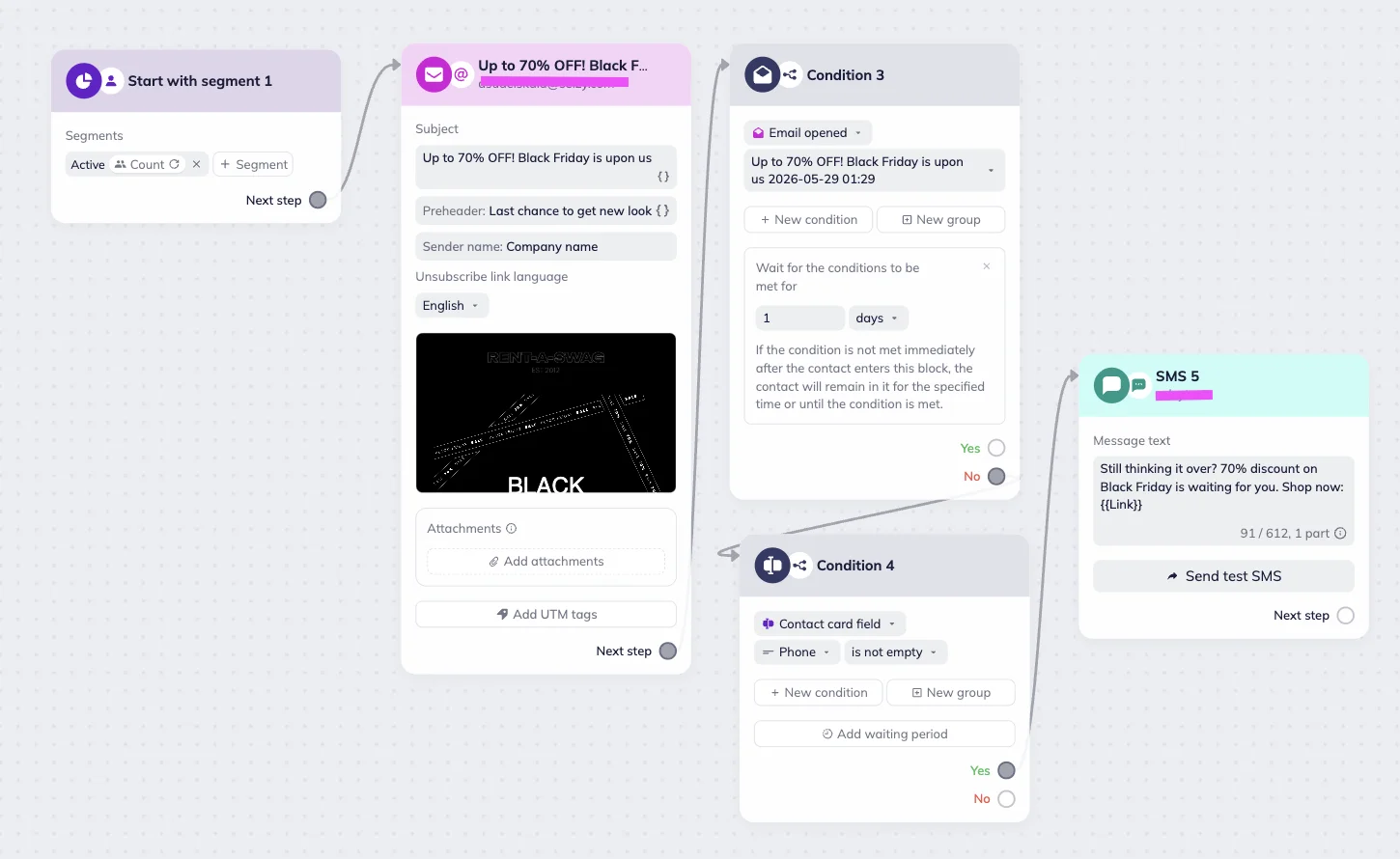
Create a Bulk scenario and add Start with the segment trigger block. Select the audience segment that should receive the campaign.
Next, add an Email block with promotional email. Follow it with a Condition block and configure it to check whether the email was opened. Set the waiting period to 1 day. If contact hasn’t opened your email during this time, you can automatically send them an SMS. To make sure the contact submitted their phone number, set up another Condition block that checks whether the contact’s Phone field is not empty.
If the contact opens the email within one day, the scenario stops for them. If they don’t open the email but have a valid phone number, the automation sends the SMS reminder instead.
This approach helps you increase engagement while avoiding unnecessary SMS messages.
Example: SMS fallback
Learn more about using SMS for your business: