






Telegram chatbot automation in Selzy

Connect a Telegram bot to an omnichannel scenario and automate messages, commands, data collection, notifications, and follow-up communication.

Build chatbot with no code View pricing

Choose a plan based on your audience size and the communication channels you need. View pricing.

Build Telegram conversations with omnichannel automation

Add Telegram to a Selzy omnichannel scenario to automate conversations, send broadcasts, collect subscriber data, and coordinate Telegram messages with email. No coding is required for standard scenarios created in the visual editor.

Getting started is easier than you think

  • Create the bot in Telegram. Open BotFather, run /newbot, choose a name and a username ending in bot, and copy the token.
  • Create a scenario in Selzy. Go to Scenarios, choose Triggered or Bulk, and start from scratch or use a template.
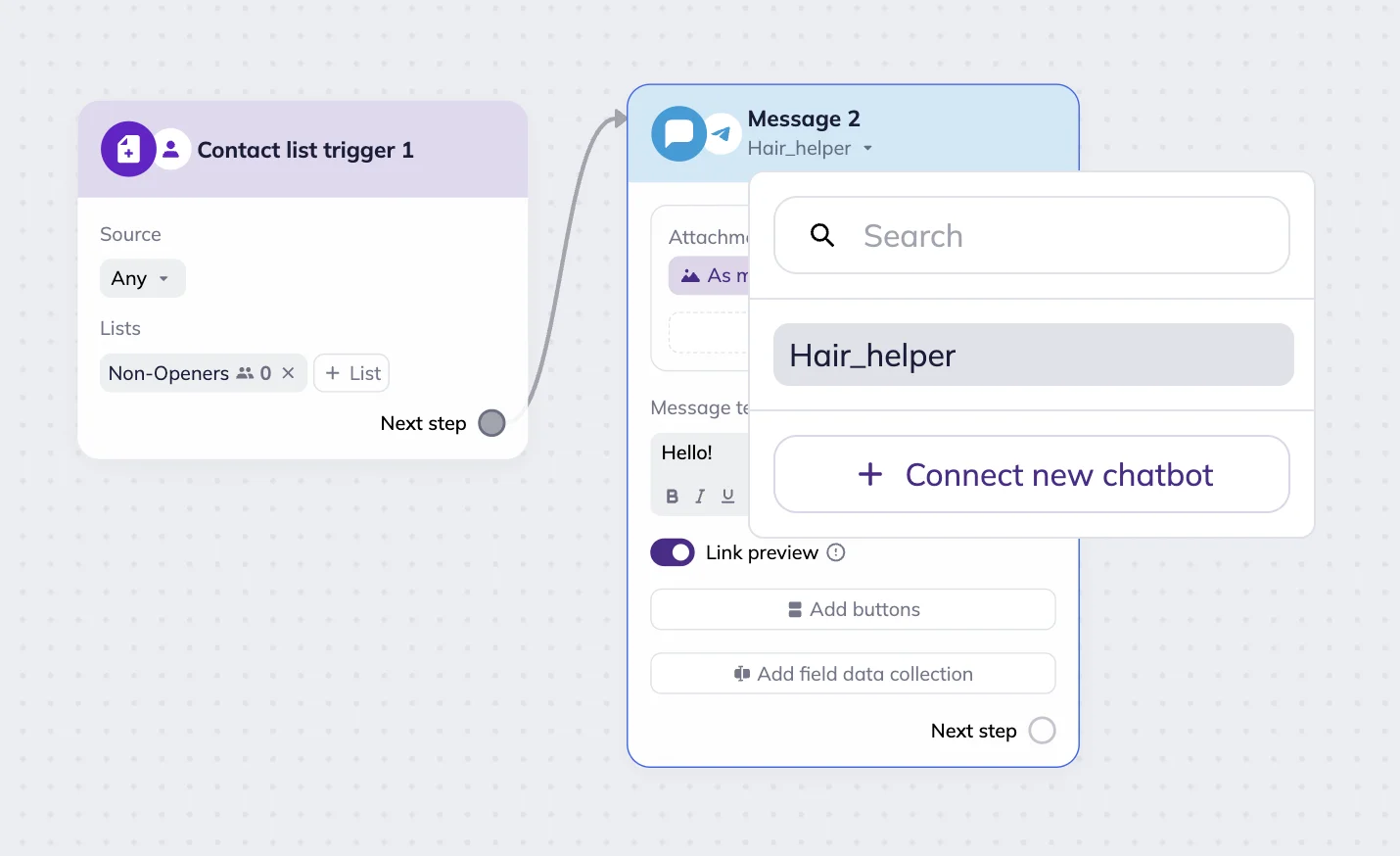
  • Add Telegram to the scenario. Add a Telegram trigger or message block, select Select a bot, and then select + Connect new chatbot. See the connection guide.
  • Connect the bot. Paste the BotFather token into Selzy, save the connection, and configure commands, messages, buttons, attachments, and data collection.
  • Test and launch. Test the scenario as a real subscriber, resolve any errors, and select Apply and run. Learn about Telegram blocks.
Telegram chatbot

Grow your business globally

Telegram passed one billion monthly active users in 2025, giving businesses a large channel for automated conversations, updates, and customer engagement. Source: Telegram.

Get in touch

Get in touch

Send scheduled broadcasts and triggered Telegram messages about products, promotions, updates, and special offers.

Capture leads

Collect subscriber names, email addresses, phone numbers, birthdays, and other details, and save them to Selzy contact cards.

Capture leads
Personalize

Personalize

Personalize Telegram messages with data stored in contact fields, including names, locations, order details, and preferences.

Stay mobile

Send notifications about subscriber actions and collected data directly to Telegram so your team can receive them on mobile. Learn how to configure an omnichannel scenario.

Stay mobile

What Telegram bots can do for you

Stay available 24/7

Use triggered scenarios to answer common questions, send updates, collect data, and guide subscribers through automated conversations at any time.

Keep in touch

Communicate with subscribers in a channel they already use for personal messages, communities, updates, and content.

Telegram message block in Selzy omnichannel scenario with Select a bot menu

Analyze. Segment. Automate

Use Telegram blocks within an omnichannel scenario to automate communication and respond to subscriber behavior.

Analyze. Segment. Automate

Review scenario starts, active contacts, errors, message delivery, clicks, and subscriber progress to improve the flow.

Analyze. Segment. Automate

Collect subscriber data, assign tags, update lists, and use this information to create more relevant follow-up communication.

Selzy

Start scenarios with Telegram commands, keywords, links, or contact events. Send messages with buttons, attachments, voice messages, video notes, and data collection fields.

Combine Telegram and email in one scenario

Coordinate Telegram messages and email blocks in the same customer journey. Use subscriber actions and collected data to personalize each next step.

Triggered omnichannel messages

Start a scenario when a subscriber joins a list, sends a Telegram command, follows a bot link, or completes another configured trigger event.

Email builder

Create the email used in your omnichannel scenario with Selzy’s drag-and-drop builder and AI writing assistant.

Email automation

Combine email and Telegram blocks in one scenario and choose each next step based on subscriber actions and collected data.

Choose the right plan for your Telegram audience

Telegram bots are available in several chatbot plans. Pricing depends on audience size and selected channels. See the pricing page for current plan combinations, prices, and trial terms.

Choose a plan based on your audience size

Bots

Telegram + Instagram
$8
/ month
Telegram bots
Instagram DM automation

Standard

Email + Telegram + Instagram
$15
/ month
Email campaigns & automations
Telegram bots
Instagram DM automation

50,000+ customers can't be wrong...

Selzy is the easiest way to start selling with email — but don’t just take our word for it.

Read our customers’ success stories and see what they have to say 👉

4.8/5
Based on 488 reviews
Product Hunt
G2 Momentum Leader award Fall 2024
G2 High Performer Small Business award Fall 2024
Capterra Best value award 2024
Capterra Shortlist award 2025
GetApp Category Leaders award 2025
Software Advice Front Runners award 2025

Get round-the-clock support via chat, email, and phone

5 mins average response time
95% of cases solved in 5 minutes
97% 👍️️️️️️ satisfaction rate

FAQ

How do I launch a Telegram chatbot?

Create your Telegram bot through BotFather, then connect it to a Telegram trigger or message block in a Selzy omnichannel scenario. Follow the current connection guide and the scenario creation guide.

How do I set up notifications for a Telegram chatbot?

Add a Telegram notification block from the Actions section of the omnichannel scenario editor. Configure the subscriber information and event details you want to receive, then connect the block to the relevant step of the scenario.

Is it free to use?

Telegram bots are available in several chatbot plans. The price depends on your audience size and the channels included in the plan. Current plan combinations, prices, and trial terms are available on the chatbot pricing page.

How do I contact customer service if I have a problem?

Feel free to contact our customer service team if you have any questions regarding omnichannel scenarios, Telegram bot connections, or messaging.

Up your marketing game

Connect your Selzy account to a Telegram bot and take your communication to a whole new level.

Get started