


Key takeaways
- Email format is crucial for effective communication, shaping how messages are received.
- Common email types include HTML, plain text, multipart, and rich text.
- Emails typically have a header, body copy, and footer.
- Keep emails brief, scannable, consistent, timely, and personalized.
- Pay attention to subject lines, CC and BCC, closing, and signature.
- HTML emails are visually rich but may trigger spam filters.
- Plain text emails lack formatting but are fast to load and accessible.
- Multipart emails include both HTML and plain text versions for better accessibility.
Email is still one of the most powerful communication tools, but only if it’s done right. The way your message is formatted can shape how it’s received, whether it’s a formal proposal, a marketing campaign, or a quick follow-up.
In this article, we’ll examine different types of emails, discuss what an email format is exactly, how to format an email properly, and what mistakes to avoid — both in professional and marketing communications.
TL;DR
- Email format is the technical and visual structure of your message.
- Common email types include HTML, plain text, multipart, and rich text.
- Emails typically consist of a header (subject line, preheader, sender information), body copy (salutation, introduction, body, closing), and footer (signature, unsubscribe link, contact information).
- Keep your email messages brief, scannable, consistent, timely, and personalized.
- Pay special attention to the subject lines, CC and BCC, closing, and signature.
What is an email format?
An email format refers to the technical and visual structure of your message. It includes everything from the code that shapes the layout to the way your content is displayed across different devices and email clients.
It’s not just an issue of aesthetics — the format you choose affects deliverability, readability, load times, and user experience. Whether you’re sending a promotional newsletter, a formal business email, or an order confirmation, the format you choose plays a very important role.
Common email types
These are the main formats your emails can take, each with its own pros, cons, and ideal use cases.
HTML
HTML emails use code (HyperText Markup Language) to create visually rich messages. With HTML, you can include elements like styling, images, buttons, and links. HTML is the standard format for promotional campaigns, newsletters, and just about anything where design and branding matter.
There are many benefits to using HTML: you can track opens and clicks, use structured layouts, and add dynamic elements. There are, however, some downsides too — HTML emails are more likely to trigger spam filters, and if not coded properly, they might not display correctly on all devices or email clients.
Here’s an example of a marketing email built with HTML:

Text-only
Plain text emails don’t have any kind of formatting, links, or images. They’re often used for personal communication, legal notices, system alerts, or when sending to recipients in highly regulated industries.
Obviously, plain text emails lack the visual appeal of HTML. But they also have some advantages: they’re fast to load, highly accessible, and enjoy better deliverability. Use plain text when you want to keep it direct, personal, and functional.
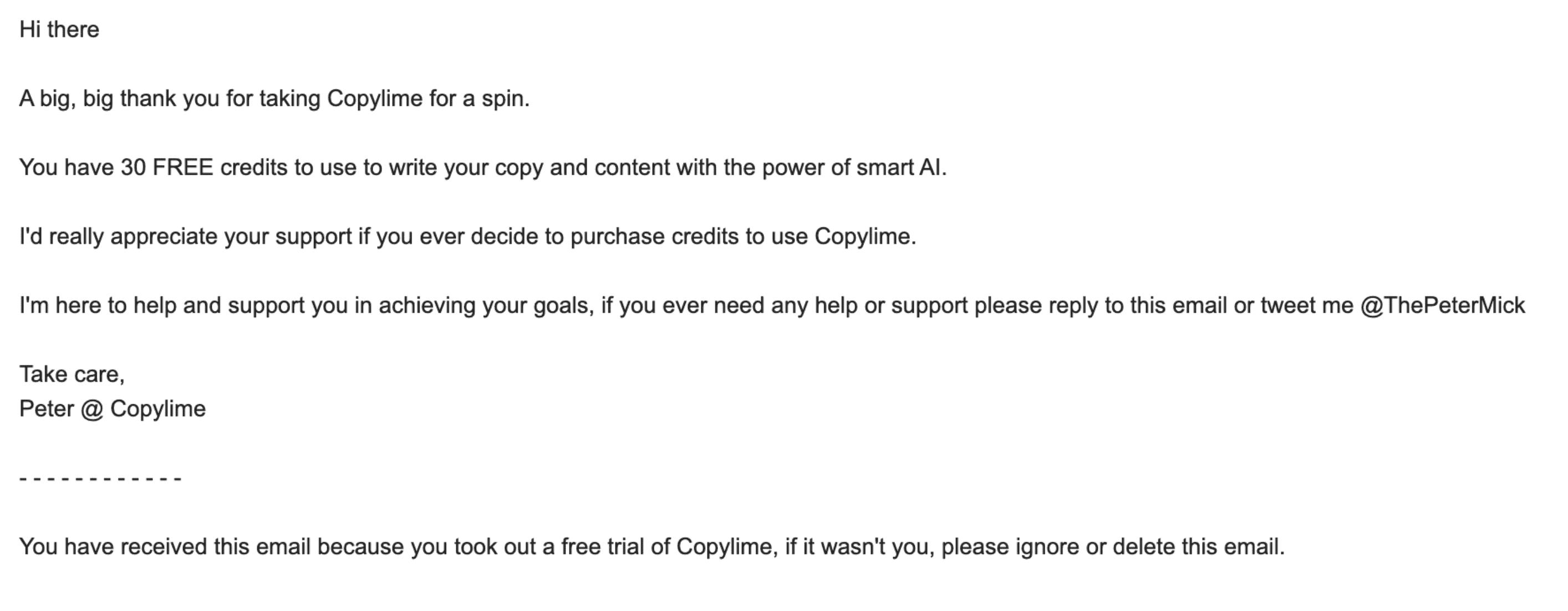
Here is an example of a plain-text email:
Multipart
Multipart emails include both an HTML and a plain text version of your message — think of it as one envelope with two letter versions inside. The recipient’s email client automatically decides which version to display based on settings, security policies, or user preferences.
This format is considered best practice for most email marketing and transactional sends. It maximizes accessibility, improves deliverability, and ensures your message gets through even if the HTML version fails to load or is blocked.
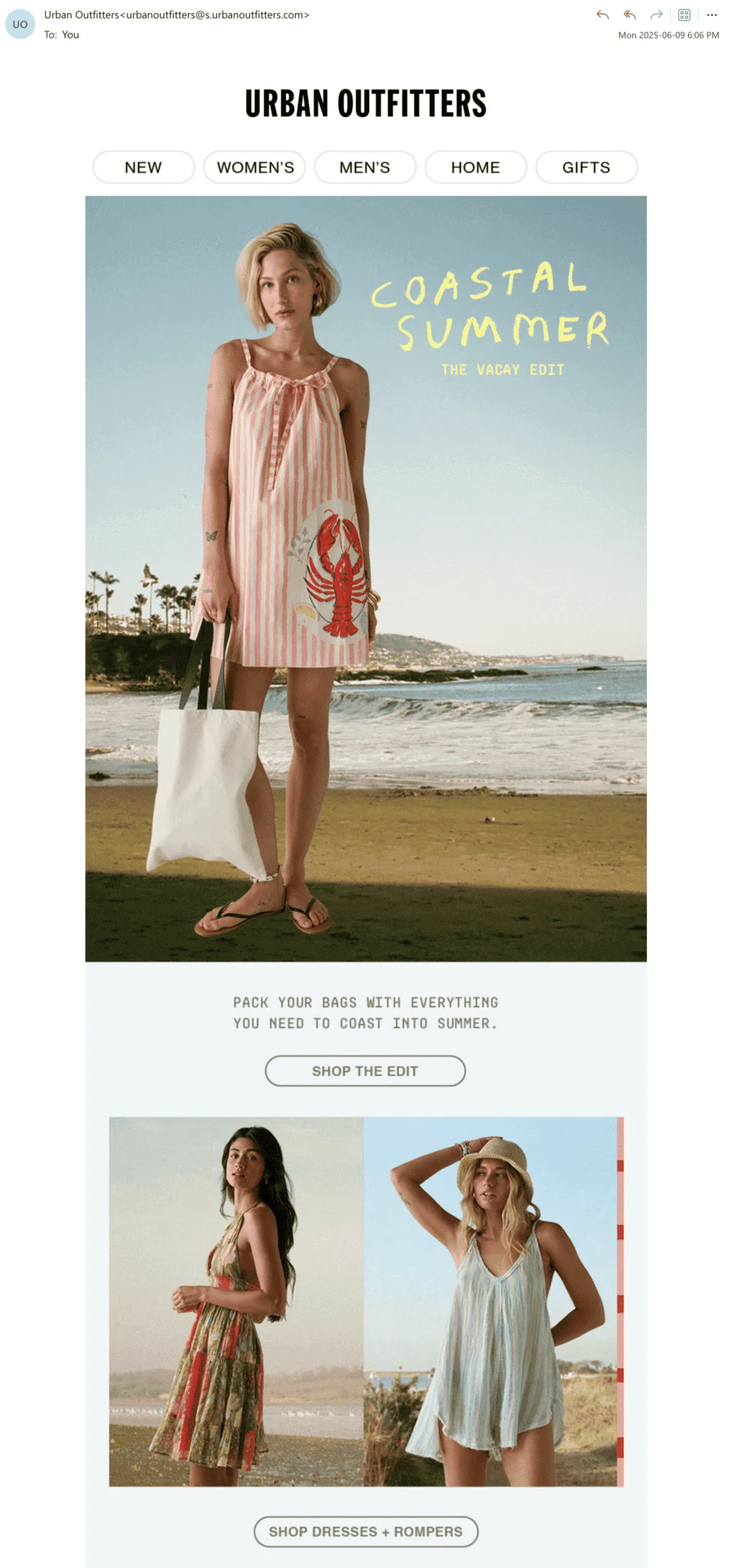
This is what a multipart email looks like in Outlook. Since Outlook supports HTML and loads images by default, it shows the fully formatted HTML version:
Behind the scenes, this email also contains a plain text version. How do we know? We checked the message source.
The “multipart/alternative” content type means both formats, plain text and HTML, are included:


Rich text
Rich text falls somewhere between plain text and HTML. It supports basic formatting — like bold, italics, bullet points, and hyperlinks — but doesn’t allow for complex layouts, images, or advanced styling.
You’ll often see rich text used in internal communications, team updates, or automated system emails. It’s more readable than plain text, simpler than HTML, and works well for straightforward, functional messages.
How to format an email from header to footer
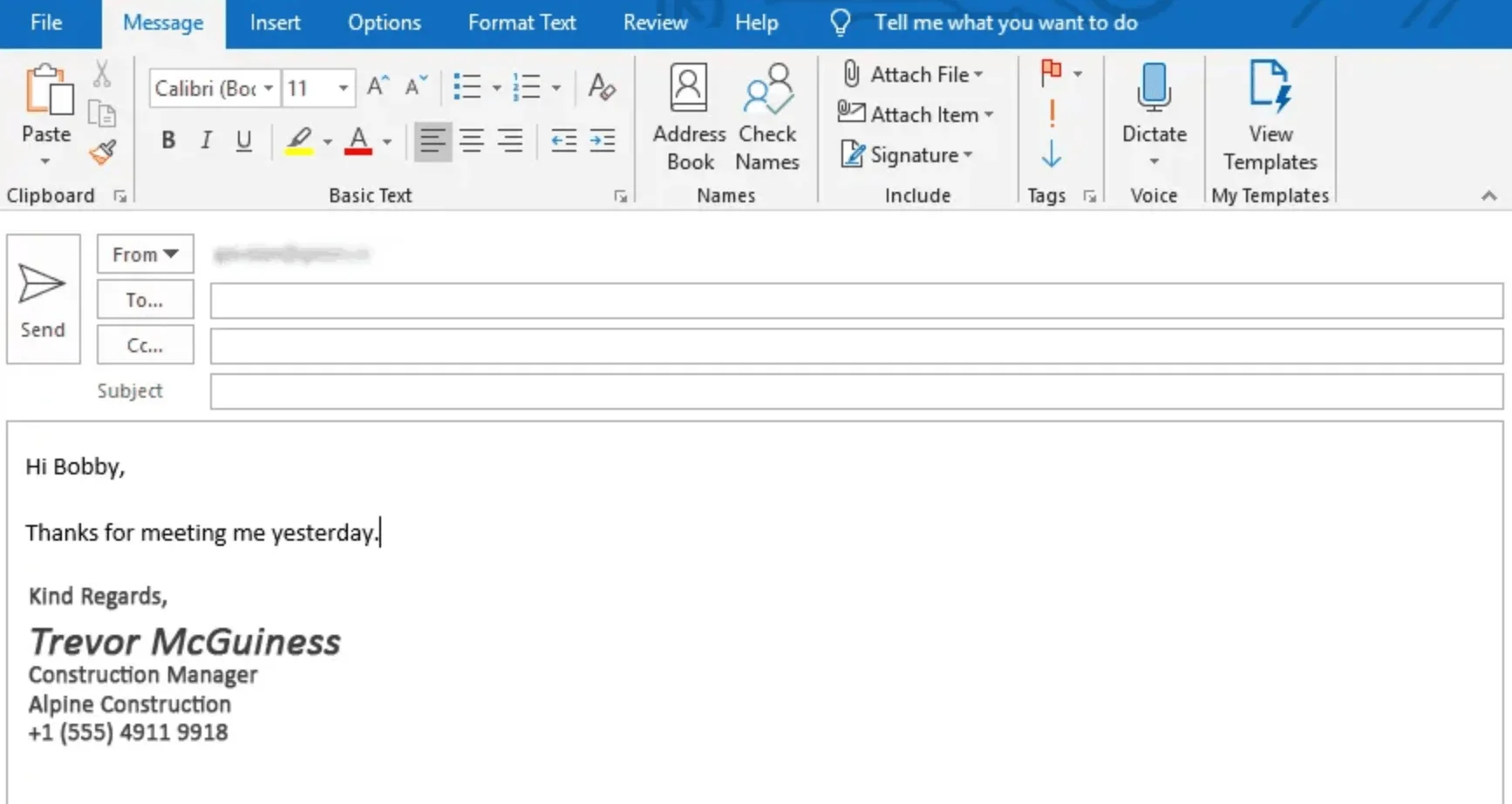
Now that you understand everything about the different technical formats an email can take, let’s break down the structure of a well-formatted email from top to bottom: subject lines, salutations, body copy, signatures, and everything in between.
Header
Think of your email header as the first impression. A well-formatted header should grab the recipient’s attention and set the tone for everything that follows.
The “header” usually refers to three visible elements: the subject line, the preheader, and the sender’s name and address. However, that’s not all there is to it — the header also contains metadata like timestamps, IP addresses, authentication details, and routing info.
In this article, we’ll focus on the non-technical parts, but it’s good to be aware of what happens on the technical side of your header, too.
Subject line
The subject line is the most visible part of your email — and often the only one people read before deciding to open or delete. It should be short (ideally, under 40 characters), specific, and relevant to the recipient. When crafting your subject line, avoid using all caps and excessive punctuation.
Here’s an example of a few subject lines from my own inbox:

Preheader
The preheader (also known as preview text) is the short line of text that appears next to or below the subject line in most inboxes. Often, senders overlook preheaders, but they’re wrong to do so — it’s actually prime email real estate. When written well, it reinforces your subject line or adds just enough curiosity to make the recipient open the email.
A good preheader should complement the subject line without repeating it, stay under 100 characters, and still make sense when read on its own.
Here are a few examples (some good, some bad) of IRL preheaders from my inbox. As you can see, some draw you in with clear value or clever phrasing, while others get cut off or waste space with messy links:

Sender’s name and address
Your sender name and address should be immediately recognizable and trustworthy. That’s because sometimes they’re the first thing your recipient sees, even before the subject line. An example of using the name or brand your audience knows would be “Emma from Selzy” or “Selzy Customer Support” rather than noreply123xyz@selzy.com. Keep it consistent, too — switching names frequently can confuse or alarm recipients.
Body copy
This is the main content of your email — the message itself. Whether you’re writing a quick update or a detailed announcement, how you structure your body copy will directly affect the way your recipients perceive it and how effective it is.
Here is an example of an email body:

Salutation
Salutation, or the email greeting, is kind of self-explanatory — but that doesn’t mean you should wing it. Match it to your relationship with the recipient. “Hi Anna” works for a friendly, informal email, while “Dear Mr. Johnson” is better suited to formal or professional contexts.
Sending bulk emails? Think of your brand voice and use it to guide the tone of your greeting (like “Hi guys” or “Hello everyone” for a casual, inclusive feel).
You don’t need to overthink this, just aim for a tone that feels natural and appropriate.
Introduction
Start your email by clearly stating its purpose and setting the tone. If you’re writing to someone unfamiliar with you or your brand, briefly introduce yourself. The formal email below is a great example of a simple, polite introduction.

For marketing emails, lead with relevance: why should the reader care? Connect your message to a need, interest, or curiosity right away.
Here’s an example from Canva. This introduction works because it grabs attention with a bold, benefit-driven headline, sets the tone immediately, and clearly tells the reader what they’ll gain by engaging further.

Body
This is the main part of your email, where the heart of your message lies. Most people skim, so structure your message to guide their eyes. Keep your content concise and focused. Break long messages into short paragraphs for readability, and use bullet points when listing information.
In professional emails, the body should build toward a clear next step, like scheduling a call, sharing a document, or answering a question. Don’t bury your ask in a wall of text — if you’re requesting action, make it obvious. Think of it like a marketing call-to-action, but in the form of plain words.
The email below builds toward a polite, specific request: a next step framed with respect and context, rather than a bold demand:

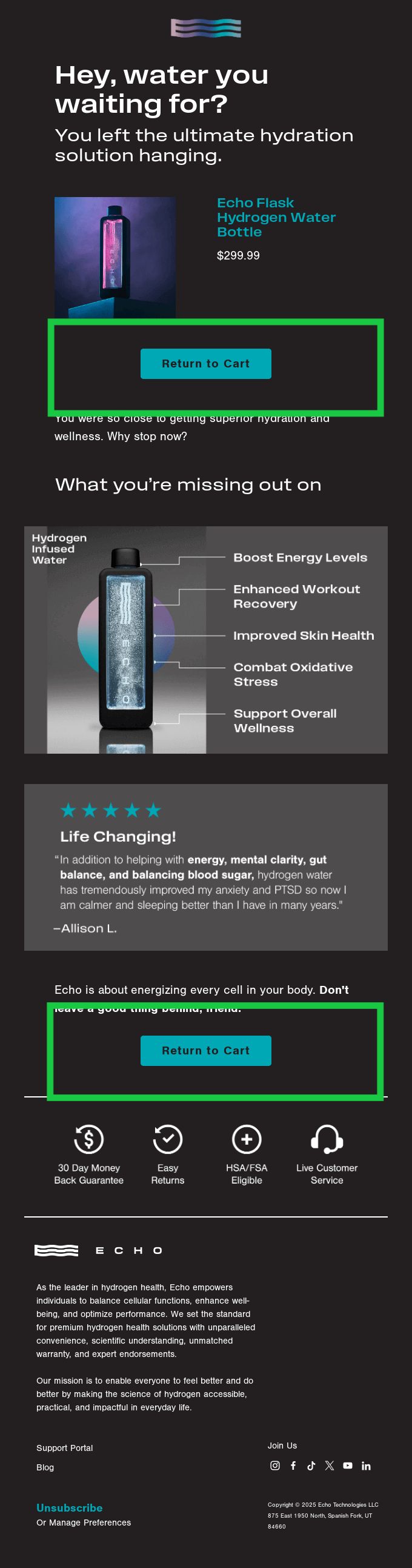
In marketing or transactional emails, your call-to-action (CTA) is the MVP of your email. Use clear, direct language like “Shop now,” “Get the guide,” or “Start your trial.” Repeat your CTA if needed across the body of the email, and use buttons that stand out visually.
The email below uses the same call-to-action twice, increasing the chance that the recipient will act on it:
Closing
The closing of your email is how you wrap it up. It gives the final impression and can also reinforce the tone of your email.
In professional emails, closings often include a polite sign-off like “Looking forward to your thoughts,” or “Thanks again for your time.”
In marketing, it might be more casual or persuasive, like “Don’t wait — grab your deal before it’s gone.”
Footer
The footer is the section at the very bottom of your email.
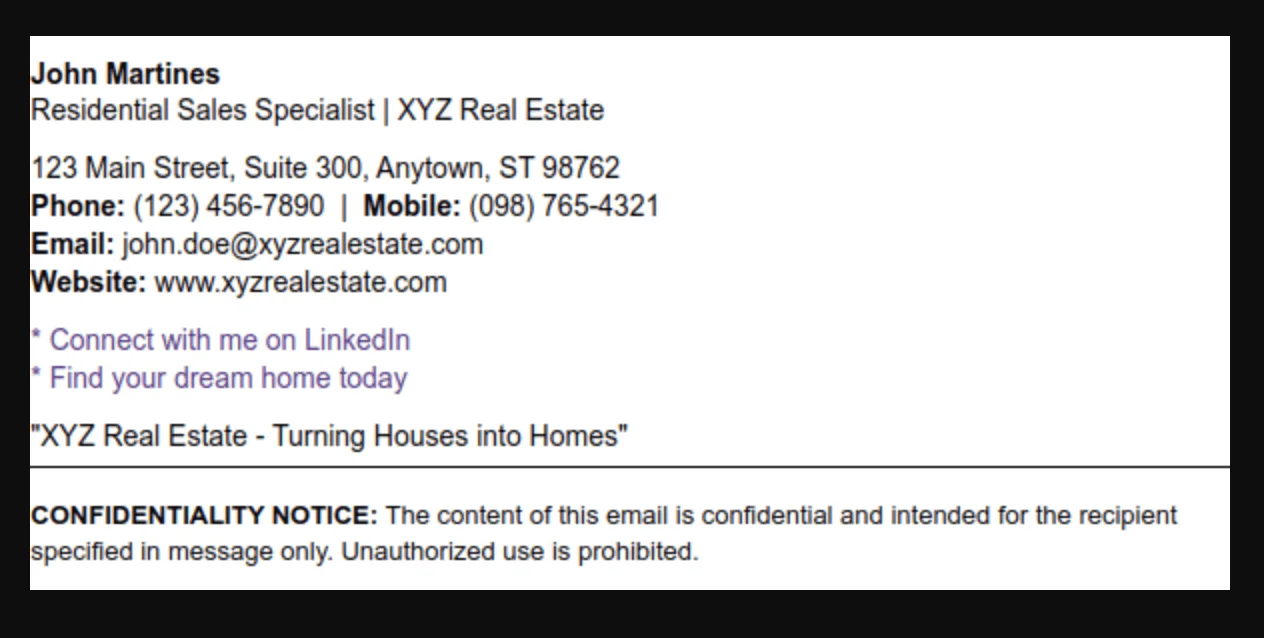
In professional emails, it’s common to include a well-designed signature created with an email signature maker, featuring your name, title, company, and contact information.
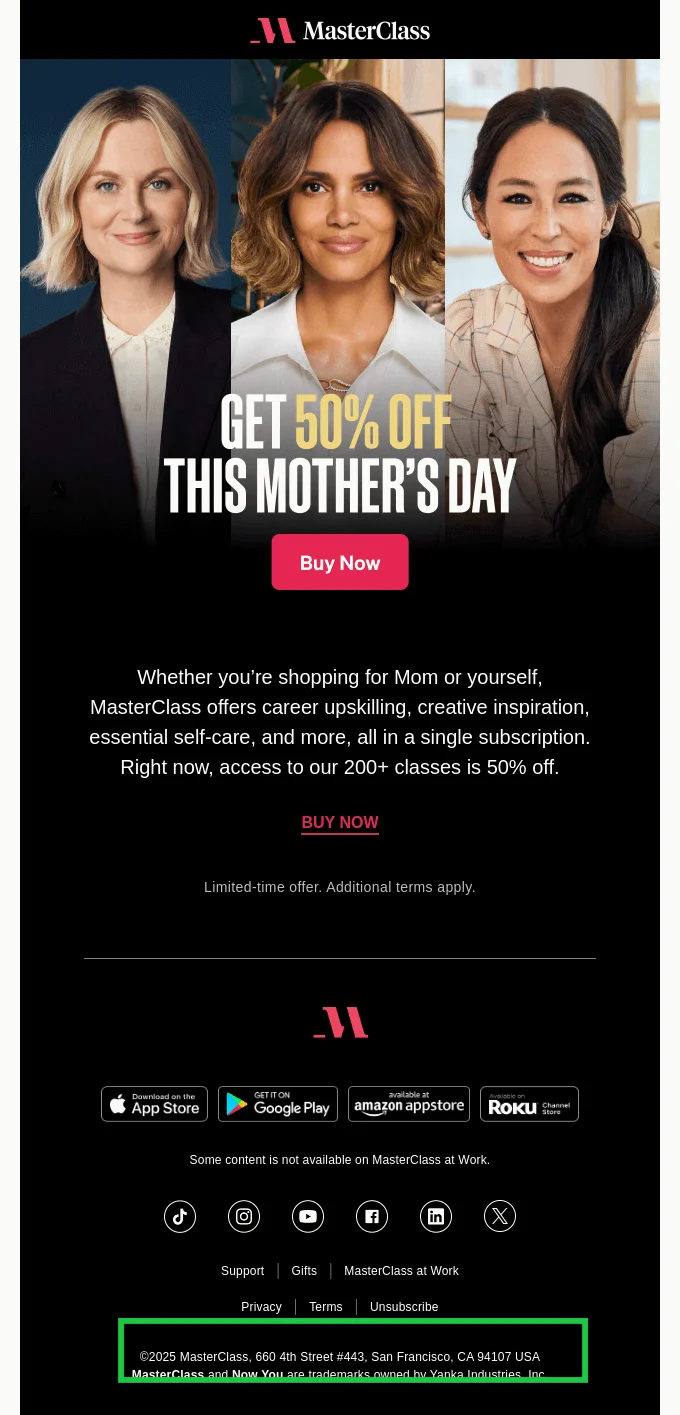
In marketing emails, the footer often includes legally required details like your physical business address, an unsubscribe link, and links to privacy policies or preference management.
It’s also a good place for bonus links (like social icons), disclaimers, or customer support options — anything that doesn’t need to be in the main body but still matters.
Email signature
Your email signature should tell the reader who you are, how to reach you, and (if relevant) what you represent. Stick to the essentials: name, title, company, and contact info. You can also include a logo, your photo, social media links, booking link (or a CTA button), or pronouns — whatever supports your communication goals.
Don’t go crazy with fonts, colors, or styling. Unless it’s part of your company identity, skip the rainbow text and the inspirational quotes.

Contact information
Your footer should also include a way for people to get in touch, especially if you’re representing a company or brand.
For individuals, this is usually your phone number and your email address. You can also include your mailing address.
Brands that send bulk email, on the other hand, are required to include their mailing address in their signature for legal compliance. You might also want to include support links or social channels to keep communication lines open.
Subscription and unsubscribe options
If you’re sending marketing or bulk emails, your footer absolutely must include a way for recipients to unsubscribe or manage their preferences. It’s not just a nice-to-have — it’s a requirement under data protection laws like GDPR and CAN-SPAM.
While a simple button or a clickable link works, many brands opt for using friendly language like “Don’t want to hear from us anymore?”
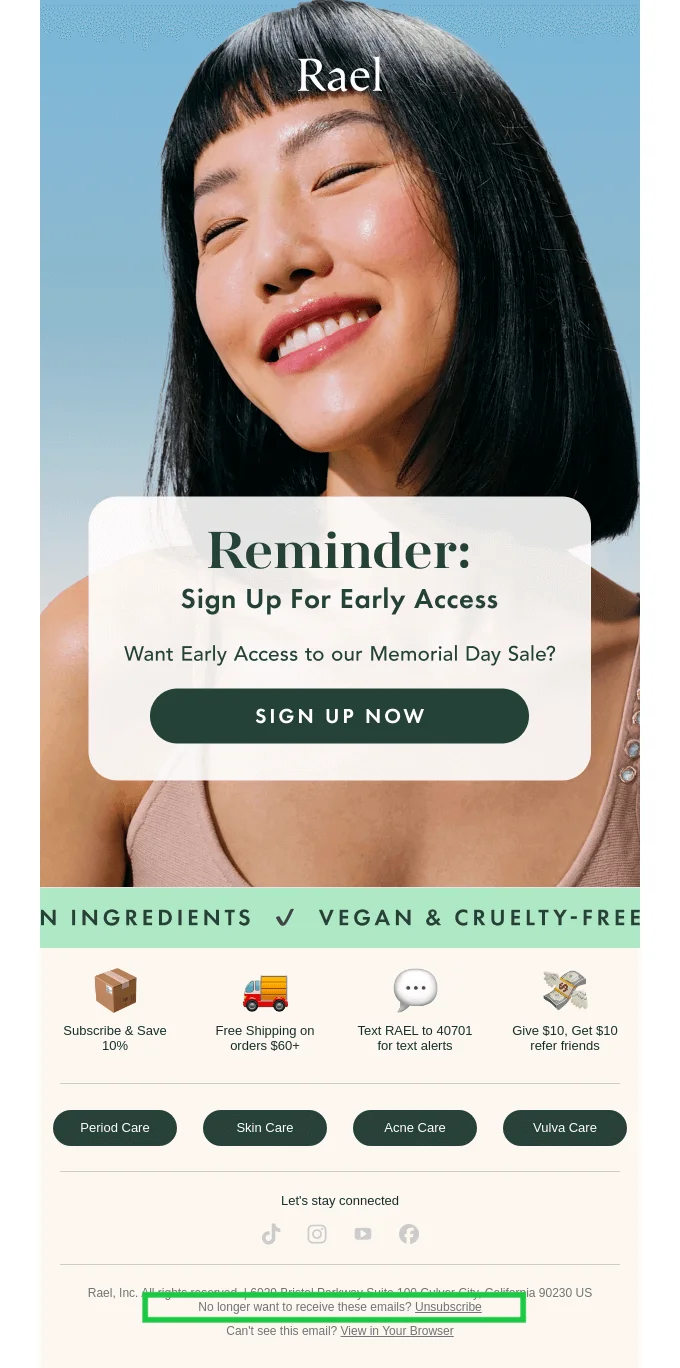
You can also add a link or a button to allow your subscribers to manage their subscription. That is, instead of having them unsubscribe fully, you’re allowing them to receive fewer emails or opt in for emails of a specific kind only (like weekly newsletters but not product promotions).

Email formatting best practices
Regardless of the type of email you’re sending — a professional message, a marketing campaign, or something in between — and regardless of the technical format (plain text, HTML, etc.), there are some universal best practices that make your emails easier to read, more polished, and more likely to get a response or clicks.
Proper formatting isn’t just about style; it’s a sign of clarity, care, and good email etiquette.
Craft compelling subject lines
Subject lines should set expectations. Respect your reader’s time by writing something they’ll immediately understand and care about. Different types of emails call for different subject line techniques.
For marketing emails, treat your subject lines like small CTAs. Use action-oriented verbs, spark curiosity, or highlight a clear benefit.
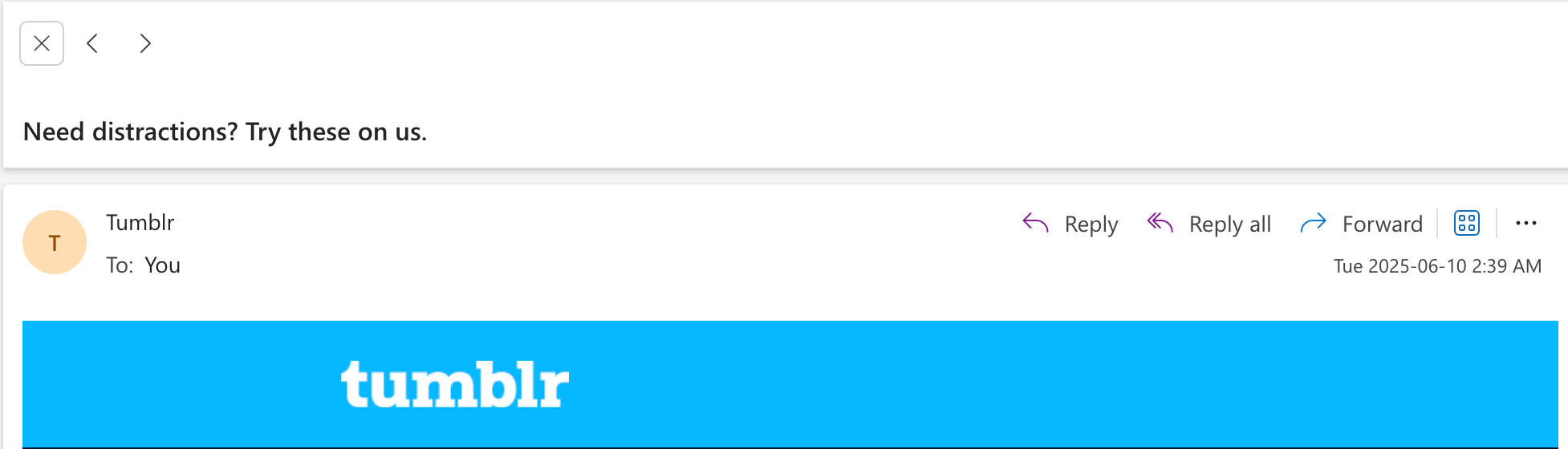
The subject line in the email below grabs attention with a relatable question and a soft call-to-action, all in under 10 words. Perfect for informal or entertainment-based emails.
For professional emails, your subject line should be straightforward. It should reflect the purpose of the message (for example, something like “Update” or “Project???” is much too vague), help with searchability, and also allow the recipient to prioritize in a busy inbox.

The professional email above may be very fictional, but it nails all the essentials. The subject line references a specific request, maintains the thread, and keeps things organized even when the content is less than conventional.
Keep it concise
No matter who you’re writing to — a potential client or a thousand-person mailing list — longer isn’t better. The best emails are easy to scan, quick to understand, and respectful of the reader’s time.
In marketing emails, brevity is crucial. Your reader is likely skimming, so lead with the most valuable info. Use short paragraphs, bullet points, and strong CTAs.
In professional emails, this means getting to the point quickly. Skip the long intros and background dumps.
In both cases, avoid filler and break up complex ideas.
Keep the body scannable
Even if your message is short, the way it’s laid out makes a huge difference. People don’t read emails word-for-word — they scan them.
Make it easy to find what matters by using line breaks between paragraphs, bullet points for lists, and bold text to highlight key information. Stick to short sections and limit each paragraph to a single idea. This applies to everything from newsletter copy to meeting summaries!
Maintain consistency
Consistency isn’t just important for branding — it’s how you build trust and avoid confusing your reader. Whether you’re sending a promotional campaign or a formal request, your email’s tone, design, and structure should align with everything else you do.
This idea is especially important for bulk marketing emails. It means that your visuals and voice should match your website, social posts, and ads. Use consistent fonts, colors, and tone of voice. You can’t have a sleek, minimalist website and then send chaotic neon newsletters. Headers, button styles, and even greeting lines should feel like they belong to the same brand.
Also, your emails should be consistent with each other. If one campaign is playful and emoji-filled and the next is formal and stripped-down, it’s jarring.
Let’s have a look at some brand consistency in action. Here’s an email I received from Urban Outfitters and also their website.

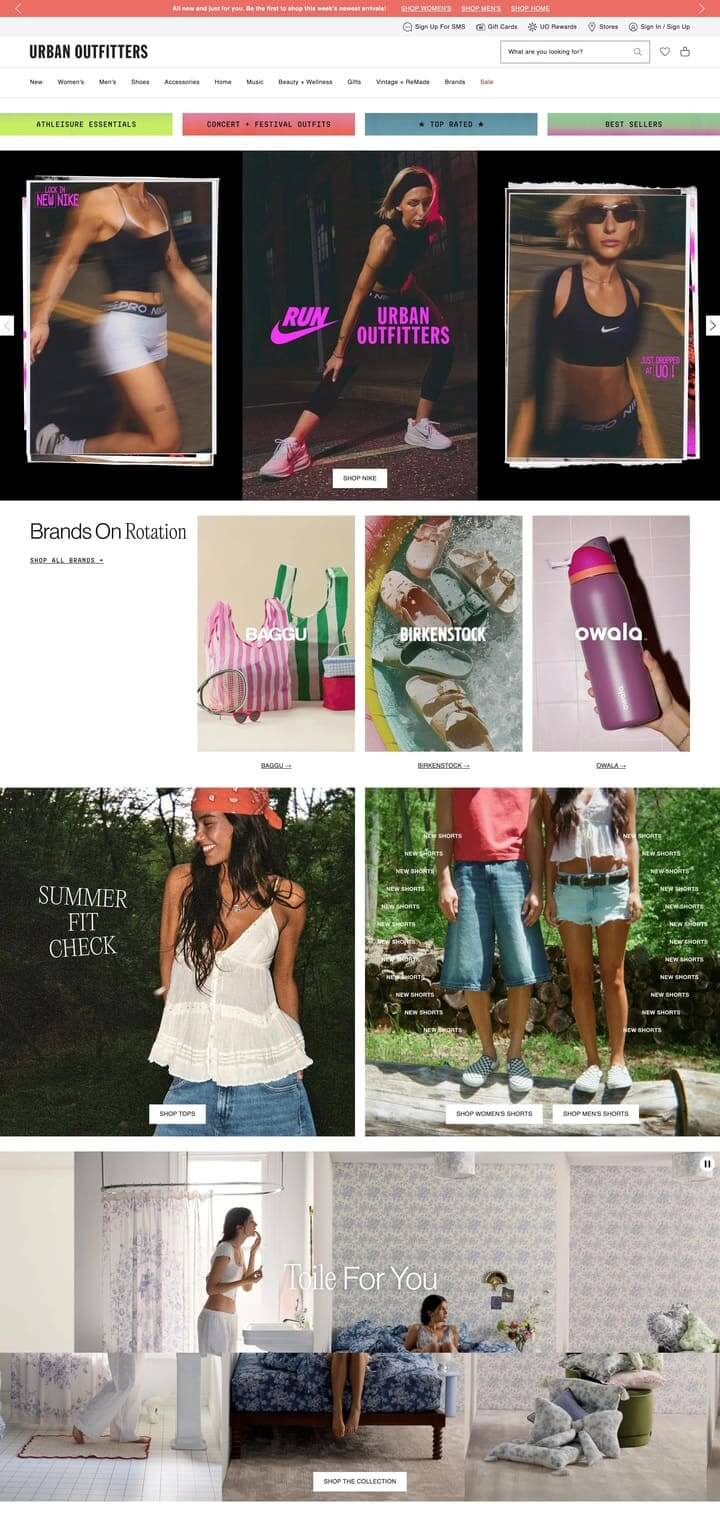
The photography style is consistent across both platforms — slightly grainy, candid, and lifestyle-focused, giving everything a relaxed, real-world feel. The tone stays the same, too: youthful, casual, and trend-aware.
Visually, the design is unified. Both the email and the homepage follow a similar rhythm: bold imagery paired with minimal copy, laid out in clean, modular blocks. Even the messaging is repeated. One of the easiest ways to ensure consistency like this for bulk emails is through the use of premade templates. More on that later.
Both the email and website clearly belong to the same brand, and the newsletter recipient will not feel any friction when transitioning from one to the other.
If you think formal professional emails don’t need to be as consistent, think again! Here, consistency shows up in tone, structure, and formatting. If you’re formal in your pitch deck, don’t open your email with “Wassup.”
Use a consistent sign-off, maintain a reliable tone (polite, clear, direct), and make sure all outgoing emails reflect your role and company. Even your email signature is part of the brand.
Personalize when possible
Don’t you just hate it when an email starts with “Dear all?” Even the best message can feel cold if it’s not addressed to you directly. Whenever possible, personalize — especially in one-to-one or small-group professional emails. You can use names and refer to prior conversations to reinforce this.
For bulk or automated emails, personalization also goes a long way. Many email service providers let you insert dynamic fields like first name, company name, or recent activity. For example, a personalized greeting like “Hi Jordan, here’s your June report” feels miles warmer than “Hi there.”
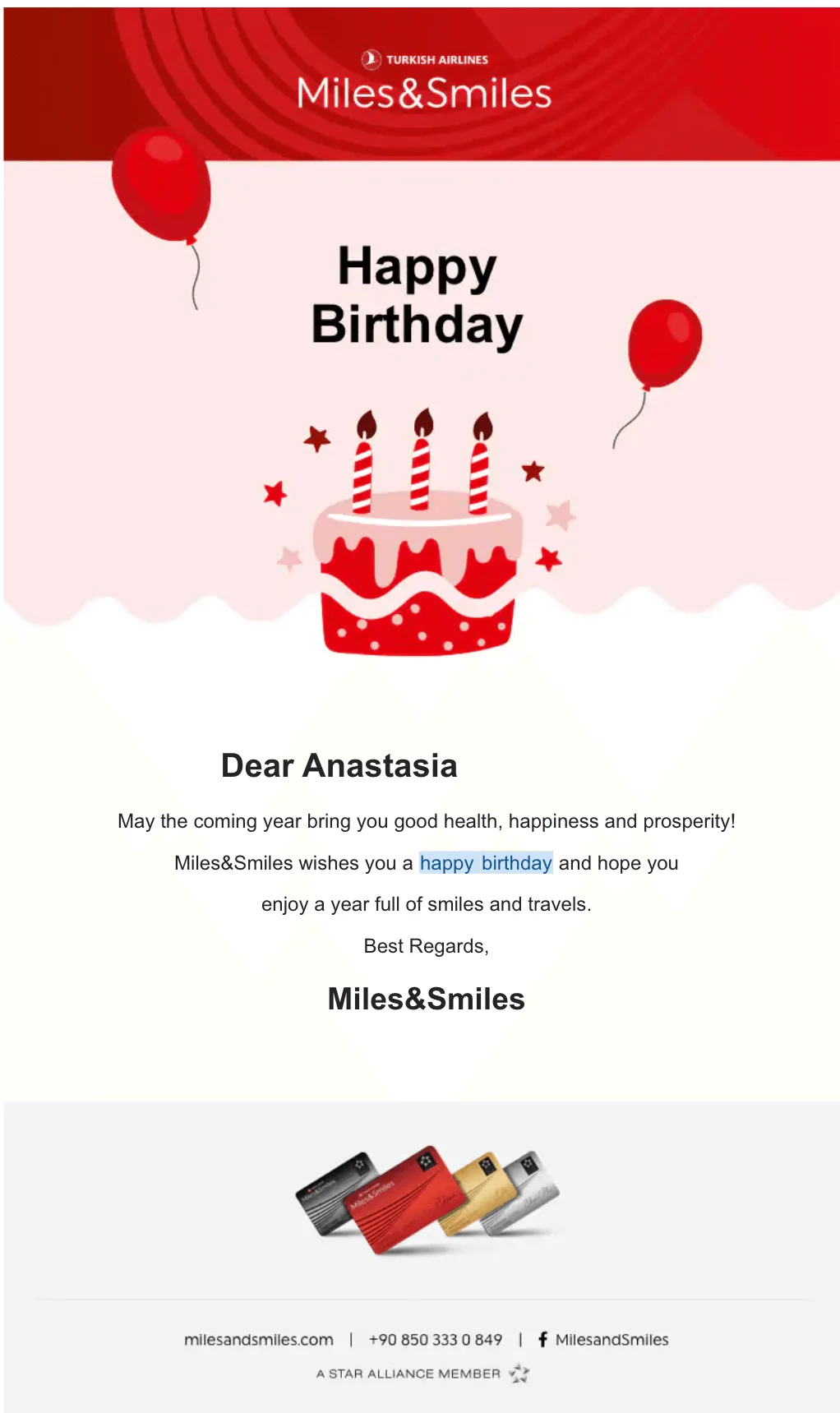
The birthday email below from Turkish Airlines is a good example of how automation and personalization can work together. It’s clearly a bulk email, but by inserting the recipient’s name, choosing a specific occasion (birthday), and keeping the tone warm and well-designed, it avoids feeling too robotic.
Know when to CC versus BCC
If you’re emailing several people at the same time, it’s important to think about visibility. Who should see who else is included in the thread, and who shouldn’t? Use the guide below to help you decide.
- Use “To” for people who need to act on the email. If you’re emailing a project team where everyone needs to respond or coordinate, putting all names in “To” makes it clear that they’re responsible.

- Use CC (which stands for carbon copy) when someone should be kept in the loop but doesn’t need to take action, like a manager or a colleague who’s just observing but not contributing.

- Use BCC (blind carbon copy) when you’re sending an email to multiple recipients without them knowing who else received it. This is ideal for external messages, announcements, or large groups.

These distinctions matter most in formal or workplace communication. In marketing, your email platform takes care of visibility automatically, but in business, how you structure recipients is a crucial part of email etiquette.
Here’s a bonus tip for you: don’t hit that Reply All button unless absolutely necessary!
Close formally
Match your closing to the tone of your relationship.
In marketing emails, a consistent branded sign-off (like “— The [Company] Team”) helps maintain tone and recognizability across campaigns.
In formal emails, go with “Best regards” or “Kind regards.” For colleagues or casual exchanges, “Thanks” or “Cheers” may be fine, but avoid being overly familiar with new contacts.
When in doubt, keep it polite and neutral.
Include a signature
Always sign off with your name, title, and contact info. For formal or branded emails, consider adding your company logo, social links, or a booking link, making sure you’re keeping the layout tidy.
Proofread thoroughly
Typos in email undermine your credibility, no matter how strong the message. Before hitting send, read your email out loud or run it through a tool like Grammarly. Double-check names, links, and attachments — reviewing and proofreading your email is essential, especially in professional or external communication.
Schedule strategically
When you’re sending professional emails, be mindful of timing. Avoid sending emails outside working hours — after the working day is over or during weekends. Also, you should be mindful of time zones. If your recipient lives half the world away, they wouldn’t appreciate an 11 p.m. email that you sent at 11 a.m. in your timezone. Most email clients like Gmail and Outlook allow you to schedule an email to send at a later time to avoid this kind of situation.
When it comes to marketing emails, the situation is slightly different. You’re not writing to one person — you’re sending to hundreds or thousands — and their behavior matters more than the clock on your end.
You don’t need to try to guess the best time to send emails; test it instead. This is where A/B testing comes in. Also known as split testing, it allows you to send two slightly different versions of the same email to two different segments of your audience and see which performs better. You can test all sorts of things, timing included.
Most email service providers have A/B testing capabilities, and Selzy is one of them.
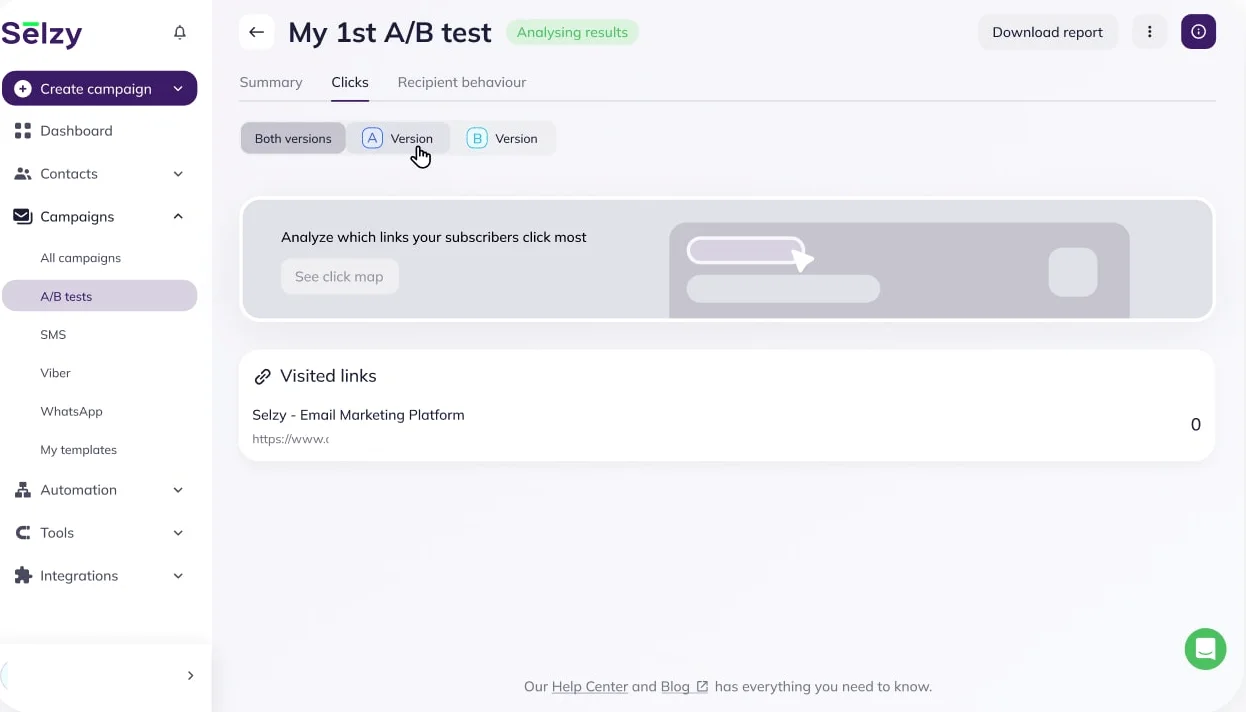
Another powerful tool for timing is automation. Let’s say you’ve run your A/B test and discovered that your audience is most responsive at 9 a.m. on Tuesdays. Instead of manually scheduling each campaign, you can set up automated sends to consistently hit that sweet spot every time.
Automation isn’t just about timing; it’s also about relevance. You can create workflows triggered by specific actions, like a welcome email when someone signs up, or a cart reminder sent two hours after someone leaves your site.

Email message formatting mistakes to avoid
Even the best emails can fall flat if the formatting is off. Whether you’re sending a formal note, a newsletter, or a cold outreach, each type of email comes with its own common pitfalls. Here’s what to watch out for.
Formal email
Formal emails are used in professional settings. This could be you reaching out to a colleague, applying for a job, or contacting a client. The tone, structure, and formatting should reflect that level of professionalism.
Common mistakes here include overly casual language or an abundance of emojis, skipping standard formatting (like greetings or closings), or writing in a disorganized, rambling way.
Here’s an example of a professional email that’s actually not very professional:
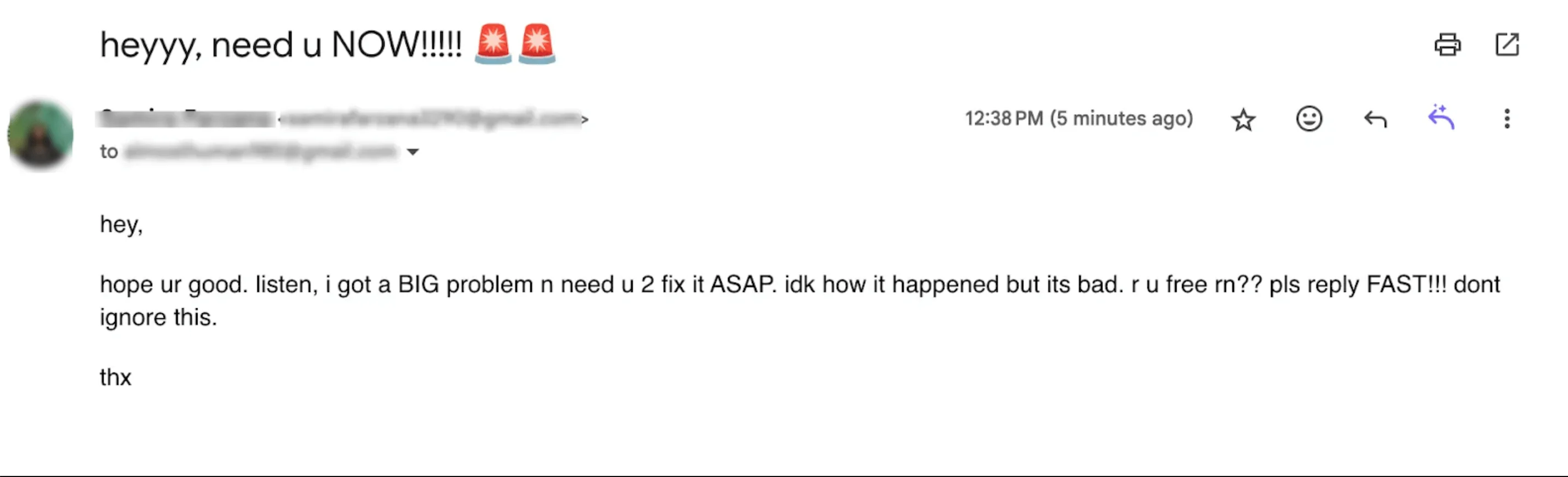
To avoid these mistakes, just follow the simple structure we outlined above. Use a clear email subject line, polite salutation, well-organized body, formal closing, and a complete signature. Keep the tone respectful, concise, and appropriate for your audience.

The email above is a good example of a professional email because it’s clearly structured, polite, and easy to follow. It opens with a proper greeting, outlines the purpose and expectations in a numbered list, and ends with a formal sign-off and signature.
Welcome email
A welcome email is the first message someone receives after signing up, and it’s a key opportunity to make a strong first impression and set the tone for your relationship with the subscriber. A good welcome email thanks the user for signing up, confirms what they’ve subscribed to, and clearly outlines what happens next.
Many brands either overload the recipient with content or give no real direction. The best welcome emails are short, friendly, and on-brand.
Include one clear CTA (like exploring your site or completing a profile), personalize where possible, and set expectations for the frequency and content of future emails.

This is a strong welcome email: clean design, warm tone, and clear personalization (“Smiles Davis”) make it feel human. It sets expectations, offers a clear CTA (“Get started”), and includes extra links for those who want more.
Transactional email
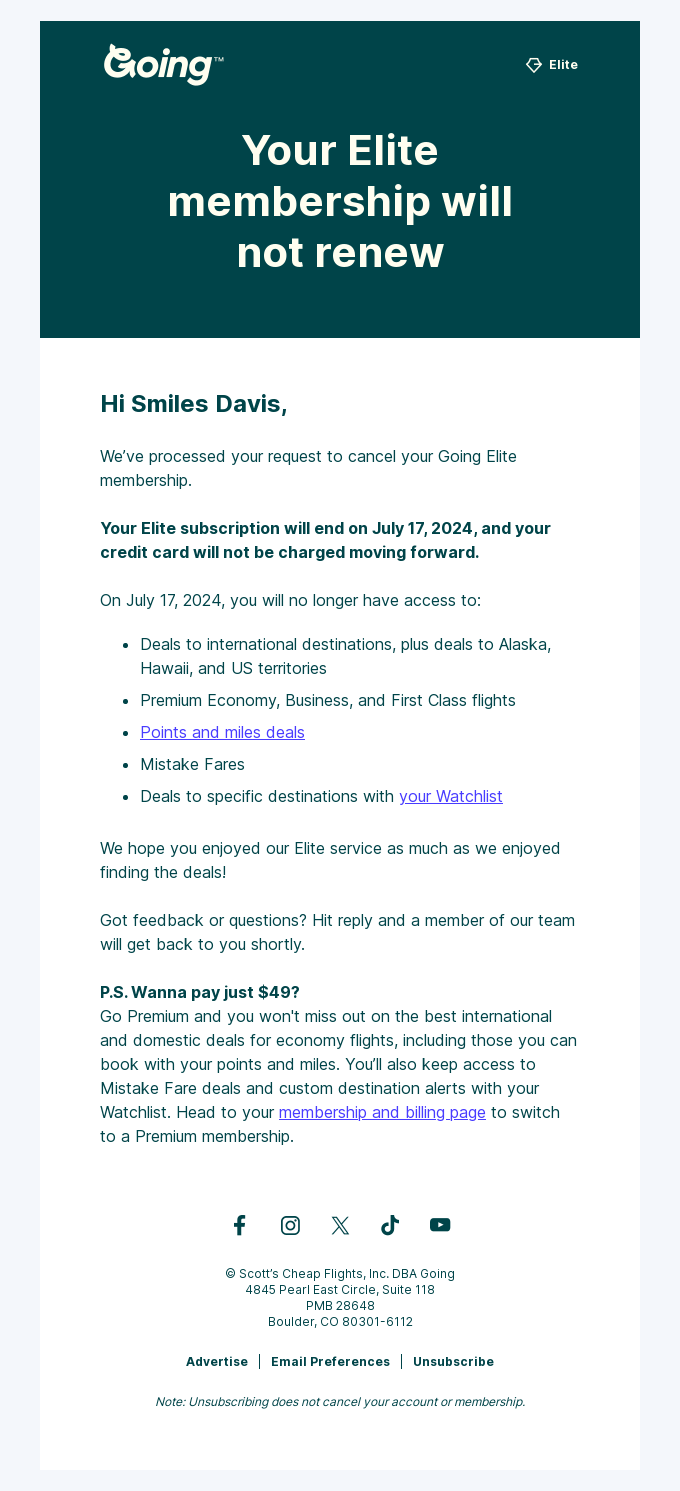
Transactional emails are triggered by a user action. Think order confirmations, password resets, or shipping updates. They’re not promotional, but they’re still part of the user experience.
Common mistakes include vague email subject lines (such as just “Confirmation”) and burying essential information.
These emails should be clear, concise, and action-oriented. Use a subject line that tells the recipient exactly what the message is about and make sure the key info is front and center.
Marketing email
Ah, marketing emails. The bread and butter of email marketers everywhere. This type of email is designed to promote a product, share news, or drive engagement. The goal is to capture attention and get the recipient to act.
Common formatting mistakes in marketing emails include writing in all caps, overusing emojis, and relying on vague or weak calls-to-action.
One of the most overlooked issues, however, is ignoring mobile optimization. With over 60% of global website traffic now coming from mobile devices, a poorly designed email on a phone can mean a lost customer. Your emails should scale gracefully on small screens, with tappable buttons, readable text, and a clean, responsive layout.

Newsletter
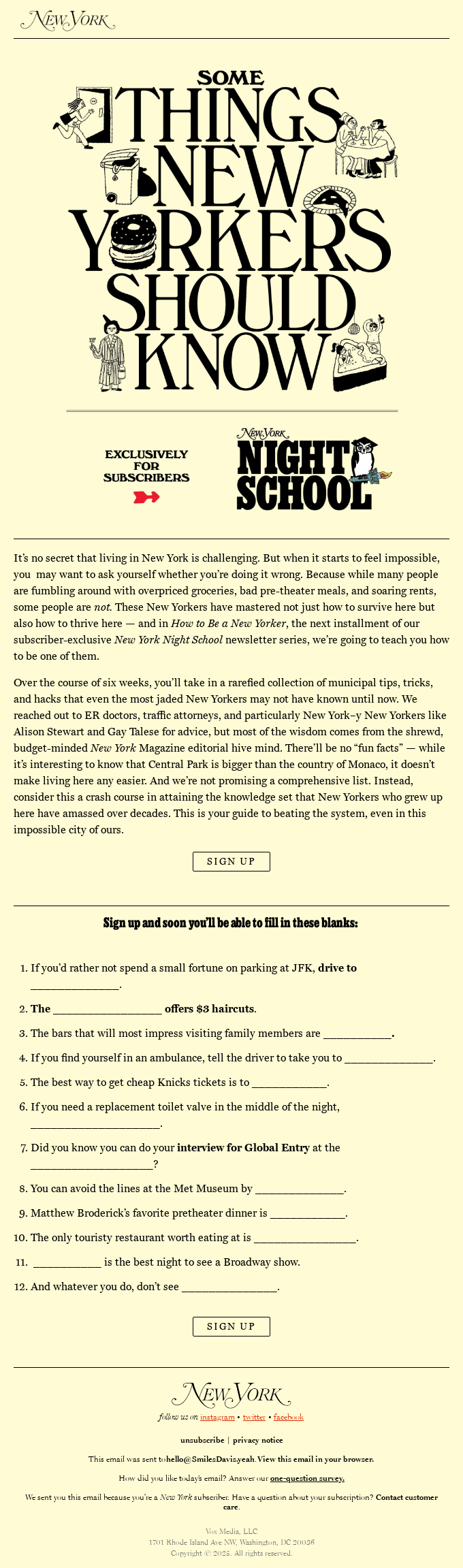
A newsletter is a recurring email sent to subscribers to keep them informed, engaged, or entertained. Newsletters often feature company updates, product news, blog content, or curated recommendations.
Now, what are some common mistakes marketers often make with newsletters? Usually, it’s making them too long and dense, not breaking up content visually, or being inconsistent with design from issue to issue.
To avoid this, use a repeatable layout with a clear structure and visual rhythm.
Cold outreach email
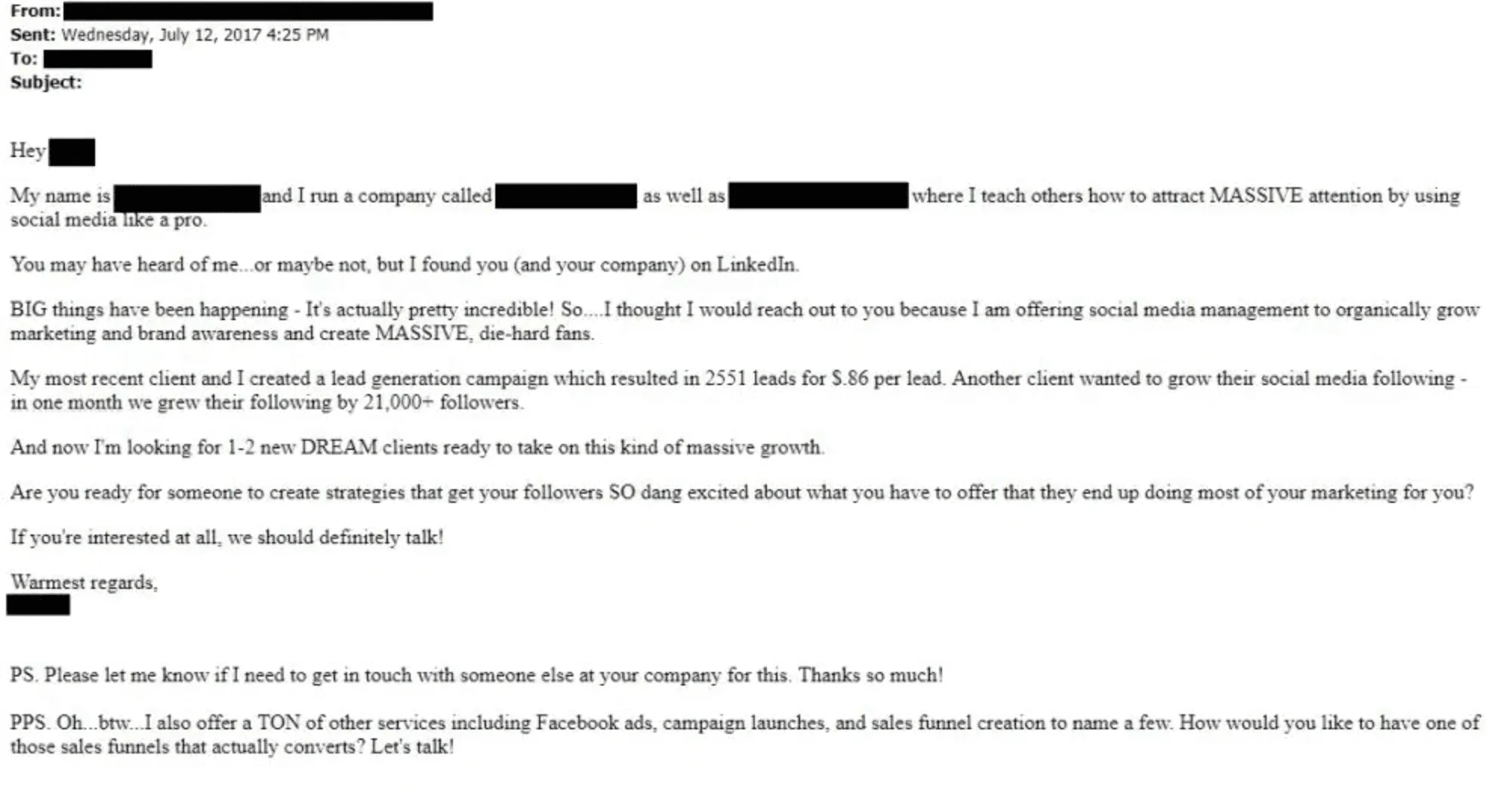
A cold outreach email is a message that you send to someone who doesn’t know you. Most commonly, their purpose is to pitch a service, ask for a meeting, or spark a professional connection. Many people find cold outreach intimidating in general because the stakes feel high and the rejection rate is real.
Clarity and confidence matter a lot in this case. Avoid emails that are too long, too vague, or poorly formatted.
Be clear about what you want the recipient to do. Keep it short, bold the essentials, include a strong CTA, and never skip your signature.
The email below is an example of what not to do:
Now compare the disastrous email above to this. It’s short, respectful, clearly explains the purpose, and ends with a specific, low-effort ask, making it easy for the recipient to respond:

Follow-up email
A follow-up email is sent to continue a conversation or to re-engage a recipient after an initial message goes unanswered. It’s your second chance, but it shouldn’t feel like a copy-paste.
Common mistakes include sending the same email twice, using passive-aggressive or guilt-trippy language like “Just following up again..,” or writing a vague subject like “Checking in.”
Instead, try to make it feel like a fresh email. Add value by sharing a new resource, insight, or update. Be clear about why you’re reaching out again and what you want the recipient to do next. Always keep it clear and concise, respectful, and relevant.
The email below is a textbook example of how to follow up by adding value, not repeating yourself:

Follow-up emails aren’t just limited to professional communications — marketers can send them too.
Here’s an example of a transactional follow-up email. It confirms the action taken, thanks the user, and offers useful next steps without overwhelming them. The links are easy to spot, and the tone is reassuring and respectful.

Email format templates
Email templates are pre-designed formats or text blocks that help you write and send emails faster and more consistently. Just be wary of email template size — it matters for both deliverability and readability.
For marketing emails, templates speed up production, ensure consistent branding, and provide a scalable, customizable foundation for campaigns. They also make A/B testing more efficient, helping you continuously improve performance without starting from scratch.
Since marketing emails are built with HTML, you need something a bit more powerful than what regular email clients offer. This is where email template builders come in, and Selzy has an amazing one. You can build your own template from scratch or pick an existing one out of our extensive template library.
For formal emails, email templates save time, ensure consistency, reduce errors, and offer a convenient way to send professional, repeatable messages at scale. You can create as many templates as you want for any type of communication, be it cold outreach or follow-up.
Want to learn more? We actually happen to offer very detailed guides on how to create your own email templates for constant use on Outlook and Gmail.
Final thoughts
Whether you’re writing a formal pitch, sending a marketing blast, or crafting a warm welcome email, good formatting makes all the difference. It keeps your message clear, professional, and effective, no matter who’s reading.
Now, go forth and format with confidence!
 New and noteworthy on our blog