


Key takeaways
- Email automation triggers act as conductors for email campaigns, initiating actions based on specific events like user actions, inactions, or milestones.
- Triggered emails are relevant, immediate, and effective, with higher engagement rates and revenue generation compared to regular campaigns.
- Scheduled emails are sent at fixed times to all subscribers, while triggered emails are personalized and sent based on specific conditions.
- Main types of email automation triggers include behavior-based, time-based, engagement-based, and event-based triggers.
Email automation triggers are like orchestra conductors. At the conductor’s baton, the musical instruments begin playing, and just like that, email campaigns go out when a trigger event happens.
In this article, we’ll explain what an email automation trigger is, which types are the most popular and effective, and show you examples you can use in your marketing strategy.
What are email automation triggers?
Email automation triggers are the events that initiate an automation scenario, like sending a campaign or an email sequence. In email marketing automation, triggers can be user actions (signing up, purchasing a product, etc.) and inactions (not finishing the checkout process) or specific events, like birthdays or reaching a certain loyalty program level.
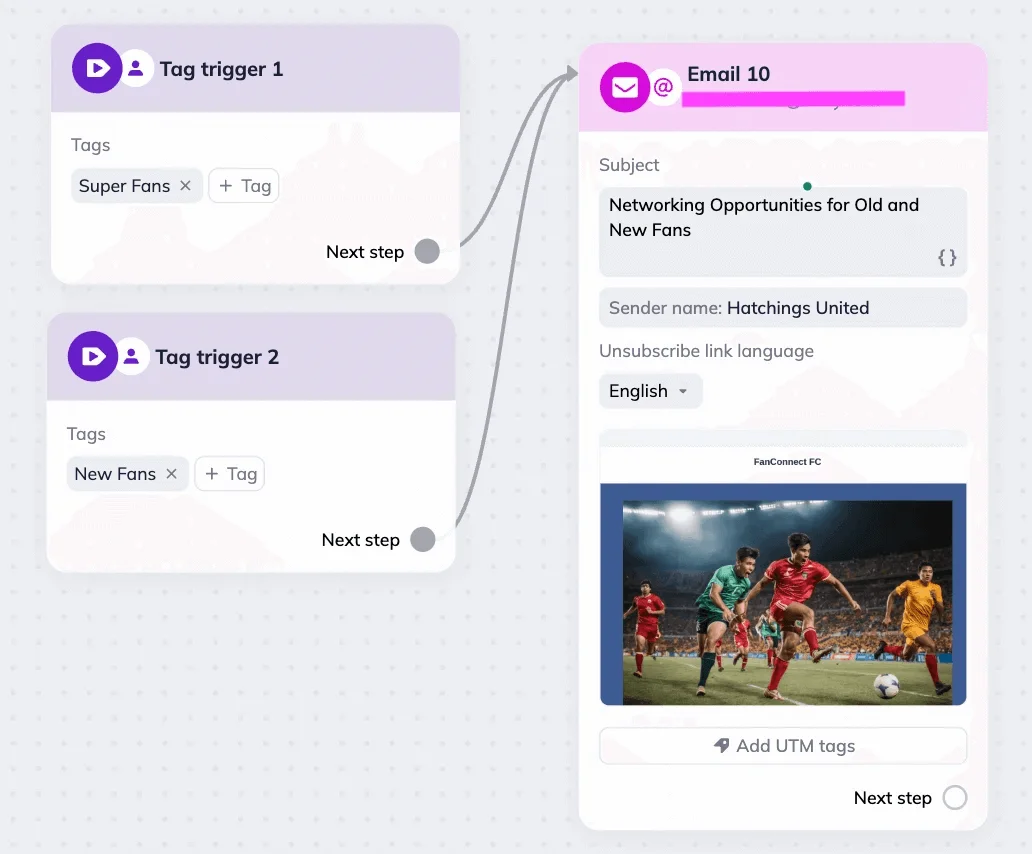
Here’s an example of a simple automation that uses specific subscriber list tags as triggers. When a subscriber gets tagged, they also receive an email. This is a great marketing automation to use alongside segmentation.
Benefits of email automation triggers
Triggered emails come with several advantages. They are:
- Relevant and personalized. You’re sending emails that directly reflect your customers’ actions, so they receive tailored messages. Compare a general Black Friday promo to a discount someone gets for reaching a new loyalty program level, for example.
- Immediate and self-operating. You set up automated emails once, and they continue working on their own. Even if a subscriber places an order outside of a marketer’s working hours, they will receive a confirmation and don’t have to wait.
- Effective. Triggered email automations typically have higher engagement rates than regular campaigns. Beyond that, they often generate a disproportionate share of email-driven revenue. According to Omnisend’s 2025 e-commerce marketing report, among those who click on an automated email, one in three people ends up making a purchase.
Triggered vs. scheduled emails
Triggered emails are sent whenever a specific event occurs, while scheduled emails go out at a fixed date and time you choose in advance (in Selzy, we simply call them bulk emails). Let’s go over the major differences between the two.
| Aspect | Scheduled emails | Triggered emails |
| Audience | Every subscriber on your list gets the same message | Only sent to customers who meet specific conditions (actions, engagement, or personal data) |
| Personalization | Usually generic, not based on individual behavior | Highly relevant, reflecting the customer’s behavior or profile |
| Timing | Sent once at a specific date and time | Sent whenever a trigger event happens, regardless of the time |
| Example | Seasonal promo sent to the whole list | Upsell email sent only to customers who purchased a lower-tier subscription or a cheaper product |
Use scheduled emails for weekly digests, announcements, and other emails that aren’t recurring.
Choose triggered campaigns for personalized messages that are connected to your customers’ actions, like abandoning a cart or ordering a product.
Main types of email automation triggers
Email marketing automations can start from many different trigger events.
There are four trigger types that cover the most popular automated campaigns. Good email automation software will give you access to all of those and maybe even some more options.
| Trigger type | How it works | Example |
| Behavior-based triggers | An email automation scenario is triggered when a subscriber performs a specific action or doesn’t perform it. |
|
| Time-based triggers | An email automation is triggered on a specific date. |
|
| Engagement-based triggers | An email automation scenario is triggered based on a subscriber’s opens or clicks. | Re-engagement flows |
| Event-based triggers | An email automation starts when a pre-determined event occurs. | Loyalty program status update emails |
12 best email automation trigger ideas and examples
Here, we’ve compiled a list of the most popular and effective automation triggers you can add to your marketing strategy, along with content examples and tips. If you want to learn even more about particular email types, check out our dedicated articles on these topics.
1. Welcome emails after signup
A welcome email or series is the first email your new subscriber gets. It’s an introduction to your brand and offerings, meant to set up expectations and create excitement for the future.
Trigger event: a customer subscribes to your list.
Best practices: thank your customers for joining, offer a welcome gift (a 10% discount, free shipping, extended free trial, etc.), outline what emails and types of content they’ll get next.
If you want to build on this foundation, create different email sequences, personalized to the subscription source. For example, you can have a slightly different welcome series for those who subscribed after a webinar and those who came from social media.
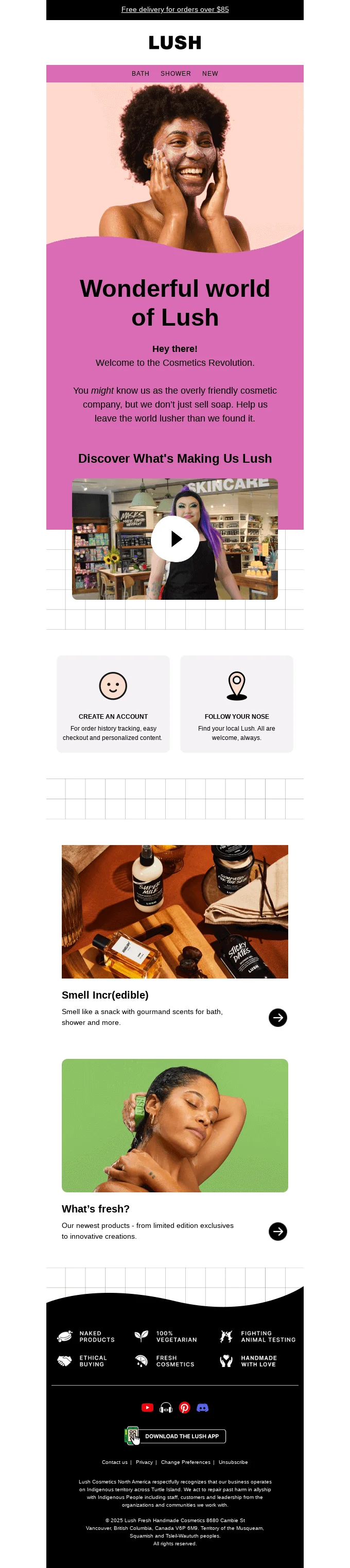
In this welcome email, Lush embeds a video to introduce new customers to the brand, recommends what steps to take next, and includes links to product selections to encourage purchases. Overall, a solid welcome automation example!
2. Onboarding emails after account creation
Onboarding emails are similar to the welcome ones and are typically used by SaaS companies. Their content is focused on platform features, tutorials, and tips.
Trigger event: a customer creates an account or signs up to your website.
Best practices: step-by-step explainers, progress bars, links to helpful content, screenshots, etc.
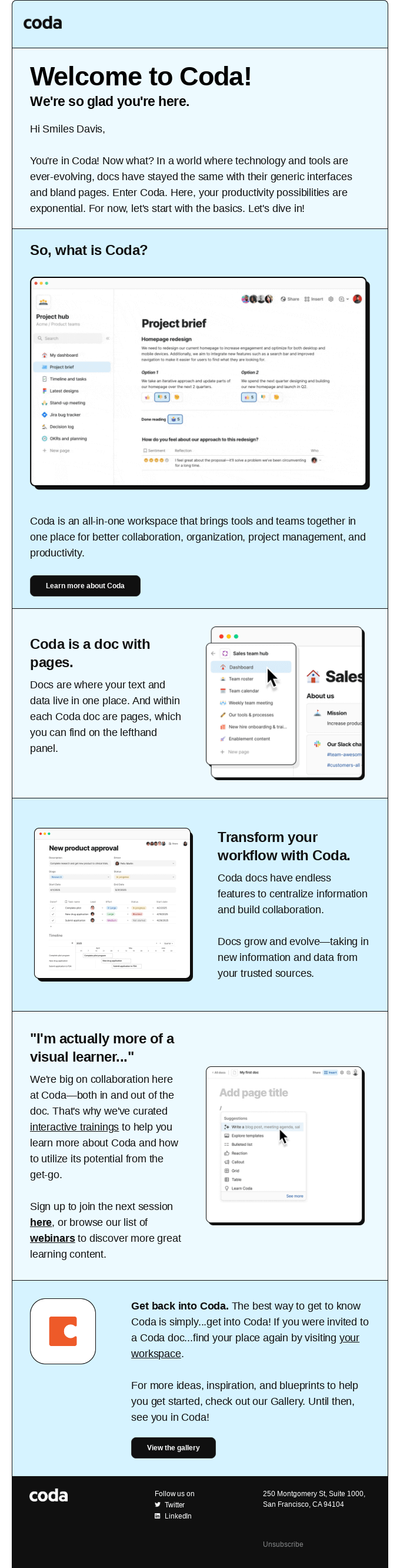
To make the onboarding email more personalized, Coda addresses the subscriber by name. The email also includes several short and clear sections that explain the main features and links to webinars and interactive training to help users get the best out of the platform.
3. Abandoned cart or checkout reminder
Abandoned cart emails are a staple in e-commerce and other industries. They have one of the highest conversion rates across all email automation scenarios — as stated in Omnisend’s 2025 e-commerce marketing report, it’s 2.04%. That’s why, if you’re only going to introduce one triggered campaign, choose this one.
Trigger event: a customer puts something into their cart but leaves your website without finishing the order.
Best practices: include the abandoned product card (or multiple ones), offer a discount, provide other product recommendations, and use FOMO and scarcity tactics.
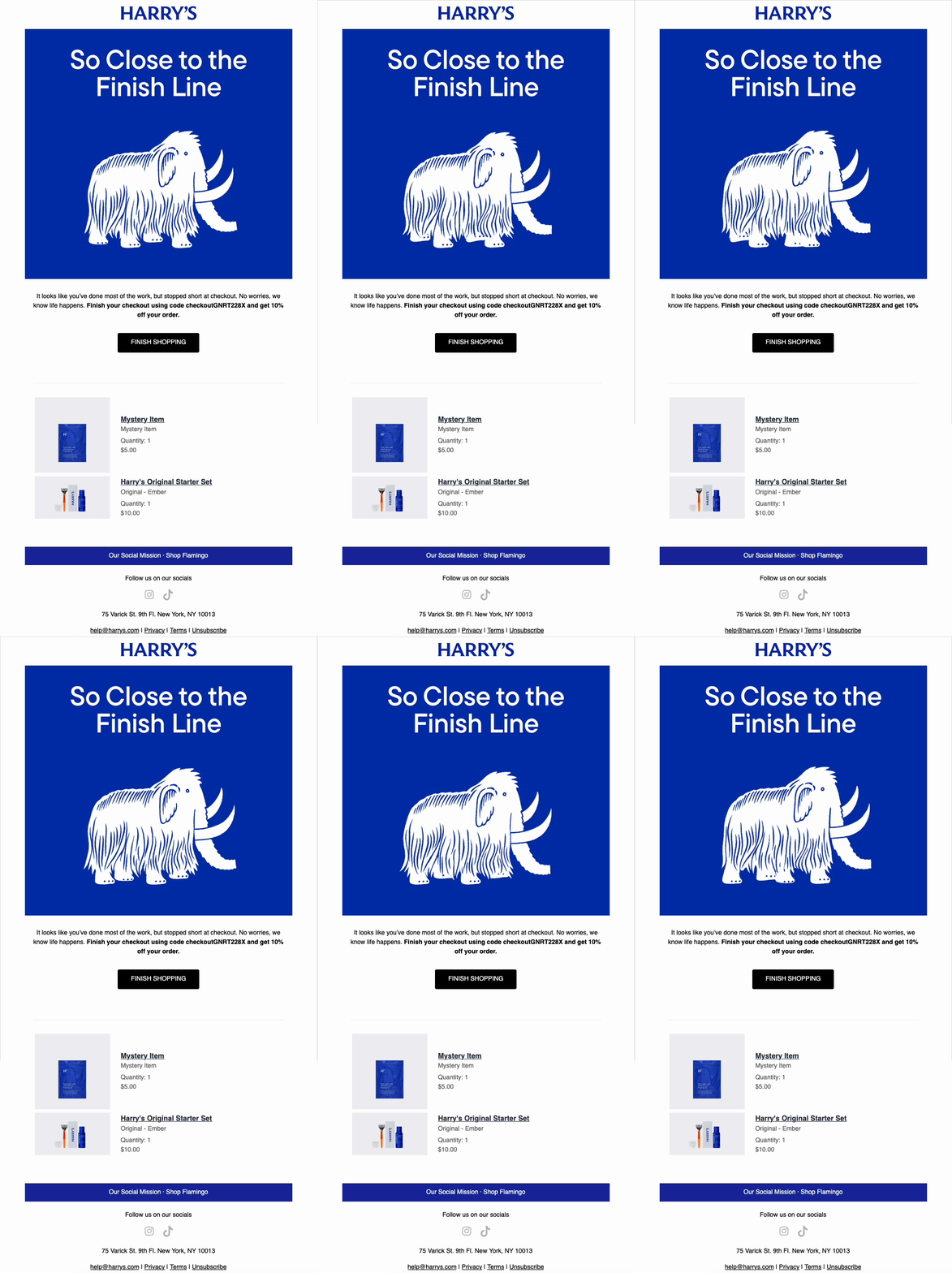
This email from Harry’s is minimalistic but has all the necessary elements to be effective — the abandoned product listings and a discount code. Plus, it also includes a great GIF of a walking mammoth that plays well with the banner text.

4. Post-purchase or order confirmation
As the name suggests, post-purchase or confirmation emails are sent right after a customer completes an order. These transactional campaigns are essential to building trust and creating anticipation.
Trigger event: a customer making a purchase.
Best practices: include information about the products ordered, provide the delivery information, and other important details.
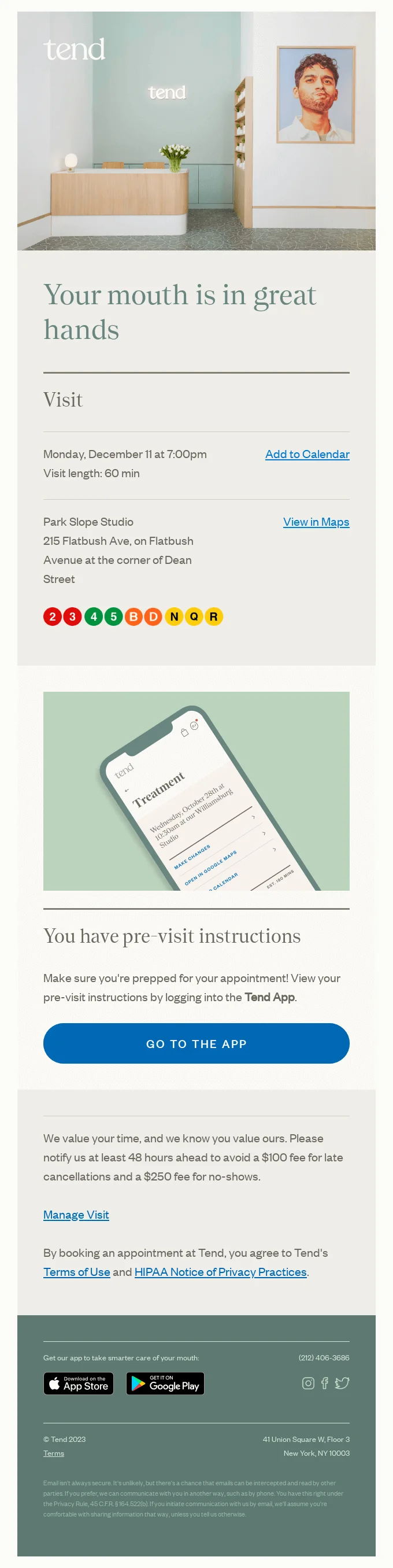
This email from Tend falls under the same confirmation category, but it looks a bit different than typical post-purchase campaigns from e-commerce brands. The subscriber receives information about their appointment, including the date and address. Notice how there are options to add the booking details to the calendar and check out the location on the map, which both make the customer experience more convenient.
5. Birthday and anniversary messages
Unlike previous behavioral automation examples, birthday emails and anniversary campaigns use specific dates as triggers. They are still tailored to each customer, so they are more effective than regular scheduled email blasts. For example, the same Omnisend’s report claims that birthday emails have a 43.37% open rate.
Trigger event: a customer’s birthday or anniversary with your company.
Best practices: personalize the email content with the subscriber’s name or other personal information, add a discount or another gift.
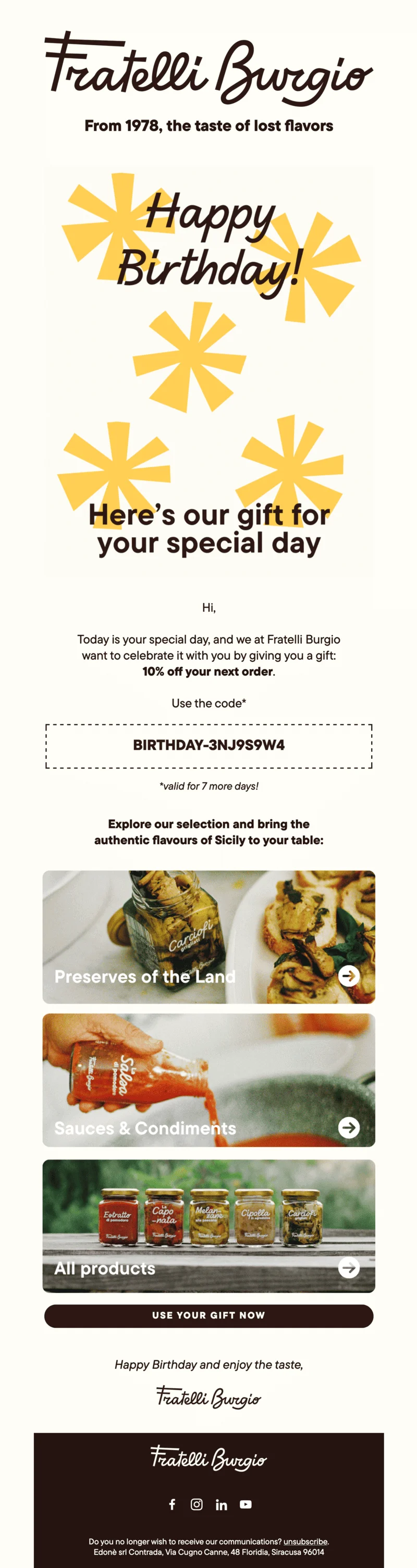
Here’s a standard example from Fratelli Burgio with a birthday greeting, a discount code, and product recommendations. Use this email as your inspiration if you want to create a solid campaign.
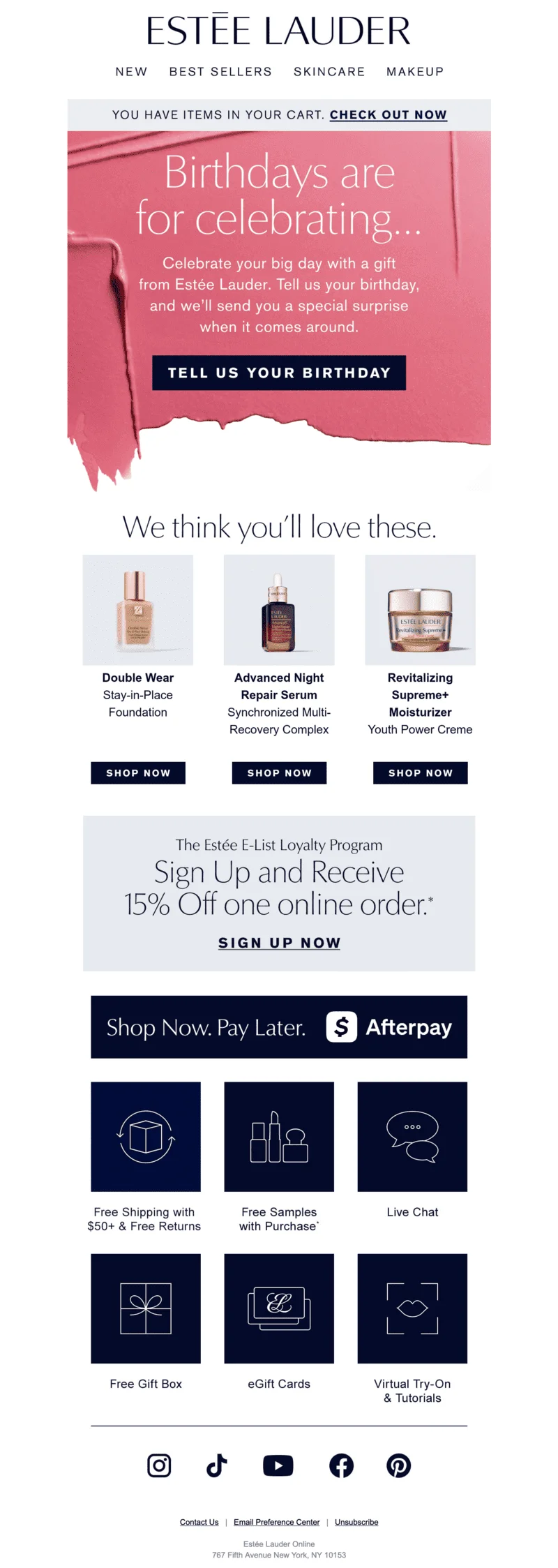
But what if you don’t know your customers’ birthdays? Check out this Estée Lauder email that offers a “special surprise” as an incentive and also includes other marketing calls-to-action.
6. Re-engagement emails for inactive users
So far, we’ve only discussed email marketing campaigns targeting active subscribers and customers. But inaction and the lack of engagement are also among effective automation triggers. Win-back or re-engagement emails target customers who have stopped opening or clicking your emails. Their main goal is to motivate them to return and, if not, to indicate who can be removed from your subscribers list.
Trigger event: a subscriber not engaging with your emails for a pre-determined period of time.
Best practices: include a discount or another incentive, remind them of your products and the value they bring, and provide an opportunity to manage messaging preferences (email types and frequency) if possible.
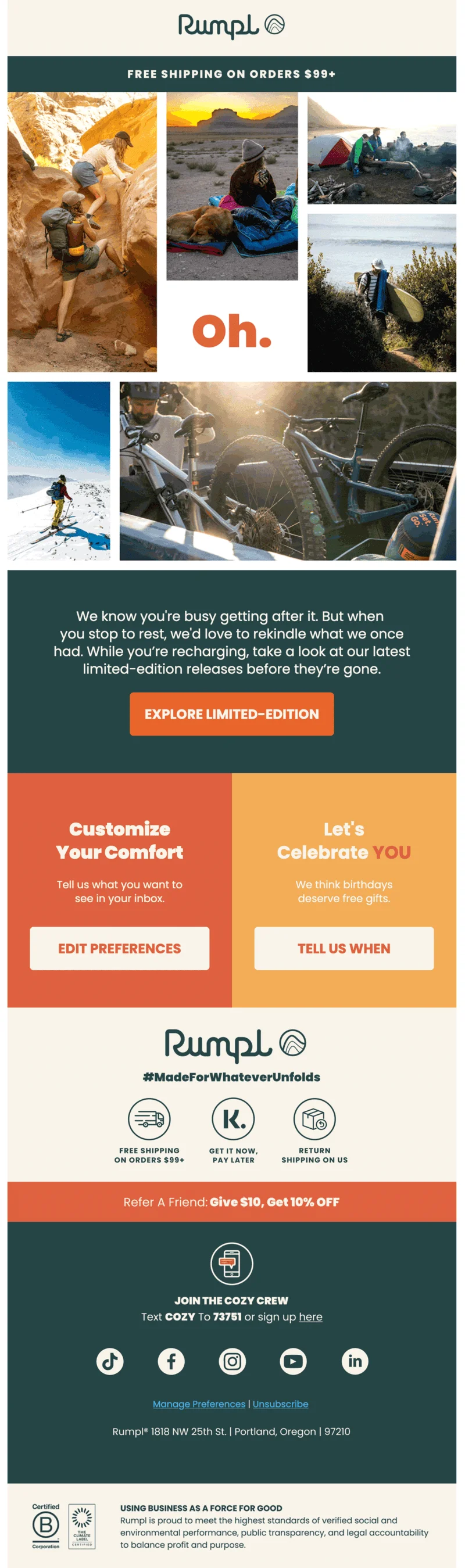
Rumpl maintains a friendly and understanding tone, acknowledging that the relationship hasn’t been that active. The brand offers the customer to take a look at their limited edition products, customize email notification preferences, and also share birthday information. It’s a great starting point for a re-engagement series that you can follow up with discount offers and product highlights.
7. Product recommendation or cross-sell emails
You can send product recommendation emails whenever something new hits your store. For example, you can set up automation that triggers when a specific section of your catalog gets updated and notify those customers who have bought from that product selection.
Cross-sell emails are sent after purchase and include recommendations of products that can be used in combination with what was bought. For example, if someone got a pillowcase, a cross-sell marketing campaign can offer blankets or bed sheets.
Trigger event: a customer purchases a product, or a product catalog updates with items a customer could be interested in.
Best practices: relevant, personalized recommendations, prominent CTAs.
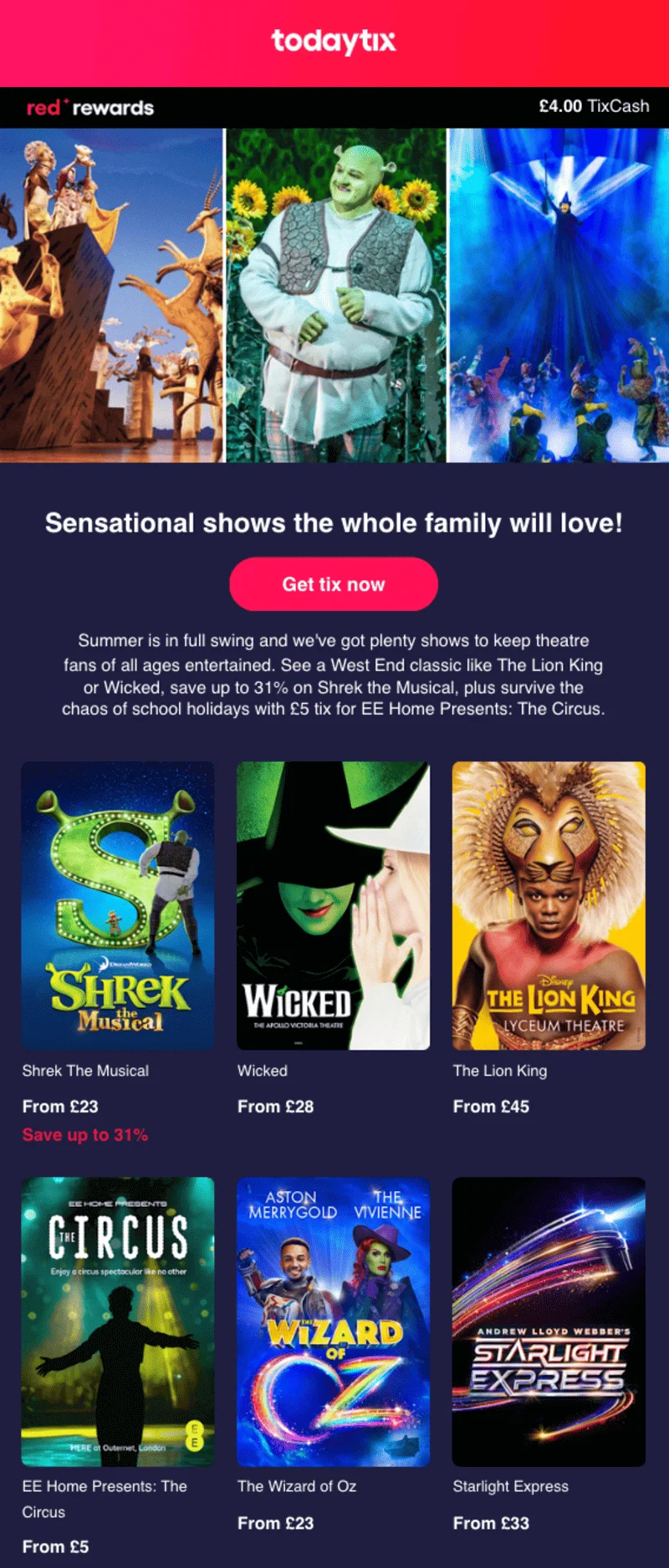
Cross-sell emails work beyond e-commerce, too. For example, this email targets parents and those who have purchased tickets to similar events for the whole family.
8. Subscription renewal or expiration reminder
If you’re in the SaaS industry, you’ll find this to be one of the most relevant automated email examples for you. This campaign triggers when a customer reaches the end of a period and reminds them about an upcoming payment to motivate them to stay subscribed.
Trigger event: end of a subscription or trial period.
Best practices: list the benefits of your subscription, compare the free and paid options, and provide the cost and payment method information.
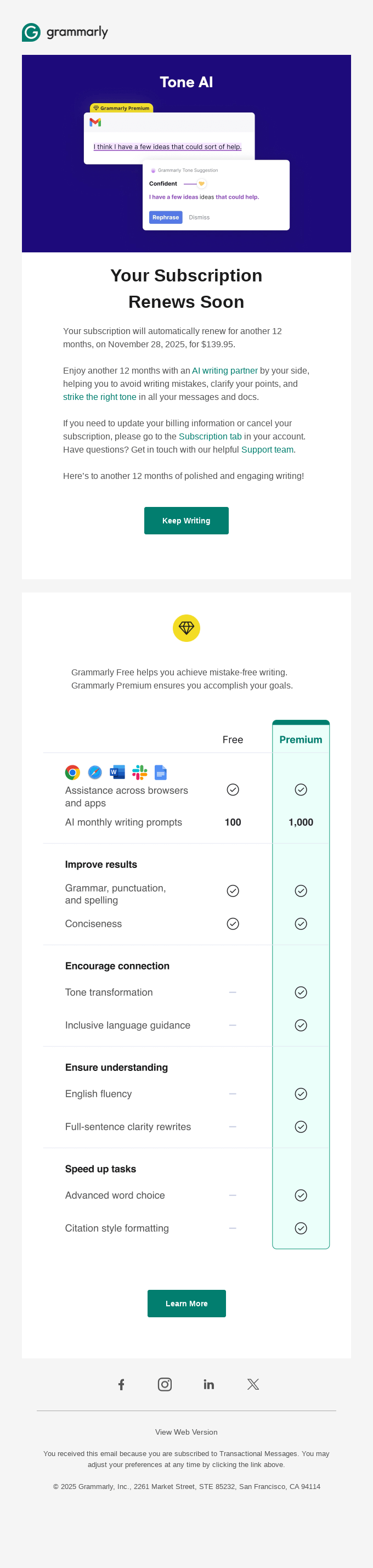
This campaign from Grammarly explains how a subscriber can manage their subscription and clearly shows the differences between their free and premium subscriptions.
9. Purchase from a specific category or product
Similar to the product recommendation email, this automation triggers when a subscriber buys specific items or purchases from a certain category. The email content should include helpful information, like tips on how to use the products, take care of them, store them, etc.
Trigger event: a customer buys a specific product or something from a specific product category. You can set up several email automation scenarios for the most important offerings in your catalog.
Best practices: provide practical and product-specific help (care instructions, how-to’s, usage best practices) and ways to connect, add complementary recommendations.
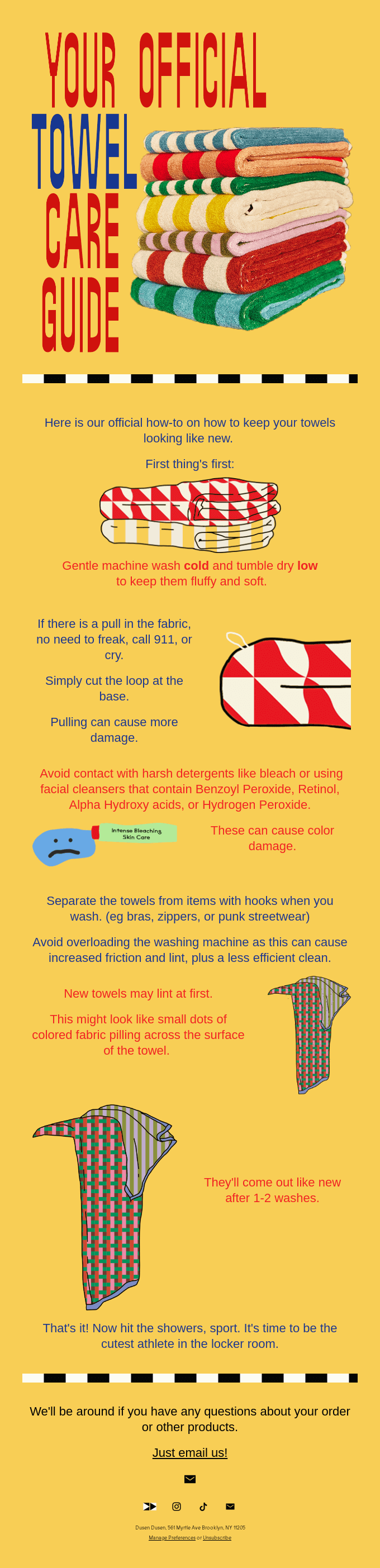
In this email, Dusen Dusen advises customers on how to take care of their brand-new towels. Although the email content is practical, the tone of voice is still fun.
10. Product back-in-stock notifications
Customers who wanted to buy a product that sold out are ready to spring back into action and just need a little push. Omnisend’s e-commerce report mentions that these marketing campaigns actually have the highest conversion rate of 5.34%. If you’ve restocked your bestselling product, you can send an automated email to all your customers, regardless of whether they were previously interested in it or not.
Trigger event: a previously sold-out product is once again available for purchase.
Best practices: use scarcity and urgency language, describe the benefits of the product, and add noticeable CTA buttons.
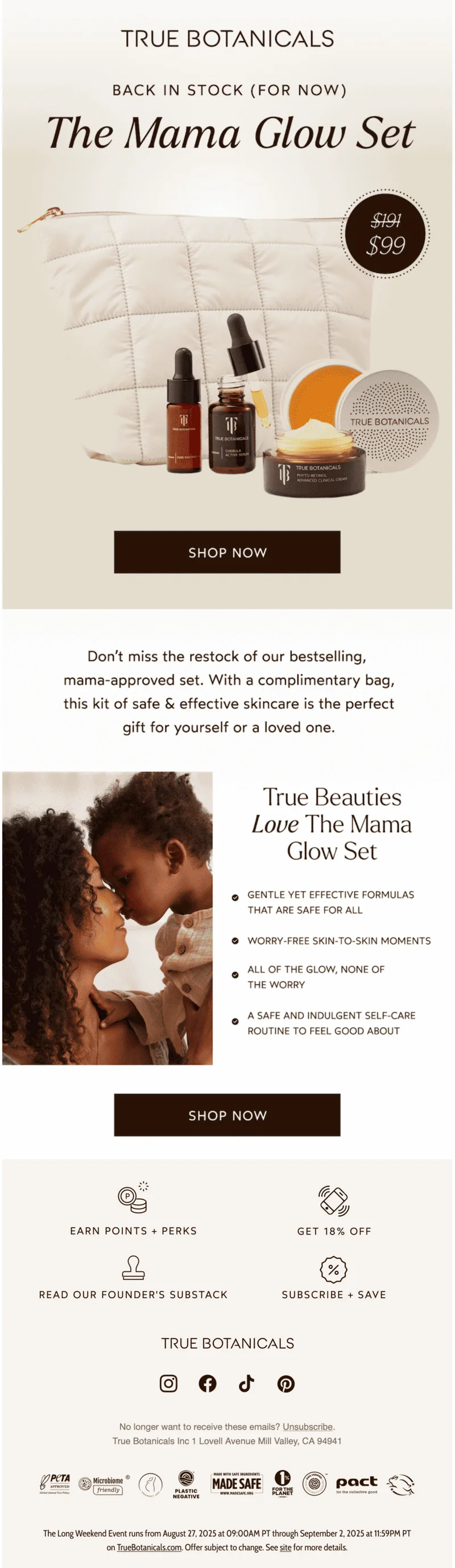
Here’s a good example with clearly outlined product features, big CTA buttons, and subtle appeals to act now:
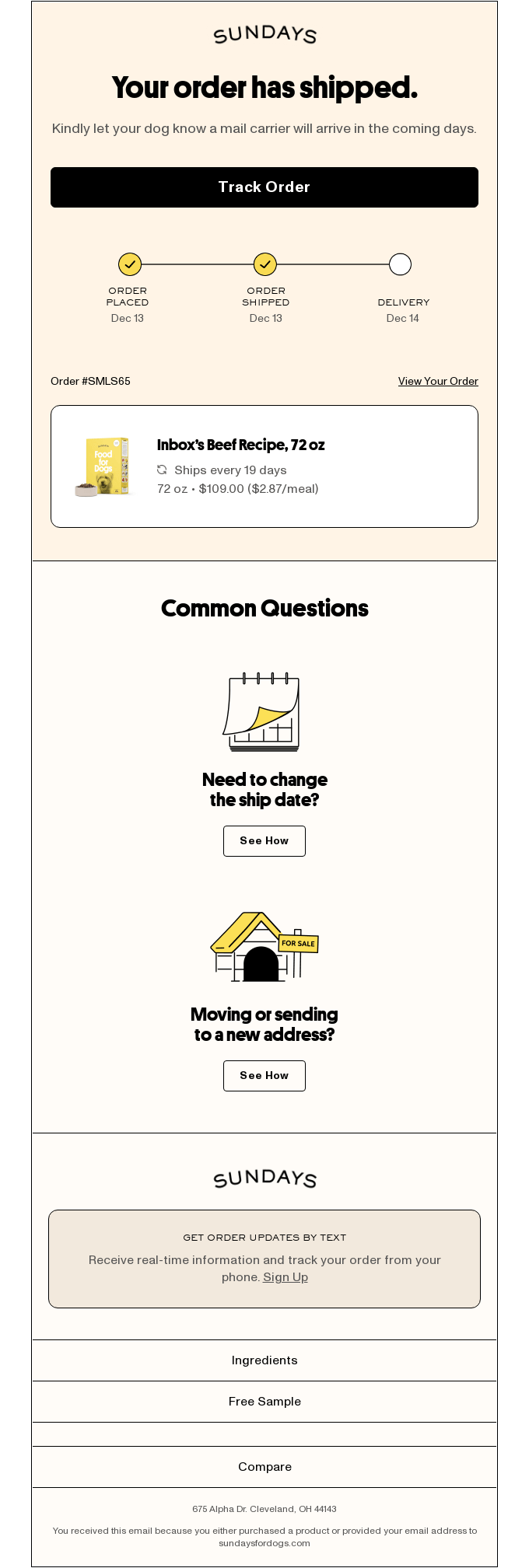
11. Order shipped or delivered updates
Your customers need updates throughout the delivery process, so update them when the order status changes. It’s especially useful when the order has been shipped or delivered to a pickup location.
For transactional messages like these, use email testing tools to make sure your customers receive these vital updates. This helps to optimize your customer journey and relieve potential pressure on your support team.
Trigger event: order status changes to shipped or delivered.
Best practices: give time estimates and provide details like the location address and package contents.
12. Request for product review or feedback
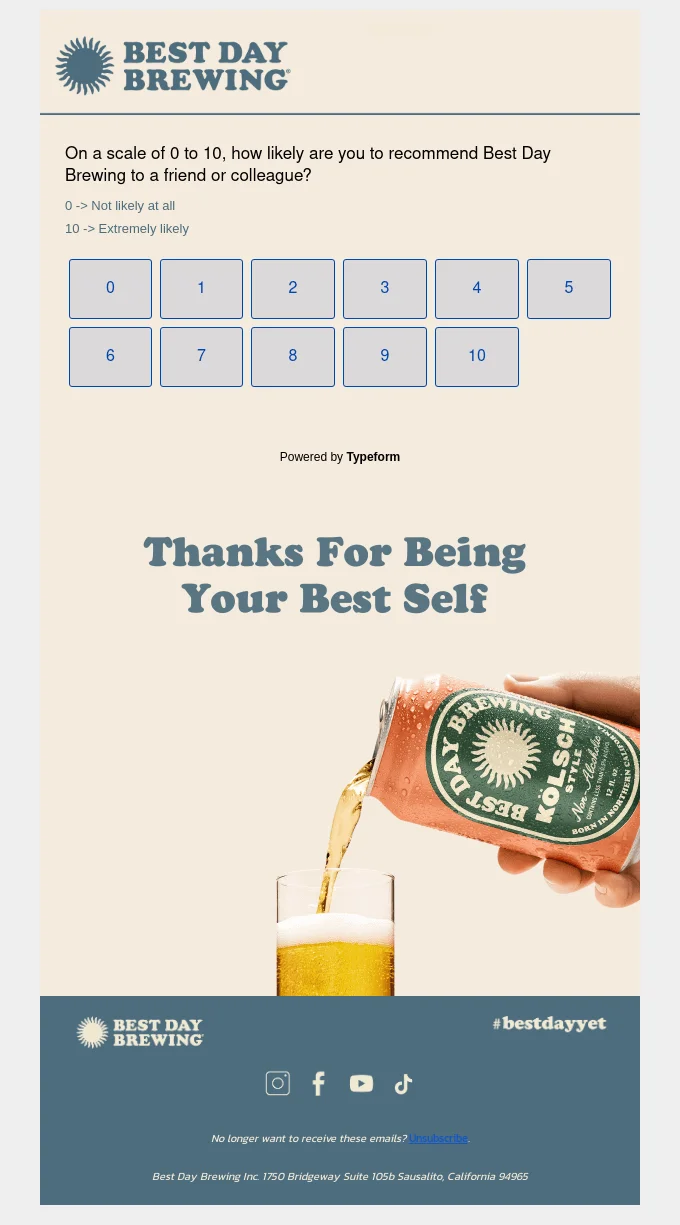
Whether you opt for a survey or ask for a review, it’s important to follow up after a purchase. Plus, learning what your customers actually think about your products can help you improve and achieve new results.
Trigger event: products are delivered or a predetermined time has passed after a purchase.
Best practices: remind the customers about the specific products they have purchased, provide an incentive (like a discount), and set expectations about the completion time for a survey.
This feedback email only has one question, so it’s easy for the customers to share their opinions.
How to set up email automation triggers in Selzy
Thanks to Selzy’s integrations with popular services like Shopify, HubSpot, and many others, you can set up automation scenarios that activate when trigger events occur.
Here’s an example of a basic welcome flow that triggers once a prospect subscribes and gets added to the new clients list.
Then the flow sends a welcome email right away, followed by another email three days later.
The first campaign is a general introduction to the company and its services, and the second one is a more focused social proof campaign that aims to convince new customers with the stories from the existing clients.
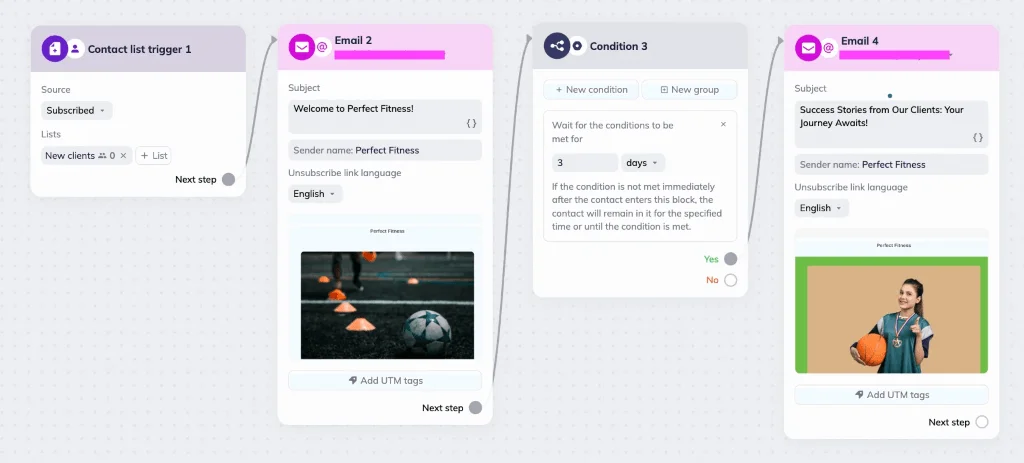
To create a similar scenario, you don’t need to code. It only takes a few steps: making a dedicated list for new subscribers, adding four blocks in our visual automation builder, and creating the emails themselves.
In Selzy, automation is a free feature, so try it for yourself now!
FAQ about email automation triggers
What are email triggers?
Email triggers are the starting events for automation scenarios. They can be behavioral, time, engagement, or event-based. For example, a customer making a purchase can be a trigger initiating a post-purchase flow.
What’s the difference between triggered and scheduled emails?
Triggered emails are targeted and are sent when specific events occur. They only affect the customers who completed a specific action (or didn’t complete it).
Unlike triggered emails, scheduled emails are one-off mass campaigns sent on predetermined dates. They are less personalized and are better suited for wide announcements and one-time messages.
What are the main types of email automation triggers?
The core trigger types are behavior-based (actions like signups, purchases, cart abandonment), time-based (birthdays, anniversaries, renewal dates), engagement-based (opens, clicks, inactivity), and event-based (loyalty updates, webinar attendance, order status changes).
What are some popular triggered email examples?
Some of the most popular and effective triggered email automations are welcome and onboarding emails, abandoned cart notifications, post-purchase, re-engagement, birthday, product recommendation, subscription renewal, back-in-stock, shipment and delivery, and feedback request emails.
How do I choose which email triggers to use?
Pick triggers that support key customer-journey moments: high-intent actions (add to cart, purchase), important updates (shipping, renewals), and retention needs (re-engagement). Start with easy wins like welcome and post-purchase flows, then add more advanced triggers as you grow.
Make automated triggers work for you
Triggered campaigns are targeted, effective, and require almost no intervention. It’s a great way to make your customer journey smoother and boost sales. No matter whether you’re in the e-commerce or SaaS industry, staples like birthday or re-engagement emails can only enhance your marketing strategy.
 New and noteworthy on our blog