


Key takeaways
- Automated birthday emails are a practical way for companies to show clients they are important and not forgotten, providing sales opportunities.
- Personalized birthday emails deepen connections, increase brand reputation, and improve engagement.
- Hyper-personalization is a key trend in email marketing for maximizing the impact of birthday emails.
- Selzy's API trigger allows for automated birthday email sending, with a focus on design and personalization.
How much do you like being remembered on your special day? It is always nice to receive congratulations, happy birthday messages, gifts, and affection from your loved ones. For companies, a client’s birthday is a chance to let them know how important they are and that they aren’t forgotten.
Automated birthday emails are a clever, practical, and customizable way of doing that. Plus, these messages can also include good offers for your clients and sales opportunities for you.
In this guide, we will tell you all about the process and best practices for congratulating your clients, why this is a must, and how to get the most out of happy birthday emails.
Quick answer
Automated birthday emails are messages that go out automatically on or around a subscriber’s birthday. To set them up, collect birthday data with consent, sync it to your email platform or CRM, create a birthday segment or trigger, design a short personalized email, add an offer if it fits your brand, schedule the send time, and track opens, clicks, conversions, and coupon use.
What is a birthday email, and why is it useful for marketing?
The concept itself is simple: a birthday email is a congratulatory message you send to the clients on their day of birth. The strategy behind it is to bond with your customers and also get more sales, and the most efficient way to do so is with email marketing automation.
Through clever segmentation and personalization, you can send automated messages that feel personal and also take advantage of many benefits:
- Deepen connections with your clients — even if they don’t buy anything, they will feel remembered and might be more inclined to do business with you in the future.
- Increase brand reputation.
- Take advantage of one of the best opportunities to provide an offer and make a sale.
- Improve open rates and engagement.
- Re-engage customers who haven’t been interacting with your brand.
If you want some statistics as proof, here we go: automated birthday messages have the fifth highest open rate among the other automated emails and have a conversion rate of 0.72%.
Hyper-personalization, which revolves around really putting the time and effort into knowing your customer and delivering content based on that knowledge, is one of the biggest trends in the now and the future of email marketing, and it will help you make the most of your birthday emails as well.
Sending an automated birthday email step-by-step using Selzy
Selzy is a marketing automation platform that can make it easier for you to send and schedule emails, be it a triggered email or a marketing one.
In this tutorial, we’ll be using Selzy’s API trigger — a special connector that allows you to receive data from other services like your e-commerce shop, website, CRM, etc, and use it to set up or personalize your marketing and transactional communications. The API trigger is available in Selzy’s omnichannel automation called Scenarios.
For this tutorial, we’ll focus on the design part of the process, as the technical aspect will depend on the other services you use in tandem with the ESP.
Step 1. Create your birthday automation scenario
First, log in to Selzy (or register!) and click Scenarios from the menu on the left.
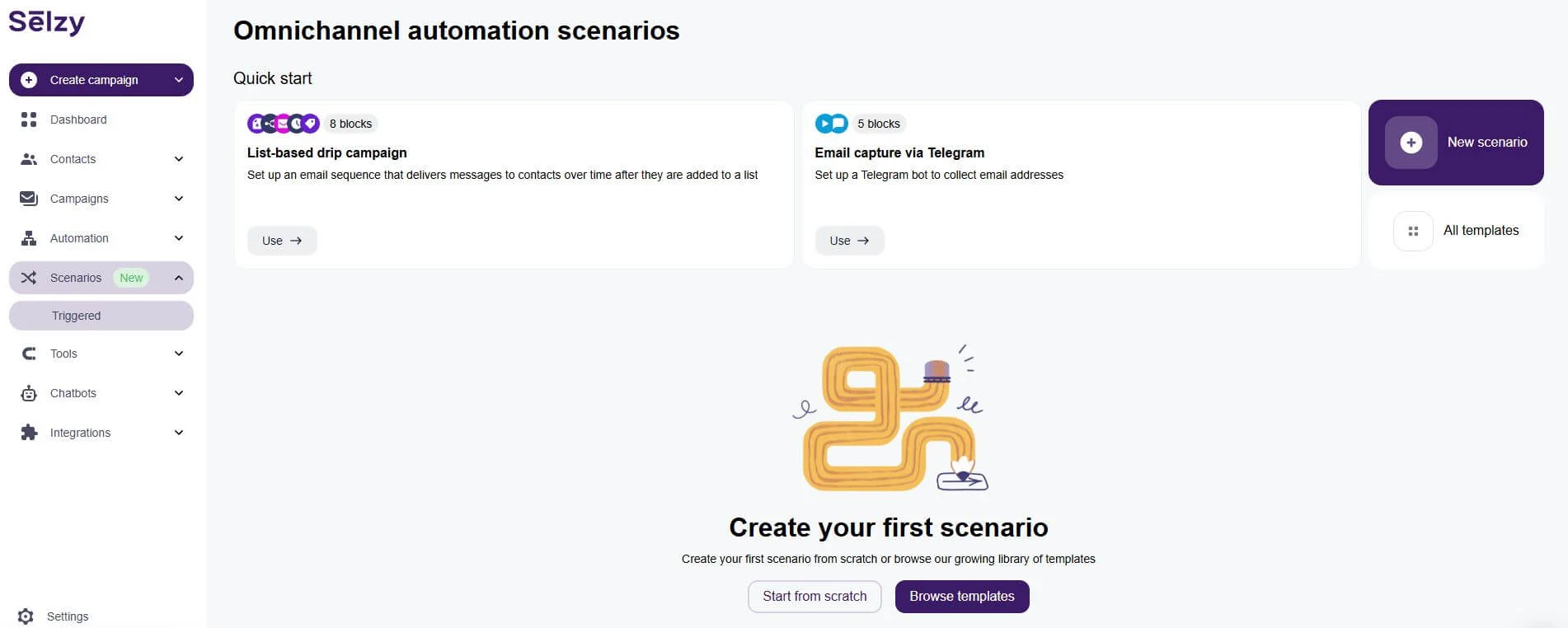
Then click on New scenario or Start from scratch to get started with your birthday email automation. You will be directed to the scenario editor page:
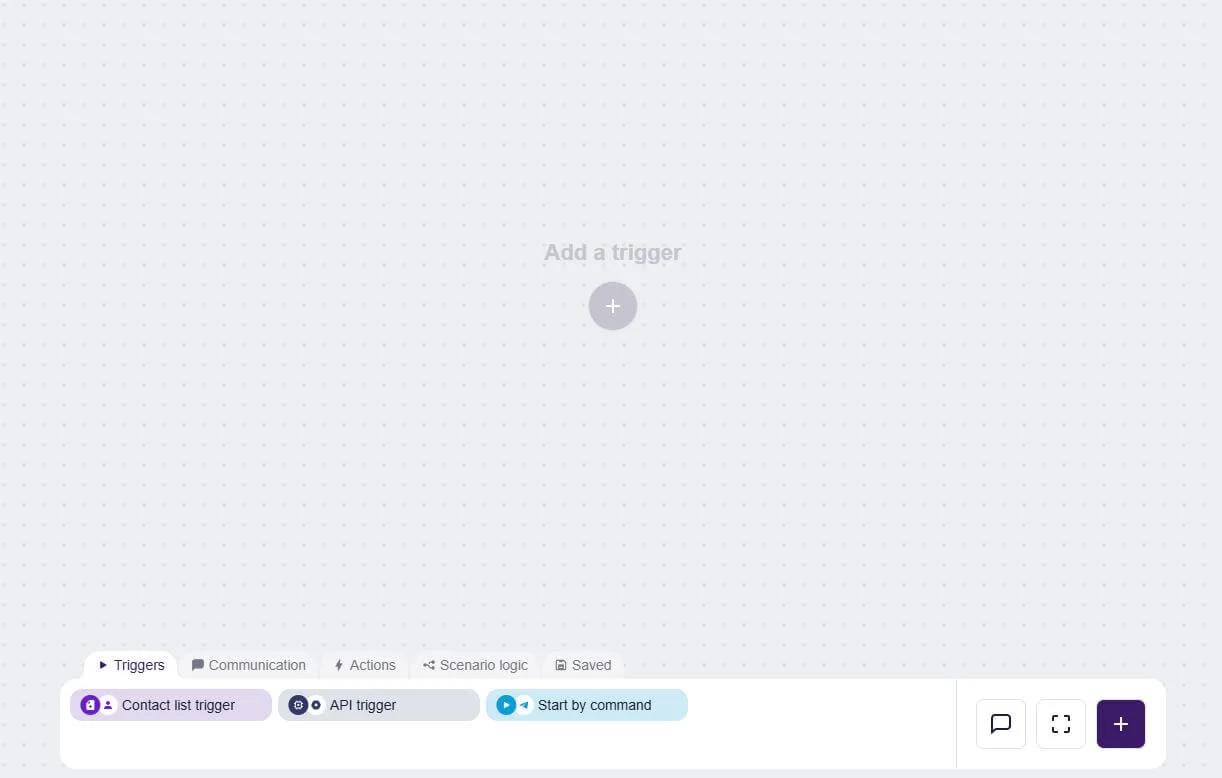
Add the API trigger block from the Triggers tab.
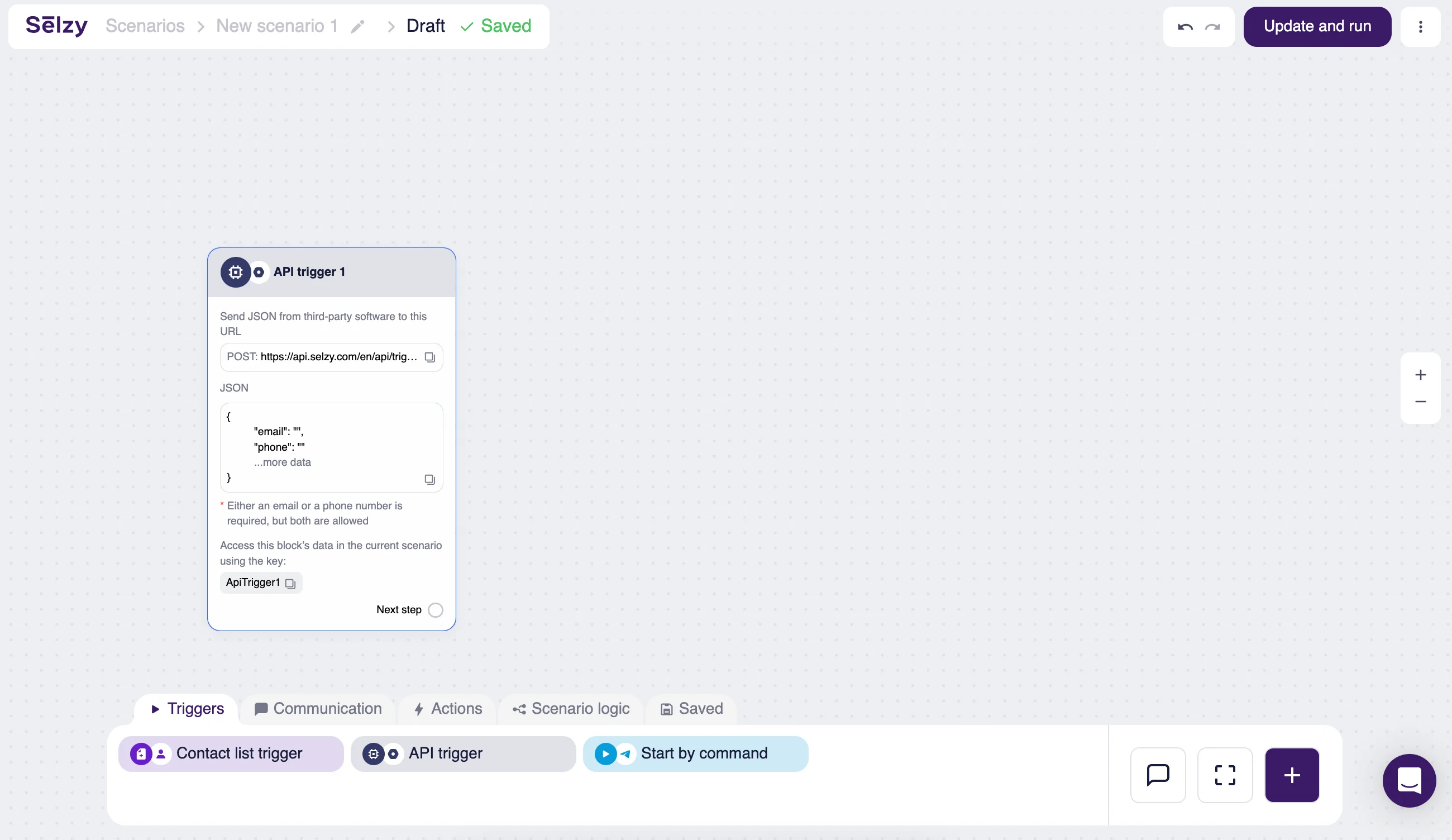
Now, follow our instructions on connecting Selzy to other platforms using the API trigger. Once you do that, complete your scenario by adding email communication blocks, conditions, delays, etc., as you wish.
Note that this automation scenario will only work if you configure your CRM setup to transfer information about customers’ birthdays the same day. The data transfer condition should sound something like “transfer customer information to Selzy if the customer’s birthday is equal to today.” As this requires specialized knowledge, we recommend that you get help from a software engineer on your team.
Before building the scenario, make sure you have a clean birthday field, clear consent to use it for marketing, timezone or send-window logic where relevant, and a fallback plan for contacts with missing or incomplete dates.
Step 2. Design your birthday email template
After you’re done with the automation scenario, you can design your birthday email. Selzy’s intuitive email builder can make your life easier with drag-and-drop and HTML options for a flexible email design.
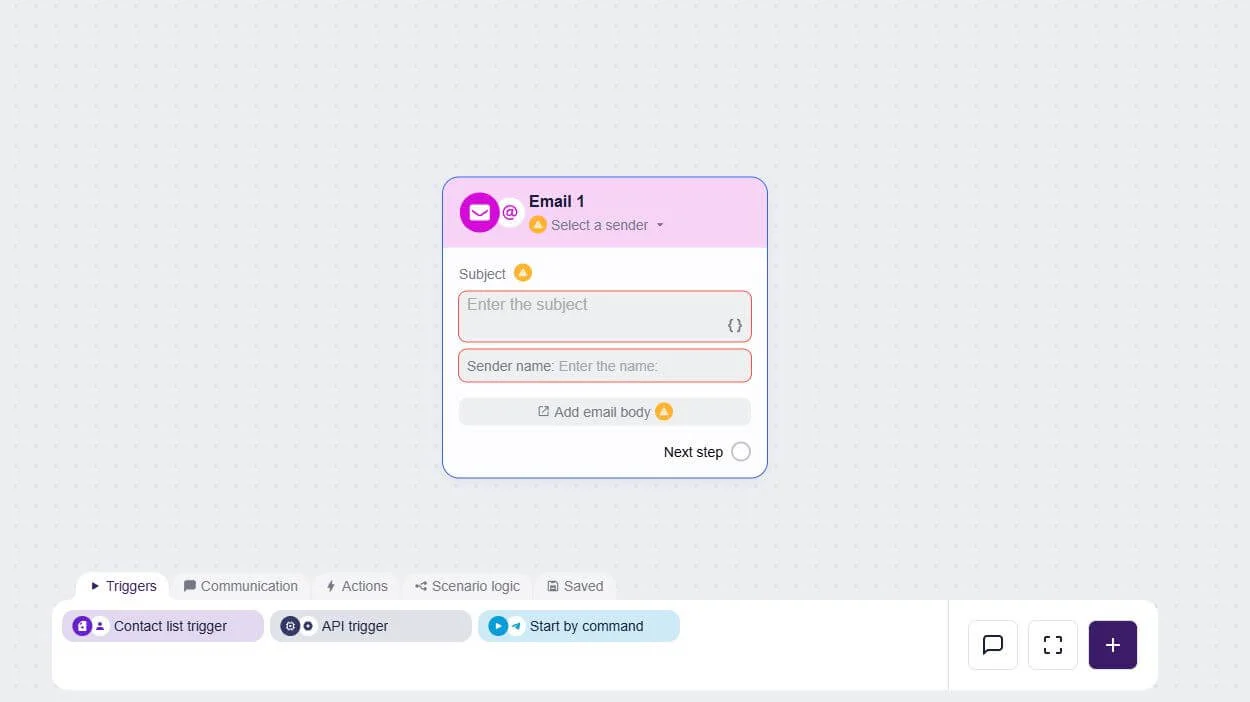
Once you add the subject line and sender’s name, click on Add email body. From there, you can choose one of your templates or start designing from scratch.
In the builder, you’ll find various blocks to use and also Selzy’s AI assistant that can generate images, copy, and entire email layouts, as well as analyze the content you have already added.
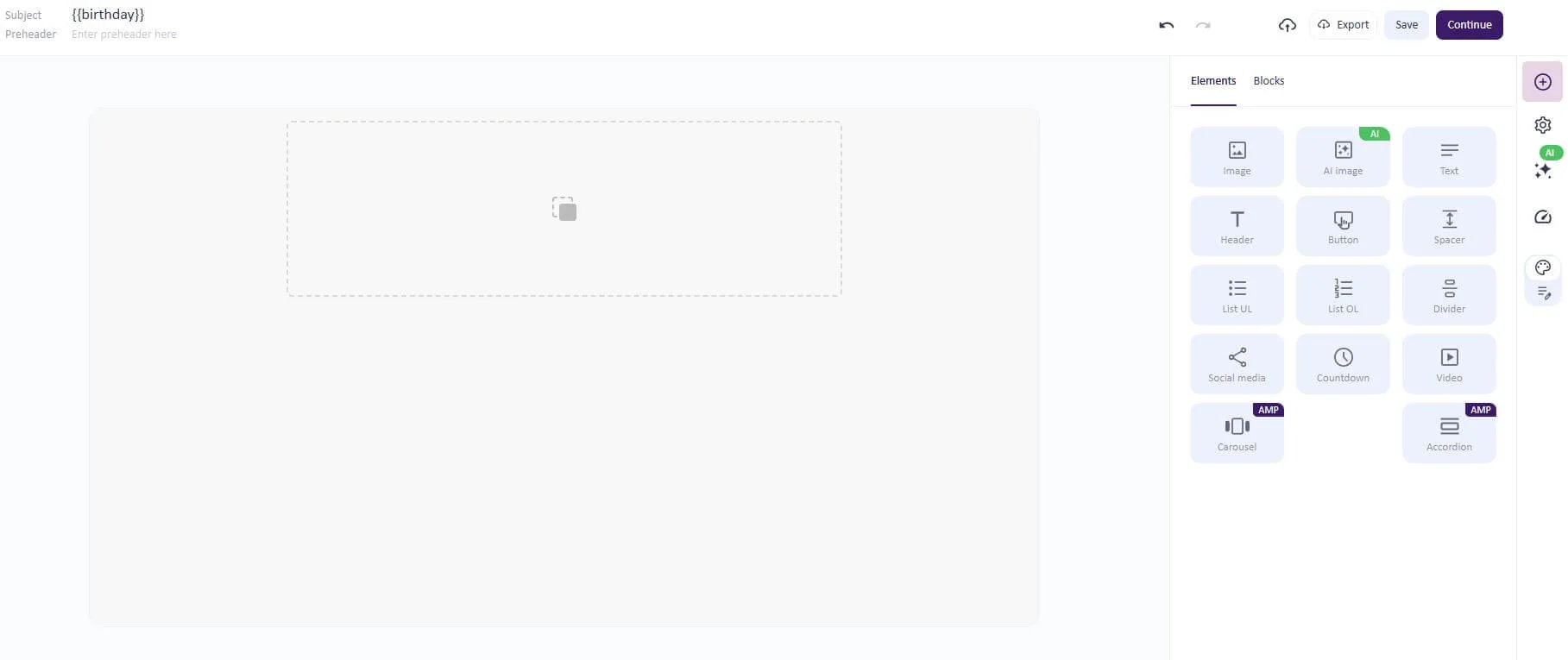
You can design your birthday email template here by adding and editing individual elements and pre-designed content blocks (accessible via search in the Blocks tab). Out of the common blocks, e-commerce and call-to-action will provide you with good designs when it comes to showing products and offering discounts.
Step 3. Think over the structure and content of the email
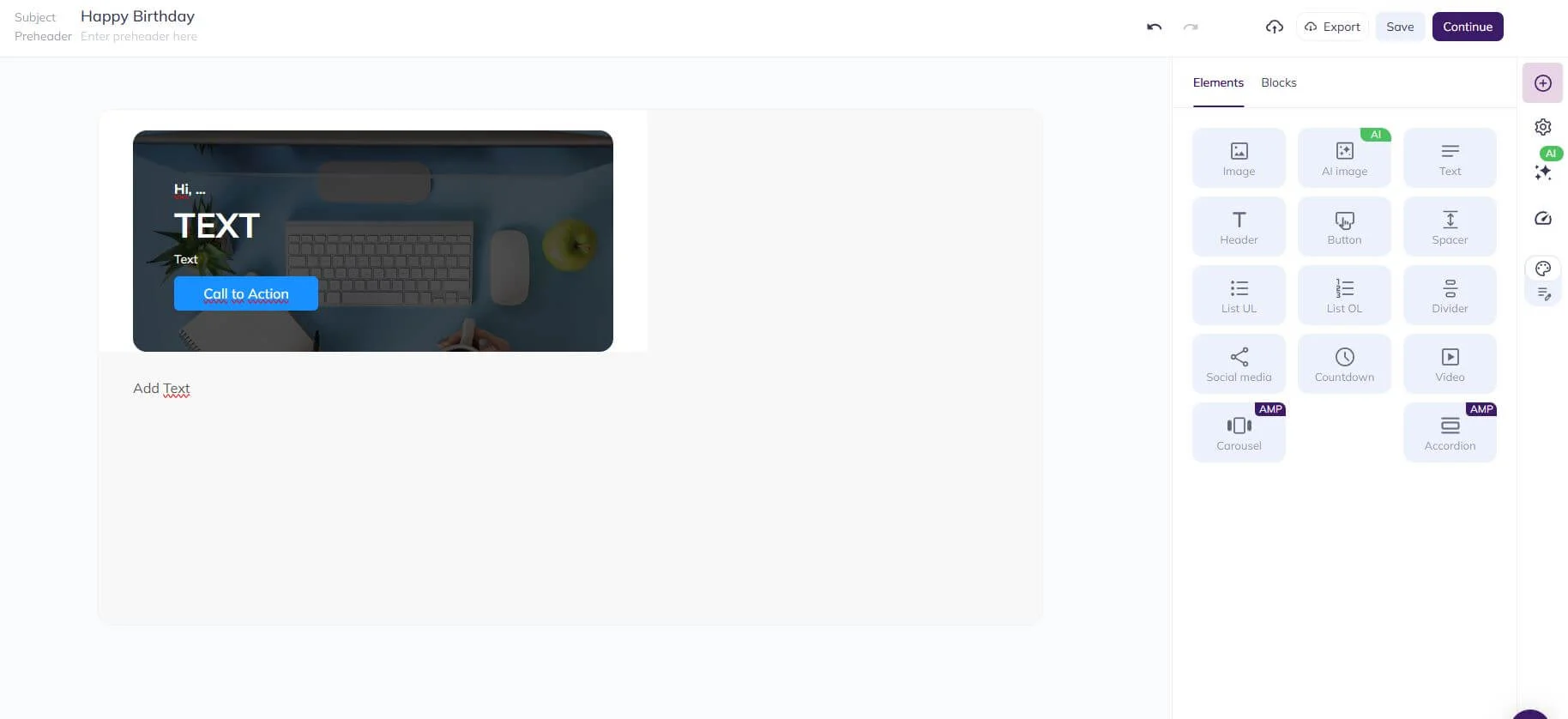
Now it is time to think about the structure, tone, visual, and written content of your email. Are you going to write a longer message? Are you going to add a call-to-action button under a big banner saying “Happy Birthday,” like in the picture above?
Using Selzy’s email builder, all you have to do is plan ahead, drag, and then drop the elements you want to use. They are all on the right of your screen, click the ones you want to use and bring them to the center of the screen at the position you want them, it’s that simple!
Consider the usual email content best practices:
- Provide essential information first. Your customers don’t want to scroll several screens to find what they need.
- Make the email easy to navigate with a clear structure and consistent messaging. If you find yourself trying to squeeze in several points at once, better to send an additional campaign.
- Ensure that your email is accessible — it makes it wider-reaching and also prevents it from going to spam.
- Stick to your signature design to reinforce brand image and recognition.
Before you build the template, check that the email has a clear birthday greeting, the subscriber’s name or another personal detail, one main offer or message, a visible CTA, a deadline if the offer expires, and a short explanation of how to redeem the gift. If the email is mainly emotional rather than promotional, replace the offer with a sincere thank-you and a simple next step.
Step 4. Personalize your automated birthday email
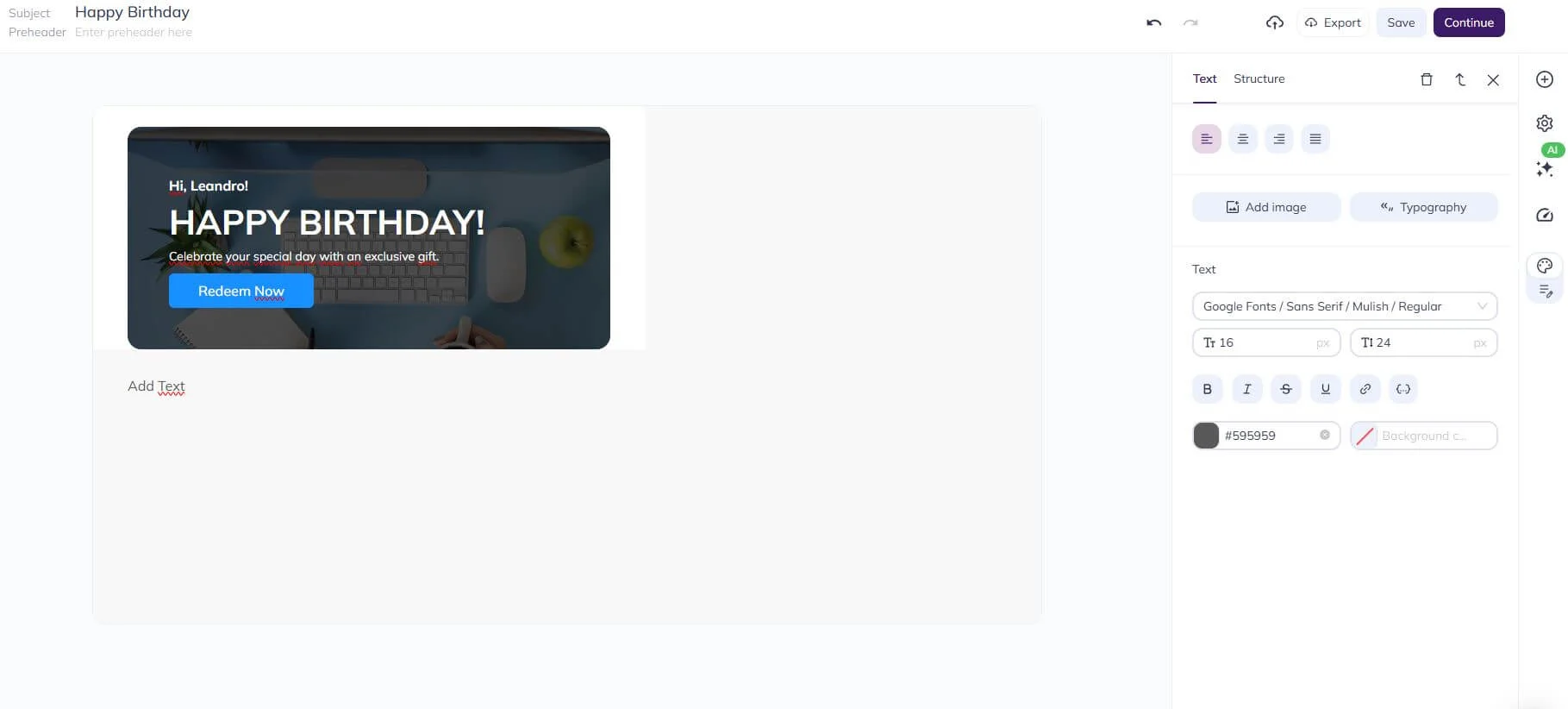
The picture above shows a more straightforward but effective example of personalization. There’s a name, there’s a gift (which can change from client to client based on demographics and other segmentation categories), and the text and images can also be dynamic. For inspiration, read our guide on personalization techniques.
Some personalization tactics, like product recommendations, personalized coupons, and others involving the data received from external services, require coding. When you design your campaign, don’t forget to process the received data using Liquid and insert relevant code into your email.
Useful personalization can include loyalty tier, previous purchase category, store location, preferred product type, lifecycle stage, or whether the subscriber has bought recently. Avoid over-personalizing with details that feel sensitive or surprising.
Step 5. Use GIFs or images for the design of the email
Images and GIFs can bring life to a static email, catch your subscriber’s eye, and draw attention. It is pretty simple to add them using our email builder: click on the Image element, drag, and drop it where you want.
Hover over the image block and click on the image folder icon to access the Image Center.
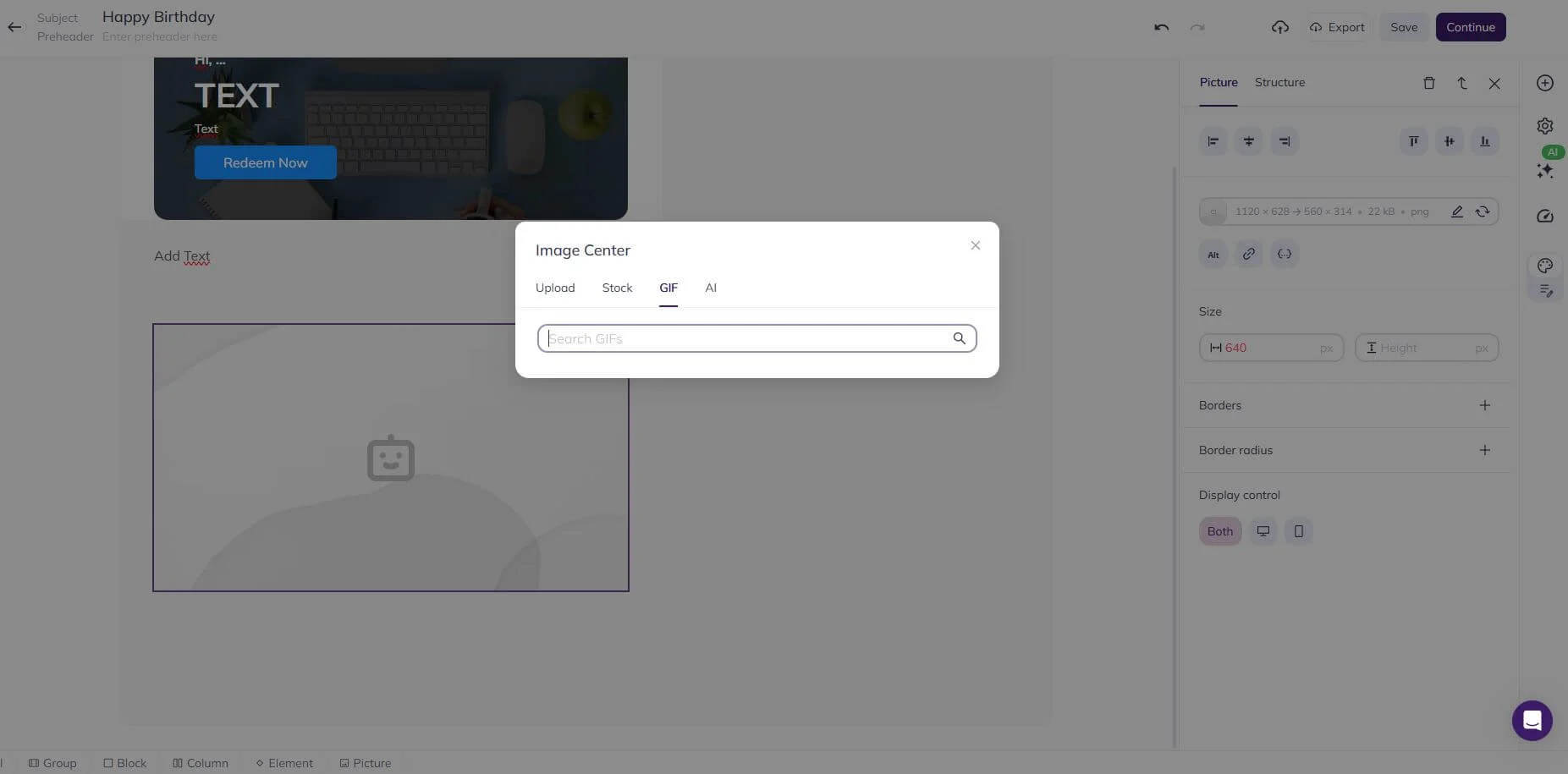
Here, you can upload images, find GIFs and stock pictures, or even tell our AI tool to generate something for you. Once you’re done, all you have to do is adjust the image’s position.
Step 6. Set up a schedule for automatic email sending
We’re almost there! After carefully creating your email and deciding on the content and personalization, you need to set an appropriate timeline for the delivery. Typically, CRMs will transfer the customers’ birthday information as soon as the new day starts. That means that your emails will be sent off at around midnight. If you don’t want this to happen, you can use delays.
For most brands, a birthday email works best when it arrives during the subscriber’s daytime rather than exactly at midnight. Test sending on the birthday morning, the day before, or at the start of the birthday month if your offer needs more planning time. If you include a discount, make the expiry clear: same-day offers create urgency, while a 7-14 day window gives people more time to buy.
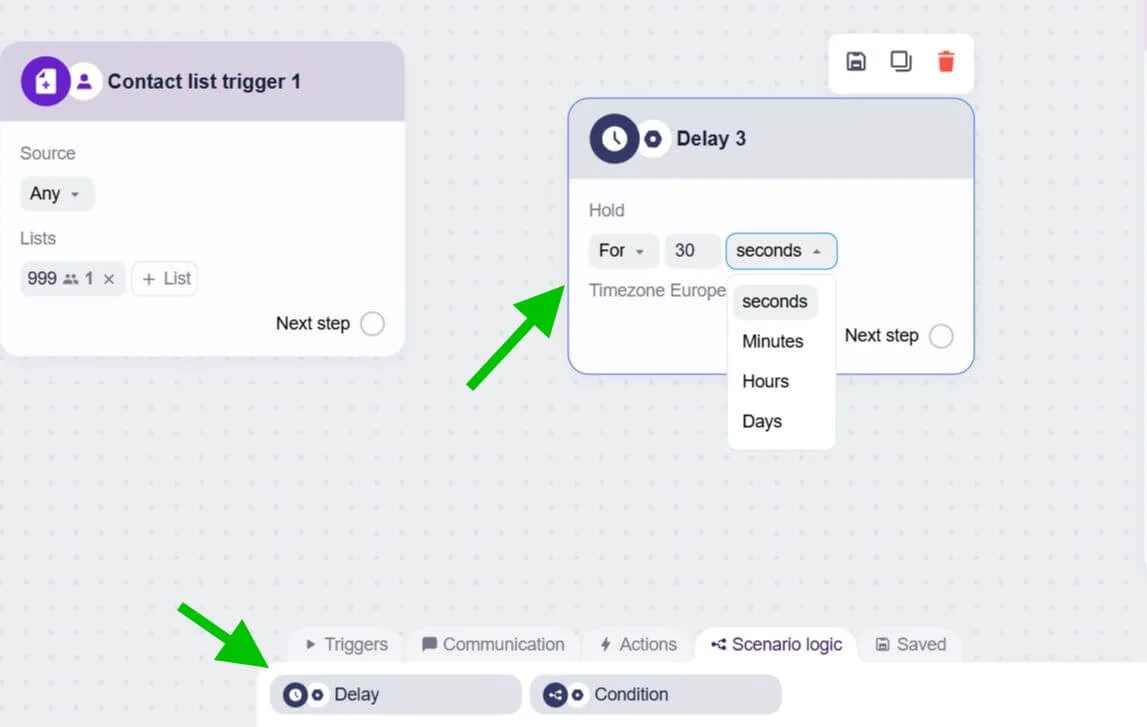
Although we can’t show you the exact way this is going to look in a real campaign, we’ll show you how to use the Delay block in Selzy’s Scenarios.
Drag and drop the Delay block from the Scenario logic tab and then set the delay timer, as in the image below:
Automation goes a long way, and the point of setting these triggers up is that you don’t have to manually send each birthday email on the right date and time. Imagine having to account for the best email sending times and remembering each one of your clients’ birthdays? Thankfully, you can just automate.

5 tips for creating happy birthday emails
Now that you know the ins and outs of the process, here are some tips to make your emails even more effective.
Create a unique birthday greeting
Every birthday email probably starts with a greeting, so it better be a good, heartfelt-sounding one, right? You can use all the information you have on the recipient to decide, and the tone of your message may vary depending on the person’s demographic information. You can also create personalized greetings for each segment, depending on the loyalty status, from newscomers to brand advocates.
On the other hand, sometimes a simple “happy birthday” coupled with good design choices and content might suffice — or be even better than a complex pre-written message that may feel copypasted.
Finally, take into consideration your brand and its tone of voice. You still have an identity, so even if you are trying to cater to your customers, do it according to the personality of your brand. The last thing you want is for your birthday email to sound cringey.
Personalize your birthday email
Personalization is important to make the recipient feel special and not like a part of a list or a simple number. Add details such as name, carefully chosen content based on the client’s previous behavior or preferences, plus offers that make sense for the client based on demographics, segments, browsing history, and so on.
If you are in doubt about what to personalize, here’s some data for you: according to GetResponse, email body personalization provides higher open rates (44.3% against 39.13%).
Thank your subscriber for being a part of the brand
Show appreciation to your clients by including a thank-you note in your email. Personalization goes a long way here, and you can mention the period that the customer has been with your company in the message. The point is to acknowledge their presence and remind them that you have been paying attention, making clients feel like they matter.
You can get creative, but you don’t have to be wordy: a simple “Thank you, [client], for being a part of our family for the last [time period]. To show our appreciation, here is an exclusive gift for you on your special day” followed by a well-designed offer should suffice…which leads us to the next subtopic.
Include an exclusive promo offer
Everybody likes getting gifts for their birthday, or if not a gift, at least a bonus or a discount. While you can just send a heartfelt message and celebrate the recipient on their special day, why not include a good offer or discount voucher? It is a win-win situation: they will feel happy about the offer, and you might sell a product or service.
Set a deadline for using the offer
Time is of the essence, and no offer is eternal. You are gifting the customer, but they have to take advantage of this opportunity within a deadline. Is the offer only valid during the day itself, or are you going to allow the customer some more time and make it last a week?
Here, the concepts of FOMO marketing will come in handy. FOMO is an acronym for “fear of missing out,” and that’s the whole idea: you make an irresistible offer and give clients a deadline, which will generate a feeling that they might be missing out on a good opportunity.
In addition to that, countdown timer GIFs will help you drive home the point that your offers are exclusive and are available for a set amount of time, giving clients a deadline to make a decision and take advantage of your special gift.
How to measure birthday email performance
Track more than opens. For birthday campaigns, review click rate, conversion rate, revenue per recipient, coupon redemption, unsubscribe rate, spam complaints, and whether the campaign reactivates customers who had not purchased recently. If the offer is expensive, compare incremental revenue against the discount cost so the campaign stays profitable.
5 famous brands’ birthday email examples
Feeling inspired? Let’s take a look at some famous brands’ email campaigns they sent to their subscribers on their birthdays.
Nintendo
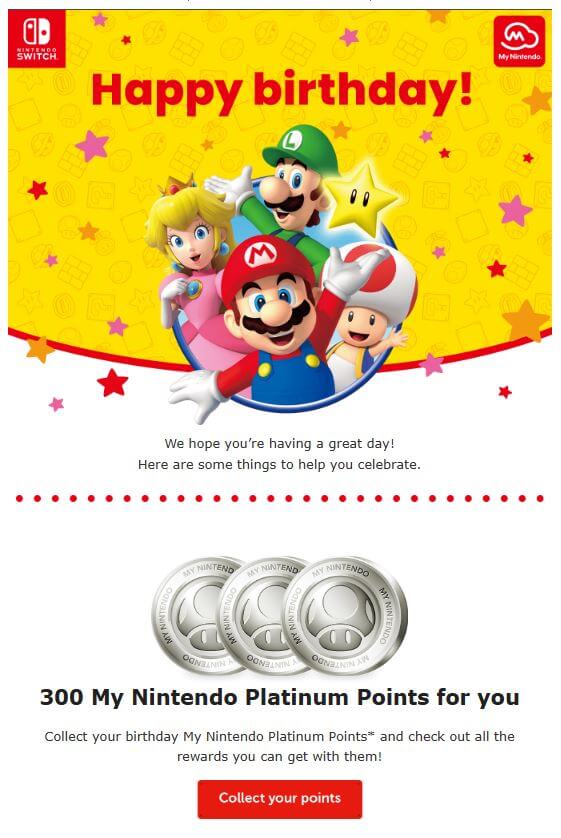
Nintendo’s birthday message is a great example of how to get it done right: the vibrant design is very much on-brand and likely to please the clients and fans. There is a nice “Happy birthday!” coupled with some of their most famous characters in a celebratory pose, and finally, a gift followed by a call-to-action button, which will definitely encourage and improve website traffic.
Cadbury
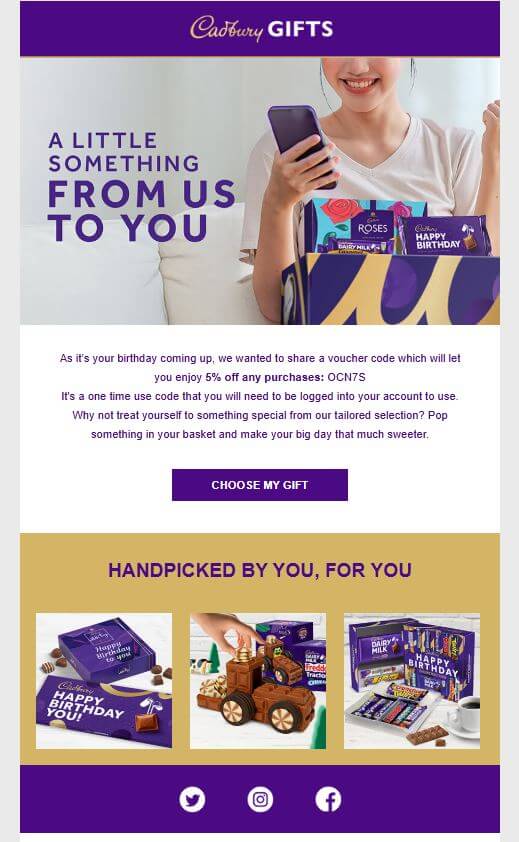
Cadbury starts nicely, already announcing they have a gift for their customers. The email has a clean but attractive design, and a one-time offer of a 5% discount off any purchase, meaning that the customer can use it for all products purchased on their special day. Personalization is great here as well, with handpicked offers. The line “make your big day that much sweeter” is brilliant for a chocolate company and provides a great finishing touch here.
St. Ives
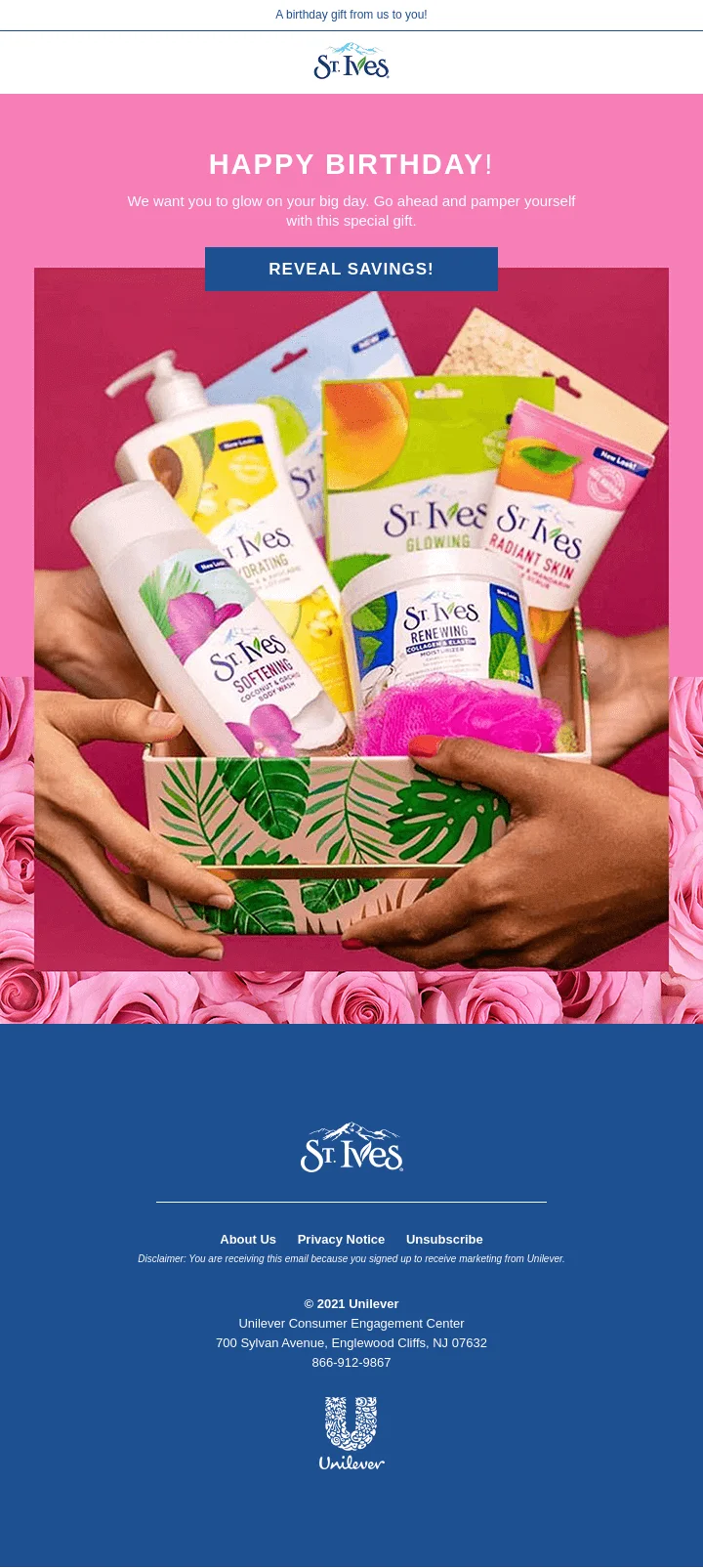
St. Ives goes for a different approach here. There is not a lot of personalization, but this example is interesting for many reasons: the greeting message is attractive and on-brand, the clean design shows many of their products, and the call-to-action is likely to pique curiosity. Notice that the brand doesn’t tell the subscriber exactly what they are getting, and that’s a good FOMO marketing strategy: you either click it, or you will keep wondering what the “special gift” is. The text “reveal savings” also implies a discount, but how big is it? Yep, you are probably going to click the link.
Hulu
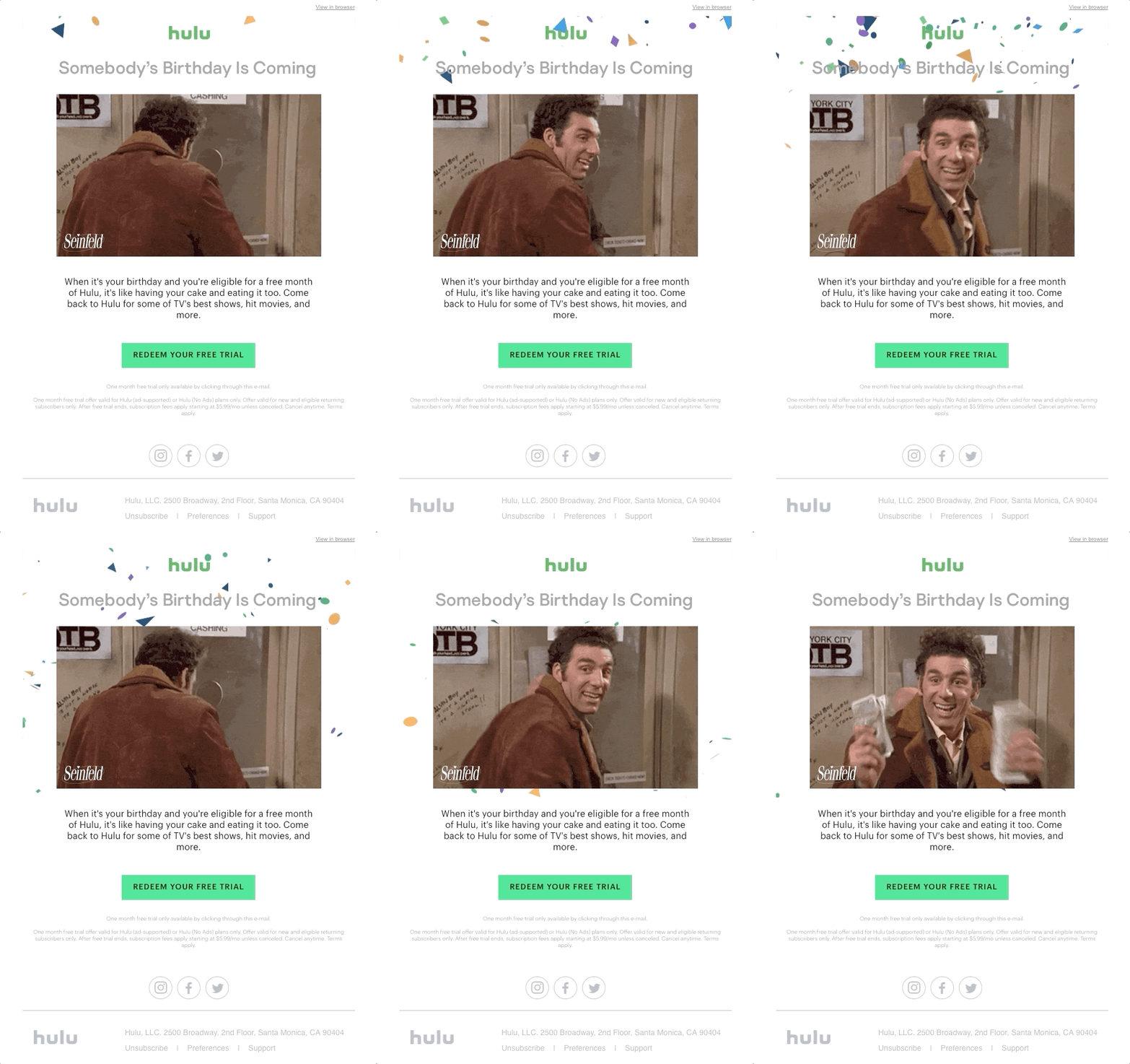
Who said you can only send birthday emails to current clients and customers? Hulu’s example is really interesting, as it is a winback email coupled with a birthday one. The message is aimed at people who are on the email list and have used the streaming service in the past, so it offers a 30-day free trial as a way to re-engage and get clients to return. This strategy also offers personalization opportunities: depending on the segment and demographic, the portrayed show can change and also become a selling point. In this case, the brand went for Seinfeld and a very smart GIF choice of a series’ character offering money, which is what Hulu is doing here, even if indirectly.
Nike
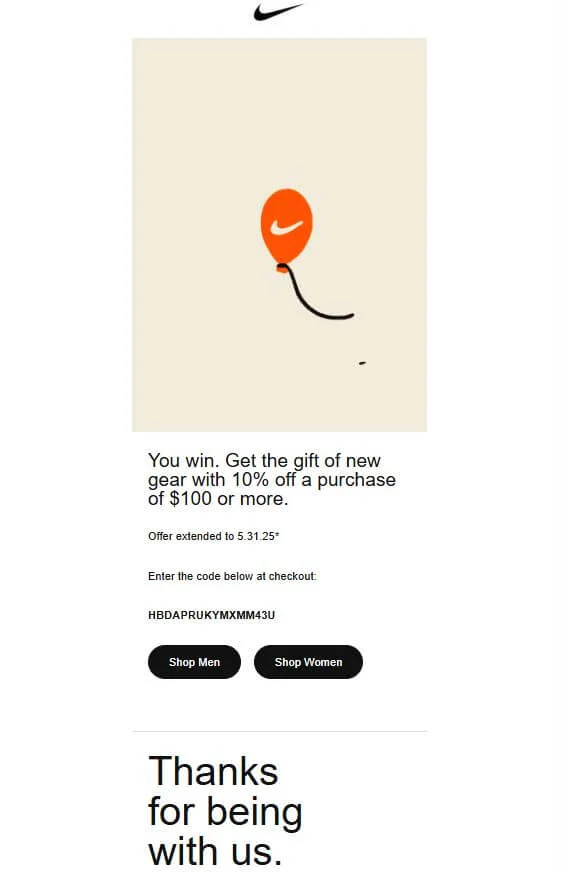
Nike’s approach is subtle, and the clean design is characteristic of the brand’s products. There are no “happy birthdays” here — but there is a well-thought-out balloon with the iconic swoosh. The brand follows up with a discount offer of 10% off a purchase of $100 or more and call-to-action links for men’s and women’s gear. There is also a thank you message, which is a nice touch. This email gives classic Nike vibes: few words, a lot of attitude, and a good offer to make it all better.
Automated birthday email checklist
Use this order: collect birthday data with clear consent, sync the date field to Selzy or your CRM, choose the trigger and send window, create the email template, personalize the greeting and offer, add a clear CTA and expiry date, test the workflow with sample contacts, launch, and review performance after the first few sends.
FAQ
What is an automated birthday email?
An automated birthday email is a congratulatory message sent to a client on their birthday using email marketing automation. It can be personalized and segmented so it feels relevant while also supporting marketing goals like engagement and sales.
How do you collect birthday data for email automation?
The content explains that Selzy’s API trigger can receive data from other services such as an e-commerce shop, website, or CRM. That data can then be used to set up or personalize birthday email communications.
When should a birthday email be sent?
A birthday email should be sent on the client’s day of birth. Automation is useful here because it lets you schedule the message so it goes out at the right time without manual sending.
What should a birthday email include?
It should include a congratulatory message, and it can also be personalized to make the customer feel remembered. The content also notes that these emails can include good offers to create sales opportunities.
Do birthday emails need to include a discount?
No, they do not have to. The main purpose is to congratulate the client and strengthen the relationship, though including an offer can help create a sales opportunity.
Final thoughts
Birthday emails are your best friend when it comes to bonding or re-engaging with clients, converting and driving up your revenue with a great ROI. Through the clever use of customer profile data, personalization, design and finally, automation, you can provide your contact base with great content and offers while making them feel important and remembered.
We hope that the ideas and examples from this guide inspire you and help you to create and automate personalized and attractive messages to your customers. Good luck!

 New and noteworthy on our blog
