


Key takeaways
- Omnichannel email marketing involves integrating emails into a broader customer experience strategy across various platforms.
- Email remains a powerful tool in omnichannel marketing due to its direct, personal, and effective nature.
- Omnichannel differs from multichannel by ensuring all communication channels are connected and coordinated.
- Email serves as a central engagement hub and a connector between different digital touchpoints in the customer journey.
- Behavioral email campaigns triggered by real customer actions are essential in an omnichannel strategy.
Omnichannel marketing is all about meeting your customers where they are — whether that’s email, SMS, social media, or in-app. But without a clear strategy, your messages can quickly become scattered.
In this article, we’ll cover what omnichannel email marketing is, why email plays a crucial role in any omnichannel strategy, look at some best practices and discuss how to measure the success of your campaign.
What is omnichannel email marketing?
Omnichannel email marketing means your emails don’t work alone — they’re part of a bigger, more connected customer experience strategy. In an omnichannel setup, email fits into a seamless brand journey across all the platforms your customer interacts with: website, app, SMS, social media, and more. The key here isn’t just being present in lots of places — it’s making sure those places work together, so your communication feels consistent and helpful no matter where someone sees it.
And email is still leading the way. It remains the most widely used marketing channel (82.4%), and the one B2C marketers consider most effective (73.5%). When it’s part of a connected, cross-channel experience, it becomes even more powerful.
Email is a big piece of the omnichannel customer experience. It’s direct, personal, and still one of the most effective ways to drive action.
Multichannel vs omnichannel
You may have heard the term “multichannel marketing” before. While the terms multichannel and omnichannel sound similar, they don’t mean the same thing.
In a multichannel strategy, you’re also using different platforms like email, social media, and SMS. The difference is that each operates independently. Your email might say one thing, your Instagram another, and they don’t really talk to each other.
With an omnichannel approach, everything’s connected. Your communication channels share data, coordinate messaging, and work together to give the customer a smooth experience.
Why email is crucial in the omnichannel experience
There are a lot of moving parts in an omnichannel strategy — apps, websites, social media, even chatbots. But through it all, email continues to be one of the most powerful tools you’ve got. Here’s why it still matters.
The inbox as a central engagement hub
Every day, nearly all of us open our inboxes, sometimes dozens of times. That space has become a trusted spot where we expect to see important messages from brands: receipts, confirmations, promotions, and re-engagement emails. It’s where announcements feel official.
And it’s no myth — people still prefer email for brand communication, hands down. Around 75% of consumers say email is their top choice for marketing messages, and a virtually identical number select it for transactional updates such as account alerts or order confirmations.
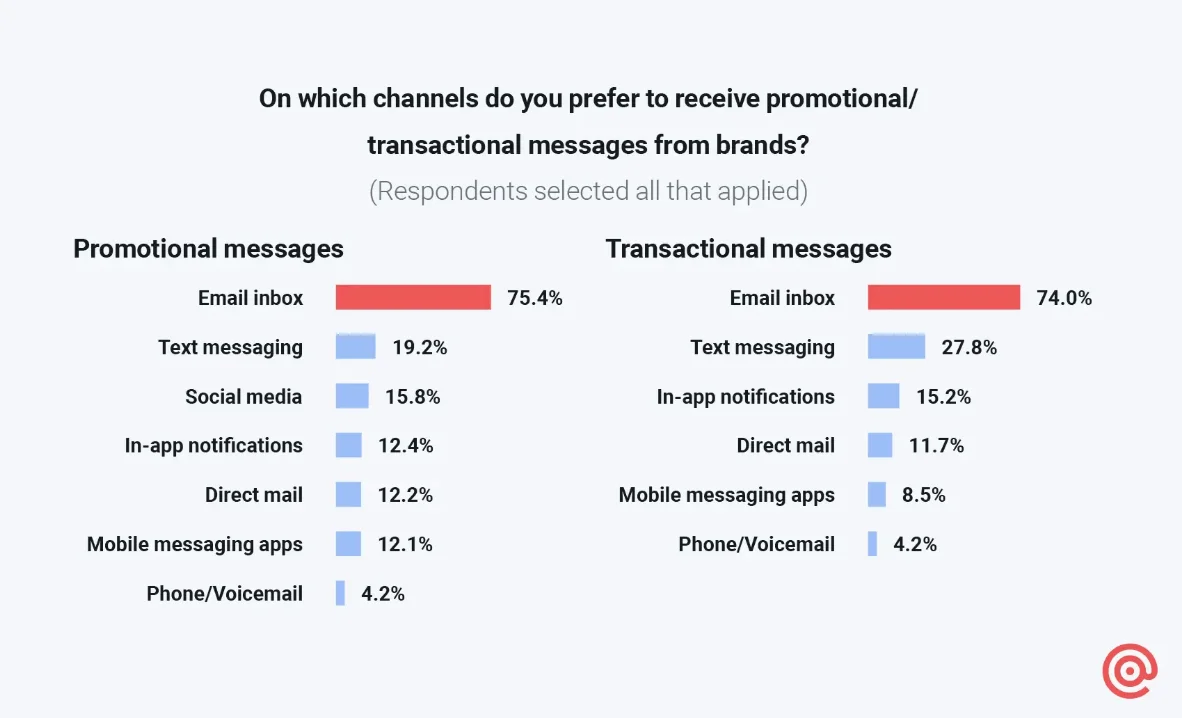
So while omnichannel marketing puts bots, notifications, and social in the mix, the inbox still rules.
Email as a connector between digital touchpoints
Email doesn’t just work on its own, it ties your other channels together. Picture this: a customer gets a text with a time-limited offer, then a follow-up email with more details, and later sees a related in-app message. That’s email helping to sustain engagement across the whole customer journey.
It can also pull in data from all over — like web browsing, cart activity, app usage, or even social media behavior. When you combine personalization and segmentation, email becomes a smart, responsive tool that “catches” the user at just the right moment.
Imagine someone adds a product to their cart on your website. They get a reminder email later that day. And if they still haven’t bought? The next time they open your app, they see a discount waiting just for them.
That reminder you send after someone adds something to their cart? That’s a behavioral email. They’re triggered by real customer actions. These kinds of automated messages are a core part of your omnichannel strategy. They help you respond at the right time, with the right message, based on what your customer actually does — not just what you hope they’ll do.
Behavioral marketing automation keeps your brand relevant, timely, and genuinely useful, which is exactly what omnichannel is all about.
Strengths of email compared to other channels
Some channels like social media, SMS, or push notifications might grab attention, but email is where decisions get made. It’s not as transient as an Instagram Story or a one-time push. Emails stick around and people come back to them.
Email marketing also delivers when it comes to return on investment. It consistently ranks as one of the most cost-effective channels out there, with an average return of $36 for every $1 spent on average.
Last but not least, email marketing is scalable, easy to personalize, and simple to automate. Plus, it’s measurable, so you always know what’s working. Whether you’re sending a quick promo or a long-form newsletter, email gives you enough space and flexibility to work with.
How to use email in your omnichannel marketing strategy
Here’s how to make email work harder as a part of your omnichannel strategy:
1. Collect and sync customer data across all channels
Email works best when it’s informed by more than just what someone clicks in their inbox. To get the full picture, pull in data from other touchpoints aside from your marketing platform — like your website, app, SMS, and even your CRM.
Use sources like forms, browsing behaviour, preferences, and purchase history to build a richer understanding of each customer. The goal is to make sure your emails reflect someone’s entire journey, not just their email activity.
When your data is synced properly, it opens the door to smarter segmentation — not just by demographics, but by behaviour. For example, you can target users who viewed a product but didn’t buy, or follow up differently with customers who already made a purchase in your app.
The bottom line here is: integrations matter. They keep your systems talking to each other, and your emails relevant.
2. Trigger email campaigns based on cross-channel behavior
Let’s say someone signs up on your website. They automatically receive a warm welcome email. If they don’t click the link to start shopping, a second follow-up email is sent a few days later — also automatically.
This is what we mean by cross-channel behavior, and a behavioural email flow. Instead of waiting for someone to interact with your emails, you send messages based on what they’re doing elsewhere — on your site, in your app, or even in your CRM.
With the right setup, your email platform can connect to these external sources and respond instantly and automatically. Selzy does it via its API trigger block. Here’s an example of an automated flow:
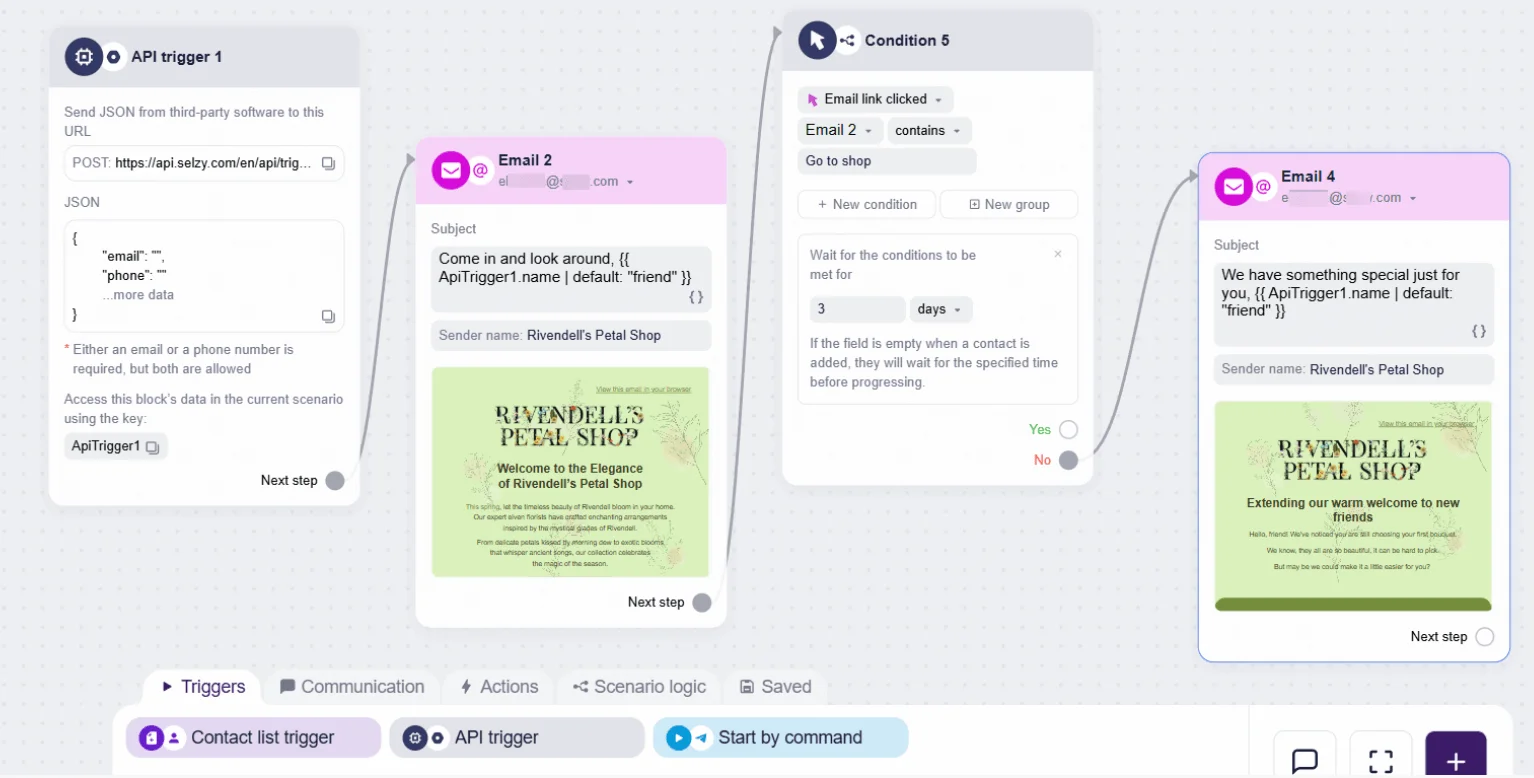
This automation kicks off when Selzy receives data from an external source, such as a website signup. It sends a welcome email, waits three days, and if the customer hasn’t clicked, follows up with a second message. The emails are personalized using the info that came through the API trigger.

3. Use dynamic personalization for real-time relevance
Dynamic personalization means the content inside your email updates based on real-time data. It goes way beyond “Hi [First Name]” — we’re talking product suggestions, loyalty perks, or location-based offers tailored to each individual.
Here’s how it works:
Your email content is personalized using real-time data from your CRM or app. Some platforms (like Selzy) let you pull in fresh data right when the email is sent — so the content reflects what the customer has been doing lately, not just what was true a week ago. That means what the recipient sees can reflect the most up-to-date info: for example, if a customer browsed hiking boots and lives in Denver, they might get an email with boot recommendations and a nearby store location.
In Selzy, this kind of personalization runs on a markup language called Liquid. If you’re just adding names or promo codes, it’s easy. For more complex stuff — like showing a list of cart items or formatting delivery dates — you can set it up yourself if you’re comfortable with basic logic of API requests. But if you’re short on time or don’t have experience, a developer can help.
4. Drive engagement across channels (push, social, web)
Email doesn’t exist in a vacuum. Use emails to guide people toward other channels — like your app (where you can follow up with push notifications), your website (with personalized landing pages), or your social media (for challenges, contests, or content). The goal is to create a smooth, connected experience across all your channels.
For example, an email could invite someone to vote on your Instagram stories, or link to a landing page that changes based on what they’ve browsed before.
5. Reuse email content across touchpoints
Repurpose your email content across other channels to save time and keep your messaging consistent. One good email can easily become a social post, an in-app message, a blog intro, an SMS alert — even chatbot copy. If you run a physical store, you can reuse the same visuals across channels to keep everything feeling cohesive.
Think: email headline becomes an Instagram caption. Newsletter sections become tweets or carousel slides.
Here’s an IRL example from Urban Outfitters. One image is a screenshot from the retailer’s website, the other — an email I received as a subscriber.
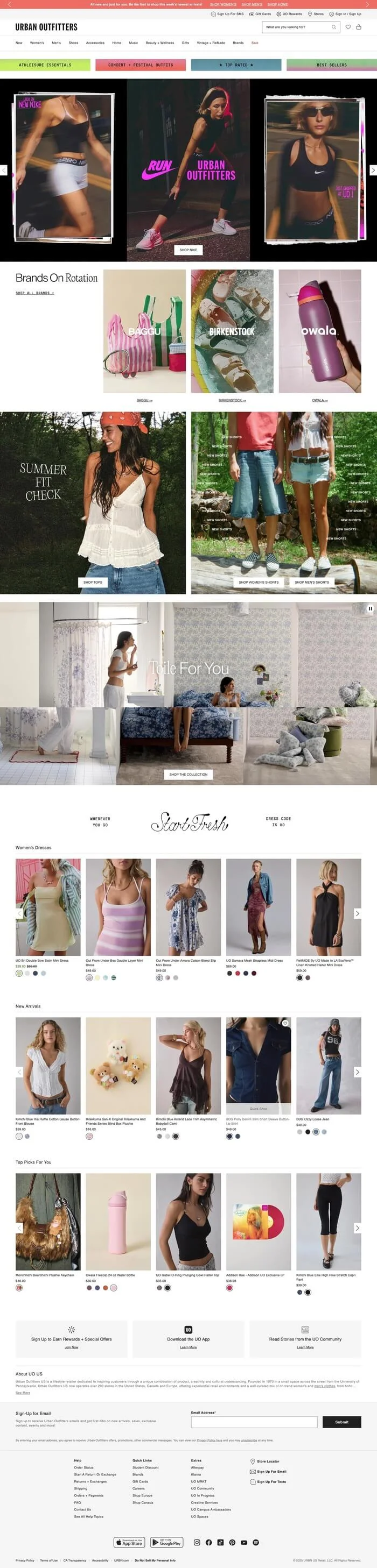

Urban Outfitters reuses both visuals and copy — the same “Summer Fit Check” headline, outfit photos, and CTAs like “Shop Shorts” appear in their email and on the homepage.
Another thing to bear in mind here is that Urban Outfitters doesn’t rebuild every email or landing page from scratch — and you shouldn’t either. Instead, use templates. They help you keep branding, layout, and tone consistent across campaigns and channels. Whether it’s a product spotlight, a back-in-stock alert, or a seasonal promo, you can plug in fresh content without starting from zero.
Tools like Selzy let you save entire email sections — think hero banners, product blocks, footers — and reuse them later. That way, you save time, maintain consistency, and reinforce your brand across every campaign.

Real example of an omnichannel email experience
Let’s have a look at some real-life examples of how brands use omnichannel to their advantage.
Email follow-up with personalized offer
Browse abandonment happens when someone looks at a product but doesn’t add it to their cart or complete a purchase. Say a customer checks out a product on your site but leaves without buying. Later, they get a personalized email reminding them about the item — with a perk like free shipping or a discount.
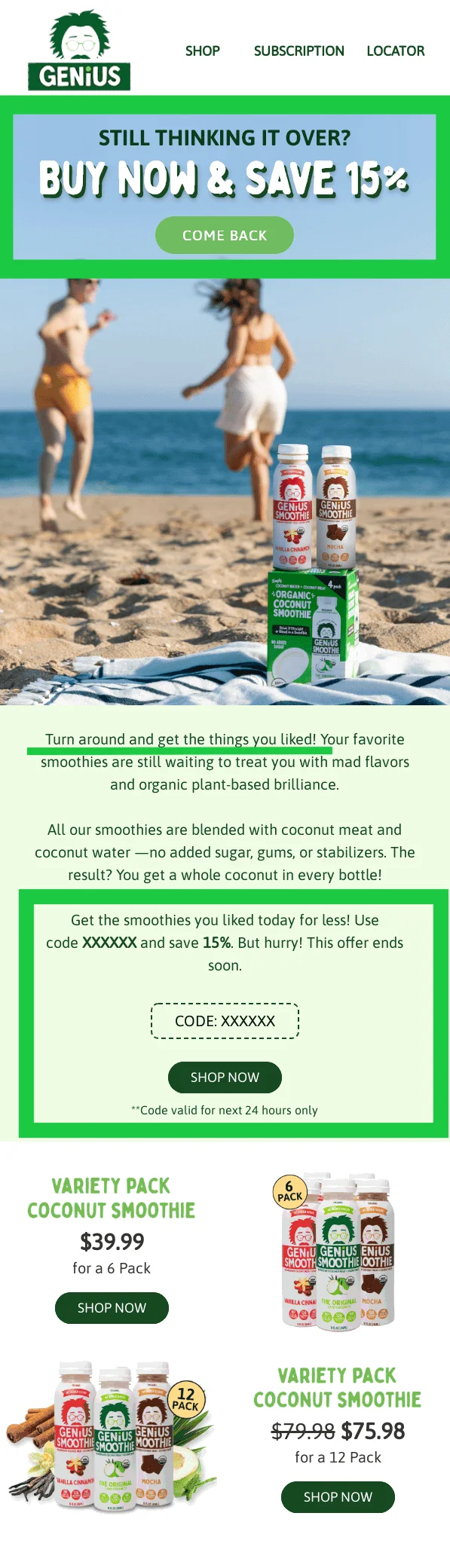
This email checks all the boxes for effective browse abandonment. It reminds the customer what they were looking at, reinforces the product’s benefits, and removes friction by including a promo code and direct shop buttons. The messaging is warm and friendly, making it feel like a helpful nudge rather than a sales push. And to top it off, it adds a little bit of FOMO with phrases like “Still thinking it over?” and a 24-hour discount timer to prompt quick action.
If the potential customer still doesn’t react to the email, a push notification follows up with a time-sensitive offer. When they click, they land on a pre-filled cart page ready to check out.
Cart abandonment reminder
Cart abandonment happens when a customer adds products to their cart but doesn’t complete the checkout. It’s different from browse abandonment, where someone only views a product without adding it to the cart. Cart abandoners are usually closer to making a purchase — which makes them more valuable to win back.
That’s why most platforms let you set up automated cart reminder emails. These go out within a defined time window and can include the items left behind, prices, product photos, and a direct CTA to return.
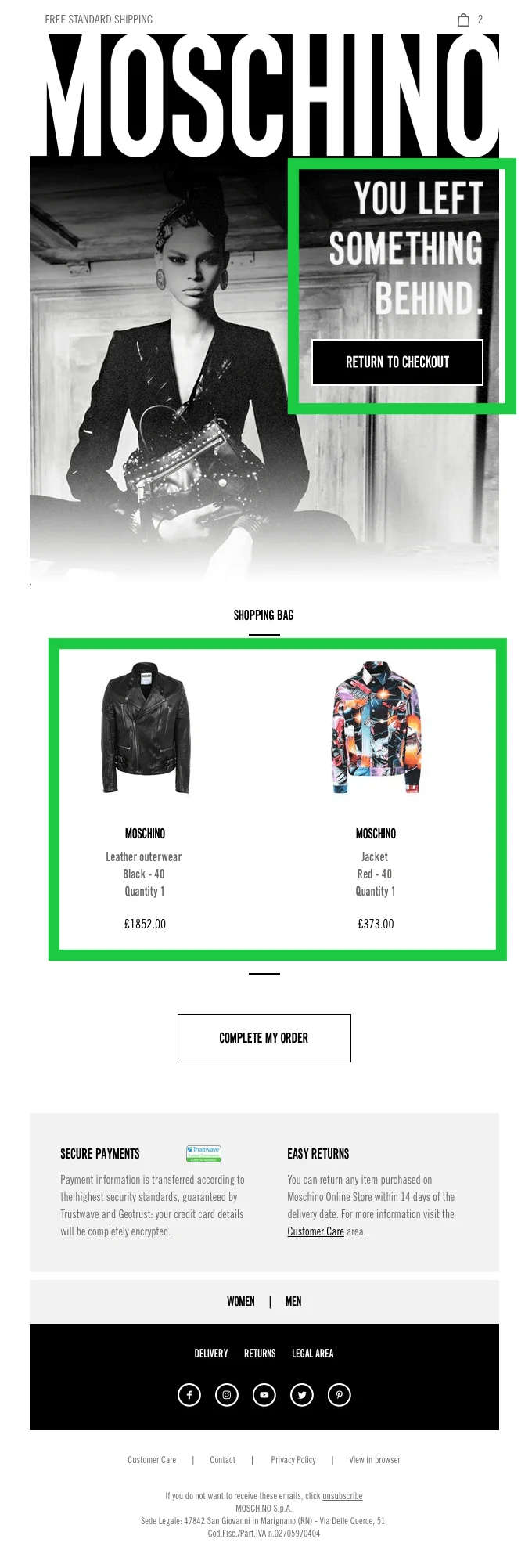
This is a great example of a cart abandonment email done right. The headline — “You left something behind” — is bold, on-brand, and instantly clear. The email displays the exact items left in the cart, complete with images, prices, and product details, making it easy for the shopper to pick up where they left off. There are two strong calls to action — one near the top, one at the bottom — to catch the user’s attention at different points.
If there’s still no action, you can follow up with a push notification or retargeting ad that features the same products.
Purchase completed — email confirms and upsells
A purchase confirmation email isn’t just a receipt — it’s also a chance to drive more customer engagement. You can suggest related products, highlight loyalty points earned, or include customer testimonials to build trust. Done right, it encourages the next visit while reinforcing the value of their purchase.
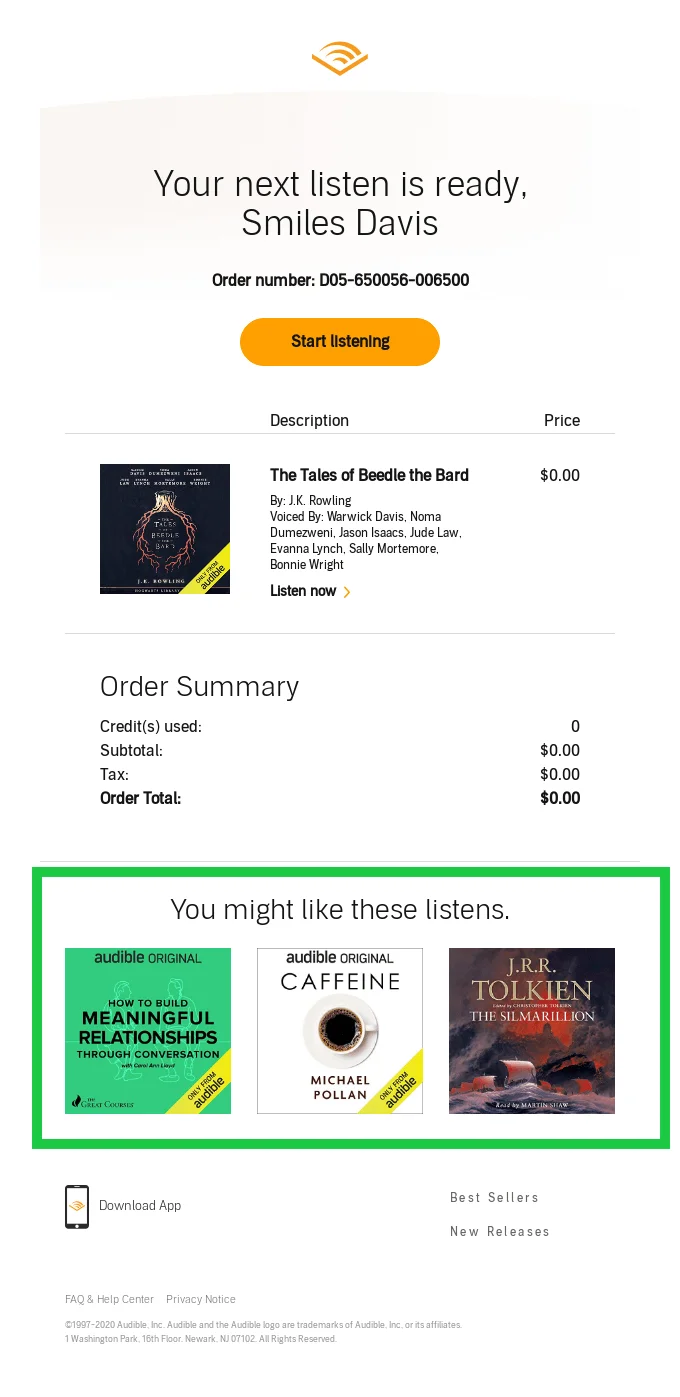
This is a strong post-purchase email: it confirms the order, makes it easy to start listening, and suggests similar titles to keep the customer engaged. Clean design, clear CTA, and helpful recommendations make it both functional and effective.
Loyalty email brings customer back via mobile app
If a customer hasn’t engaged with your brand in a while — especially through your app — you can send a loyalty-focused email reminding them of their points, perks, or rewards balance. Include a direct link to the app and use a personalized CTA like “Open the app to claim your reward.” You can also tease app-only content like early access sales or exclusive products.
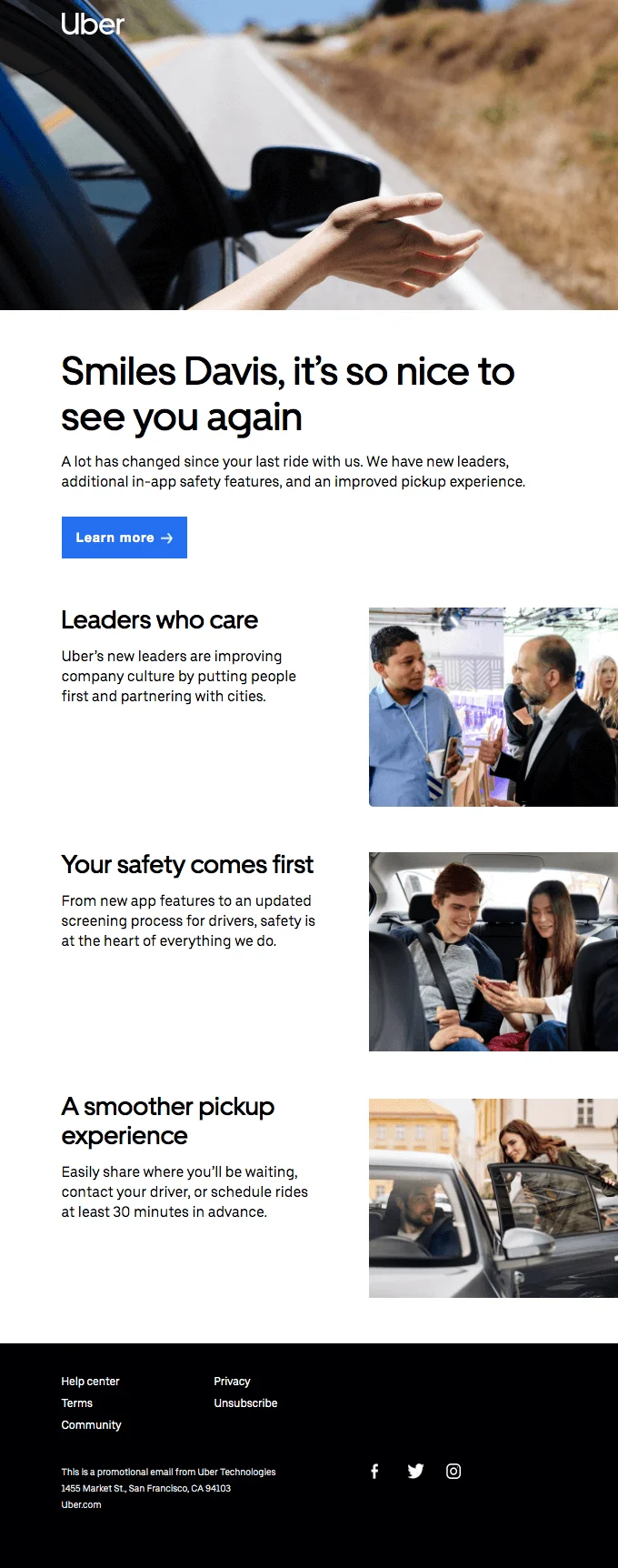
This email brings the user back with a warm tone and a clear message: things have improved, and it’s time to give the app another try. It highlights real benefits and encourages users to re-engage by opening the app. Visually clean and easy to skim, it feels welcoming without being pushy.
How to measure the success of your omnichannel email campaigns
We’ll show you which metrics to track and how to use the data to improve your strategy.
Key metrics to track (CTR, conversion, retention)
To understand whether your omnichannel email strategy is actually working, you need to track the right metrics. Start with the essentials:
- Click-through rate (CTR) measures how many people clicked a link in your email. It’s a quick indicator of how engaging your message and offer were.
- Conversion rate goes a step further. It tells you how many recipients took a meaningful action — like making a purchase, signing up, or booking a demo. This is where you see whether email is driving real outcomes.
- Customer retention rate looks at whether your emails are helping build long-term relationships. Are people coming back? Are your workflows encouraging repeat engagement?
You can also monitor things like bounce rate, unsubscribe rate, email ROI, and engagement over time, most of which are easily accessible in your email platform’s analytics dashboard.
Cross-channel attribution: How to do it right
In omnichannel journeys, email often plays a bigger role than it gets credit for. A customer might click an email, browse on mobile, and complete the purchase in-app or in-store.
To track email’s true contribution, use UTM parameters in your links and tag custom events in Google Analytics 4, Mixpanel, or Segment. If your ESP (email service provider) allows, connect it to your analytics and CRM tools to get full-funnel visibility in one place.
Using data to refine your email strategy
Let your campaign results guide your next moves. Run A/B tests on subject lines, layouts, send times, and offers to learn what drives better performance.
Dig into engagement by segment — see who’s opening, who’s ignoring, and tailor your content accordingly.
Check automation reports to understand where users drop off in a journey, then tweak timing or content to close the gaps.
And since you’re using automation, don’t forget about list hygiene: regularly clean your email list by removing inactive or bouncing contacts. A healthy list keeps your deliverability strong and your reporting accurate.
Final thoughts
Omnichannel email campaigns aren’t just about sending more, they’re about sending smarter. Track the right metrics, connect the dots across existing and new communication channels, and keep refining based on what the data tells you. The more intentional your strategy, the more impact your emails will have.
 New and noteworthy on our blog