


Key takeaways
- Back-in-stock emails are automated campaigns that notify customers when a previously out-of-stock product becomes available again.
- These emails are effective, with high open rates (59.19%) and conversion rates (5.34%), making them a valuable marketing tool.
- Benefits of back-in-stock emails include increasing conversions with high-intent shoppers, recovering lost revenue from out-of-stock products, and building customer loyalty through transparency and trust.
Picture this: you’re shopping online and find something you like. Alas, it’s out of stock! If you sign up for notifications, the brand will let you know when the product you had your eye on is restocked. This is what we call back-in-stock emails.
In this article, we’ll cover what back-in-stock emails are, why they’re important, how to write them, and also look at some of the best e-commerce practices.
What are back-in-stock emails?
Back-in-stock emails are automated campaigns that are sent out when a product that was out of stock becomes available again.
They’re triggered when inventory for an out-of-stock item is replenished.
Here’s a back-in-stock email from my own inbox, from British brand Damson Madder. Please don’t judge me for having almost 10,000 unread emails.
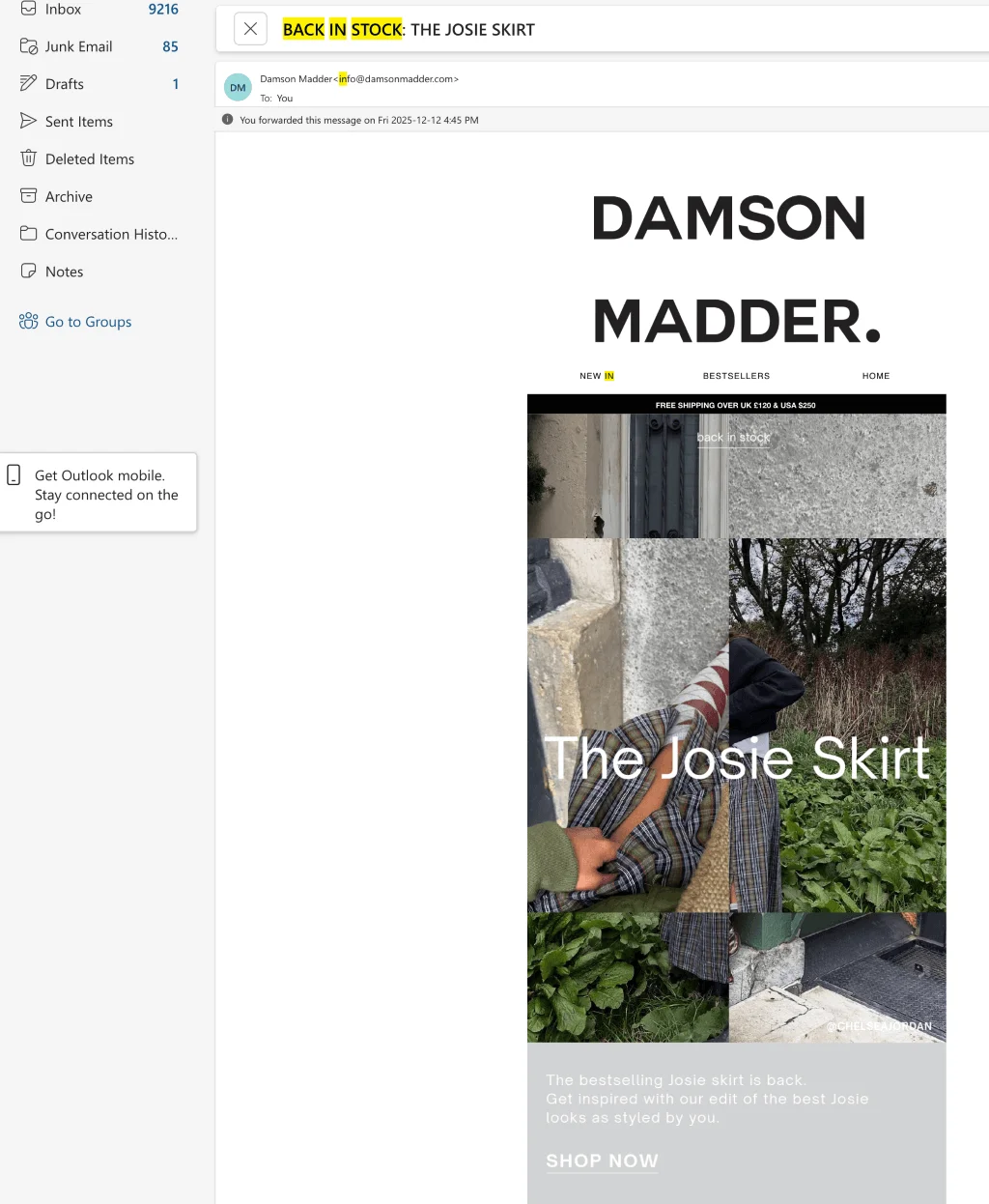
The main purpose of a back-in-stock email is simple: to inform customers that a product is available again and give them a chance to complete a purchase.
In general, emails like this are sent to customers who’ve shown interest in the product. This includes people who signed up for restock notifications, joined a waitlist, or viewed this product.
In practice, however, many brands don’t treat back-in-stock emails strictly as one-to-one alerts, but rather as broader restock announcements. In cases like that, emails can also be sent out to interest-based segments, such as customers who browsed similar products, purchased from the same brand, or engaged with related categories.
This is what happened with the email from Damson Madder above: I never asked to be notified about this particular skirt, but I have bought a skirt from this brand before. So, in this case, the email is based on my previous engagement with the brand.
Why back-in-stock emails matter: Key benefits
There’s a reason these emails are such a big deal: they work, and they work really well. According to 2025 research by Omnisend, automated emails in general perform much better than regular campaign messages.
For back-in-stock messages in particular, open rates reached 59.19% and conversion rates around 5.34%. And brands know about this: back-in-stock emails were one of the fastest-growing automation types year-over-year, with send volumes increasing fourfold.
Let’s have a look at some of the advantages back-in-stock emails offer.
Increase conversions with high-intent shoppers
We already know these emails convert well. Here’s why.
Back-in-stock emails are sent to people who have already shown interest in a product. In other cases, brands send restock emails to broader (but still relevant) audiences. Either way, these emails reach people who are more likely to make a purchase, as opposed to a general promo audience.
They also tend to include urgency signals, an important part of FOMO marketing. This can be a note about limited quantities, high demand, or the risk of selling out again.
Together, all of these factors mean that these emails often convert better than standard promotions.
Recover lost revenue from out-of-stock products
Beyond increasing conversions, back-in-stock emails can also help brands recover revenue they lost due to temporary stockouts. When a product is out of stock, it means that a purchase was interrupted, rather than that people stopped wanting it.
Back-in-stock emails help reconnect that sale once the supply issue is resolved. Instead of focusing on attracting new users, brands can turn existing interest into sales by bringing shoppers back when the product is available again.
Build customer loyalty through transparency and trust
Even though back-in-stock emails are automated, they still count as proactive communication. Instead of the brand just silently updating its inventory, it lets customers know that the product is available again.
This shows that the brand remembered the shoppers’ interest and followed up. It also sets clear expectations around availability and saves customers from repeatedly checking product pages. For the recipient, this makes the brand feel reliable, responsive, and customer-aware.
15 best back-in-stock email examples to inspire your campaign
Let’s have a look at back-in-stock emails from some of our favorite brands to give you an idea of what you should be aiming for in your own campaigns.
1. OPI
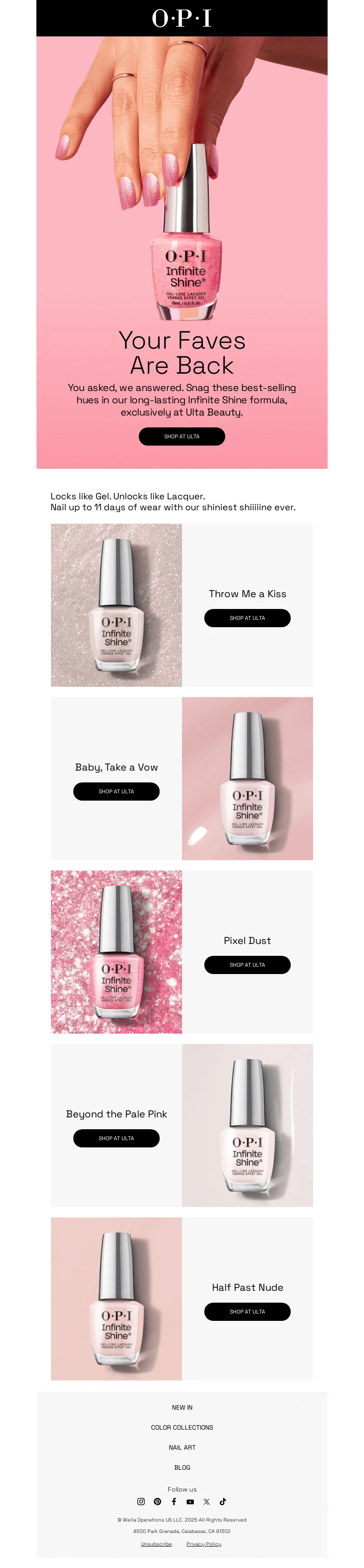
Why it works:
- Clear restock signal. The message makes it obvious right away that popular items are back.
- Strong product visuals. Each shade is shown clearly, helping customers quickly spot their faves.
- Low-friction purchase path. Each product has a clear, visible CTA that takes you straight to the item.
2. Huckberry
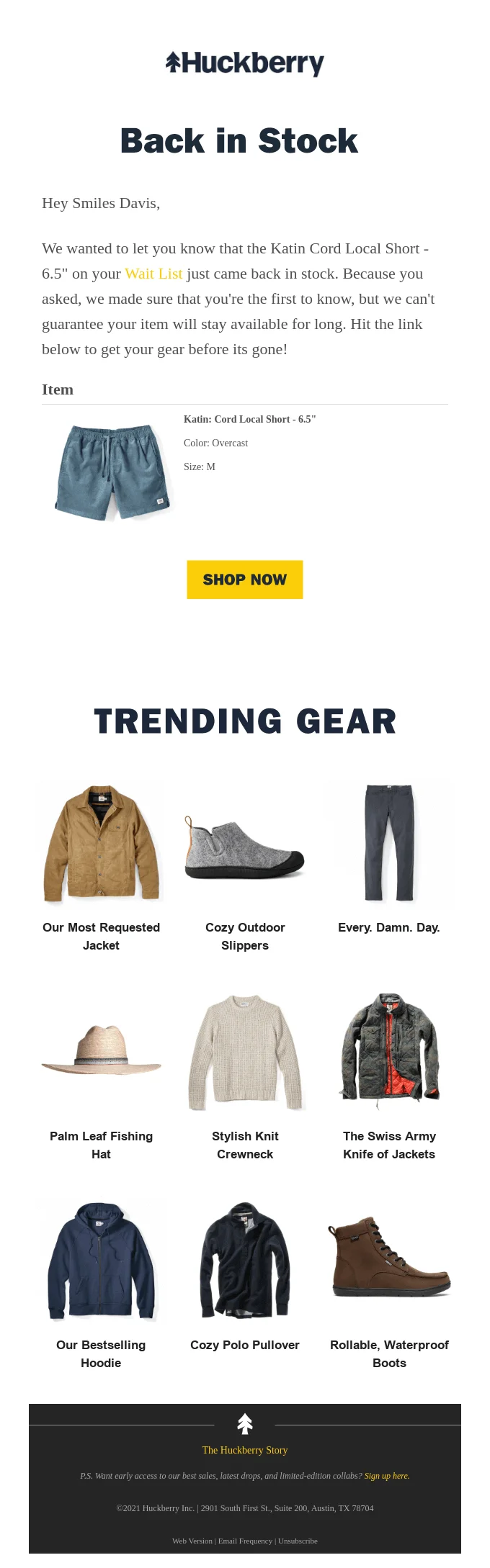
Why it works:
- Clear one-to-one personalization. The email addresses the customer by name and directly references the exact item, size, and color they waitlisted
- High purchase intent. Phrases like “because you asked” signal that this email is a response to customer action, not a blast campaign.
- Focused cross-selling. Trending products are shown after the main CTA, giving the customer alternatives without distracting them from the product they’re mainly interested in.
3. Barefoot Scientist
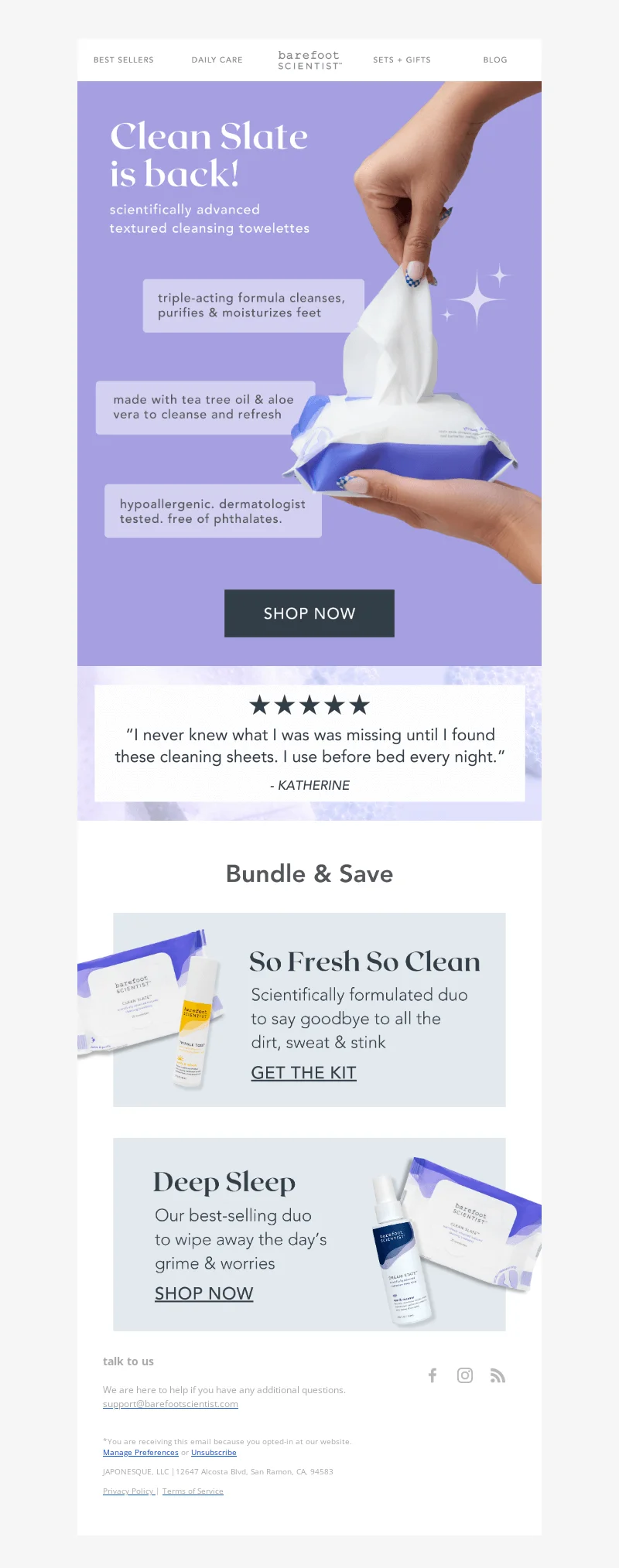
Why it works:
- Instant restock clarity. The headline makes it immediately clear that the product is back.
- Visible social proof. A prominent five-star review builds trust and reassures customers.
- Reinforced product value. Product photos and short descriptions help customers decide quickly.
4. Joseph
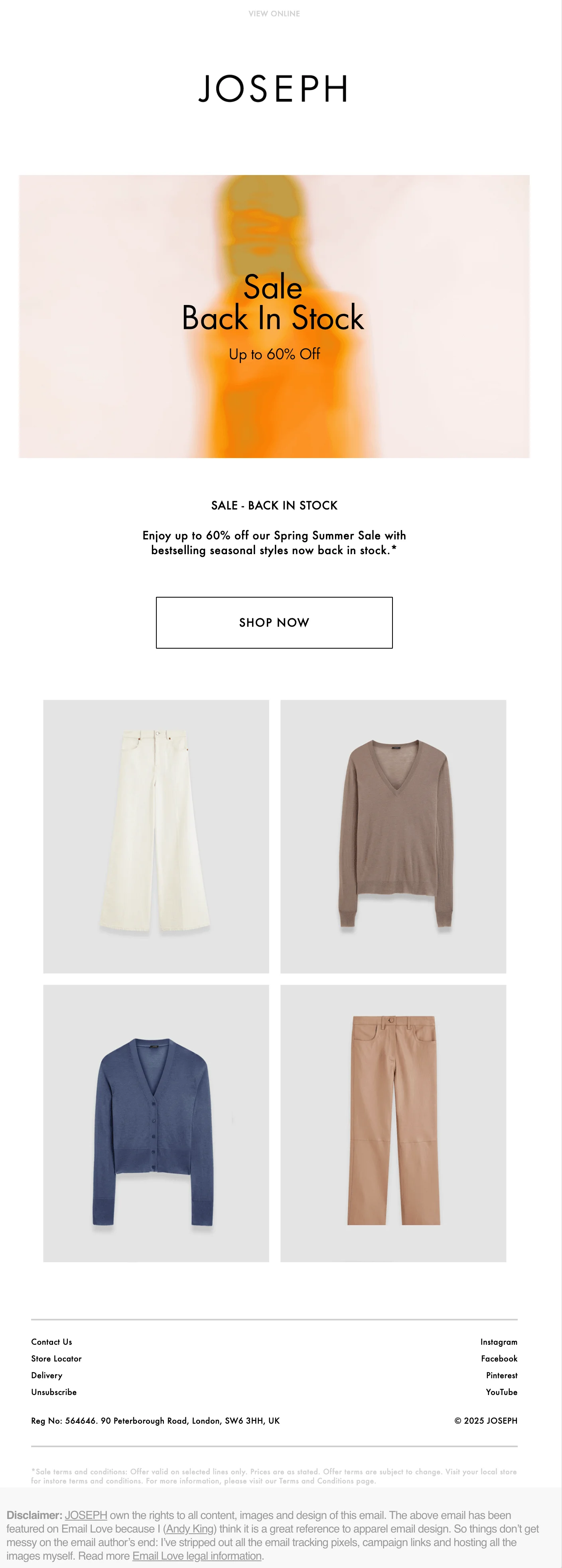
Why it works:
- Distraction-free design. The layout is uncluttered, so attention stays on the products.
- Strong product photography. High-quality images show the items without needing much explanation.
- Concise copy. Short text quickly explains what’s back in stock and why it’s worth checking out.
5. Hard Lines

Why it works:
- Integrated restock message. The restock announcement is built naturally into the newsletter, so it feels like part of the content rather than a sales email.
- Distinct brand voice. The tone, visuals, and copy stay consistent with the brand’s usual style.
- Value-driven storytelling. The email highlights charity work and brand values alongside products, which builds emotional connection and long-term loyalty.

6. Fishwife
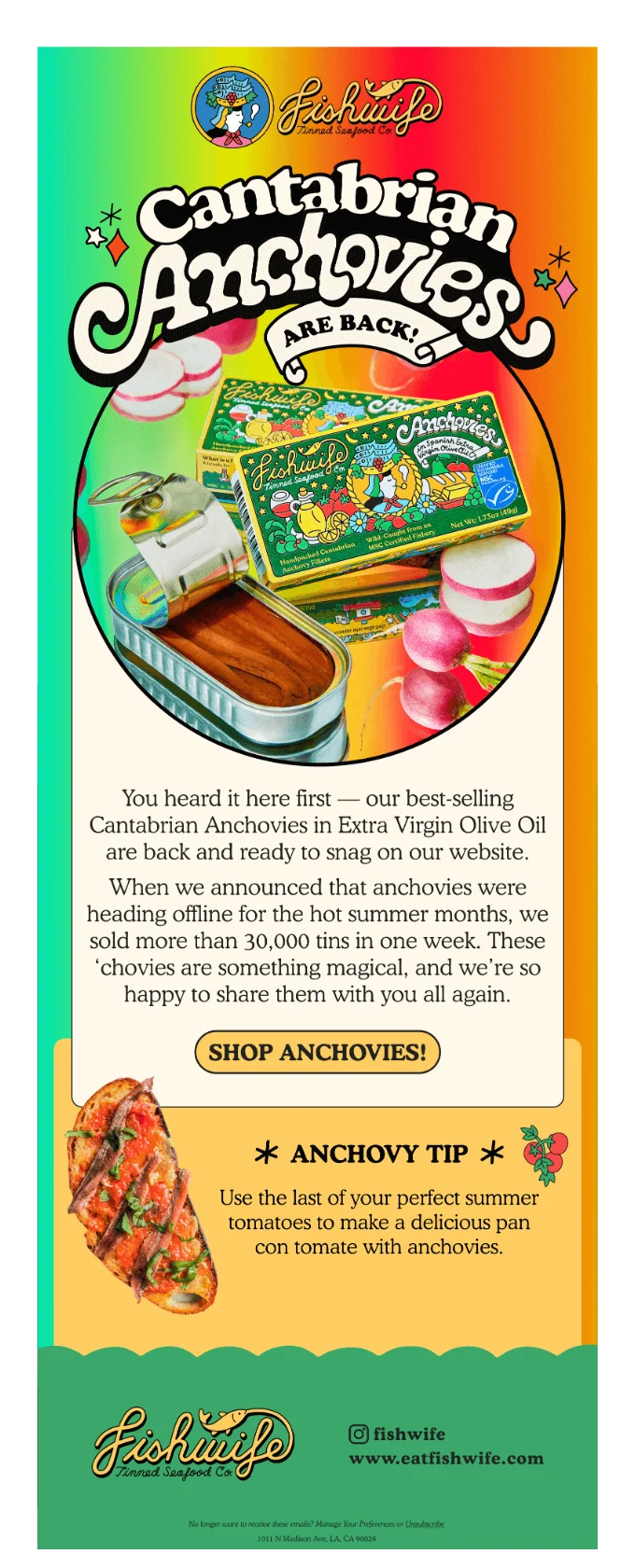
Why it works:
- Strong demand signals. The email mentions past sell-out numbers to show strong interest.
- Playful brand visuals. Bold colors, illustrations, and typography make the email instantly recognizable and fun.
- Extra customer value. The recipe tip adds something useful beyond the restock notice, giving the recipient yet another reason to click.
7. Godiva
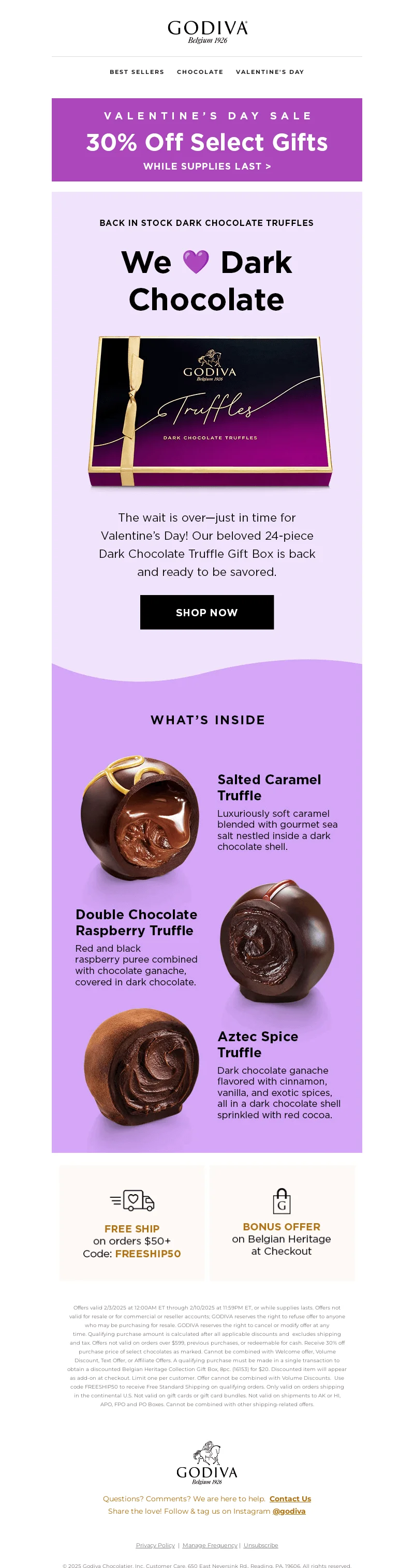
Why it works:
- Seasonal timing. The email links the restock to Valentine’s Day, giving customers a clear reason to buy now.
- High-value product presentation. Large and detailed images make the chocolates feel gift-worthy.
- Extra purchase incentives. Discounts, free shipping, and bonus offers work together to reduce hesitation.
8. Twoobs
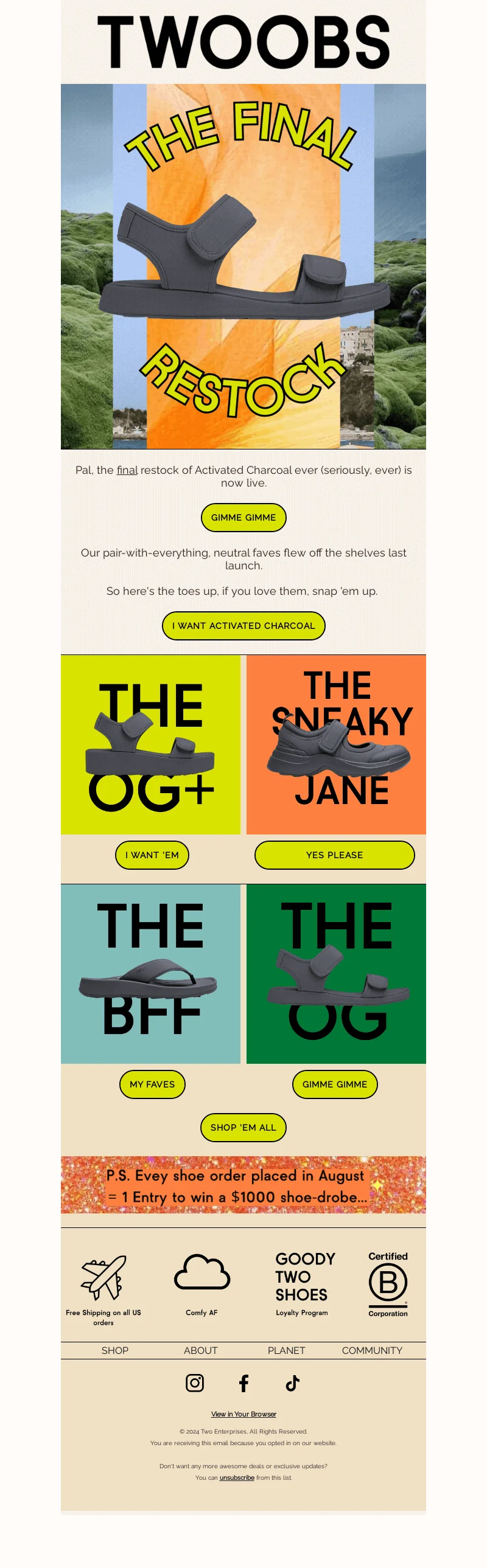
Why it works:
- Final-chance urgency. The email clearly frames this restock as the last one, incentivizing the recipient to buy ASAP.
- High-energy design. Bright colors and bold typography match the brand’s tone, as well as grab attention.
- Clear product choice paths. Even though there are multiple options, they’re all easy to scan.
9. Oh Polly
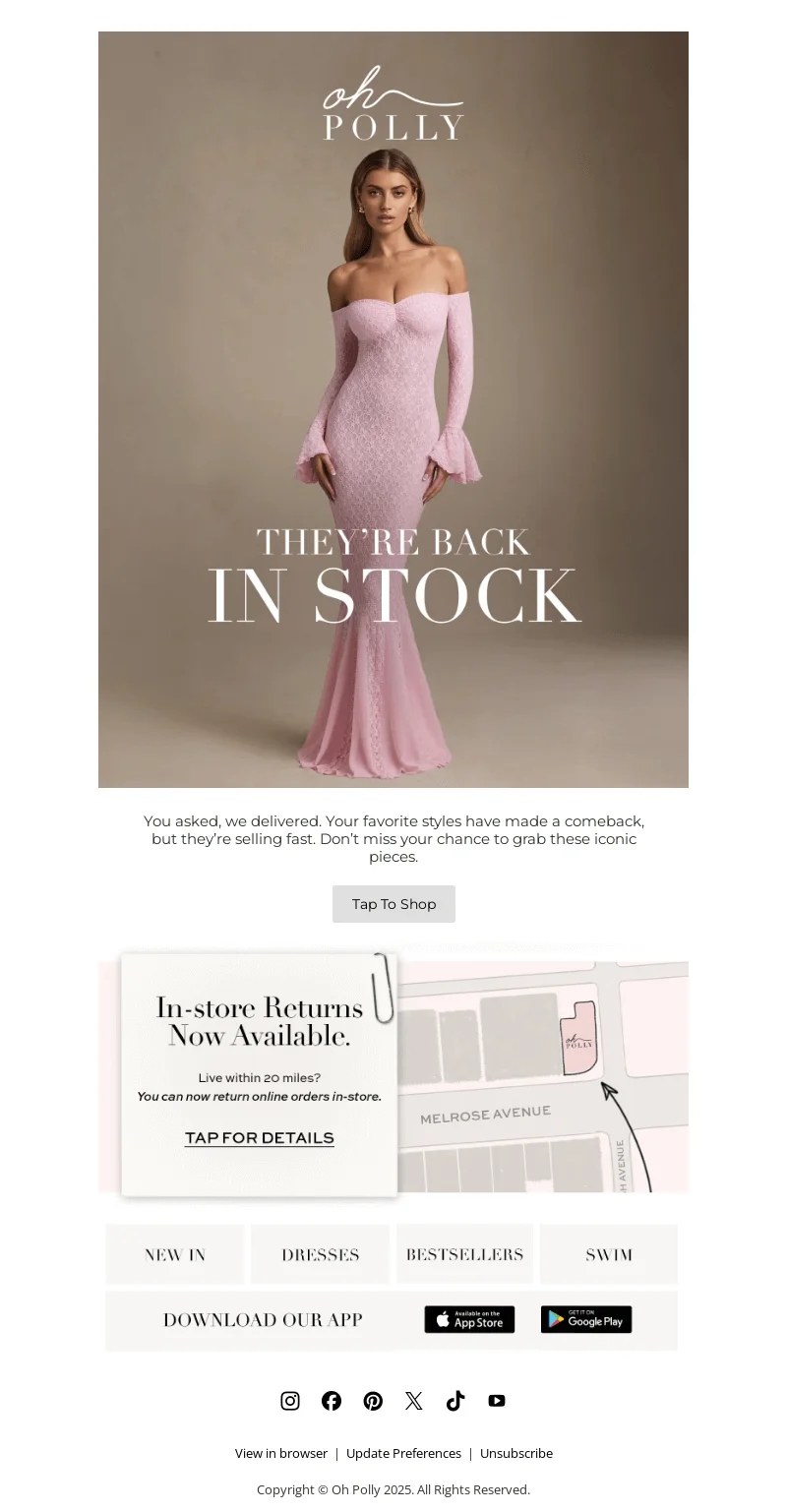
Why it works:
- Urgency-driven language. Even though the copy is designed to drive quick action, it doesn’t feel aggressive.
- Immediate restock clarity. The headline clearly states the item is back in stock, so there’s no confusion.
- Aspirational visuals. High-quality fashion imagery helps customers picture themselves wearing the product. This can lead to an impulse buy – we’ve all been there!
10. Wonder Valley
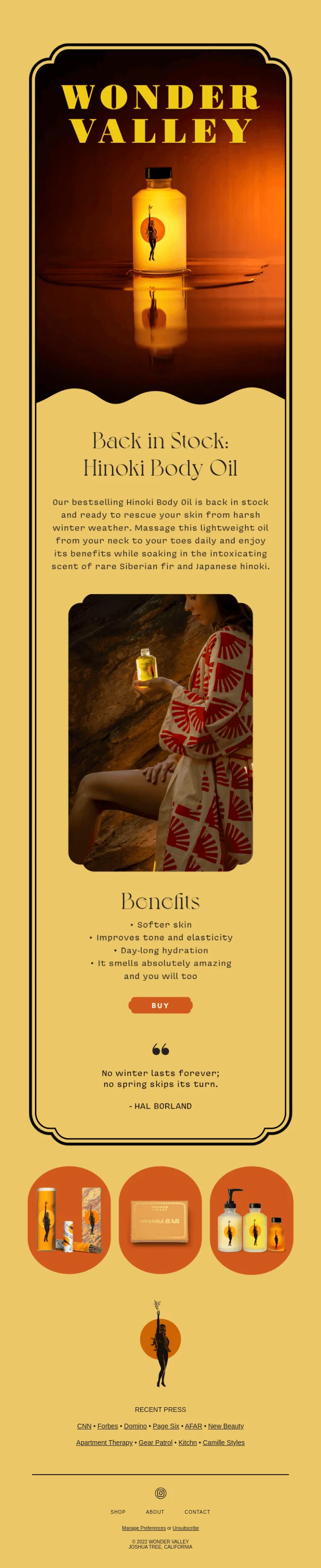
Why it works:
- Strong visual identity. The email instantly feels on-brand thanks to its bold colors, layout, and styling.
- Clear benefit listing. Key product benefits are spelled out simply, making it easy to see why the product is worth buying.
- Clear product focus. The entire email stays centered on one item, keeping attention on the restock and reducing distraction.
11. Betsey Johnson
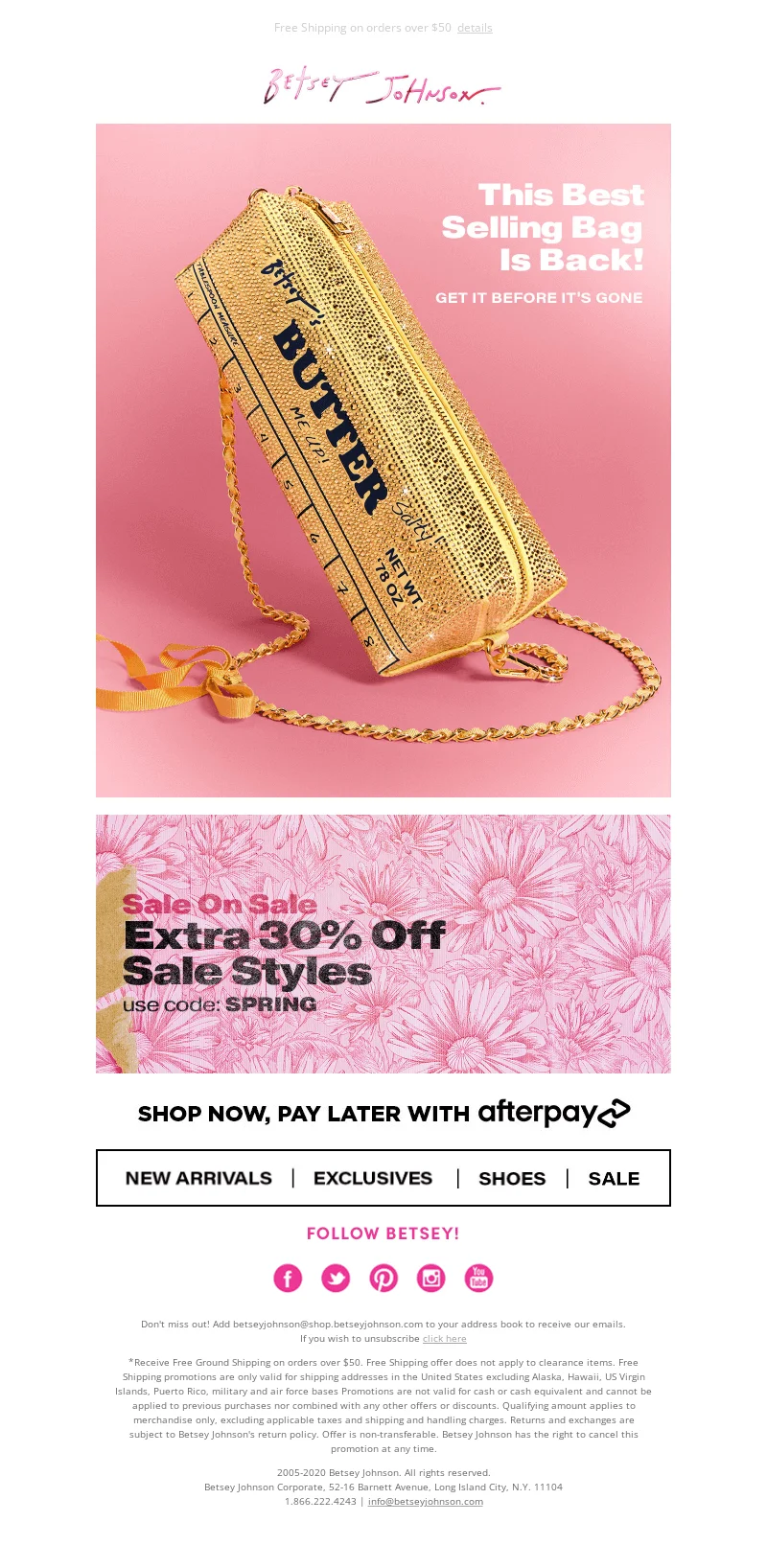
Why it works:
- Proven bestseller. The email clearly states that the item is a best seller, which reassures customers that it’s popular.
- Urgency framing. Phrases like “get it before it’s gone” create a sense of limited availability.
- Bold brand visuals. The colors and design of this email match the brand’s personality and make it stand out.
12. P&Co
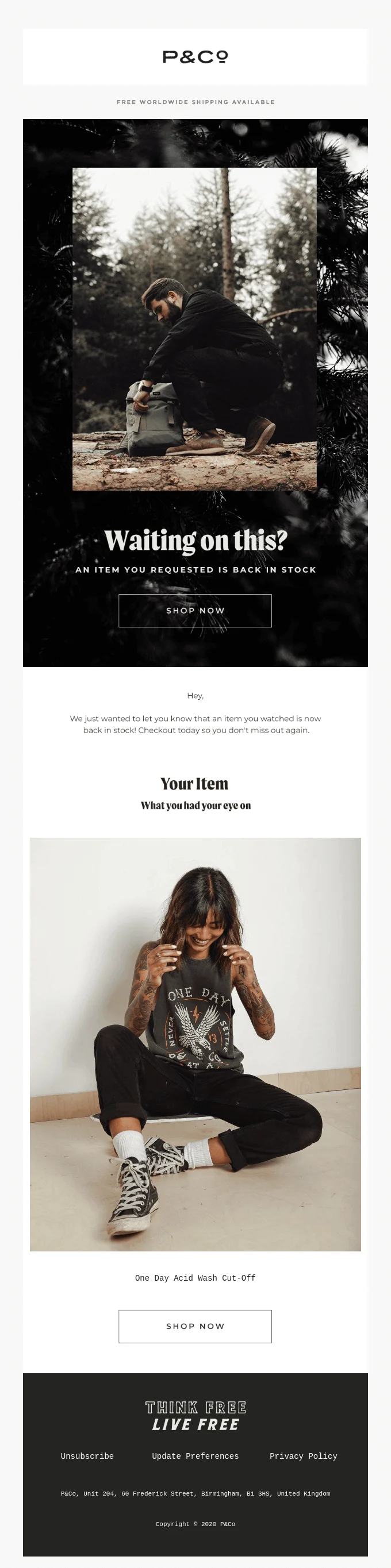
Why it works:
- Direct intent. The email clearly references an item the customer viewed or requested.
- On-brand visuals. The photography and styling match the brand’s aesthetic.
- Focused structure. A single product, a clear headline, and one primary CTA keep the recipient’s attention on completing the purchase.
13. Grooming Lounge
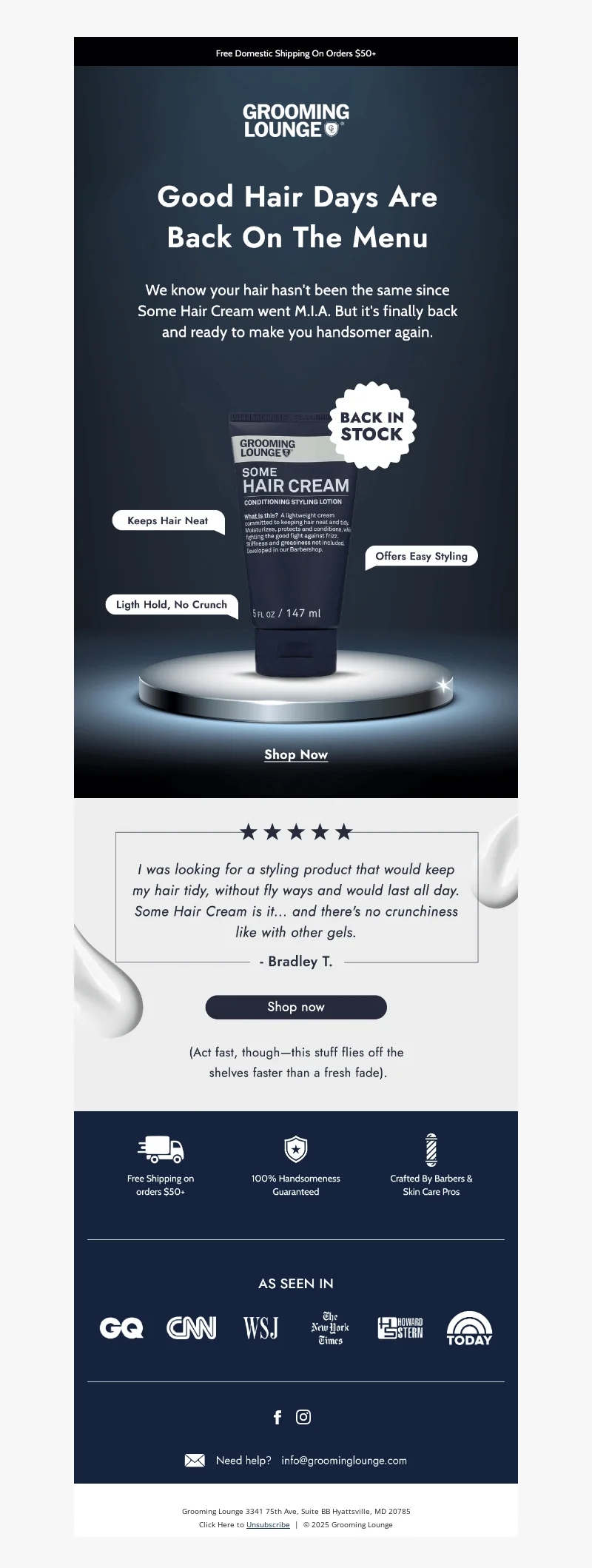
Why it works:
- Playful messaging. An amusing copy makes the restock feel fun and human instead of just promotional.
- Trust signals. Reviews, media logos, and guarantees reduce hesitation.
- Clear benefits. Short feature callouts explain what the product does and why it’s useful at a glance.
14. Uniqlo
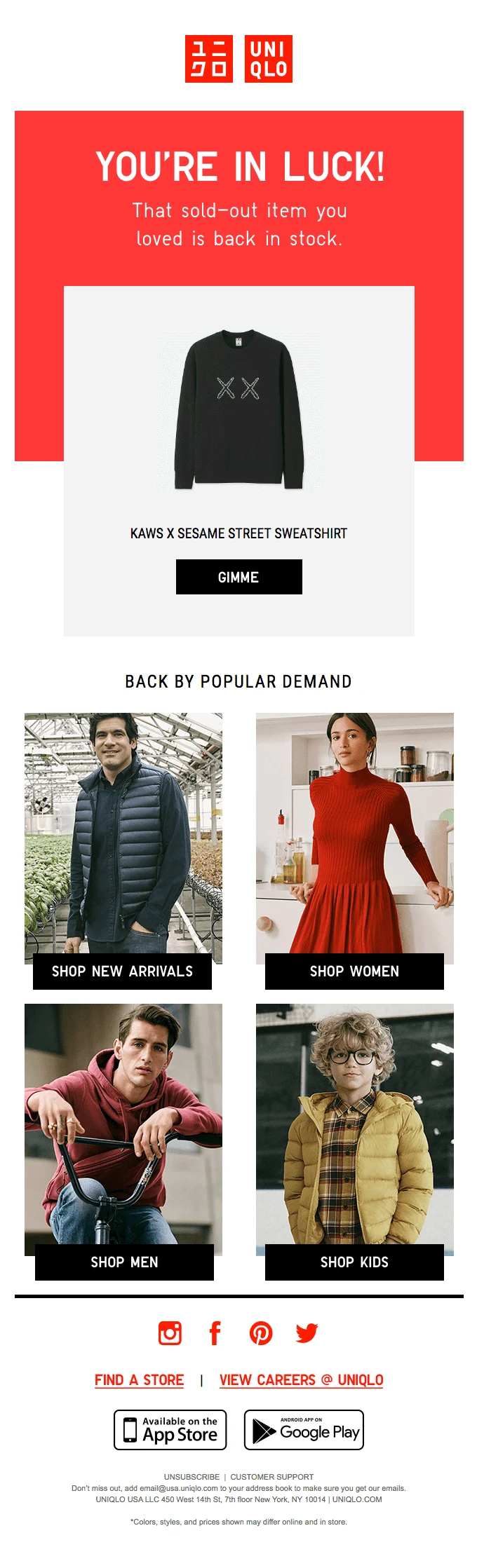
Why it works:
- Clear demand signals. Phrases like “back by popular demand” immediately explain why the product returned.
- Positive framing. Optimistic copy (“you’re in luck”) makes the restock feel like good news rather than a promotion.
- Focused presentation. One main product is highlighted first, keeping attention on the restock before trying to cross-sell.
15. Roller Skate Nation
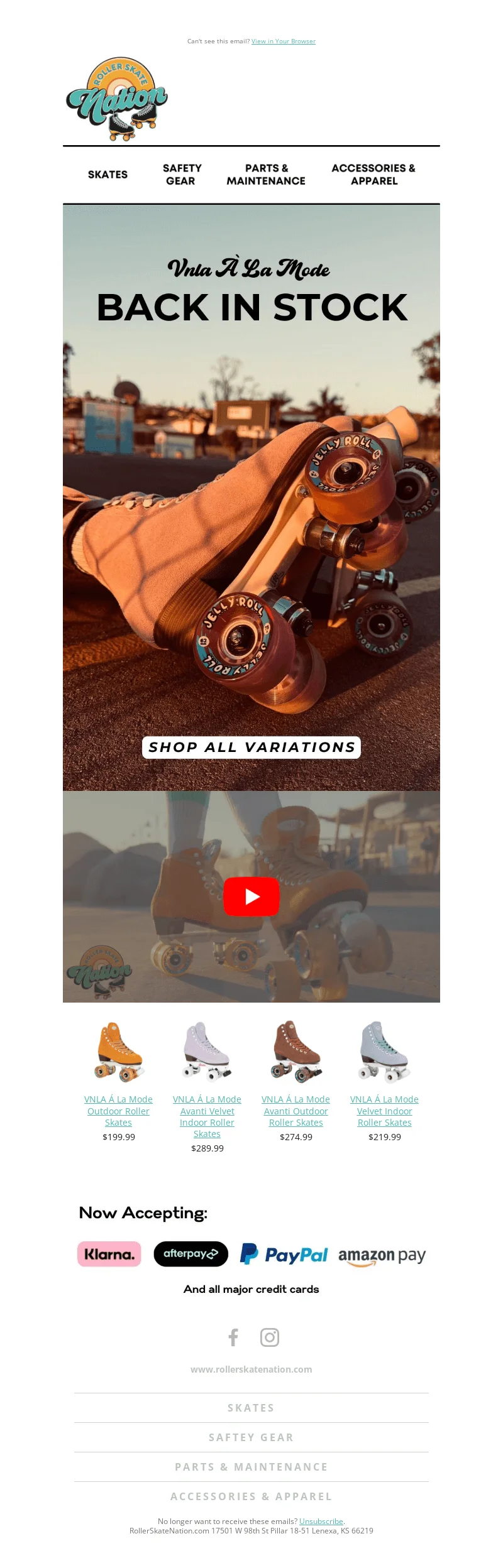
Why it works:
- Clear restock announcement. The headline immediately confirms the product is available again.
- Contextual video. The video shows the skates in action.
- Easy product navigation. A prominent “shop all variations” button makes it simple to familiarize yourself with all models and colors.
How to write effective back-in-stock emails
Even though the emails above come from different e-commerce sectors, they have a lot in common. In this section, we’ll have a look at what makes a back-in-stock email effective and how you could get started with restock emails of your own.
Highlight urgency and scarcity
Back-in-stock emails work best when they remind customers that availability may be limited.
After a restock, quantities are often small, and popular items can sell out again quickly. Simple time-based cues like “back for a short time”, “limited quantities”, or “while stock lasts” can help encourage action. However, this approach requires moderation — you don’t want to come across as spammy.
Personalize your messaging
Personalization is so, so important for email marketing. And these days, it goes beyond addressing the customer by name (but it’s good practice to do so anyway!).
So, use all the customer data that you have. Mention the exact product the customer showed interest in and match the message to their past behavior — whether they viewed the item, joined a waitlist, or abandoned a purchase. This makes the email feel relevant.
Show what makes the product special
Back-in-stock emails aren’t a good place for a full product description or any unnecessary tech jargon, but it’s a good idea to quickly remind the customer of the product’s key features. Highlight one or two key features or qualities, such as the design, functionality, or popularity of the item to jog the recipient’s memory. And don’t forget to add strong images to reinforce everything.
Add social proof or reviews
In emails, social proof usually appears as customer reviews, ratings, testimonials, or labels like “bestseller” or “customer favorite.” It helps confirm that the product is worth buying, as well as reinforcing demand and reassuring shoppers.
Keep the CTA clear and direct
A CTA, which stands for “call to action”, is the button or link that tells customers what to do next. For example, common CTAs for back-in-stock emails include phrases like “Shop now” or “View item”. Use simple, action-oriented language and avoid adding multiple competing CTAs.
Subject line ideas to boost open rates
There’s one thing all marketing emails have in common: the subject line you choose can either make or break your campaign. That’s because the subject line, together with the preview text, is often the first thing your subscriber sees. We’ve collected some of the best back-in-stock subject lines you can totally steal for your next campaign.
- It’s official: [product name] is BACK
- Guess who’s back in the house
- Back in stock on all your favorites
- (finally) back in stock 🦋
- We brought something back for you
- Missed out last time? These sold-out pieces are back in stock
- [Product name] has returned ✨
- Our bestseller is back in stock
- Hurry! [Product name] is back in stock
- BACK IN STOCK: [product name]
- Our BIGGEST back-in-stock delivery… maybe ever?
How to set up a back-in-stock email campaign (step-by-step)
Let’s put all this theoretical knowledge into practice. Here are a few simple steps you can take to set up your own back-in-stock email campaign.
Enable back-in-stock notifications on your website
To set up a back-in-stock campaign, you first need a way for shoppers to ask to be notified.
This usually starts on the product page when an item is out of stock. Instead of an “Add to cart” button, show a clear CTA like “Notify me when available”. These notifications perform best on individual product pages, rather than on category pages. Try to keep the signup process simple, and in most cases, just asking for the customer’s email address is sufficient.
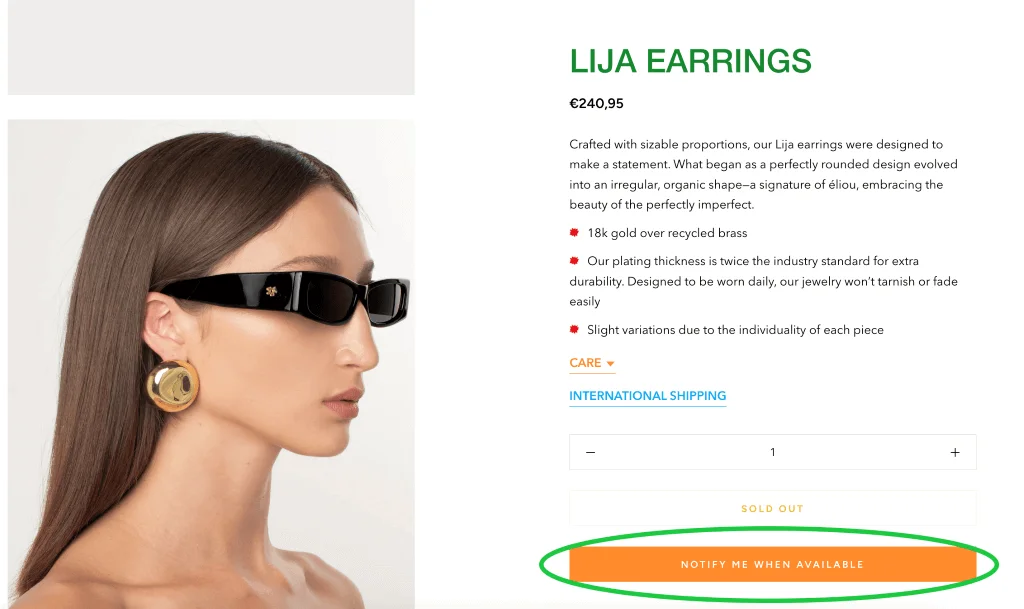
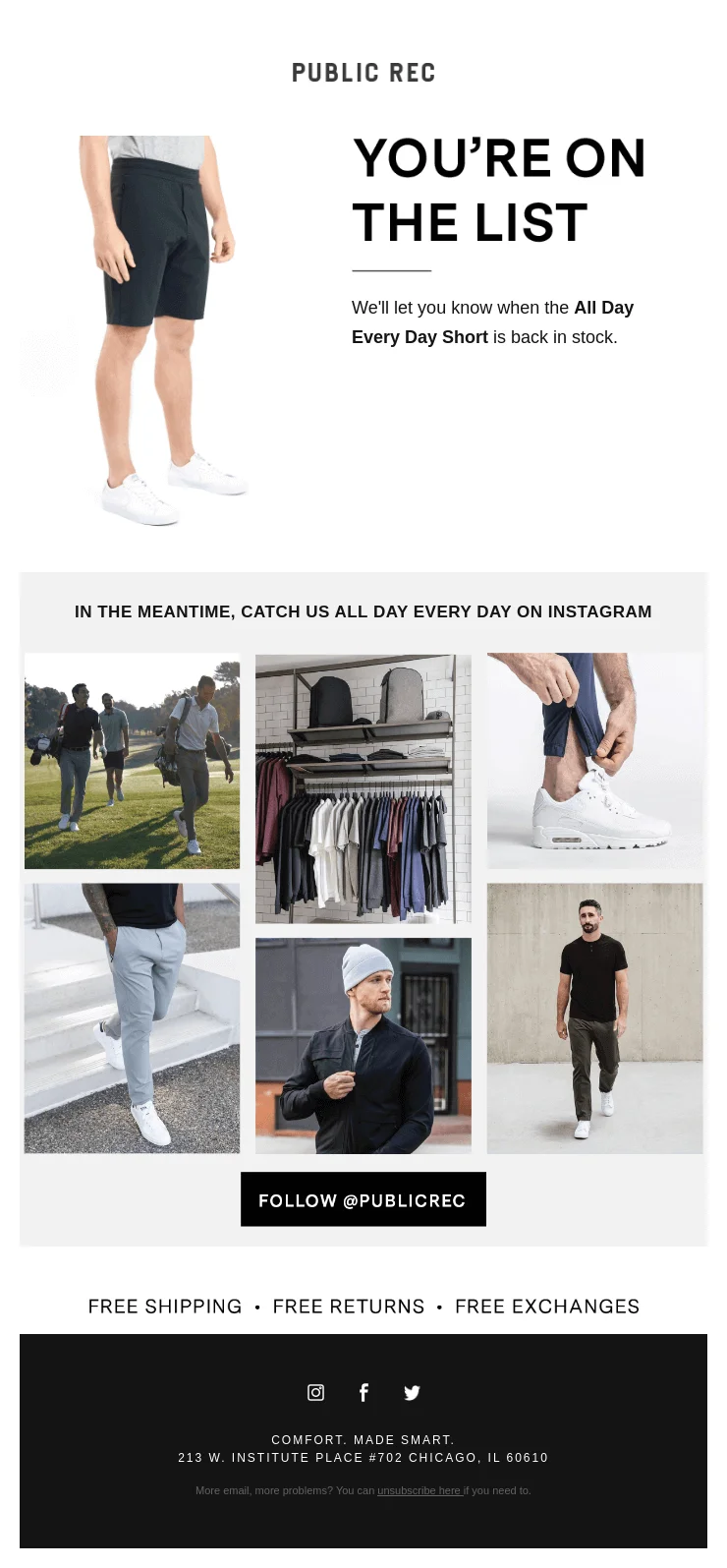
Once a customer signs up, it’s also a good idea to confirm that their request was received. Here’s an example of an email like this:
Segment customers who requested updates
Segmentation means splitting your email list into smaller groups based on customer behavior, traits, or interests, so you can send more relevant messages to each group.
If we’re talking about the simplest setup for back-in-stock emails, you don’t need to segment your audience at all. When a customer signs up for a restock alert, the email is sent automatically as soon as the product becomes available again.
However, as we’ve seen above, many brands send out broader restock announcements, cover multiple products at once, or target customers based on past behavior rather than a single request. Here, segmentation makes sense.
For example, you could create a segment of customers who previously purchased from the same collection or product line, who engage with products of the same category, or browse related items.
Prioritize high-value or VIP customers
Not every customer is the same. Some of them buy more from your brand, engage with your content more, or regularly engage with promotions. These are your VIPs, and you should prioritize them for your back-in-stock emails.
For example, you can send restock emails to this group first or give them early access before opening availability to a wider audience. This makes loyal customers feel like they’re appreciated.
Automate your workflow in the email platform
We’ve already mentioned several times that back-to-stock emails are automated. But what does this mean, exactly?
If you’re using an email service provider like Selzy (and you’re running email campaigns, you really should), you’ll be pleased to learn that they often support trigger-based automation. This means an email can be sent automatically when something happens on your website or in your store. For back-in-stock emails, this is when a product’s stock status changes from “out of stock” to available. Another relevant example of trigger-based automation is when a customer signs up for product notifications, they receive a confirmation email that was triggered by this action.
Once the trigger fires, your ESP can do the following:
- Send the email instantly, without you needing to do anything.
- Pull dynamic content like product names, images, or links.
- Repeat this process many times across many products.
Here’s how you can set this process up in Selzy. The image below shows a scenario for a welcome email, but the general idea is the same.
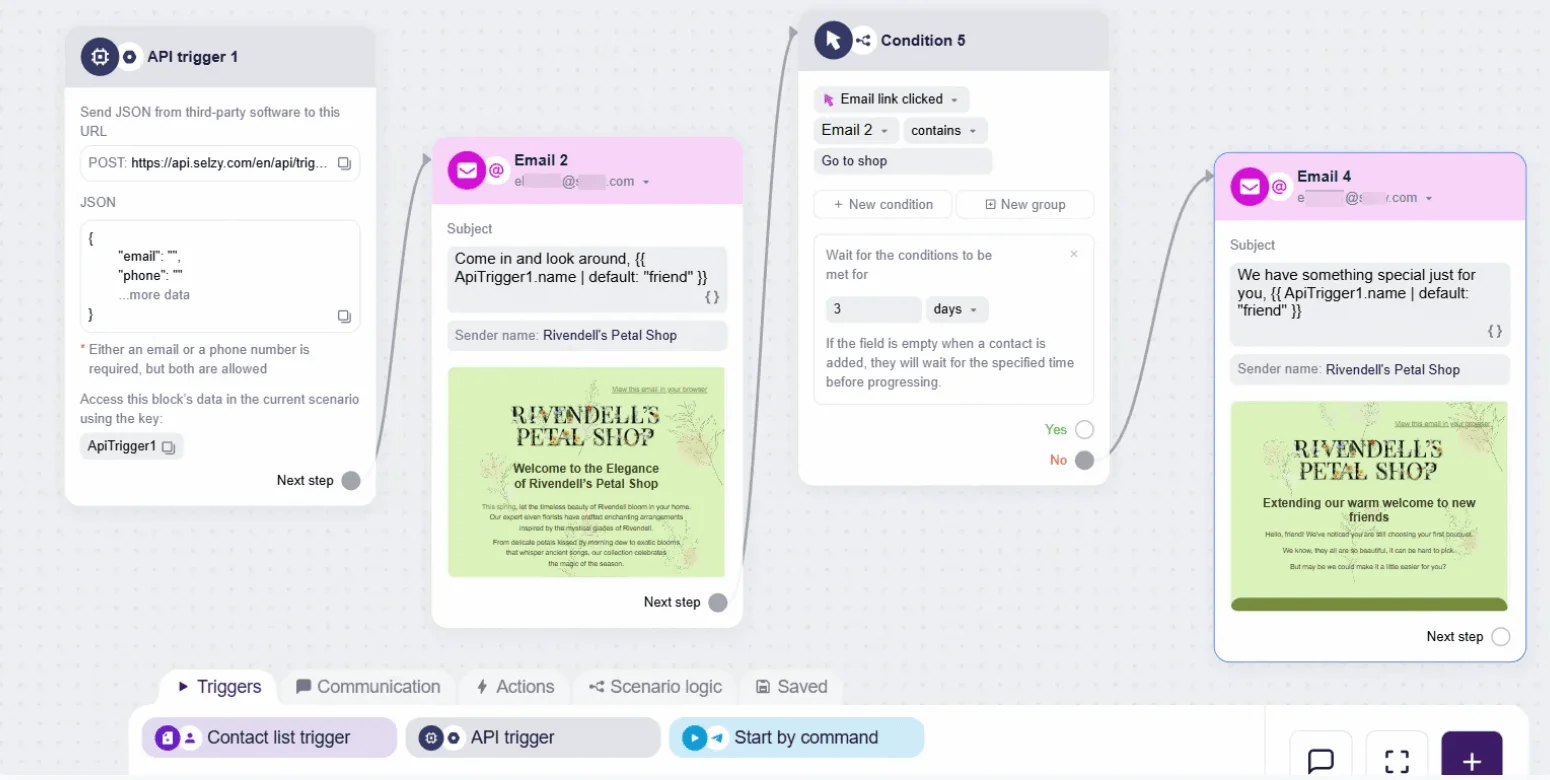
In most cases, your back-in-stock email should be triggered the moment a product’s status changes from out of stock to available.
Track performance metrics (CTR, conversions, unsubscribes)
Once your campaign is live, the work doesn’t end there. It’s always important to check how your emails are performing, so don’t just forget about them as soon as you’ve released them into the wild.
There are several metrics to help you gauge how well your emails are doing. The good news is that your ESP can also do all of that work for you, so you don’t need to calculate anything. This is Selzy’s dashboard, where you can see all the metrics and stats.
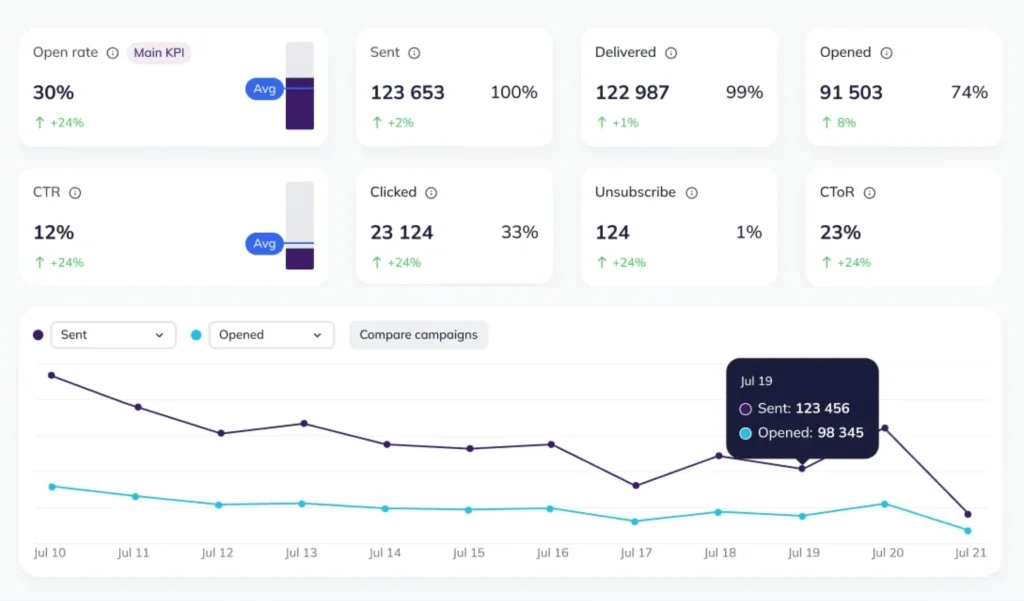
Now, let’s get specific. For back-in-stock emails, some metrics are more important than others.
- Click-through rate (CTR) shows whether people are interested enough to click through from the email to the product page. A strong CTR usually means the message feels relevant and timely.
- Conversions show you how many customers actually bought after clicking. So, for back-in-stock emails, it’s completing a purchase after receiving the email. This is the clearest signal that your back-in-stock emails are doing their job.
- Unsubscribes are somewhat of a warning sign. If people unsubscribe after receiving restock emails, it may mean you’re sending too often, targeting the wrong audience, or promoting items they don’t really care about.
FAQ
What’s a back-in-stock email?
It’s an automated message that lets your customers know when a product has become available again. These emails are usually sent shortly after the item has been restocked.
Who gets back-in-stock emails?
These emails are primarily sent to people who expressed interest in the product in the past. This can include customers who signed up for alerts, joined a waitlist, or viewed the product earlier. Many brands also send back-in-stock emails to people interested in similar products.
Are back-in-stock emails promotional?
Not exactly. Back-in-stock emails are sent to share information about an update rather than to promote something. That said, many of them do include product details, reviews, or special offers to help customers decide.
How quickly should you send a back-in-stock email?
Back-in-stock emails work best when they’re sent as soon as the product becomes available again. At that point, customer intent is still high, and the product is top of mind. Delaying the email for too long increases the chance that shoppers lose interest or buy from another brand.
Do back-in-stock emails need a discount to work?
No, discounts aren’t required for back-in-stock emails to be effective. Since these messages are sent to customers who already showed interest in the product, the restock itself is often enough to drive action. Many brands rely on urgency, limited availability, or social proof instead.
 New and noteworthy on our blog