


Key takeaways
- Triggered emails are automated responses based on user behavior, time, events, or engagement.
- Triggered messages generate 10 times higher revenue-per-email than regular emails.
- Types of triggered emails include behavior-based, time-based, event-based, and engagement-based triggers.
Through email triggering, you can welcome new customers, confirm a purchase, or remind customers of their abandoned carts. The best part: you or your team don’t have to do it manually.
In this article, we’ll get you covered with the best triggered email examples and best practices for the current landscape.
Why use triggered emails?
Triggered emails are automated responses, set up to be sent based on user behavior, time, events, or other forms of engagement.
For example, if you get a new customer, that’s a trigger for a welcome email. Opening your email inbox and writing a reply for each new subscriber would be extremely time-consuming. That’s why you use triggers – to save yourself time, to standardize communication, and to properly react on time to what customers do.
For detailed information, read our overview article on triggered emails.
What’s important is that according to data from Validity, triggered messages generate revenue-per-email that is 10 times higher than regular ones. When properly set up, they ensure that you can respond on time to all your customers’ actions, or lack thereof.
Types of triggered emails
Behavior-based triggers
Behavior-based triggers are dependent on what your customers do, or don’t do. Common examples are abandoned carts or views, website clicks, read content, purchasing behavior, etc.
Time-based triggers
Time-based triggers relate to automated messages sent on specific, pre-defined dates and times. These could be subscription renewals, client anniversaries and other special dates, or seasonal promotions (Black Friday, Valentine’s Day), among others.
Event-based triggers
Event-based triggers happen when a pre-determined event occurs – a product back-in-stock update, changes to terms and conditions, software getting updated, loyalty program status updates, and more.
Engagement-based triggers
Triggered emails also work based on a customer’s level of engagement, or, in other words, how often they click and open your emails. Re-engagement flows, which are sent to contacts who haven’t been interacting with your messages, are the most common examples.
Best triggered email examples
1. Welcome emails — Start the relationship right
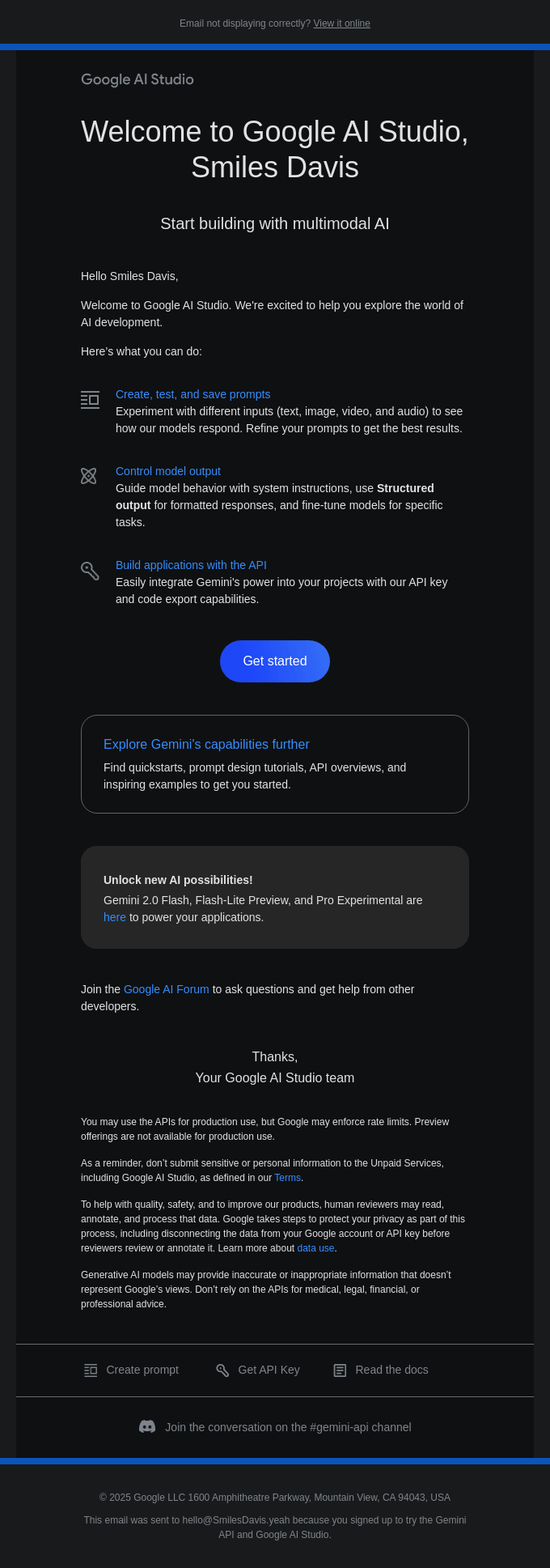
Welcome emails are the first ones you send once a user subscribes. They are meant to introduce subscribers to your company and what it offers, making them feel right at home.
Google’s AI Studio message works well in that respect: it has a touch of personalization, a concise welcome message, and an introduction to some of its main features.
The “get started” button is there for people who want to delve into the product right away, too. When you send a welcome message, don’t just write “welcome” and call it a day. This one strikes the right balance between showing new possibilities and not overwhelming new customers.
2. Onboarding emails — Guide users through first steps
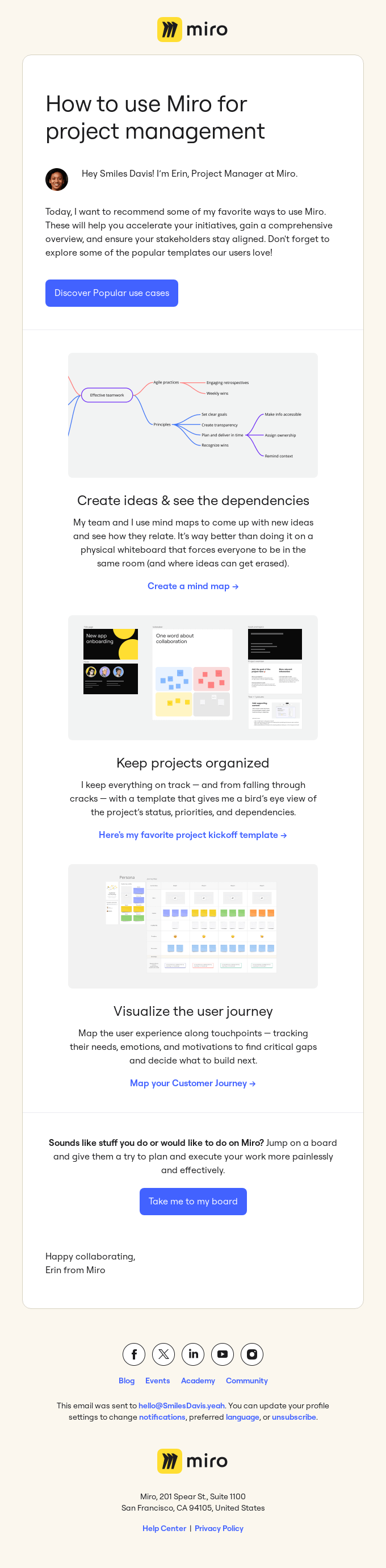
Onboarding emails offer more details about product features, educating the user about its capabilities. Their idea is to guide the user, driving adoption and retention along the way.
Miro, an online interactive whiteboard, can be used for many purposes, and the message above showcases just that. The message contains personalization, popular use cases for the platform, and CTA buttons to redirect the subscriber.
3. Cart abandonment emails — Recover lost sales
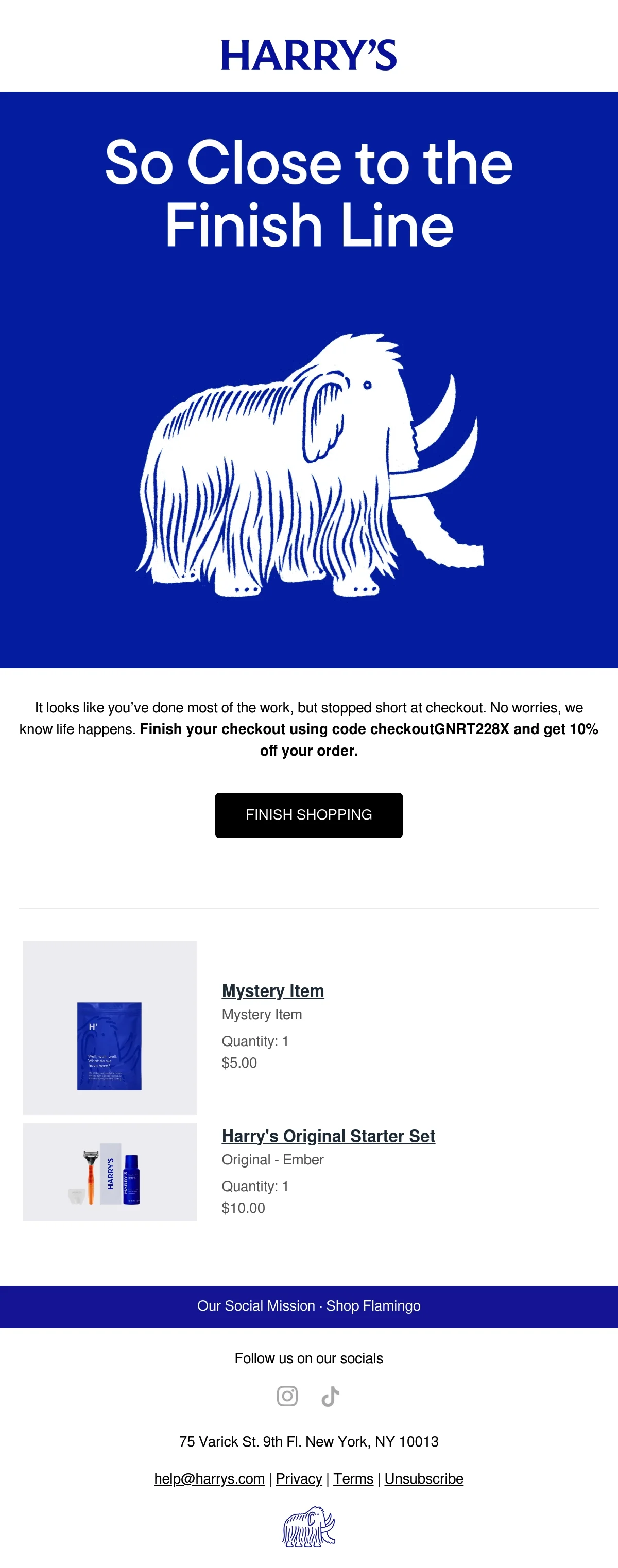
Sometimes, life gets in the way, and people can’t finish a purchase. Perhaps they were interrupted or too busy for their own good, or maybe they just gave up halfway through.
Cart abandonment emails are there to remind customers they didn’t complete their order. Harry’s email nudges customers in the right direction, even offering a 10% discount.
This is a really effective way of going about it. Whatever the reason, it is a nice reminder, and they even get a discount. In case they had just quit on the purchase, the 10% off might be the needed encouragement for a change of heart.
4. Order confirmation & shipping emails — Build trust
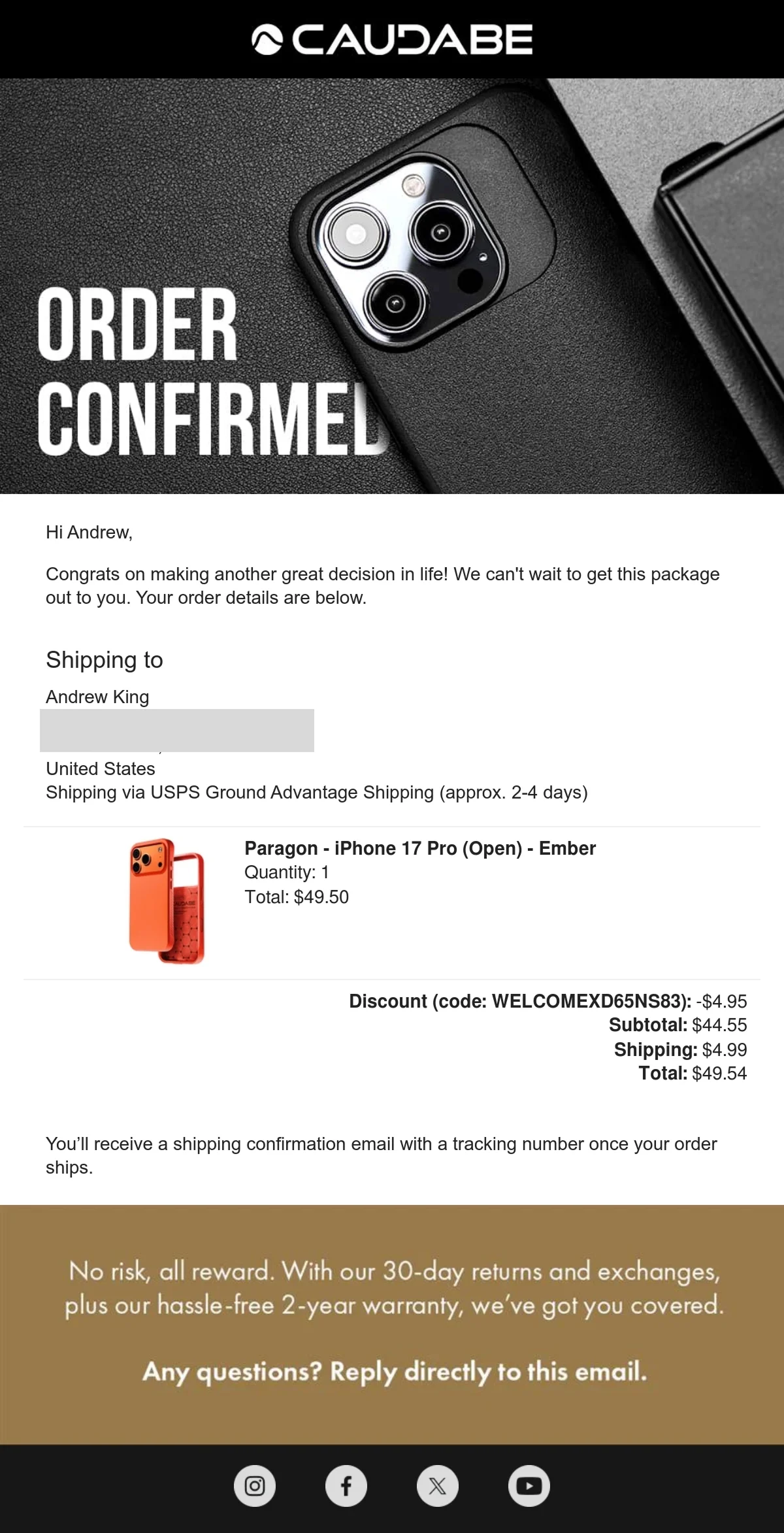
Order confirmation emails are common, transactional messages sent to customers who have just completed a purchase. Aside from adding an extra element of comfort (it’s good to know everything worked out fine), it shows your company has a standard procedure in place.
Caudabe’s message has everything you need: personalization, a thank you, product description, and price, plus information about the shipping process. These emails are also important because they enable both parties to act if any information is wrong (the shipment address, for example).
5. Re-engagement emails — Win back inactive users
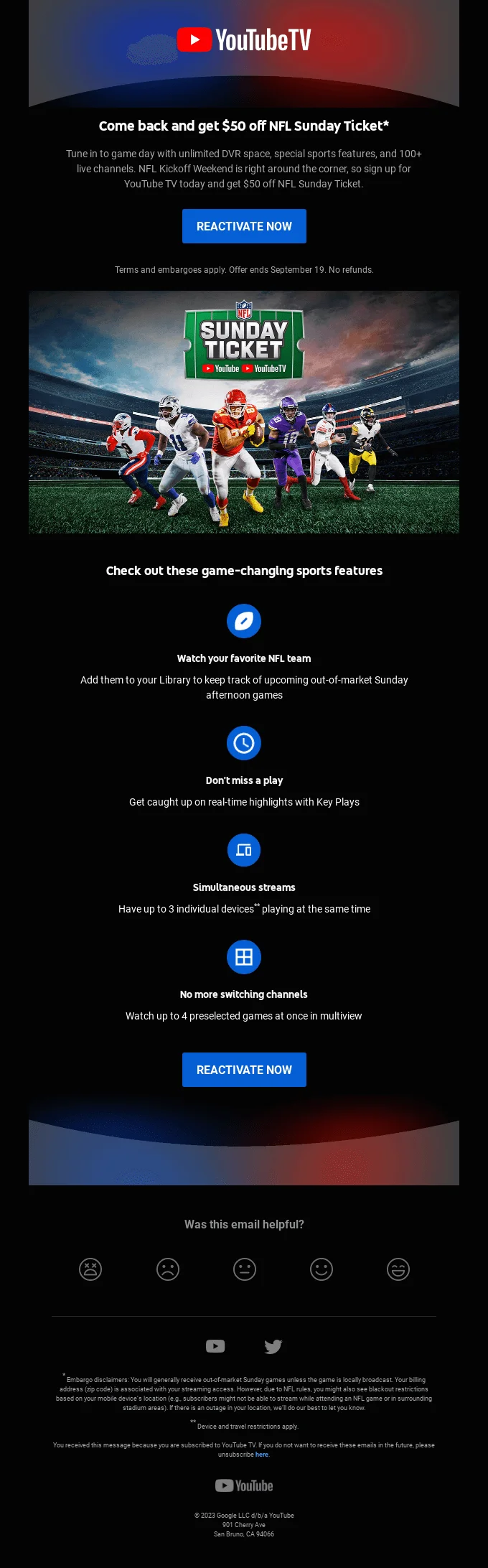
Re-engagement emails are an attempt to reconnect. They are usually sent when customers haven’t interacted with email campaigns for some time. While insisting on a relationship that isn’t working is counterproductive, giving up right away is even worse.
YouTube’s message is a nice invitation to come back: a hefty price discount for something the recipient was probably interested in. As a rule of thumb, it’s a good idea to offer something of value in your first re-engagement email. The “offer ends September 19” is a nice touch, encouraging the fear of missing out on a promotion. By the way, if you need more information on how to make the best out of this tactic, we have a complete guide on FOMO.
6. Birthday & anniversary emails — Add personal touch
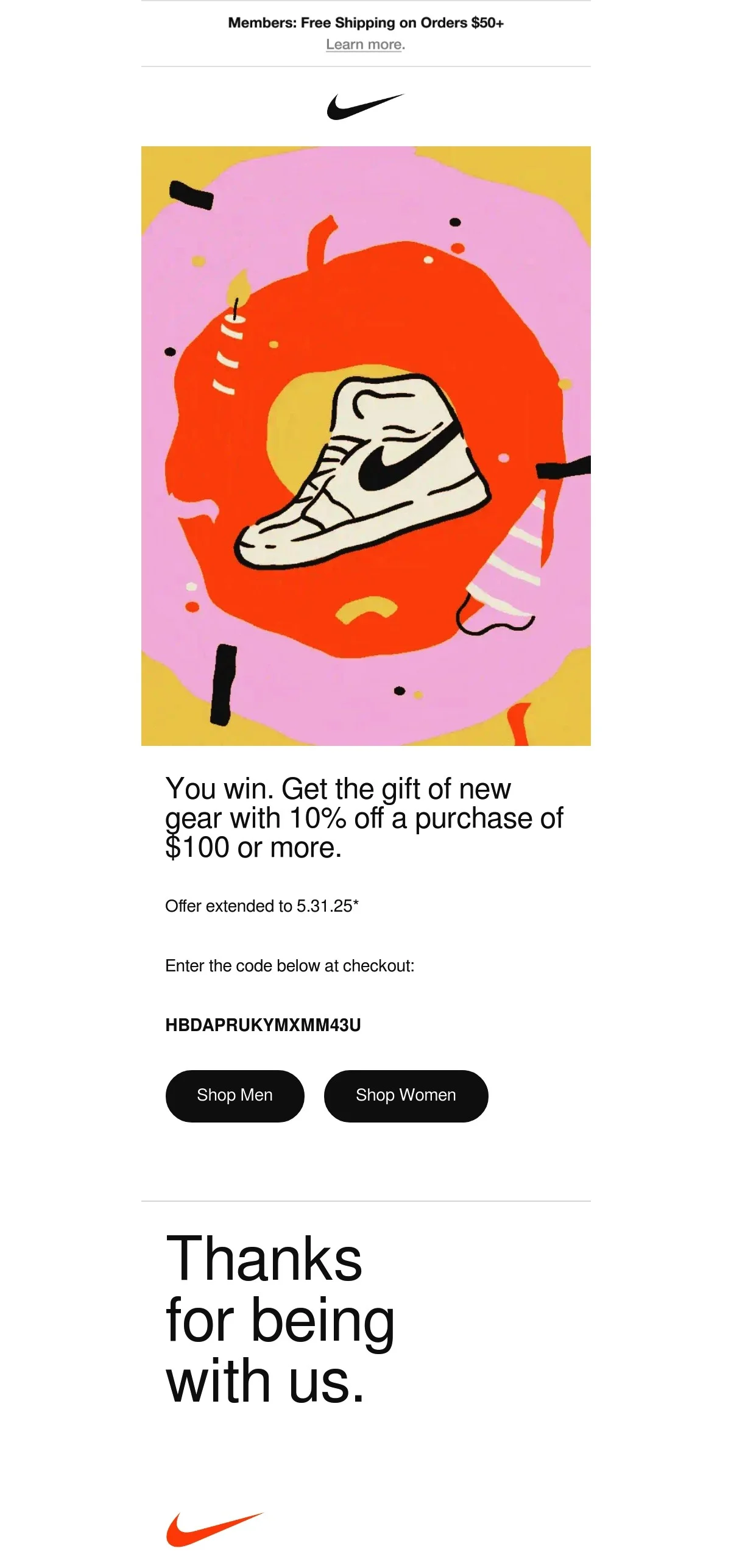
Everybody likes being remembered on their birthday, and that’s what birthday emails are for. As an alternative, you can also trigger email messages on relationship anniversaries or for your own company’s anniversary.
In Nike’s case, the brand stays within its visual identity, adding a nice birthday art, a 10% discount for purchases over $100, and a thank you message. The extra touch is that the offer is extended past the actual birthday, but still has a deadline. The FOMO tactic is being used effectively here, too.
7. Product recommendation emails — Personalize the upsell
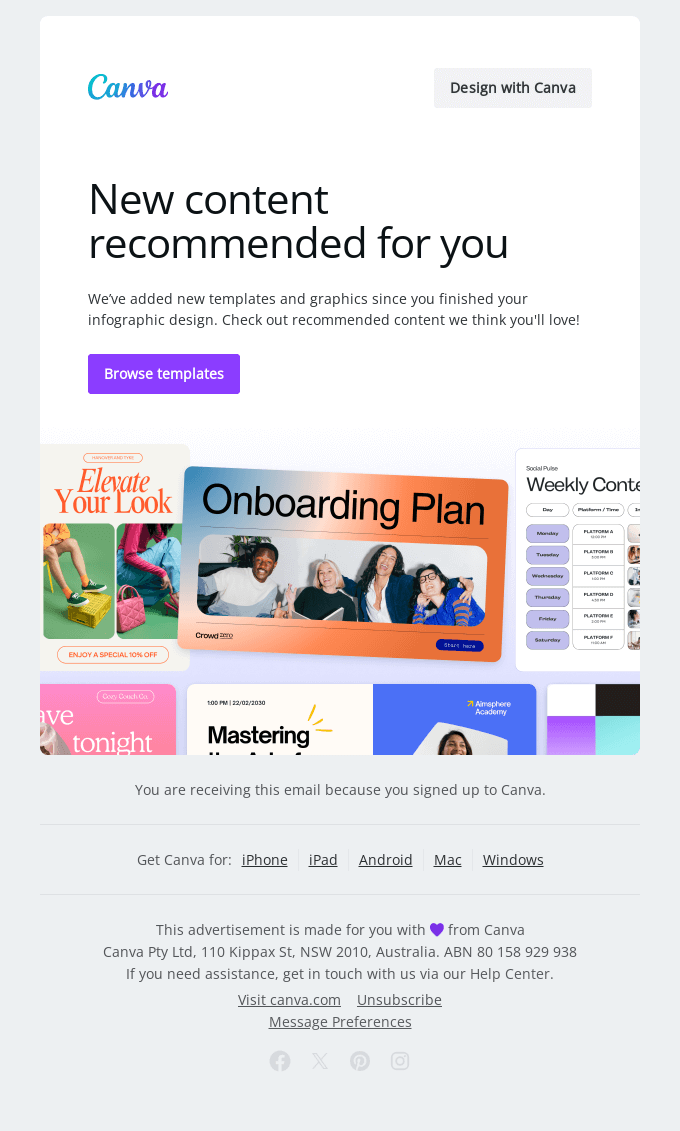
Part of marketing is to let your customers know what’s new, of course. You can, and should, offer them personalized product recommendations. Actually, these offers increase your chance of conversion, as you are showing them something connected to what they already expressed their interest in.
Canva’s approach catches the eye because the recommendations are personalized, but you have to click the CTA button to check them out. This is a nice combo of FOMO tactics, personalization, and design, and it is likely to have a good click rate.
8. Replenishment or subscription reminder emails — Drive repeat orders
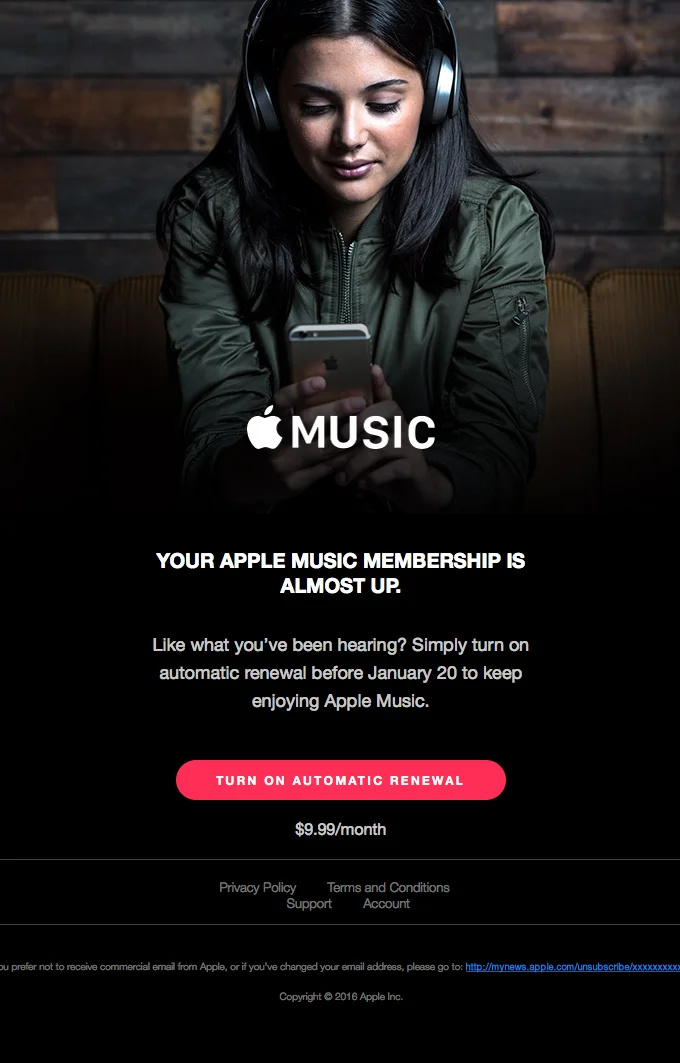
Replenishment (product back-in-stock) or subscription reminders are there to drive repeat sales and keep the flow going. As long as you offer something of good quality and value, clients will probably have no reason to discontinue their subscription.
Apple’s subscription reminder lets clients know about the expiration date, but adds a nice touch by offering an automatic renewal option. This way, the company doesn’t have to worry about those reminders, and the customer can use the service without thinking too much about monthly fees or expiration dates.
9. Feedback or review request emails — Build social proof
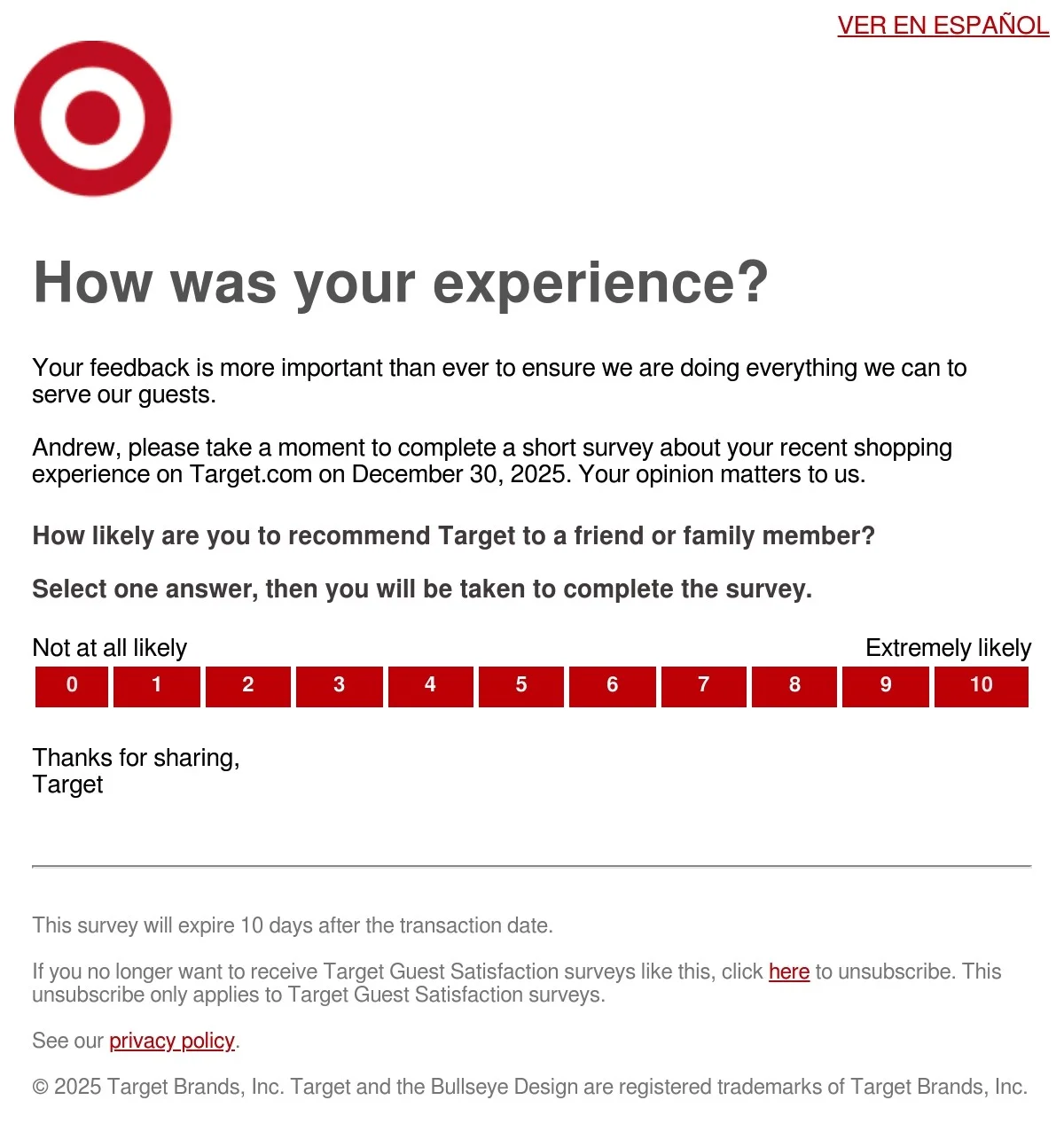
Product review requests are important for building social proof. When you have customers advocating for your brand, this generates more interest and at a lower cost of acquisition.
Target’s straightforward email is effective for a couple of reasons: the question is in the email body, and the ranking system also redirects you to the full questionnaire. If people have already clicked it, they will be more inclined to go through and answer.
What you do post-purchase matters just as much as converting for the first time, too. You want customers to buy from you again, after all. Sometimes, even if their experience wasn’t great, their feedback helps you improve.
10. Cancellation or post-churn emails — Try to retain or learn
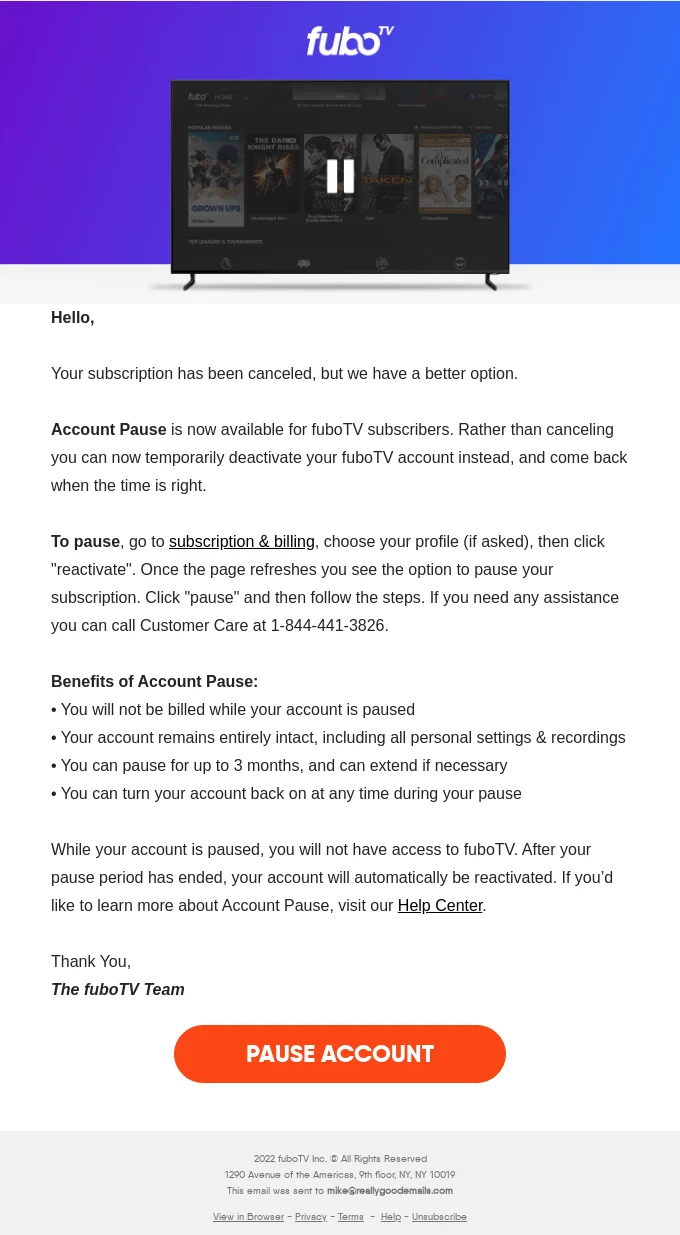
Cancellation or post-churn emails are often the last piece of interaction you’ll have with your customers, at least for a while. Post-churn messages are sent so that your business can have feedback from your customers after a cancellation. Cancellation messages are more informational, letting clients know they are ending their subscription, but also trying to reverse the situation one last time.
Often enough, cancellation emails provide a link to cancel the termination. FuboTV’s message is a little more inventive, allowing clients to pause their subscription (and the payments, too). Sometimes people just need more time to think it through. If you read closely, the service was already cancelled, so this is a nice attempt at winning back a few customers.
How to set up triggered emails step-by-step
-
Identify your most valuable triggers
Go through our list of examples and the most common types of triggered emails to understand which ones matter the most for you.
Needless to say, you don’t need to set automated responses featuring all email types we showed in this article. Focus on the ones that make more sense for your business, and add some as they become relevant.
-
Choose automation tools (ESP, CRM, e-commerce)
You could go for more complex CRM tools, e-commerce platforms, or a professional email service provider (ESP) like Selzy. Regardless, you need automation features, and an intuitive automation builder where you can set triggers and conditions for new emails to be sent.
If you are just getting started, we recommend sticking to ESP platforms, as they offer the best cost-benefit ratio. Most of them, however, only allow for automations on paid plans – but not Selzy. With Selzy, you can run triggered email campaigns even on the free plan. You can also check our user-friendly guide on how to set automation triggers within Selzy’s platform.
-
Map user journeys
From the moment a person subscribes to your list, the idea is to convert them into a customer, and that takes time. Think about the stages of a customer’s journey: awareness, consideration, decision, retention, and loyalty.
To make your life easier, here’s a possible path, connecting practical use of email marketing and triggered messages to different stages of a customer’s journey:
- Welcome/onboarding after subscription (awareness stage).
- Content newsletters, seasonal offers (consideration stage).
- Triggered emails based on customers’ actions (also consideration stage).
- In case of shown interest, personalized offers (decision stage).
- Order confirmation and then post-purchase emails, including review requests and thank you messages (start of retention).
- Retention emails (back-in-stock, resubscription offers, loyalty or VIP programs, more content, seasonal promotions, birthday and anniversary emails).
- Re-engagement emails in case they stopped showing interest.
The step-by-step above is only an example, so remember to identify what makes more sense for your business. If you need help with the earlier stages, check our complete guide on sales prospecting emails.
-
Set rules and conditions
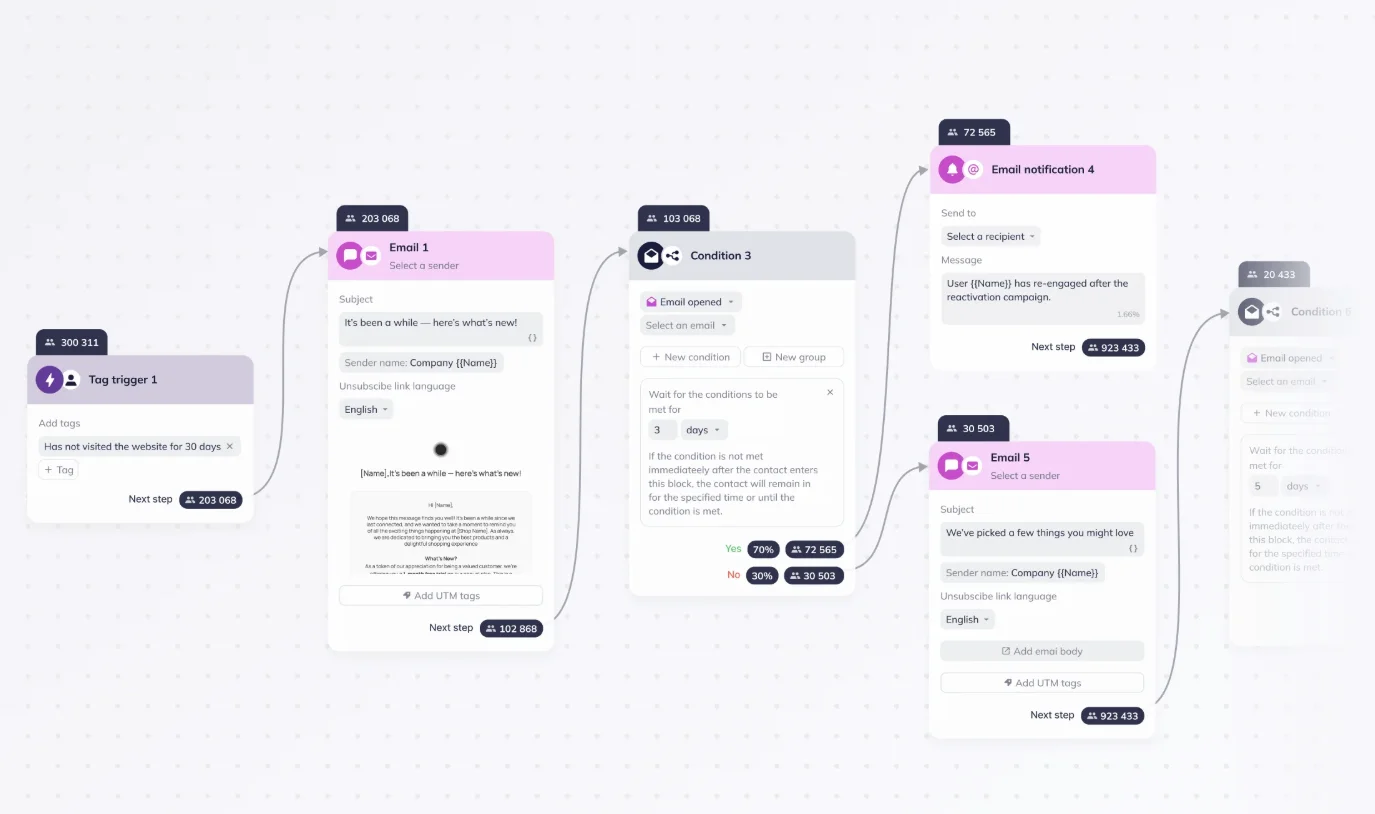
Now that you have a plan, you need to set the rules and conditions to make your automated messages more precise. Here, we are getting into the nitty-gritty – things like “if customer doesn’t meet condition A, send email B” and so on. Conditions can be diverse:
- A client ignored your abandoned cart email, so a new trigger is set to resend a reminder, but include an additional discount coupon.
- Your customer hasn’t interacted with your content in the last 30 days, so you sent a re-engagement email. The email wasn’t opened, so a new condition was met to trigger an unsubscribe message.
- It is your customer’s first order, so the conditions are met for you to send a post-purchase email sequence.
At the same time, be careful not to set too many triggers (more on that later).
-
Personalize content dynamically
Because of the nature of triggered emails, you are already acting and reacting to what your customers do. You can definitely take that up a notch, though. Observe how they respond to your newsletters, what products they search for, and what they click on or don’t. These are truly valuable insights, and they can be used in the upcoming messages, adding an extra touch of customization.
Your triggers can, and should be, segment-based and product-based as well. Make sure every subscriber has an individualized experience, and a great one at that as well.
-
Test, analyze, and optimize
Tailormade, memorable user experiences are only possible through proper testing.
Maybe you’ve set the email triggers fine, but the content of the message isn’t resonating with your contacts. Develop an alternate version, split the campaign, and analyze the results.
If the open rate is low, something needs fixing. Is it the content? Did you set a proper trigger? Was the automated message sent too early after an action? You will have to tweak and optimize as you go, basing yourself on data to decide on the best strategies.
Common mistakes to avoid
Over-triggering or duplicate messages
Email fatigue is a thing. Don’t send too many messages to the same contact, or you face the risk of a subscription cancellation.
To avoid this problem, stick to a few principles:
- Prioritize: Not every action demands a trigger.
- Set a cooldown: Make sure subscribers don’t receive another triggered email for a set amount of time, if they have just received another one.
- Set email caps: Even if trigger conditions are met, limit how many emails you send during any given period.
- Trigger timing: In some cases, such as a website visit, set a deadline before you send an automated message. Nobody wants to feel overwhelmed.
- Segment and personalize: The beauty of automated responses is that they do the job for you. The problem is they can’t discern what’s relevant for each crowd. Only you can.
- Monitor metrics: Doubling down and sending even more messages when you are being ignored will not help. Analyze your interaction metrics and make a conscious decision.
Lack of testing
You wouldn’t go on a 200-mile road trip without checking your car, so don’t go blindly sending hundreds of automated messages in hopes of generating profits right away. If you have 500 contacts, pick 100-150, check their segments, develop different versions, and observe the results. Yes, sample size matters too – picking twenty contacts will do nothing for you. Test before you commit, and test to change strategies as well.
Ignoring user intent or lifecycle stage
A user lifecycle stage provides a bigger perspective on the relationship stages between them and your company. Someone earlier in the sales funnel shouldn’t be bombarded with purchase offers right away. Likewise, your approach should be different for loyal customers.
In general, don’t ignore what they are trying to tell you. For instance, if someone has been browsing the same product for a while or not interacting with you at all, it’s time to act. You should pay close attention to each stage, as your communication strategies will vary.
Sending irrelevant messages
Segmentation and personalization go hand-in-hand towards creating an individualized experience for the user. I personally have already said out loud, “Why are you even recommending this to me?” multiple times when opening emails or clicking on notifications. That’s exactly the reaction your company should try to avoid.
Be careful with timing, and extra careful with the content you send.
Final thoughts: Turn triggers into conversations, not just automations
Through clever use of automations, proper triggers, personalization, and segmentation, you can use technology in your favor, helping you to reach and interact with customers in ways you couldn’t do before. That’s the whole point: triggered emails are conversation enhancers, and not copy-paste corporate mumbo-jumbo. They can be used to guide users over their journey, from interest to purchase, and save you the time of writing dozens of messages manually.
We hope the tips, examples, and guide provided in this article help you trigger a long period of prosperity for your business.
 New and noteworthy on our blog
