


Key takeaways
- Marketing automation is crucial for boosting sales, saving time, and personalizing marketing outreach.
- Outward automation targets customers for engagement and loyalty, while internal automation alerts the team about important events.
- Automated campaigns can be triggered by various actions like leads sharing emails, new users signing up, or customers making a purchase.
- Benefits of marketing automation include saving time, improving customer experience, and boosting conversions and ROI.
If you’re not using automation, you’re leaving money on the table. Not only can it boost sales, but it also saves time and makes your marketing outreach scalable and personalized.
In this article, we’ll quickly cover what marketing automation is, show you the best marketing automation examples, and help you start using automated campaigns for your business.
What is marketing automation, and how does it work?
Marketing automation is a tactic of using software to automatically send messages, update statuses, or perform other actions under predetermined conditions.
These conditions are triggers, and the whole automation sequence is a scenario or a workflow.
Marketing automation can be outward or internal. Take a look at this comparison table to learn the difference:
| Automation type | Who is targeted | Goal | Common triggers |
| Outward automation | Customers | Reach out to customers, maintain engagement and loyalty, and increase sales. |
|
| Internal automation | Members of the team (e.g., sales, marketing, etc.) | Alert the team about an important event, streamline internal processes, coordinate between several teams. |
|
Regardless of the automation type, each trigger is followed by an action, like sending an email, updating a status, or assigning a sales rep to the client.
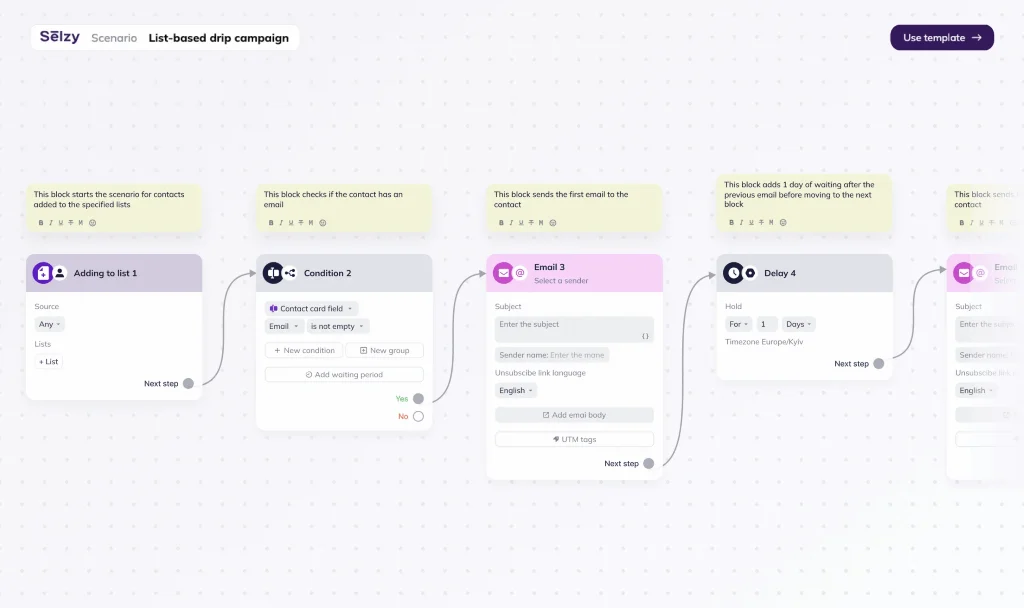
Here’s an example of an automated drip campaign that triggers when a contact enters a specific list and continues with an email if they have an email address:
Let’s take a look at one of the popular automation examples — order confirmation emails. For these transactional messages, the trigger is someone buying your product. The subsequent automated action is an email that includes the order information, receipt, and delivery details.
With marketing automation, you only need to set up a scenario once, and it continues to work on its own whenever the conditions are met.
Why use marketing automation: Key benefits
Marketing automation has many advantages. Read on to learn why your business should invest in automation software and how it can benefit both you and your customers.
Save time and resources
Marketing automation eliminates repetition and frees you from tedious tasks. Instead of manually sending thank-you emails to every customer, you can set up a scenario once, and it will cover your entire subscriber list.
More than 30% of sales-related activities can be automated, and you can instead spend your time on more meaningful work that requires human decision-making.
Some automation types also prevent you from wasting resources. For example, thanks to re-engagement and sunset flows, you can make sure that all of your subscribers are engaged and remove inactive contacts. As many email service providers charge per subscriber, this can help you save money.
Improve customer experience
You can use marketing automation to create a smooth customer experience across the sales funnel.
Your customers will get an immediate reaction to their activities instead of waiting for a representative to get in contact with them. Marketing automation makes your communication relevant and timely. For example, if they sign up on your website, they’ll get an onboarding email sequence right away. This works across industries — from real estate marketing automation to B2B SaaS one.
Another important factor is personalization.
You can integrate your email marketing software with your CRM or e-commerce store and use customer data to send campaigns that truly reflect your clients’ preferences and previous actions. Segmentation also helps you group similar customers to further optimize and automate the outreach. All of this contributes to a stellar customer experience that can help you get an edge over the competition and a conversion rate increase of 10%.
Boost conversions and ROI
Automated messages have 2361% higher conversion rates than traditional campaigns. As they require less work and attention, they also have a higher return on investment (ROI).
Plus, some of the most effective email types are typically automated, like abandoned cart emails, welcome messages, restock notifications, etc. They are relevant and respond directly to customers’ needs, which leads to higher conversions.

Top 10 marketing automation examples
Now, let’s take a look at marketing automation in action. These examples show both customer-facing scenarios and internal ones and span across several channels.
1. Welcome email series
The trigger for welcome emails is customers signing up to your service or newsletter. These emails have one of the highest conversion rates — 2.91%.
Depending on your brand’s marketing strategy, you can send one or multiple welcome emails. We’d recommend sending 2-3 messages:
- Introduction to your company and email program — describe your mission and your unique value proposition and explain the types of emails you’re going to send in the future.
- Bestseller products showcase — pick one or several options from your product catalog and convince your subscribers that these satisfy their wants and needs.
- Newcomers offer — promote a 10-15% discount on the first purchase, complimentary delivery, or a gift.
Some brands extend their email sequences to up to 8 emails, with explainers of product benefits, social proof, etc.
In the first welcome email, Flakes offers a 20% discount, summarizes the brand’s origin story, and highlights two products. This is a great combination, especially for smaller e-commerce brands that need to introduce themselves to the audience.
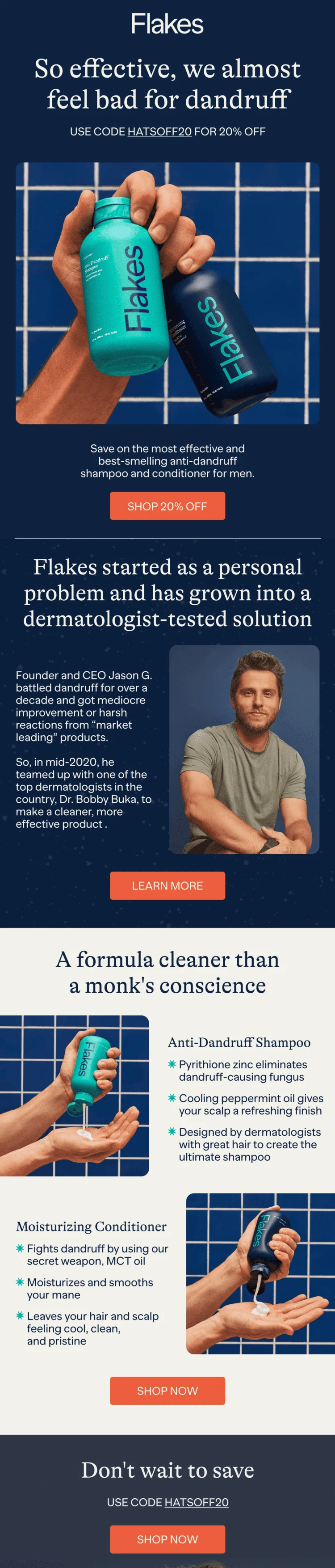
The series continues with two emails: one is a note from the CEO, and the other compares the brand’s products to their competition.
2. Abandoned cart reminders
The trigger for abandoned cart emails is customers adding products to the cart but leaving before completing the checkout.
Average conversion rate for this email type reaches 3.33%, with top-performing campaigns getting as high as 7.69%.
Here again, your flow can be as simple as one email with a reminder and link to the product or as complex as three consecutive messages with delays. A typical abandoned cart automation includes:
- A reminder email.
- An email with a discount, 24 hours after the first one.
- A retargeting email with other product recommendations, after 48 hours.
To make your automated abandoned cart messages even more effective, you can use FOMO and imply that the product stock is limited.
Another option is to provoke an emotional reaction, like Westman Atelier. In this email, the product purchase is made out to be a call of the heart, which makes the purchase feel better.
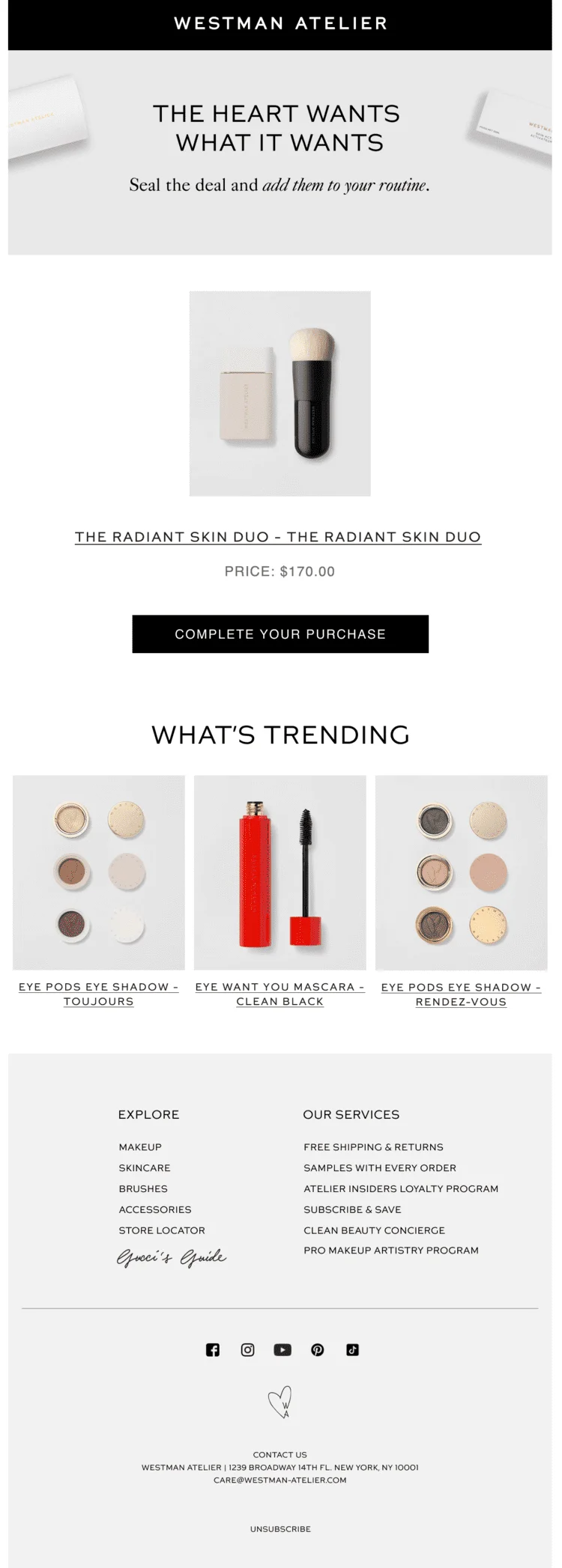
Note that this email also includes other product recommendations at the bottom to give hesitant customers some other options.
3. Post-purchase follow-ups
Post-purchase emails are triggered after a customer buys a product. One of their main goals is to build customer loyalty through continuous engagement.
Here, your marketing automation scenario can consist of a thank-you message, a feedback or review request, and product use advice.
Sundays opted for an email that validates the customer’s choice and highlights product benefits using social proof and expertise.

An email like this is especially good when the order delivery takes a long time. It helps customers to wait patiently and stay excited about their purchases.
4. Lead scoring and qualification
Lead qualification is the process of determining whether a person is a good fit for your business by comparing them to your ideal customer persona.
It usually implies lead scoring — a tactic of assigning numerical values to each prospect based on set criteria, like demographics, behavior, and engagement levels. You assign points for each area, based on how similar the client is to your ideal customer and how close they are to conversion.
For example, a B2B warehouse business in the US may assign the largest amount of points to leads from the US, a smaller amount to those in Canada, and a negative amount to clients from Europe.
Here’s another helpful template of lead scoring:
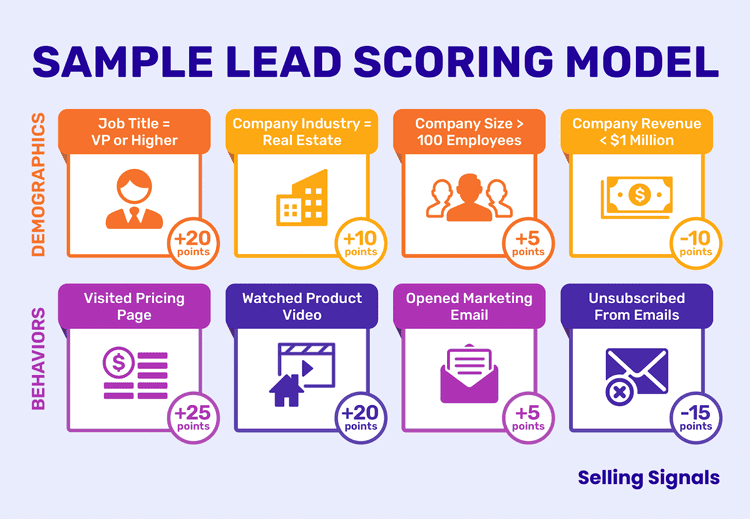
Without automated lead scoring, your marketing team needs to manually hand off leads to the sales team, making this process more time-consuming and less predictable. Marketers may transfer a lead too early or too late, and both may negatively influence conversion.
Lead scoring, on the other hand, makes this process quantifiable and automatic. With properly scored and qualified leads, your sales team can focus on those who are most likely to convert and bring value to your company.
5. Birthday or anniversary campaigns
The trigger for this automation is a customer’s birthday, an anniversary of doing business with you, or a company’s anniversary. Using an automation tool for birthday emails helps make them scalable, reliable, and personalized.
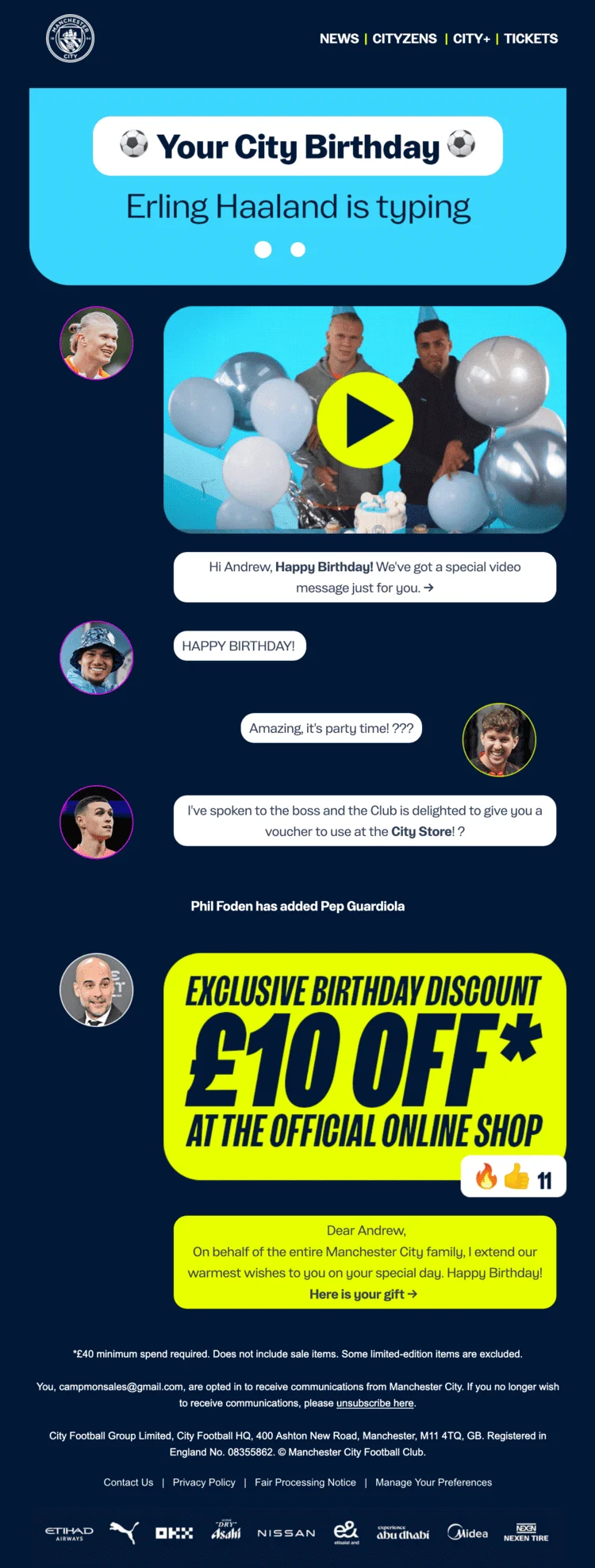
A good campaign usually mentions the subscriber by name, includes birthday wishes, and offers a special deal to mark the occasion.
Man City executed this strategy in a fun way, making it seem like birthday texts are coming from the players in a group chat. There’s also a personalized video message and an exclusive birthday discount sent by the team manager.
6. Re-engagement workflows
Unlike other campaigns on our list, re-engagement automation is triggered not by a subscriber’s action, but by inactivity. Also known as win-back emails, they are automatically sent after a period when the customer hasn’t opened or clicked your emails, interacted with your app, or bought from you.
These usually include a discount, product recommendations, and a reminder of the products’ valuable features.
A comprehensive re-engagement flow can consist of 5 emails:
- A simple reminder about your brand and a “we miss you” message
- A deal email with a discount or another offer that can help your relationship with that customer get back on track
- A feedback email to learn what went wrong and how you can prevent a similar situation in the future
- A last chance email to alert the subscriber that they are going to be removed from the email list
- An unsubscribe notice
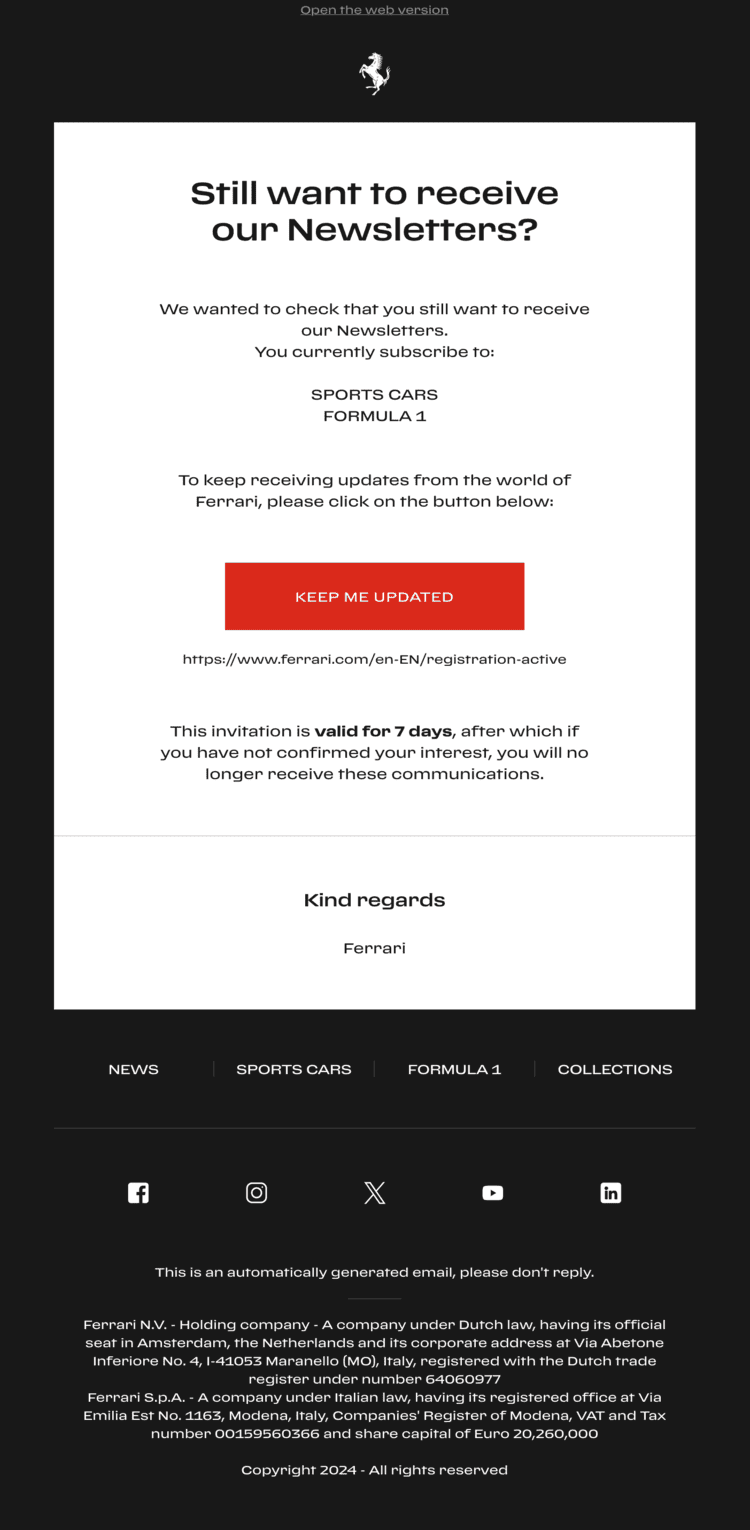
Ferrari made a great last chance email with a reminder of what emails subscriber receives, a prominent call-to-action button, and clear conditions for the upcoming unsubscription.
7. Cross-selling & upselling sequences
Cross-selling and upselling are triggered by a purchase.
Cross-sell emails suggest items that complement a customer’s recent purchase. For example, if someone purchased a sofa, a cross-sell campaign might include pillows or blankets to go along with it. The key element behind the success of these emails is personalization and relevance. The product recommendations should make sense to the customer to lead to conversion.
Upsell emails also include product recommendations, but the suggestions are comparable to the purchased item. These campaigns offer more expensive alternatives. In the sofa example, an upsell would be an offer of a bigger or more luxurious sofa. This tactic works especially well in SaaS, where you can promote a pricier subscription tier.
Citizen recommends a free subscriber to try their paid features. With four sections describing the most important features and several CTA buttons, it’s a good upsell pitch.

8. Retargeting ads automation (Google, Meta, LinkedIn)
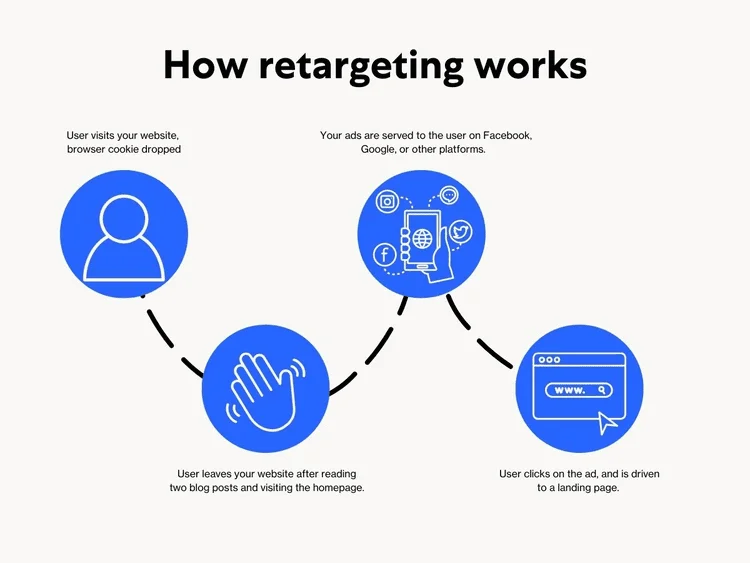
This automation targets leads who visited your website or read your emails but didn’t convert. These ads show relevant and personalized information to motivate prospects to reconsider. They can be based on behavior (like clicking on a product), purchase history, preferences, etc. For example, someone who explored the menswear category may get a promo featuring a coat for men.
Marketing automation makes ad retargeting easy and helps you get more sales. Here’s a diagram to explain the process:
9. In-app messaging or push notifications
If you have an app, send automated push or in-app messages based on user actions like clicking on a product, adding to cart, abandoning a cart, etc.
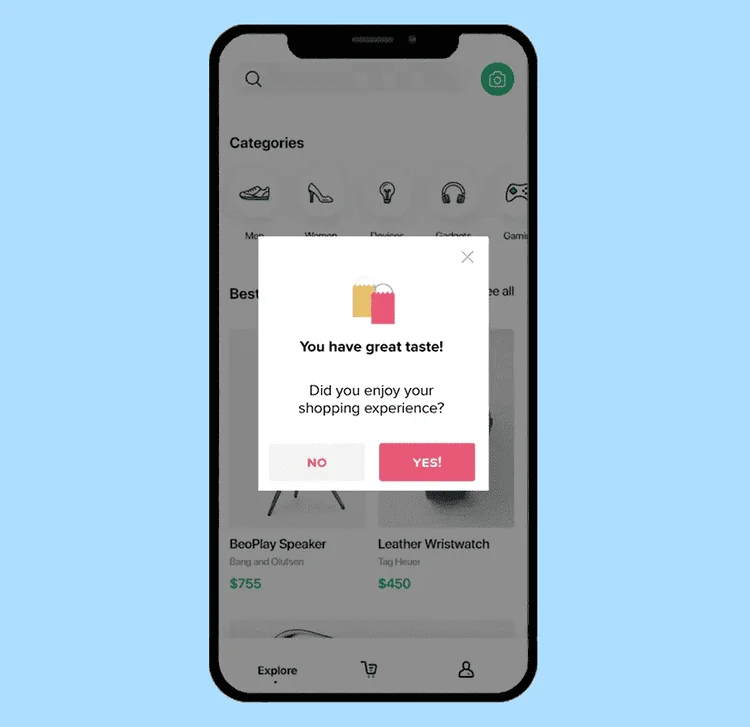
The difference between the two is that in-app messages appear when someone is actively using the app, and push notifications show up outside the app and can be sent when it’s closed. Both of these can be used just like email — to re-engage users, recommend a product, announce a launch, collect feedback, etc.
This in-app message example appears after a customer has finished the purchase and asks to evaluate the experience:
10. Internal notifications for sales teams
Use marketing automation to alert your sales team based on specific triggers. For example, they can get notified when a prospect fills out a contact form, requests a demo, or visits the pricing page. The sales team can also get updated when a deal moves from one stage to another, when a specific internal task is completed, when a follow-up is missed, or when a particular deal is stalling.
In combination with lead scoring and qualification, this automation helps you save time and streamline internal processes. On the other end, your customers will have a smooth experience with a timely outreach exactly when they are ready to take the next step.
How to get started with marketing automation
Excited to use these automation examples? There are four steps to take.
Choose the right marketing automation platform
Start with a reliable and functional automation tool. If you’re only establishing your tech stack, consider the marketing channels you plan to use and pick an automation platform that covers everything you need: email marketing, chatbots, CRM, social media, etc.
If you already use marketing software, make sure that your automation tool works with it. It needs to have integrations to receive customer information from your e-commerce store, CRM, etc.
Define your goals and audience
Research your customers or gather information you have about them in one place. Focus on demographics like age and location, and the platforms they frequent.
Next, think of the goals you want to achieve and set measurable results and KPIs. For example, you may focus on conversions and set a number of sales or a specific conversion rate to assess the effectiveness of your campaign.
Map customer journeys and key touchpoints
Outline your customers’ journeys to conversion, from the awareness stage to retention. As engagement becomes omnichannel, some customers may start right from the website, others — from social media or ads. Some of them may then make a purchase, others may become email subscribers, etc.
Create a map for a model customer and mark all the important touchpoints and key communications associated with them. For example, when a lead signs up for your service, you may send a welcome email and an onboarding series.
Start small: Test simple workflows first
Pick one automation scenario and perfect it before adding other ones to the mix. Although marketing automation works without human intervention, it still needs a level of maintenance. There may be technical errors or updates, and if you set up several scenarios at once, these additional tasks may pile up.
We recommend starting with one of the most effective automation scenarios, like a welcome series or an abandoned cart email. After you make sure that the process runs smoothly and see the first results, you can add other automation types.
FAQ about automated emails
What is a marketing automation workflow?
A predefined sequence of messages or actions triggered by user behavior or attributes (e.g., sign-up → send welcome email → wait 1 day → send product tips).
Which workflows should I set up first?
Start with a welcome series, abandoned cart, post-purchase follow-up, and a re-engagement (win-back) flow. These cover acquisition, conversion, retention, and list hygiene.
How many emails should a welcome series include?
Typically 2-3: intro/value, social proof or product picks, and an incentive/onboarding step. Add more only if each message has a distinct purpose.
What triggers should I use for key flows?
- Welcome: new sign-up or first purchase
- Abandoned cart: add-to-cart without checkout
- Post-purchase: order completed/shipped
- Re-engagement: no opens/clicks or purchases for X days
- Birthday/anniversary: date match in profile
- Internal alerts: pricing page visits, demo requests, high lead score
What metrics should I track?
By workflow: delivery, opens, clicks, conversions, revenue, time-to-convert, unsubscribe/spam rate. Also monitor list health (activity, growth, churn) and per-step drop-offs.
How often should I message in automated flows?
Use purposeful delays (e.g., 1-2 days between welcome touches). Respect quiet hours for SMS/push and cap total weekly sends with global frequency limits.
How do I personalize without being creepy?
Start with declared preferences and recent behavior. Segment by lifecycle stage, product interest, and engagement level. Reference only data users reasonably expect you to have.
What common mistakes should I avoid?
Unsupported stats, no source attribution, overlapping automations, missing suppression rules, one-size-fits-all content, and “set-and-forget” workflows that never get reviewed.
 New and noteworthy on our blog