


Key takeaways
- Behavioral emails respond to user actions at the right moment, creating a smoother experience, building trust, and driving results.
- Behavioral emails are triggered by user actions like cart abandonment, product views, app inactivity, or browsing history.
- Triggered emails deliver significantly better conversion rates compared to manual campaigns.
- Key concepts of behavioral email strategies include triggers, relevance and timing, and personalization and segmentation.
Behavioral emails aren’t just about sending messages — they’re about responding to users at the right moment. They create a smoother experience, build trust, and drive results without feeling pushy.
Here, we examine what behavioral emails are, define a few key concepts, observe the latest behavioral emailing trends and look at some best real-life examples.
What are behavioral emails?
Behavioral emails are messages triggered by what users actually do — not who they are, or when you last emailed them. Think cart abandonment, product views, app inactivity, or browsing history.
Instead of guessing when to send what, marketers can use behavioral emails to focus on delivering the right message, to the right person, at the right time. It’s not about sending a mass newsletter and hoping that it resonates with someone out there, it’s about paying attention to your users’ actions and responding in a way that feels timely and personal.
Behavioral emails really work, and you don’t have to take our word for it – the numbers speak for themselves. Triggered emails deliver +2361% better conversion rates compared to manual campaigns, according to Omnisend’s 2024 report. And in a report by Litmus, behavior-based triggers were named one of the top five most effective segmentation strategies, alongside interest and engagement-based approaches.
There are three key concepts at the heart of behavioral email strategies:
- Trigger. The user does something, for example, visits a product page, signs up, but doesn’t complete onboarding. That action automatically sparks a relevant email campaign.
- Relevance and timing. Since the campaign is based on behavior, it lands when the user actually needs it — not a week later in a random batch.
- Personalization and segmentation. Behavioral emails naturally adapt to user journeys. They’re segmented not just by demographics or geography, but by real engagement and interest.
Behavioral email vs. traditional email
Let’s have a look at some real-life examples of a traditional batch-and-blast email and a behavioral one, side by side.

The email above is a textbook example of traditional batch marketing — beautiful and brand-led, but not personalized or behavior-driven. It goes out to everyone who’s ever subscribed to that brand, regardless of what they’ve clicked, bought, or browsed.

The message above, on the other hand, is a behavioral email at its best — personalized, timely, and triggered by a real user action. It celebrates a milestone in a way that strengthens loyalty and engagement.
Let’s compare the key differences of these two types of emails side by side.
| Aspect | Batch email | Behavioral email |
| Timing | Fixed, sent on schedule | Not fixed, triggered by action |
| Targeting | Broad, same message to everyone | Personalized, based on context |
| Engagement | Lower | Higher |
| Maintenance | Manual | Automated |
How it works: Behavior triggers and automation
It all starts with one thing: a user doing something. That action becomes a trigger, launching an automated workflow, sending a personalized email. It’s just a chain reaction that responds to what the user does.
You define what your triggers are, draft your email, and then your email service provider (ESP), like Selzy, takes care of the rest. They run the automated workflows that send the right message at the right time without any input from you.
While different businesses may find certain triggers more effective than others, a few common ones tend to work well across the board. We’ll have an in-depth look at each of them later in the article.
- Cart abandonment. Someone adds items to their cart but doesn’t complete the checkout.
- Product views. A user browses a specific product or category.
- Inactivity. A subscriber hasn’t opened an email or logged into the app in a while.
- Completed purchase. Triggered after a customer makes a purchase, prompting a follow-up email with recommendations or related offers..
- Unfinished onboarding. Triggered when someone creates an account or starts (but doesn’t finish) a key task.
To make your triggers even more effective, it helps to combine them with behavioral segmentation. This type of segmentation splits users into groups based on past activity, rather than who they are. This could be something like new vs returning customers, engaged vs inactive subscribers, or high-intent shoppers vs casual browsers.
Lastly, everything we’ve just discussed relies on clean, solid data. Automation only works if your tracking is accurate, your contact lists are healthy, and your triggers are firing as expected. Good data hygiene — like regularly cleaning your list and making sure events are tracked properly — is essential for keeping your workflows running smoothly.
Why behavioral email matters in 2025
Recipients expect emails to be timely, relevant, and tailored to them. Behavioral email delivers on that expectation by responding to real user actions. Thanks to advances in AI and automation, setting up these kinds of personalized, scalable email flows is now easier than ever.
Users expect relevance
A modern user expects real-time relevance, and they’re more privacy-aware than ever. The trade-off here is clear: 82% of consumers are willing to share some personal data — if it means getting a better, more personalized experience. At the same time, 71% of consumers expect companies to deliver personalized interactions, and 76% get frustrated when it doesn’t happen. According to McKinsey, failing to personalize your email comms in 2025 is not just a missed opportunity, but a business risk.
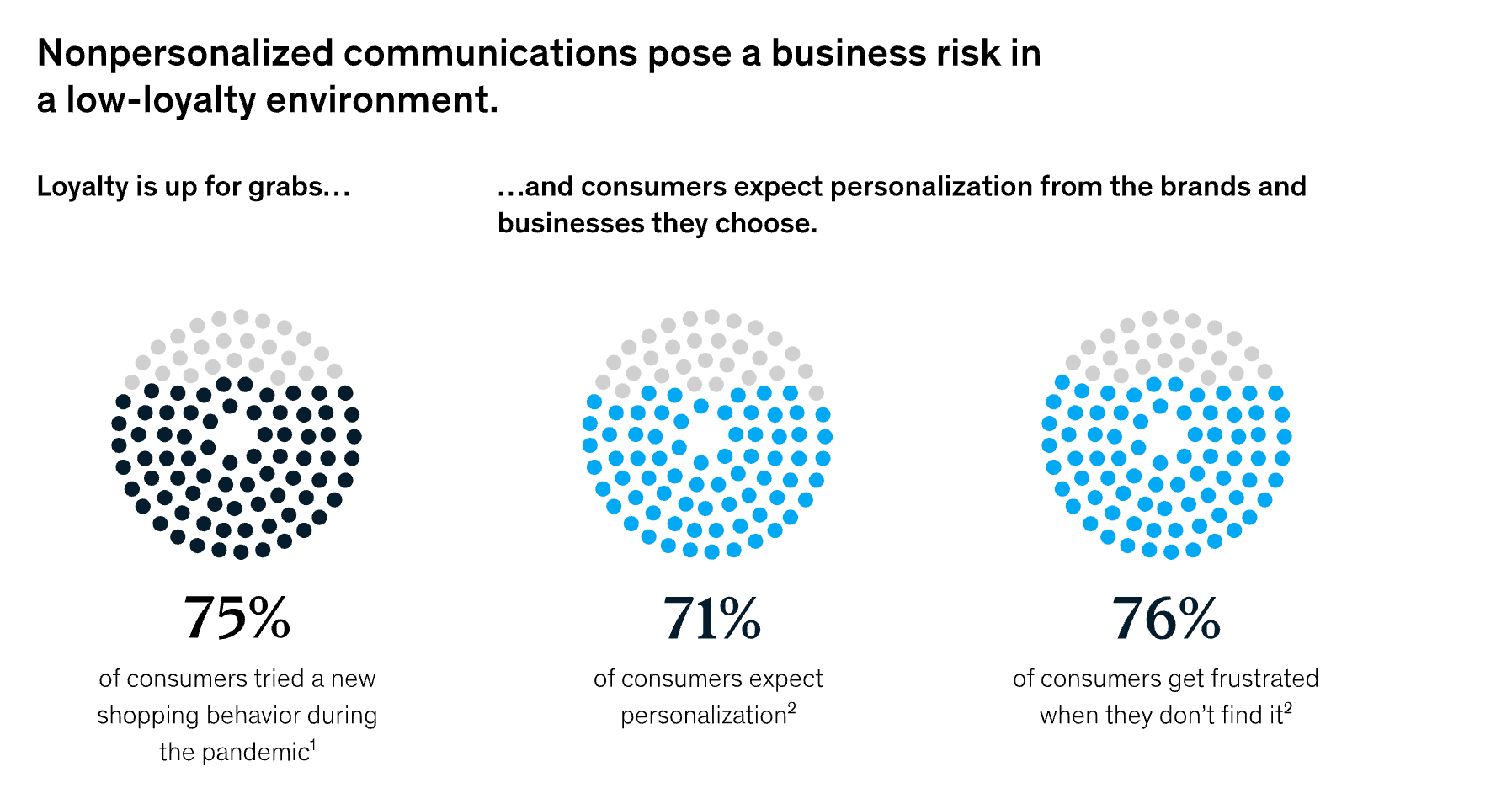
All of this means that consumer patience is wearing thin. If your recipient doesn’t find your email useful, they’ll ignore it, or even worse – mark it as spam. And with users jumping between devices and platforms, brands need to respond not just quickly, but contextually.
Deeper personalization
Personalization in email used to mean adding a first name to your message — and that’s still a good start! But today, users expect more than just dynamic fields. With behavioral triggers, you can go deeper: sending messages based on what people actually do, not just who they are.
By combining behavioral data (like browsing activity or purchase history) with contextual cues (like time of day or device type), you can craft emails that feel timely, helpful, and genuinely personal.
This level of personalization should apply to both subject lines and email body content. A well-timed subject line based on user behavior can dramatically improve open rates — and what’s inside should follow through with relevance and value.

Benefits of behavioral email marketing
Let’s have a look at some of the practical benefits of behavioral email marketing.
- Higher engagement and open rates. Behavioral emails are triggered by user actions, making them more relevant. This means you’re likely to see increased open rates and click-through rates for emails of this kind.
- Increased conversions and sales. Timely, personalized nudges (like cart reminders or product suggestions) help move users closer to purchase and reduce drop-off.
- Better customer lifecycle management. From welcome to re-engagement, behavioral emails support every stage of the customer journey
- Improved brand trust and loyalty. When users feel seen and understood, they’re more likely to stay engaged, return, and advocate. We saw this demonstrated by statistics from McKinsey.
How to set up a behavioral email strategy
Ready to revamp your email strategy with behavioral targeting? Here’s how to get started.
Step 1: Track user behavior across channels
Start by collecting data on what your users actually do — not just who they are. This includes actions like browsing product pages, clicking emails, abandoning carts, completing purchases, using your app, or even pausing halfway through a signup process.
These behavioral signals can come from multiple sources:
- Your website, via analytics tools or embedded scripts.
- Apps, by capturing in-app usage and session duration.
- Email marketing platforms, like data on opens or clicks.
- CRM and other sales tools, like tracking deal stages, follow-ups, and so on.
The goal is to build a clearer picture of user intent: who’s ready to buy, who’s comparing options, and who’s checked out completely.
Step 2: Segment your audience dynamically
Once you’ve collected behavioral data, the next step is to put it to work. Instead of segmenting users by static traits like age, gender, or location, group them based on what they’re doing right now. Here, a segment could be something like “Active in the last 7 days” or “Clicked on an email but didn’t convert.”
These segments update in real time as user behavior changes — thanks to your ESP or automation platform. As soon as someone meets the criteria, they’re added to the segment. If their behavior changes, they move out.
Step 3: Set up automated trigger-based flows
Now it’s time to build the actual flows — automated emails that go out based on what users do. In Selzy, this is done using the API trigger block inside the Scenarios tab of the omnichannel automation module.
The API trigger lets you send real-time data from external sources — like your website, app, or Shopify store — into Selzy, and use it to start personalized email sequences. You can create all sorts of flows, like welcome emails for new subscribers, post-purchase follow-ups, or custom campaigns based on product views or user inactivity. You can also personalize the emails in your flow using the data from the trigger — like adding someone’s name or order details directly into the subject line or email body.
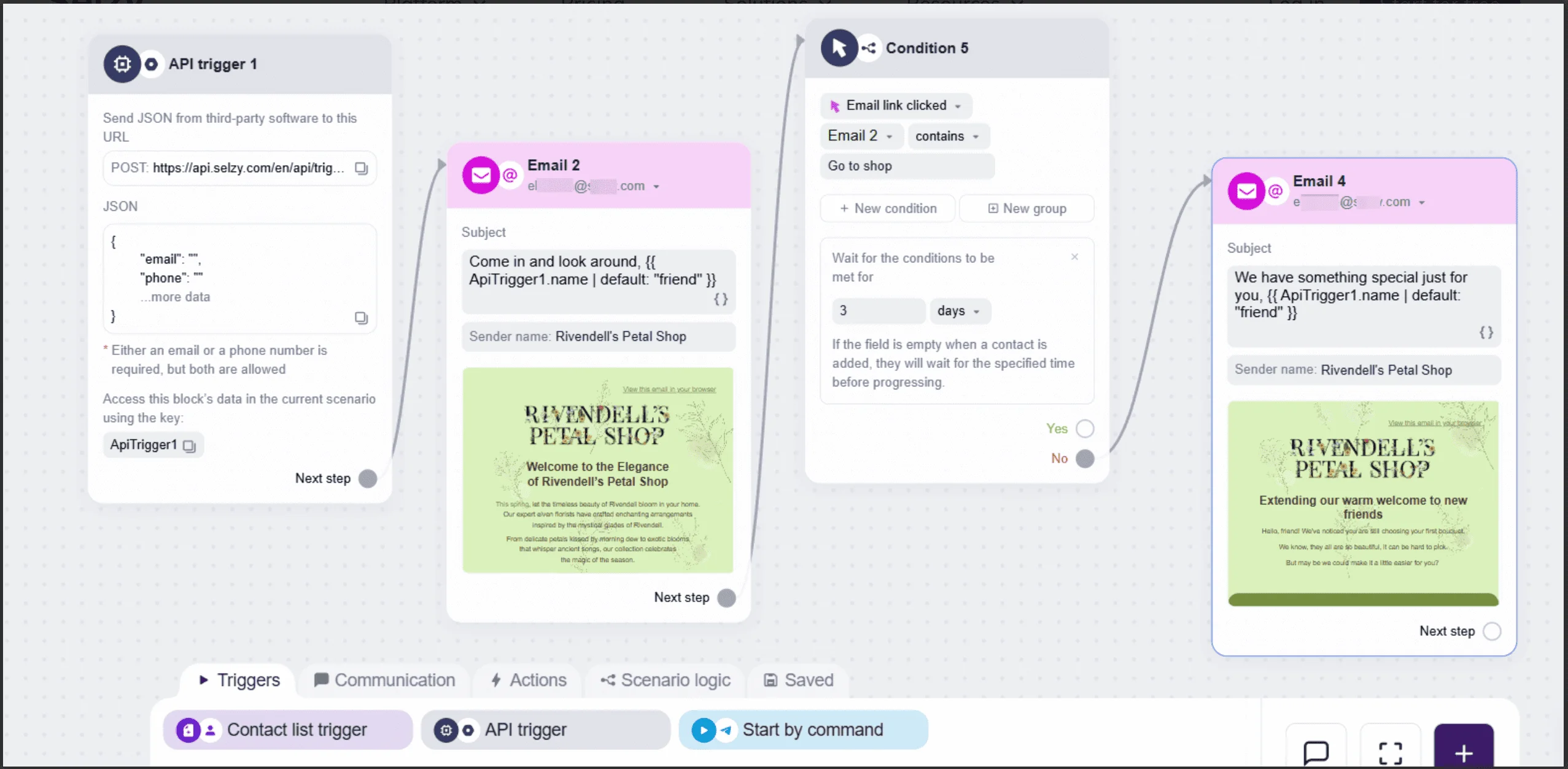
The image above is an example of a welcome sequence in Selzy. This flow uses the API trigger block to send a personalized welcome email when a user signs up. If they don’t click the link in the first email, a follow-up message is sent a few days later — still using personalized content pulled from the original data. Check out our full API trigger block guide.
Step 4: Test, measure, and optimize
To get real results, you need to test and tweak. Experiment with subject lines, timing, frequency, and even the trigger logic itself. Track key metrics like open rate, click-through rate, and conversions to understand what’s actually working.
Your ESP should handle all of that — including A/B testing. Email marketing optimization helps you avoid over-emailing while keeping your brand top of mind at the right moments.

Behavioral email examples that actually work
Need inspiration? Here are real-life examples of behavioral emails done right — from welcome sequences to cart reminders.
Welcome email after sign-up
Welcome emails are your first impression, so make it count. They’re triggered automatically right after sign-up, which means high open rates and a great spot for any key messages. Use this opportunity to greet new users, reinforce your value, and guide them toward that all-important first action.
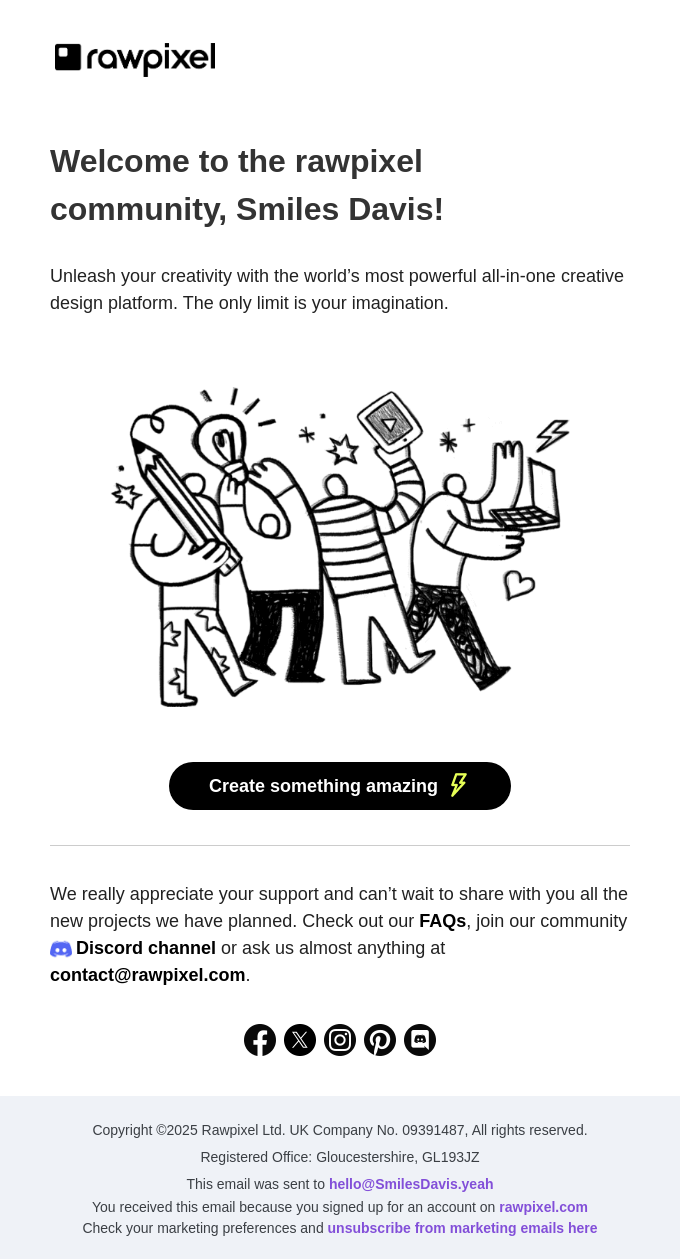
This email nails the essentials of a strong welcome message. It’s personalized, enthusiastic, and clearly introduces the brand’s value: a powerful creative platform with endless possibilities.
The call-to-action is immediate and action-oriented. Plus, it includes helpful resources (FAQs, Discord, contact email) without overwhelming the reader.
Abandoned cart reminder
The abandoned cart reminder email is triggered when someone adds items to their cart but doesn’t check out. Prompting them to come back and complete the purchase, it often highlights the exact products left behind and may include a limited-time offer — like a discount or free shipping — to encourage action.
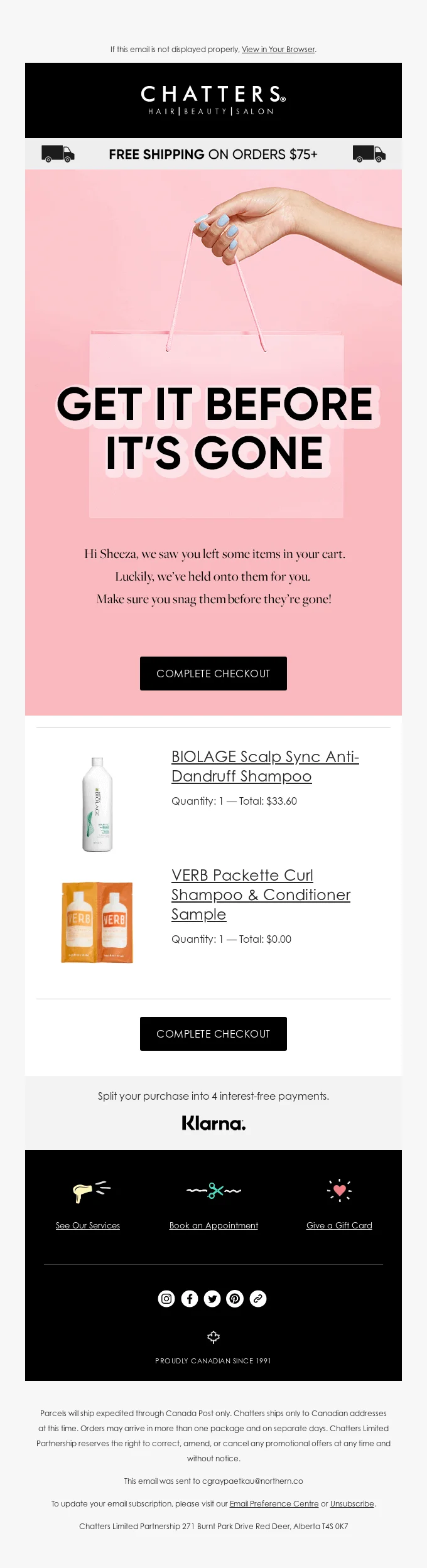
This abandoned cart email works well because it creates urgency with a bold headline, shows the exact items left behind, and includes two clear CTAs — one at the top and one after the product list — making it easy for the customer to return and complete their purchase. Also note the language used: by reiterating that the products may soon be gone, the brand is employing FOMO marketing.
Product recommendation based on browsing
When a customer browses but doesn’t buy, this email follows up with curated suggestions based on what caught their eye — helpful, relevant, and low-pressure.
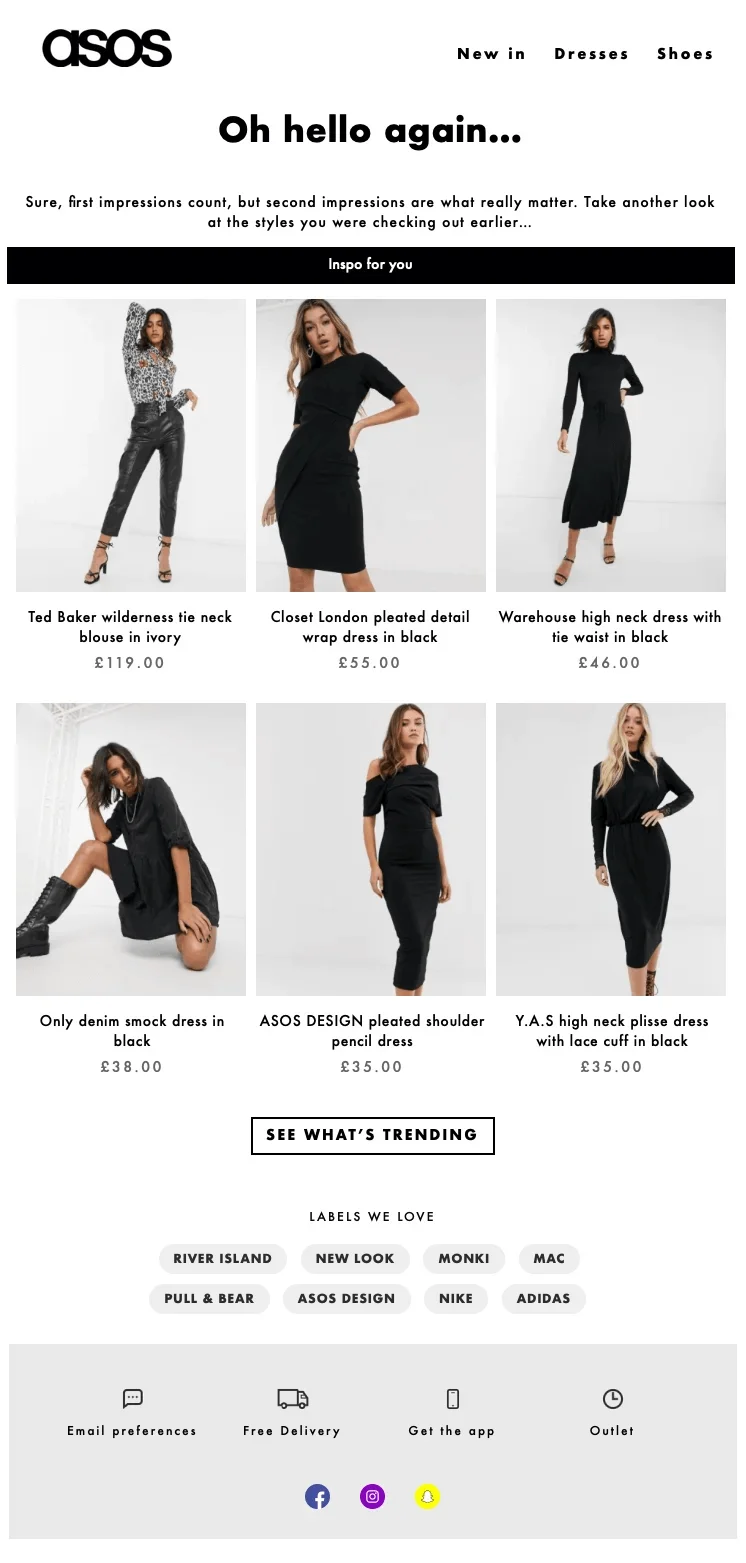
This is a great product recommendation email because it feels personal without being intrusive. It references the recipient’s past browsing in a friendly, casual tone and offers curated suggestions under a clear header.
The product layout is clean and visual, with prices and names clearly displayed, making it easy to scan and shop. Plus, the call to action — “See what’s trending” — broadens the appeal beyond just the previously viewed items, encouraging further browsing.
A quick note on personalization vs individualization:
It’s easy to recommend “more of the same.” But true individualization goes beyond what someone viewed — it considers what they need, based on timing, habits, and context. The more your emails reflect this, the more helpful they feel.
Re-engagement email for inactive users
Aimed at reconnecting with users who haven’t interacted in a while, the re-engagement email often features a compelling offer — like a discount, new product release, or personalized content — along with a friendly “we miss you” message. It’s your chance to remind them why they signed up in the first place and tempt them back with something valuable.
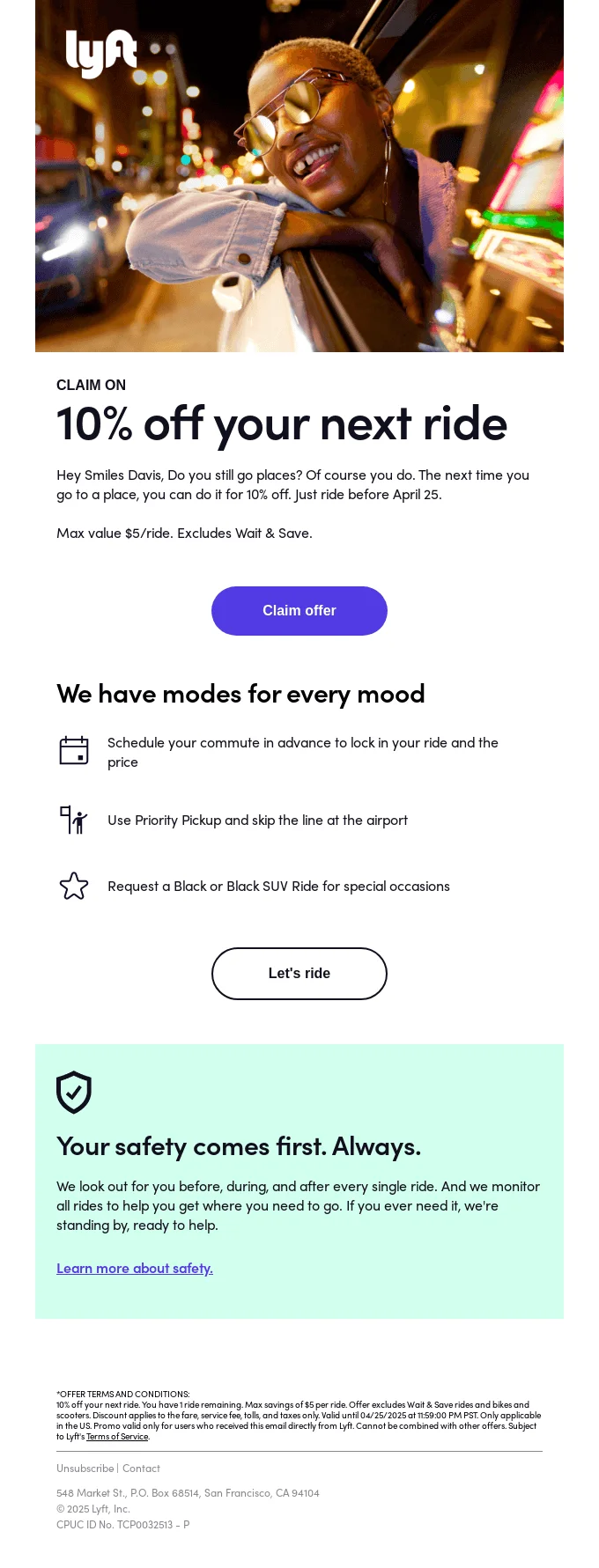
This is a strong re-engagement email because it combines a personal, conversational tone with a time-sensitive incentive — 10% off your next ride. The headline is bold and benefit-driven, and the CTA is clear and repeated.
Post-purchase upsell or feedback request
The name here is quite explanatory – a post-purchase email is sent after your customer buys something. It serves two key purposes: gathering insights and turning one-time buyers into regulars.
It may recommend complementary products based on what the customer just bought, encouraging a second purchase while the customer is still engaged. Alternatively, it may ask the customer to rate their experience, leave a review, or answer a quick survey.
Let’s have a look at a feedback request email:
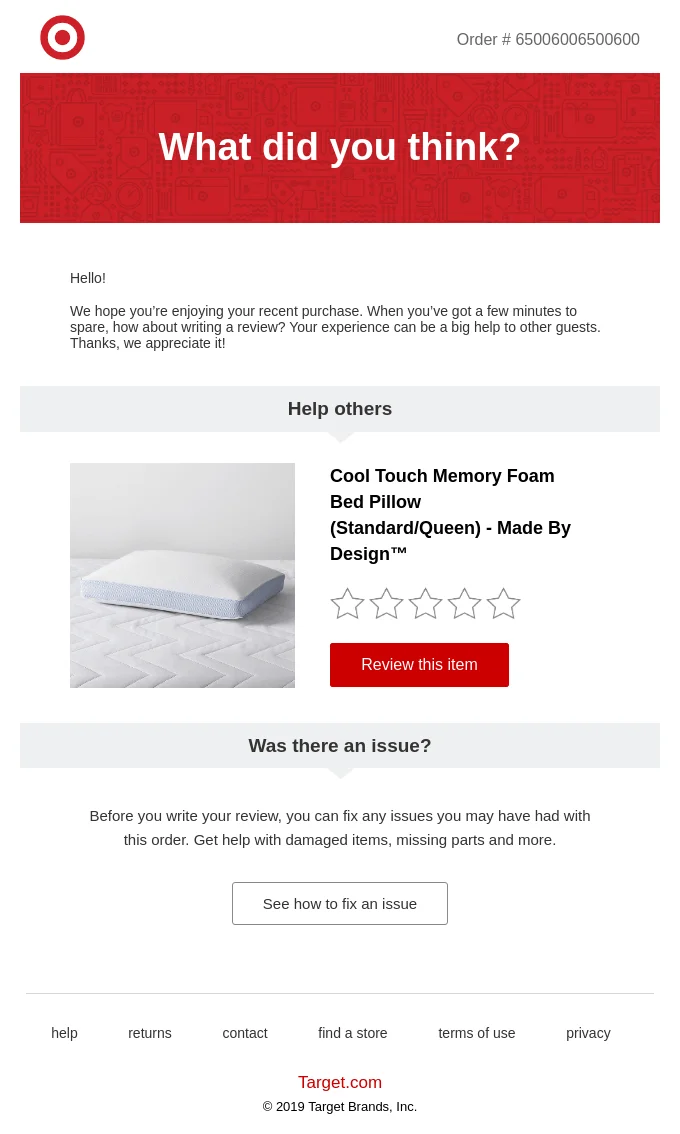
It works because it’s clear, friendly, and helpful — it shows the exact item the customer bought, makes it easy to leave a review, and offers support if there was an issue, all in a clean, well-structured layout.
And here’s an upsell email:
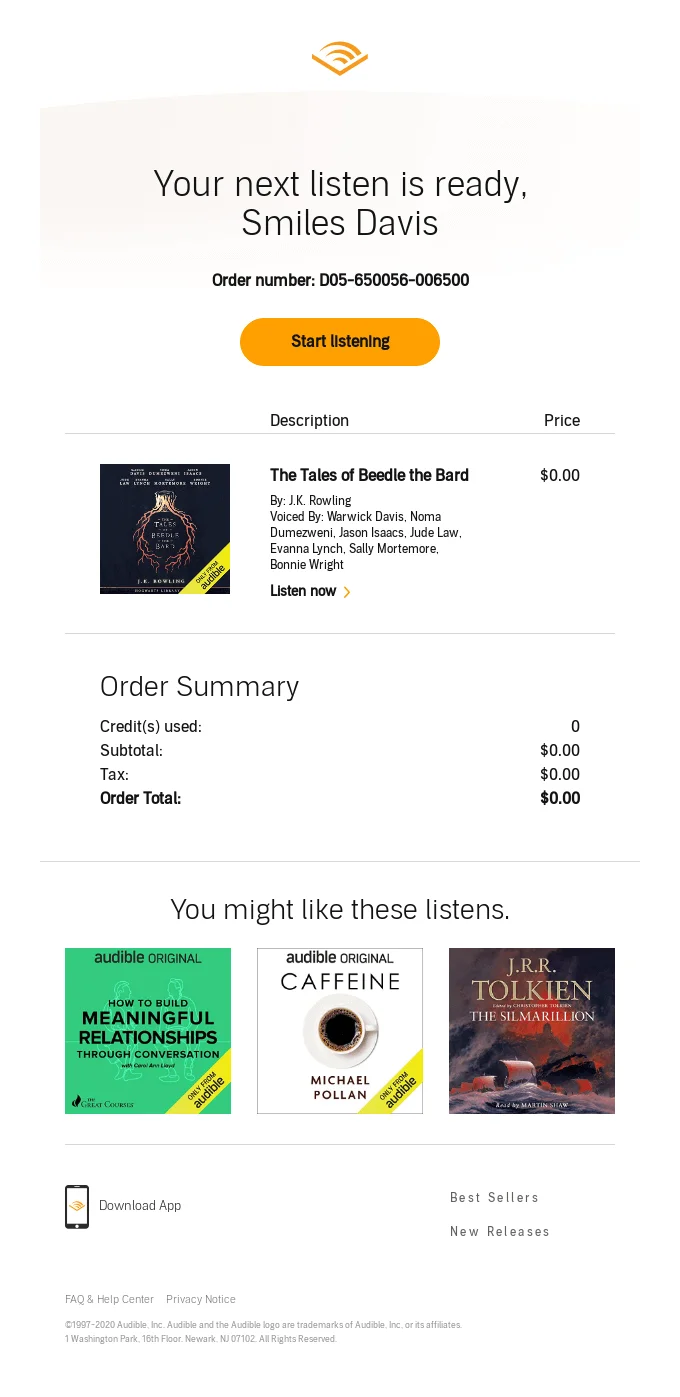
This email confirms the user’s purchase and immediately adds value by suggesting similar audiobooks they might enjoy. The layout is clean, the CTA is prominent, and the recommendations are visually appealing and personalized based on the user’s taste.
Behavioral triggers based on app activity
These emails are sent when someone does (or doesn’t do) something inside your app. For example, if a user signs up but never finishes setting up their profile, you can send a reminder to complete it. Or if they haven’t used a key feature yet, you can guide them toward it with tips or encouragement.
These emails are part of an omnichannel strategy when they connect with what users do in the app and follow up through email, keeping experience consistent across each touchpoint.
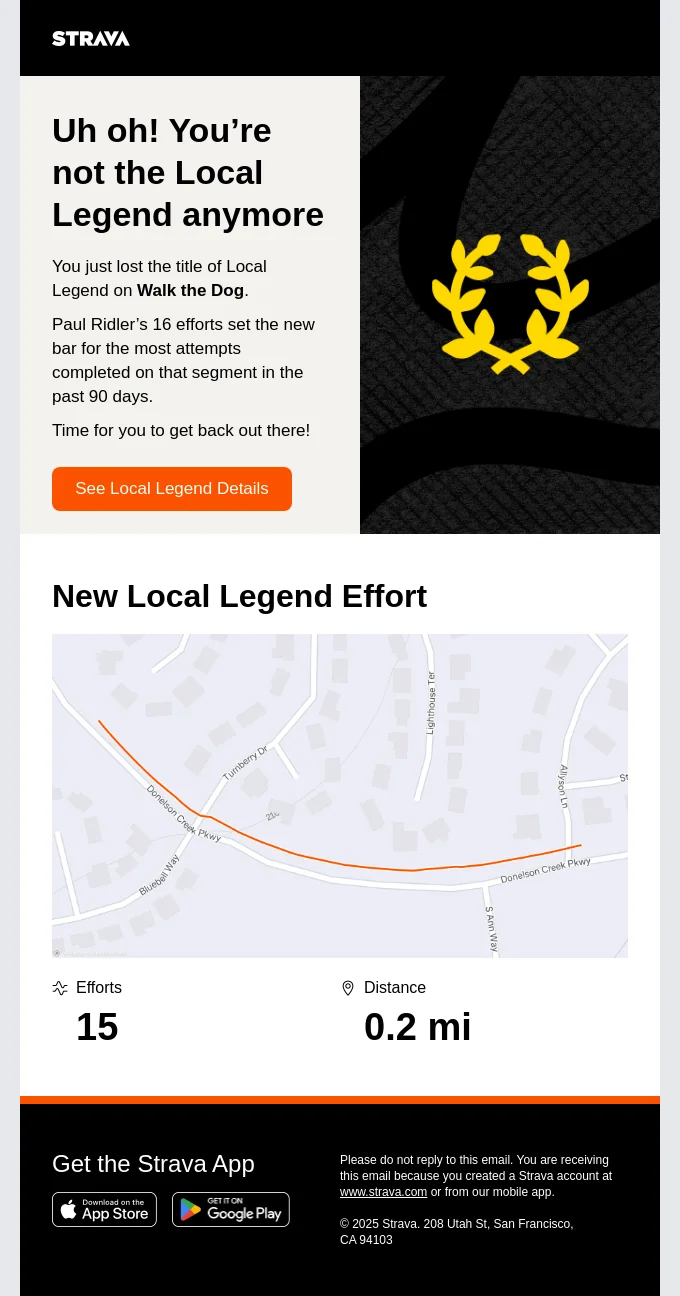
This email is triggered by user inactivity in a specific part of the app — in this case, losing a title due to reduced activity. It uses gamified elements and subtle FOMO to prompt users to re-engage.
Final thoughts
There’s no single formula for great behavioral emails and an efficient marketing strategy, but there are patterns that work. The strongest email strategies respond to customer behavior in a way that feels timely, relevant, and natural. When done well, these emails don’t just deliver information. They help users move forward, deepen their engagement, or make informed decisions. That’s what good behavioral email is: an extension of the product experience.
 New and noteworthy on our blog