




Key takeaways
- OpenClaw is an AI agent platform for real-world tasks, interacting with tools like Selzy.
- OpenClaw uses skills to interpret commands and perform actions in specific platforms.
- OpenClaw for email marketing automates tasks in Selzy, enhancing efficiency and reducing manual effort.
- OpenClaw agents require human oversight for important decisions, enhancing control.
- OpenClaw is beneficial for solo marketers, small teams, founders, and those experimenting with AI agents.
- The Selzy OpenClaw skill enables integration with Selzy for email campaign management.
If you’re a marketer, you know the routine of building email campaigns, even using an ESP like Selzy: you have to log in first, manage contacts, draft your messages, double-check the subject line, set it all up, send some test emails to check whether everything works fine, and finally hit send. It’s not complicated if you’re a pro, but it can get repetitive. And if you’re responsible for multiple campaigns, that means you have to spend hours doing it every day.
That’s where OpenClaw for email marketing comes in. Unlike chatbots or built-in AI tools that you can use for specific tasks (Selzy’s email builder is AI-powered and can help you with design and copy, among other things), agents act like personal assistants, doing tasks for you in real tools. OpenClaw is one such agent, and it’s been insanely popular lately, with over 300K stars on GitHub and more than 450K followers on X at the time of writing.
In this article, you’ll learn exactly how OpenClaw works, how you can integrate it with Selzy, and how to use it to run real email marketing workflows, saving your time.
What is OpenClaw?
OpenClaw (previously known as Moltbot or Clawdbot) is an AI agent, or rather a platform for building ones, that you can set up and use to do actual real-world tasks for you on your computer or server. It can be anything from personal admin to supporting developer workflows, and managing long-running jobs.
This is because unlike bots, OpenClaw agents are designed to interact with real tools and platforms to get work done. All you have to do is to set things up.
How OpenClaw AI agents work
The general idea is simple: you describe what you need in your own words like you would normally communicate to a person, and an OpenClaw agent interprets your intent and does what needs to be done in a specific tool like Google Sheets, Slack, your CRM or Selzy.
OpenClaw does this through so-called “skills” — pre-built capabilities that teach an agent how to interact with specific platforms. When you make a query, an agent parses it, identifies the skill (like, Selzy for email marketing), and translates your human language into API calls. For example, if you want to “send a campaign in Selzy to my VIP list about the spring sale”, the agent understands that it needs to find or create a list, draft or select a message, and set up a campaign in Selzy and does exactly that.
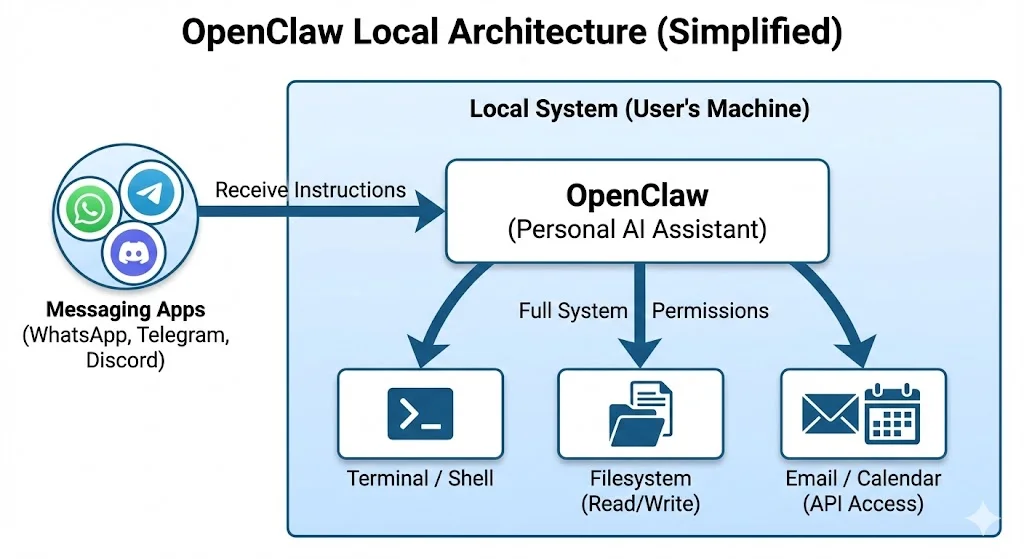
So, in simple terms, skills are basically specialized, multi-part prompts with “hands”. Agents don’t improvise, they follow clear paths defined by skills, which means that this isn’t about replacing human judgment. It’s designed to remove those repetitive processes we described in the beginning of this article, that slow you down.
Why use OpenClaw for email marketing automation?
Let’s look at the most common possible use cases:
Common challenges OpenClaw helps solve
- Campaign management
Email marketing platforms like Selzy are powerful, but it usually means that the more powerful a tool is, the more complex it is too. Even simple tasks like creating a new campaign means going through the same sequence, setting up a list, importing contacts, creating a message, configuring settings, and testing before launching over and over again. If it’s your everyday job or even if you just run a weekly newsletter, it might become draining.
An assistant like an OpenClaw AI agent can spare you that.
- Context switching
Doing operational tasks means that you have to be pulled from doing whatever strategic thinking you’ve been doing. And if you have a lot on your hands and do things fast, email mistakes like sending to the wrong list happen that you have to apologize for.
OpenClaw handles the operational steps for you while you stay focused on strategy and creative decisions.
What OpenClaw AI agents add on top of email platforms
OpenClaw for email marketing doesn’t replace Selzy or any other ESP, but does tasks there according to your programming (skills). In other words, the value isn’t in doing something the platform can’t do, but doing it for you — faster and with much less manual effort on your part.
You can still perform human oversight, though. OpenClaw agents ask you for confirmation before doing important steps like launching campaigns or making significant changes, which means that you’re still in control. The agent just removes the boring parts of your workflows.
So, basically, OpenClaw for email marketing means using an AI agent to manage your email campaigns using natural language commands.
Instead of doing tasks like creating lists, drafting messages and scheduling campaigns manually, you instruct the agent, and it performs those tasks for you right in your email platform, such as Selzy, via API. You stay in control, but the routine is handled for you.
Who should benefit from using OpenClaw and Selzy together?
Make no mistake: as AI agents become more sophisticated and at the same time more common, more people will use them to handle complex (and not so complex but still time-consuming) email marketing tasks. Think triggered campaigns based on user behavior, dynamic segmentation based on user preferences, and real-time optimization of send times.
Agents can also help you with managing cross-platform workflows like pulling data from your CRM, segmenting contacts in Selzy, sending campaigns and tracking their results — all from a single instruction.
The best part is that with combining an AI agent platform like OpenClaw and an ESP like Selzy, you become a conductor to your own small orchestra. So, based on the above, such an agent can be especially useful to:
- Solo marketers.
- Small and mid-sized teams.
- Founders running email marketing themselves.
- Teams experimenting with AI agents in production.

What is the Selzy OpenClaw skill?
What the Selzy OpenClaw skill does
The Selzy OpenClaw skill is a pre-built integration that you can download and use to connect your OpenClaw agent directly to your Selzy account via REST API. This way, you allow it to perform email marketing tasks for you.
This skill covers the full lifecycle of email campaign management. You can manage contact lists, set up campaigns, cancel active or scheduled campaigns and pull performance statistics.
Instead of logging into Selzy’s interface and navigating through your personal space, just describe what you need. The agent then translates your request into actions inside Selzy and reports the results.
What you need to use the Selzy skill
To use OpenClaw for email marketing in Selzy, you need three things:
- A Selzy account
- An API key from Selzy
- An OpenClaw agent with the Selzy skill enabled
In this guide, we assume that you already have OpenClaw up and running.
If you’re new to it, follow the official OpenClaw installation instructions first and then return here to configure it for email marketing with Selzy.
The API key allows OpenClaw to connect to your Selzy account. You can generate it from your Selzy account settings:
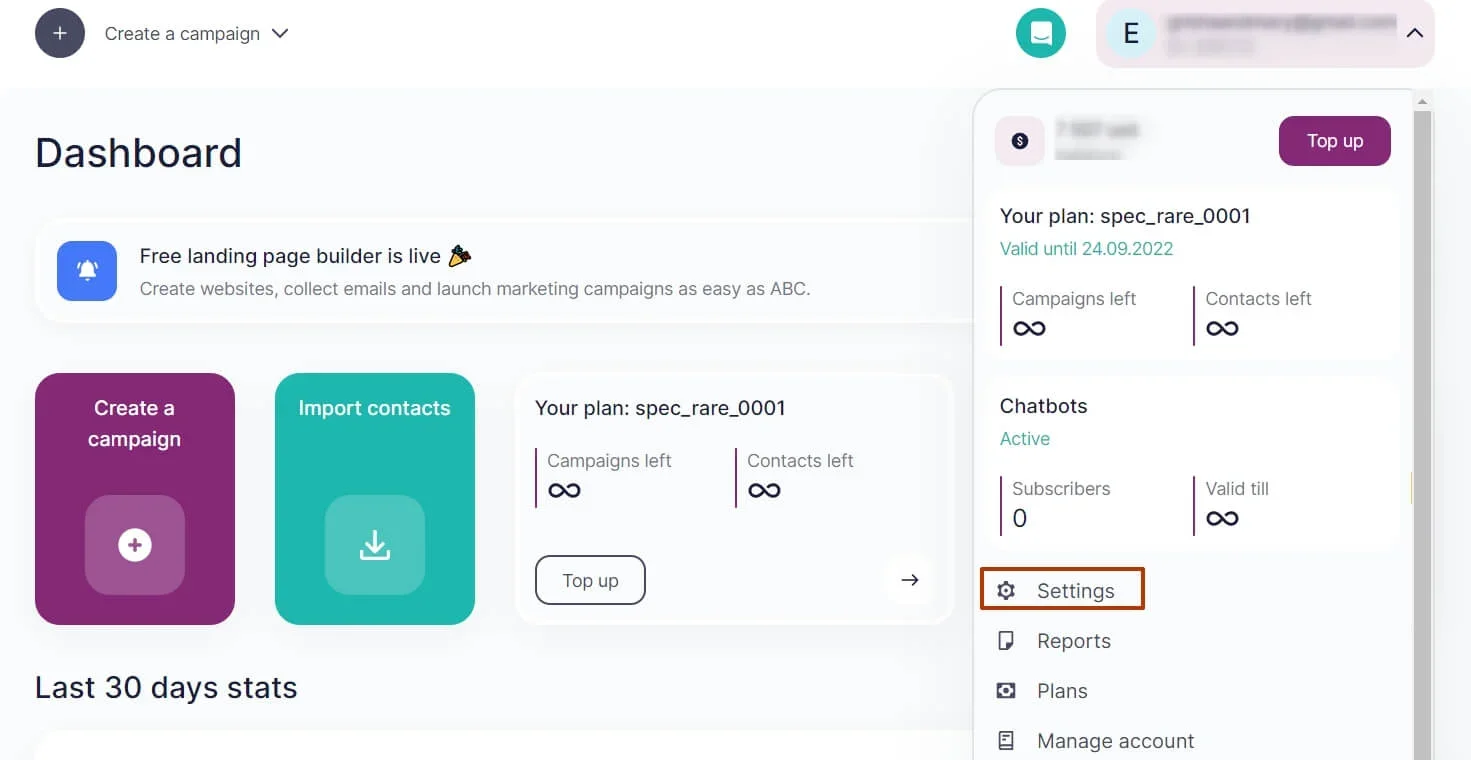
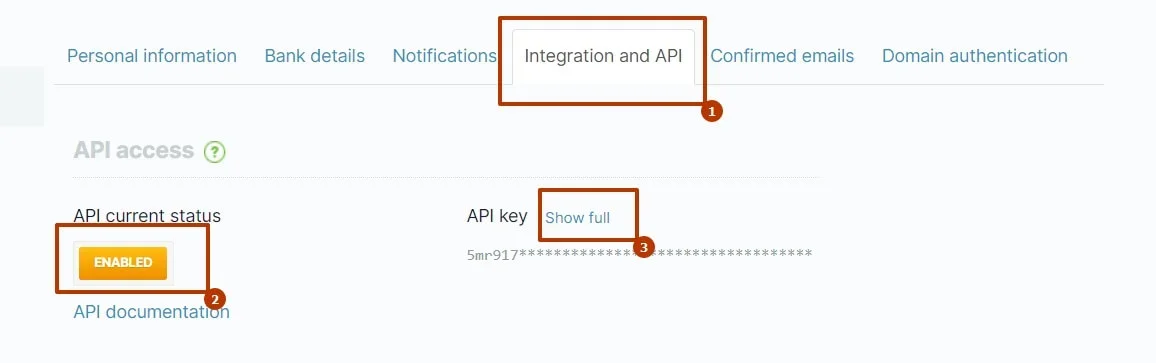
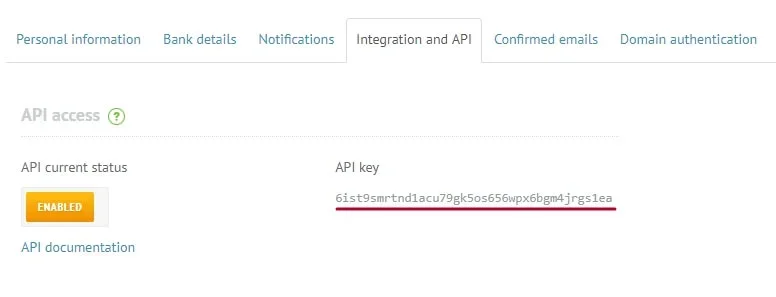
For more information, read the full article on getting the Selzy API key in our Help Center.
Once you have it, add it to your OpenClaw environment as a secure variable.
And done! Once the skill is active and authenticated, your agent is ready to manage your Selzy campaigns.
How authentication and security work
Security is a concern when you’re connecting AI agents to your marketing platforms (or to anything really. If you’re reading this, you’ve probably also read articles and social media posts justifiably concerned with security).
The Selzy skill gets authenticated via the SELZY_API_KEY environment variable, which means that your API key is stored securely in your OpenClaw environment and never gets exposed in any plain text during operation.
If you wish, you can regenerate the API key at any time in your Selzy personal space. The skill won’t work without valid authentication anyway, which gives you control over access.
What you can do with the Selzy skill in OpenClaw
Now, let’s see in detail what you can actually do with the Selzy skill in OpenClaw:
Manage contact lists and subscribers
- View existing lists with details like total contacts and active contacts.
- Create new lists with custom names.
- Import contacts, subscribe or exclude individual addresses without touching the Selzy interface.
If you command to import new contacts in bulk, your AI agent in OpenClaw is going to use the importContacts method, that accepts contacts with fields like email, name, and phone. Individual subscribers are added with the help of the subscribe method, which supports double opt-in confirmation to make sure that your campaigns follow email marketing compliance best practices.
- Exclude specific contacts from your lists to keep them clean.
Before the agent does that, though, it’ll ask for confirmation to give you a chance to make sure everything is fine.
Create and manage email messages
- Create email campaigns from scratch by providing the sender name, email address, subject line, and instructions on email body content.
- Update subjects and content that you can reference by ID and specify what needs to be done like updating the subject line, modifying the body content, or adjusting any other parameters.
- Reuse existing messages — just tell the agent which message you mean by its ID, and it’ll pull it in. The skill also supports listing all your messages within a date range.
Create, schedule, and cancel email campaigns
- Set up a campaign by specifying its ID, optional send time, and preferences for what you’d like to track like opens and clicks.
- Send immediately — for that, the agent will prepare everything and ask for final confirmation before launching.
- Schedule a campaign — provide the date, time, and optionally a timezone, and the agent sends a campaign automatically at a predefined moment.
- Cancel a campaign by using the campaign ID. Your agent will then cancel the sending and confirm the status.
You can also check the status of a campaign at any time to see whether it’s scheduled, being sent, or completed.
Analyze email campaign performance
- Delivered, opens, clicks — the Selzy skill can get campaign statistics including the number of delivered emails, opens, clicks, unsubscribes, and spam complaints. This is one of the advantages of automating email marketing with OpenClaw — that performance reporting becomes part of the conversation too.
- Automatic rate calculations — to make your life even easier, the agent automatically calculates key metrics like open rate, click-through rate. You get a performance summary in a clear and human(and marketer!)-friendly format.
- Campaign overviews — you can check the performance of a specific campaign by providing its ID, or ask for a list of recent campaigns and their stats that you’ve sent during a certain date range. This makes it quick and easy to check your recent results without even logging into Selzy.
How to manage Selzy email campaigns with OpenClaw
Let’s get down to business and see what OpenClaw for email marketing looks like in practice:
Creating an email campaign using natural language
Let’s pick up from the example we’ve already tried earlier in this article.
You might say to your OpenClaw agent something like “Create a campaign for my VIP customers announcing the spring sale and send it tomorrow at 10 AM”.
The agent then interprets this line and breaks it down into bits it can understand an act on.
- First, it calls getLists to get all your lists of contacts and searches for the one labeled “VIP customers”. That is, if you have one; if such a list doesn’t exist, it’ll ask you to create it or specify an existing list by exact name or ID
- Next, the agent will ask you about the email content like sender name, email address, subject line, and the description of the email’s content — just describe naturally — and the agent generates the necessary HTML code. Once you provide all the details, it calls createEmailMessage to construct an email in your Selzy environment and gets a message ID in return.
- Then it calls createCampaign using that message ID and schedules the campaign to tomorrow at 10 AM, and activates tracking for opens and clicks. Before finishing, the agent shows you a preview with info on which list will receive the email, the campaign’s subject line, the content’s summary for you to review the details and confirm the scheduling.
What would normally take up to ten minutes of going through Selzy’s interface happens in a couple of minutes during what looks like a simple conversation. Doesn’t seem like a massive gain individually, but try summing up all that saved time in the course of a month.
Preventing accidental email sends
Email mistakes happen like any other and they can be costly. Sending to the wrong list or launching a campaign that hasn’t been properly checked can definitely damage brand reputation and mean lost sales. That’s why we made it so that the Selzy skill includes mandatory confirmation for any action that sends emails.
Before a campaign goes out, the agent shows the recipient list, message details, and schedule. Nothing is sent without your explicit confirmation.
This is especially important when working in teams. If you don’t want someone else accidentally triggering a send, the confirmation step will act as a safeguard.
Adding or removing subscribers
You can add new contacts to your lists via OpenClaw in two ways:
- For bulk imports, describe which contacts you want to add, and the agent will call importContacts with certain field names like email, name, phone, etc. You can specify whether you want to just add new contacts, overwrite existing ones, skip duplicates, or only fill in empty fields with relevant information.
- For adding individual subscribers with double opt-in, the agent uses the subscribemethod. For example, if you say something like “Add janedoe@example.com to the newsletter N list with double opt-in”, the agent will set the double_optin parameter to 3, triggering Selzy to send a confirmation email to that subscriber. The contact will be added to your list only after they confirm the subscription.
You can remove subscribers by telling the agent which contacts you want to remove. For example, should you “Exclude johndoe@example.com from all lists”, the agent will call the exclude method and Selzy will handle this removal. Just as with any other actions with potentially serious consequences, the agent will ask you to confirm it first.
Checking and interpreting campaign results
Some time after launching a campaign, you’ll want to see how it performed. For that, ask your OpenClaw agent: “How did the spring sale campaign perform?”; or you can provide it with the campaign’s ID by telling something like “Show me stats for campaign ID 12345”.
The agent will then call getCampaignCommonStats using the campaign’s ID and get detailed statistics for you: the number of sends, recipients and delivered emails, opens, clicks, unsubscribes, and spam complaints. It will also calculate the open and click-through rates.
If you want to get the idea of several recent campaigns’ performances, you can ask something like: “Show me all campaign performances from the past week”. The agent will then use getCampaigns with a date range and will get back to you with the list of campaigns and their statistics. This makes it easy to assess performance of several campaigns at once and understands the general picture without manually pulling reports from Selzy.
Best practices and safety measures
Let’s go over some tips and guardrails.
Confirmation rules for email sending
Since the AI agent technology is relatively new, it’s understandable that a lot of marketers are on the fence about entrusting it with their job (and living). So we’d like to stress it once again: no, using an OpenClaw for email marketing means that an agent will not make important decisions with your Selzy campaigns without consulting you first.
The Selzy skill makes sure strict confirmation rules are enforced for any action that triggers email sends. The same rules goes for new campaigns and rescheduled sends. The agent will not go forward without your confirmation, even if you ask it to something in the form of a direct command.
These safety measures exist to prevent costly mistakes and provide you with some peace of mind that you deserve.
Error handling and user-friendly explanations
OK, but if something goes wrong before you launch a campaign, like a list doesn’t exist, a message isn’t found or an API call falls short, the Selzy skill makes sure you get clear and best-UX-practices actionable error messages that you can act upon instead of technical jargon.
For example, if you were to refer to a contact list that doesn’t exist, the agent will say something like: “I couldn’t find a list called ‘VIP customers’. Here are the lists available in your account”. It will then show you the actual list names and their IDs that it’d get from getLists.
If the API returns an error like “Incorrect API key,” the agent will explain that your SELZY_API_KEY variable might not be right and suggest checking your Selzy account settings.
And so on. This user-friendly approach makes it easier to work with errors and keep workflows moving.
Email marketing best practices enforced by the skill
The Selzy skill is designed for a proper email marketing hygiene. For one, it needs that all sender emails come from verified domains and the agent will remind you of this requirement.
It fully supports double opt-in through the subscribe method, which allows you to add contacts and automatically send them confirmation emails. This helps you maintain a clean and engaged list of contacts and stay compliant with GDPR and CAN-SPAM.
The skill also prevents you from sending to non-active or otherwise excluded contacts by accident.
These safety measures help maintain your sender reputation, reduce spam complaints, and keep you compliant.
FAQ about OpenClaw for email marketing
What email marketing tasks can be done with an OpenClaw agent?
OpenClaw for email marketing can manage contact management, creating and updating email messages, scheduling and canceling sends, and gathering performance statistics, including calculating open and click-through rates.
Can OpenClaw send emails without confirmation?
No (at least not with Selzy’s skill!). When using OpenClaw for email marketing with the Selzy skill, campaigns need explicit confirmation to be sent. The agent prepares the campaign, shows you the list, subject line, and schedule settings, and waits for approval.
Is OpenClaw safe to use for email marketing?
Yes, as long as it’s properly configured. OpenClaw for email marketing connects to Selzy via a secure API key stored as an environment variable. The key is not exposed in a visible way during any operation, and you can regenerate it at any time.
Do I need coding skills to use OpenClaw for email marketing?
You don’t need any advanced coding skills to use OpenClaw for email marketing. Once the Selzy skill is active and authenticated, you interact with the agent using natural language instructions — basically, just conversing with it.
Does OpenClaw replace email marketing platforms like Selzy?
No. OpenClaw for email marketing does another thing — it operates within them performing tasks defined by specific skills. Selzy is still a platform where you can manage contacts and campaigns. OpenClaw simply does operational tasks for you.

 New and noteworthy on our blog
