


Key takeaways
- Autoresponders are essential for maintaining contact with clients through automated messages triggered by specific actions.
- Benefits of using autoresponder software include saving time, reaching customers with relevant messages, driving engagement, and increasing trust in your brand.
- Top autoresponder tools for different needs include Selzy, ActiveCampaign, Brevo, Omnisend, MailerLite, and Kit.
- Selzy offers strong deliverability, AI tools, and flexible pricing plans starting at $7.50 per month.
Companies strive to provide their clients with the best possible products and services, and emails are often the most reliable way to connect. However, once a regular email marketing campaign is sent, you need to keep that bond strong and responding to every customer action manually quickly becomes unmanageable.
This is what autoresponders are for: a way to keep you in contact with your contacts through a series of automatic messages. In this blog post, we will further explain what autoresponders are, their benefits and tell you all about the best email autoresponders to help your business.
Best autoresponder software: Quick picks If you’re short on time, here are the best autoresponder tools for different needs:
- Best overall: Selzy — easy to use, affordable, and strong deliverability.
- Best for advanced automation: ActiveCampaign — powerful workflows and deep customization.
- Best free option: Brevo — solid automation plus SMS on a free plan.
- Best for e-commerce: Omnisend — built-in workflows for online stores.
- Best for beginners: MailerLite — simple interface and budget-friendly plans.
- Best for creators: Kit — designed for bloggers and content monetization.
Want more details? Below, we break down each tool, including features, pricing, and ideal use cases.
How we selected these autoresponder tools
We evaluated each tool based on key factors like automation features, ease of use, pricing, deliverability, and integrations.
We also considered real-world use cases (e-commerce, SaaS, creators, and small businesses) to ensure every option fits different needs.
What is an email autoresponder?
In simple terms, an email autoresponder is an automation tool that sends pre-written emails to clients, depending on certain trigger events that occur.
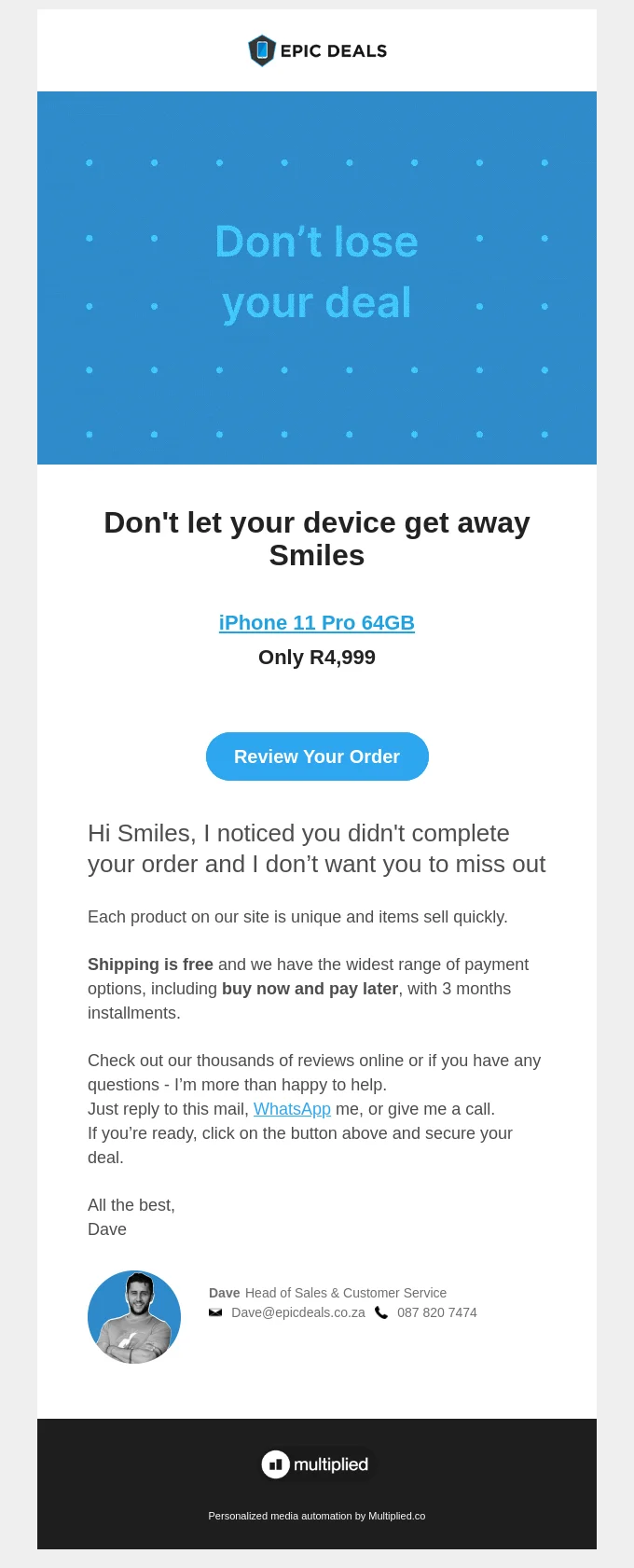
Email autoresponders can be set up to trigger specific actions. They can be triggered by customer actions, such as registration confirmations, inquiries, purchases, specific dates (you can automate an email to congratulate someone on their birthday, for example), cancellations or abandoned carts. Once the trigger action occurs, the software automatically sends the appropriate message and sends the designated automated response.
Key benefits of using autoresponder software
Answering each customer action individually would be too time-consuming and inefficient, so it will save you a lot of time. There are many other benefits, like the ability to:
- Reach customers with a relevant message at the right time.
- Drive engagement and stay connected with your clients.
- Follow up on orders or recover abandoned carts.
- Provide quick responses and increase trust in your brand.
- Free the employees to do other tasks.
- Welcome new users, thank current ones for their purchase or try to revert subscription cancellations.
Basically, email autoresponders are a powerful email marketing automation tool that enables you to increase customer trust, engagement, retention and sales.
Top 11 best autoresponder software in 2026
| Tool | Best for | Free plan | Starting price, billed monthly | Key feature |
| Selzy | Ease of use + deliverability | ✅ Yes (1,000 contacts) | $7.50/month | 99.8% deliverability + AI tools |
| ActiveCampaign | Advanced automation | ❌ No (trial only) | $15/month | 800+ automation workflows |
| Brevo | Free multichannel marketing | ✅ Yes | $9/month | Email + SMS automation |
| AWeber | Beginners | ✅ Yes | $15/month | Simple automation builder |
| GetResponse | Sales funnels & lead nurturing | ❌ No (trial only) | $19/month | Funnel + automation combo |
| Mailchimp | Small businesses | ✅ Yes (limited) | $13/month | All-in-one marketing suite |
| Constant Contact | Basic automation | ❌ No (trial only) | $12/month | Event + email automation |
| Omnisend | Ecommerce | ✅ Yes | $16/month | Prebuilt ecommerce workflows |
| Kit | Creators & bloggers | ✅ Yes | $39/month | Audience monetization tools |
| Drip | Advanced segmentation | ❌ No (trial only) | $39/month | Deep personalization |
| MailerLite | Budget-friendly simplicity | ✅ Yes | $10/month | Clean UI + automation basics |
Selzy — Best for deliverability, compatibility and range of features
Who it’s for: Small businesses and marketers who need an easy-to-use autoresponder with strong deliverability and built-in AI tools.
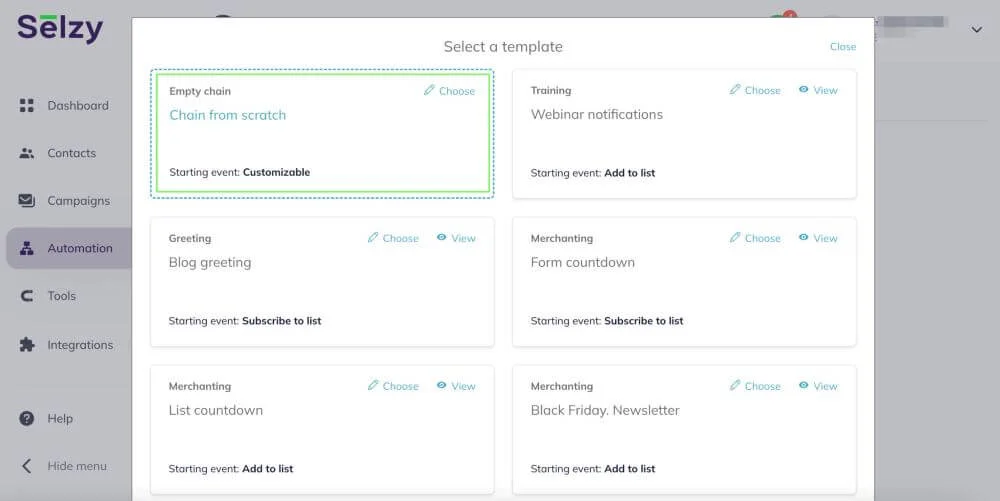
Selzy’s own autoresponder service is one of the easiest to use available in the market and comes with a plethora of features:
- Intuitive email builder with drag-and-drop email editor
- Multilingual role-based AI writing assistant and AI-powered image generator to generate content within minutes
- Over 140 built-in email templates that can be tweaked
- More than 800K free GIFs, stock and sticker images to help you design your messages
- A delivery rate of 99.8%
- Automated customer journeys
- Over 12 automation templates based on the most popular occasions
These are just some of the key features. You can learn more about our autoresponder service, including more info about trial tests and customer reviews. Selzy’s autoresponder tool is a great option if you are looking for something simple to use and well-rounded.
For example, Selzy also includes built-in deliverability tools (SPF, DKIM, and DMARC checks), flexible pay-as-you-go pricing, and even a Telegram chatbot builder for multichannel automation.
Selzy has a free plan that allows for 100 contacts and 1,000 sent emails per month. There’s also a Free trial with 2,000 contacts and 10,000 emails — you need to verify your credit card, but you will not be charged. Paid plans start at $7.50 billed monthly for the Lite package, which already boasts full core features regarding email automation, templates, segmentation and more. The Standard plan features a deliverability boost a very practical email quality checker, all for $15 monthly. All paid plans are currently at a 30% discount for the yearly payment as well.

ActiveCampaign – Best for advanced automation
Ideal for: Advanced users and growing teams that need powerful automation workflows, CRM integration, and detailed segmentation.
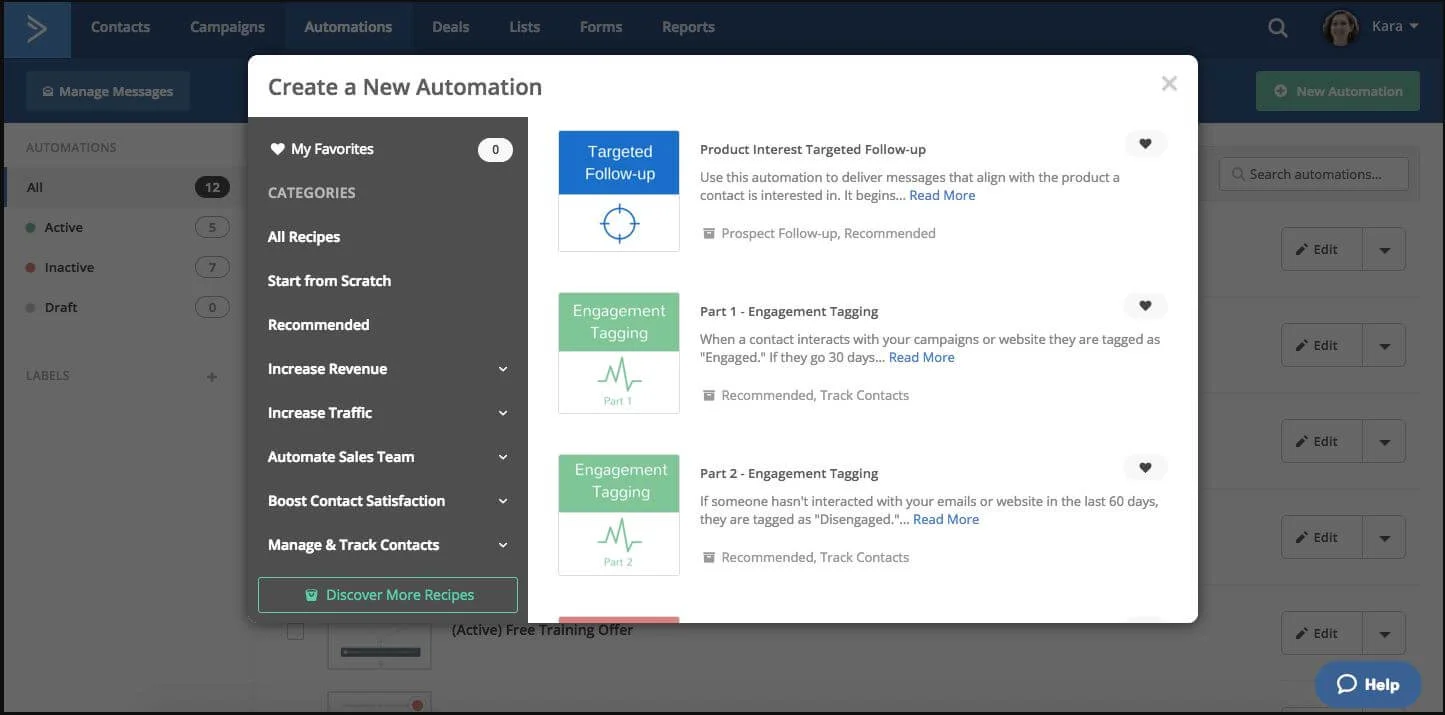
One of the most well-known email marketing platforms, ActiveCampaign provides a powerful autoresponder platform considered to be among the most advanced on the market. It currently boasts 820 automation recipes and you can see some of them in the picture above.
Its main drawback is that the learning curve can be a little steep. The user interface is pretty straightforward, but packed with so many functions it seems daunting at first. Once you get the hang of things, the sky is the limit and you can highly customize your automation chain using if/then logic, user behavior and so on. ActiveCampaign also comes with a built-in sales automation tool, a CRM solution, team collaboration features and chatbot automation.
The pricing starts at $15 a month for 1,000 subscribers, but you can also test it in a 14-day trial version. The starter plan offers five actions per automation and multi-step marketing automation. Unlimited automation triggers, limited A/B testing, SMS automation and generative AI become available with the $49 Plus plan, billed monthly as well.
Brevo — Best for multi-channel support
Best suited for: Budget-conscious businesses looking for a free autoresponder with email, SMS, and multichannel automation.
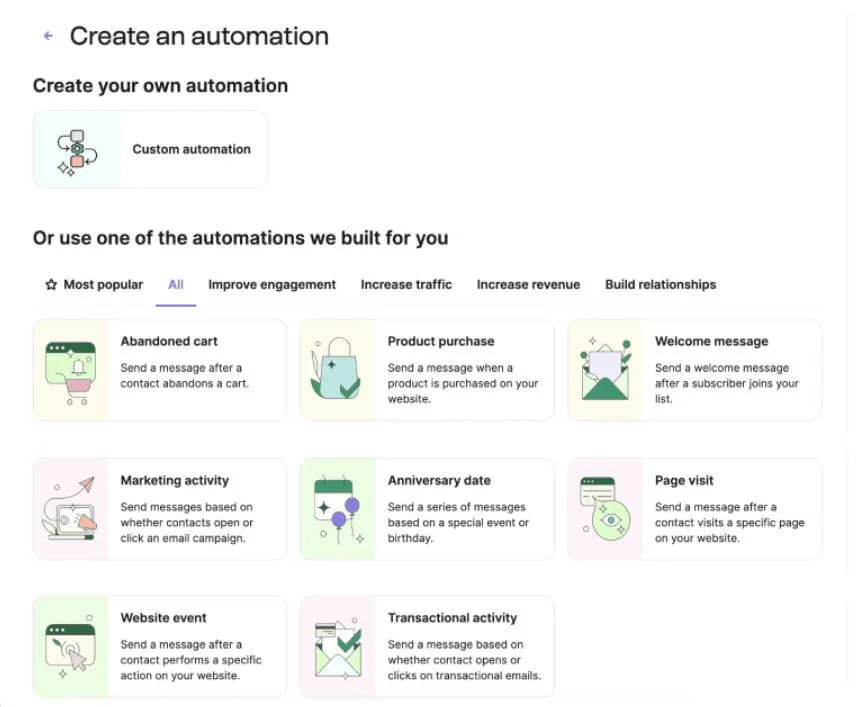
Brevo is widely regarded as one of the best free autoresponder platforms. It checks all the boxes in terms of what you need to start, ranging from modern templates, an easy-to-use email editor, a limit of 300 sent emails per day on the free plan and basic automation triggers, as seen above. Customized workflows with branching triggers are also free.
Brevo also includes a built-in CRM, live chat, and transactional email tools, making it a more complete marketing platform beyond just autoresponders.
Even though it has a free forever plan, Brevo also offers paid plans that bring more advanced functionalities to the table, such as a combination of email and SMS marketing, plus the ability to work with more contacts. Paid plans, billed monthly, start from $9 for 5,000 sent emails per month.
AWeber – Best for user-friendly automation
A good fit for: Beginners who want simple autoresponders, pre-built templates, and an easy setup process.
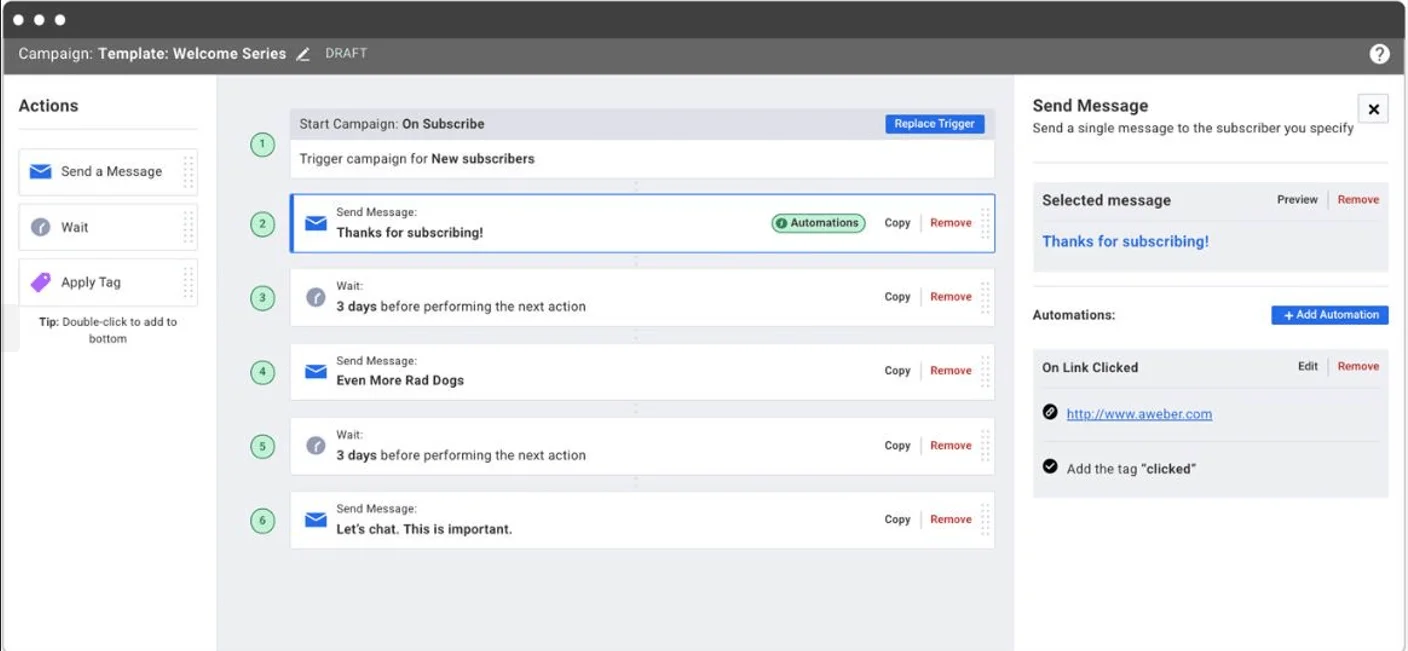
AWeber has been on the market for quite a while (founded in 1998) and is well-known for its automation capabilities. As you can see above, it lets you create triggered messages after a subscriber takes specific actions and you can also build your automation from scratch or choose from pre-built automated responses for common topics.
AWeber also provides pre-written templates for email marketing campaigns if you want to get started quickly, making its email editor one of the comprehensive ones.
It also includes tools like web push notifications and an AI writing assistant to help create and optimize email content.
AWeber offers a free plan for up to 500 subscribers and 3,000 emails per month, making it easy to get started without upfront costs. There’s also a 14-day trial of paid plans that allows full, unlimited access to premium features
Paid plans start at around $15/month for 500 subscribers, unlocking more advanced automation and features.
For 500 subscribers, the Plus plan at $90 per month offers unlimited automations and landing pages, advanced subscriber and message insights and 24/7 customer support. The pricing scales according to the number of subscribers.
GetResponse – Best for sales and lead nurturing
Recommended for: Businesses focused on lead generation, sales funnels, and conversion-driven email automation.
GetResponse is a digital marketing platform that features email marketing, lead generation, list generation, detailed analytics and autoresponder capabilities. It truly shines in its focus on sales, lead nurturing and conversion, providing extensive tools to create websites, sales funnels and landing pages.
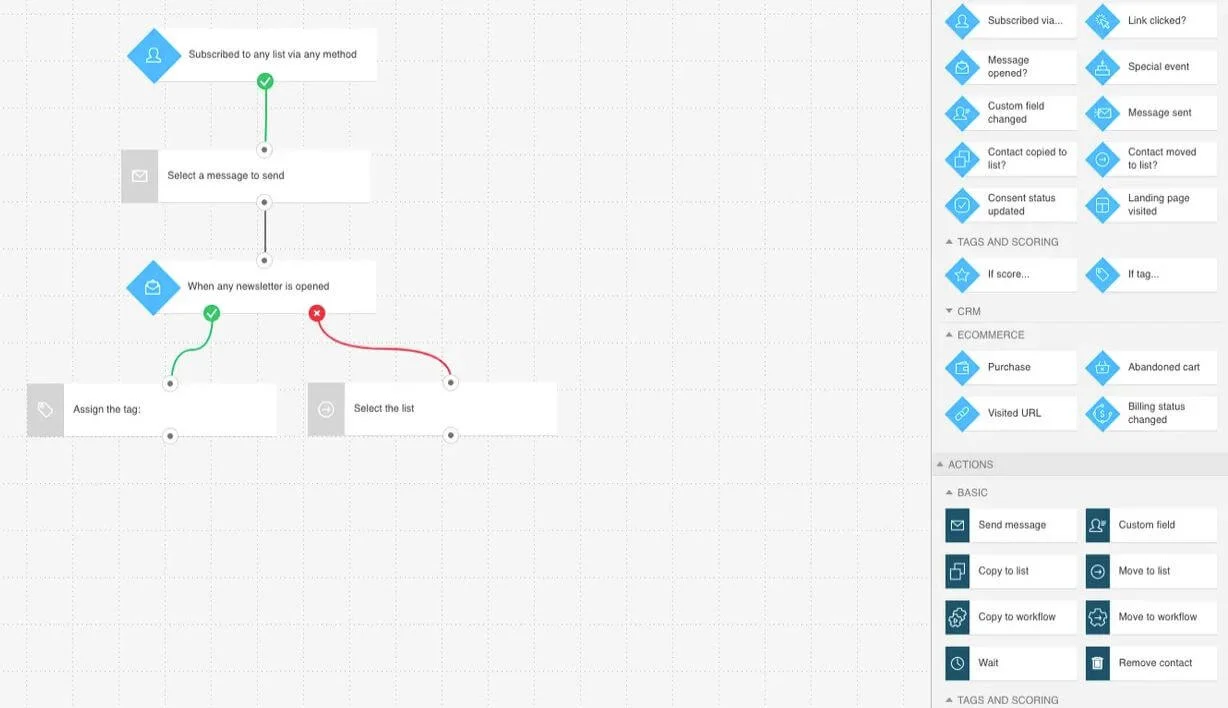
The more advanced automation functionalities also enable the user to build triggered campaigns based on lead scores and cart abandonment, as in the screenshot shown above, in addition to letting you time your automated messages so they are delivered within the best timing window possible. GetResponse also has a very detail-oriented reporting system and a great set of anti-spam tools to prevent emails from bouncing.
GetResponse offers a 14-day free trial. Paid plans, billed monthly, start at $19/month for 1,000 contacts and offer unlimited autoresponders, AI email generators and templates for email or landing pages. Other powerful tools, such as advanced segmentation and unlimited marketing automation, are unlocked with plans starting at $59/month.
Mailchimp – Best for beginners and small businesses
Works best for: Small businesses that want a familiar, all-in-one marketing platform with basic autoresponder features.
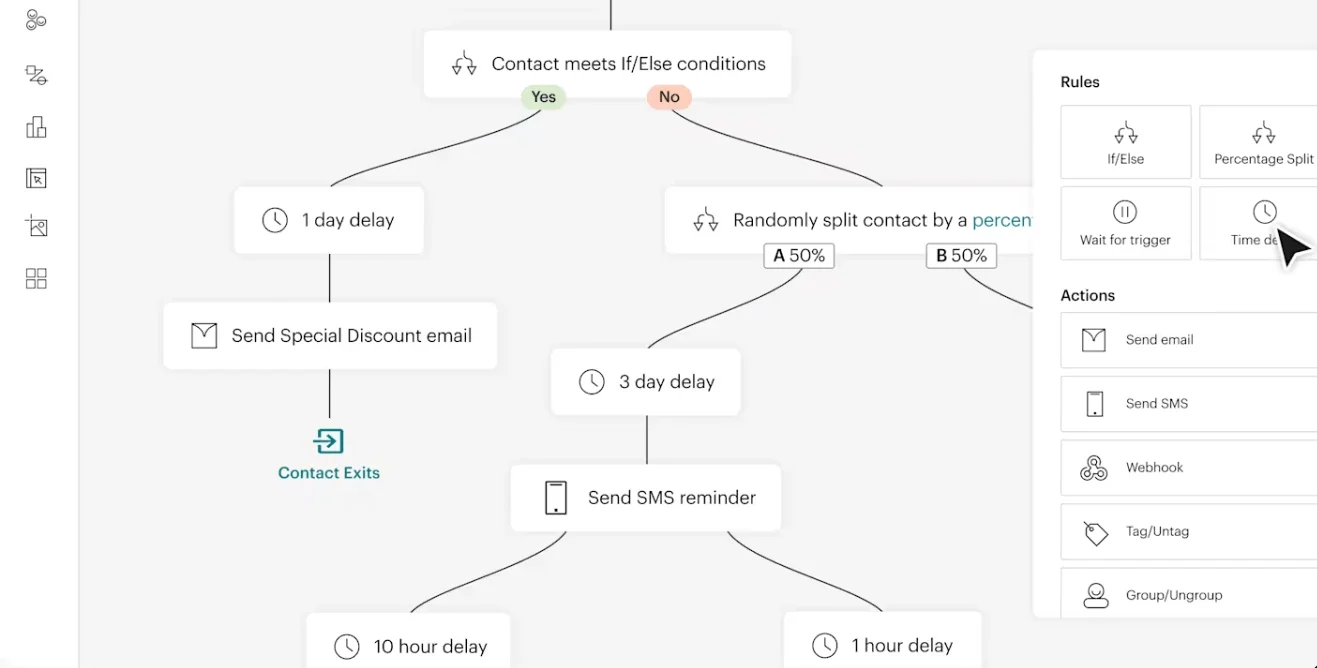
Mailchimp brings a well-rounded package to the table, often being praised for its email building tools, powerful analytics and user segmentation features. The automation journey builder (featured on the picture above) is also a strong point – it is possible to create your first email and its set of automations in a short amount of time. Their latest update focuses on improvements to their template list, automation workflows and AI-powered features.
Their Free plan is very limited – you have email support for 30 days, 500 emails per month, but none of the more powerful automation features. Paid plans start at $13 for the Essentials plan, billed monthly, for 500 contacts and 5,000 emails, plus access to a limited number of automated journeys, analytics and segmentation tools. The best value for money on the platform is found on the Standard plan at a monthly $20. The plan adds up to 200 automated journeys, more powerful analytics and segmentation tools, generative AI features and many email marketing staples, like A/B testing, landing pages and the like.
Constant Contact – Best for simple autoresponders
Best choice for: Users who need straightforward email automation and event-based campaigns without complex workflows.
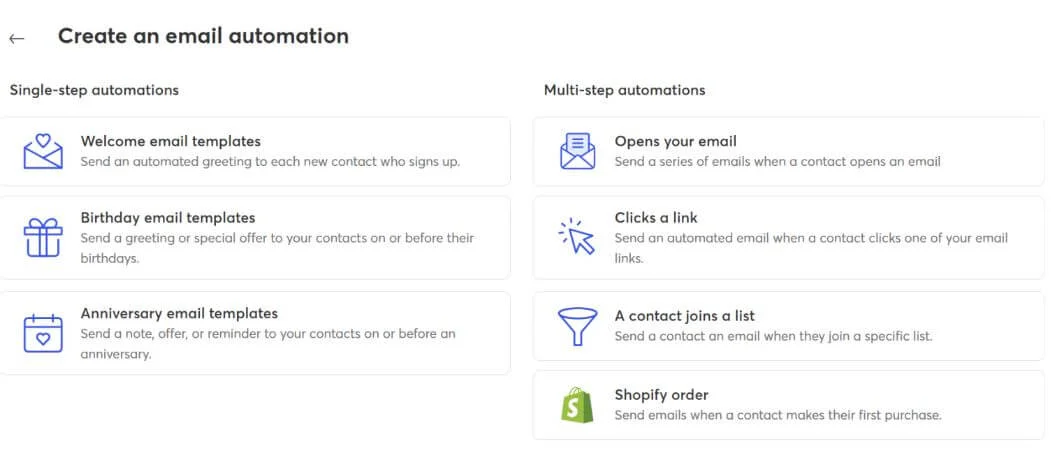
Constant Contact provides an easy-to-use builder for automations, allowing you to create custom welcome messages, abandoned cart reminders and relevant sequences for your e-commerce store. It also boasts a great RSVP feature for webinars and other online events, so you can use it for other things besides marketing – you can keep track of the personal development initiatives of your staff too.
Its main drawback is that it is not as powerful as other options in this list, lacking more sophisticated automations, especially if comparing the cheaper plans. There is a 14-day free trial, and paid plans start at $12/month for the Lite plan, limited to one automation template. The standard plan comes at $35 monthly and offers three automation templates, an AI-powered campaign builder and automatic resend to non-openers. The $80 a month premium plan offers unlimited templates, custom automations, templates for e-commerce and auto-send welcome emails.
Omnisend – Best for e-commerce email automation
Perfect for: E-commerce businesses that rely on automated emails for abandoned carts, promotions, and customer retention.
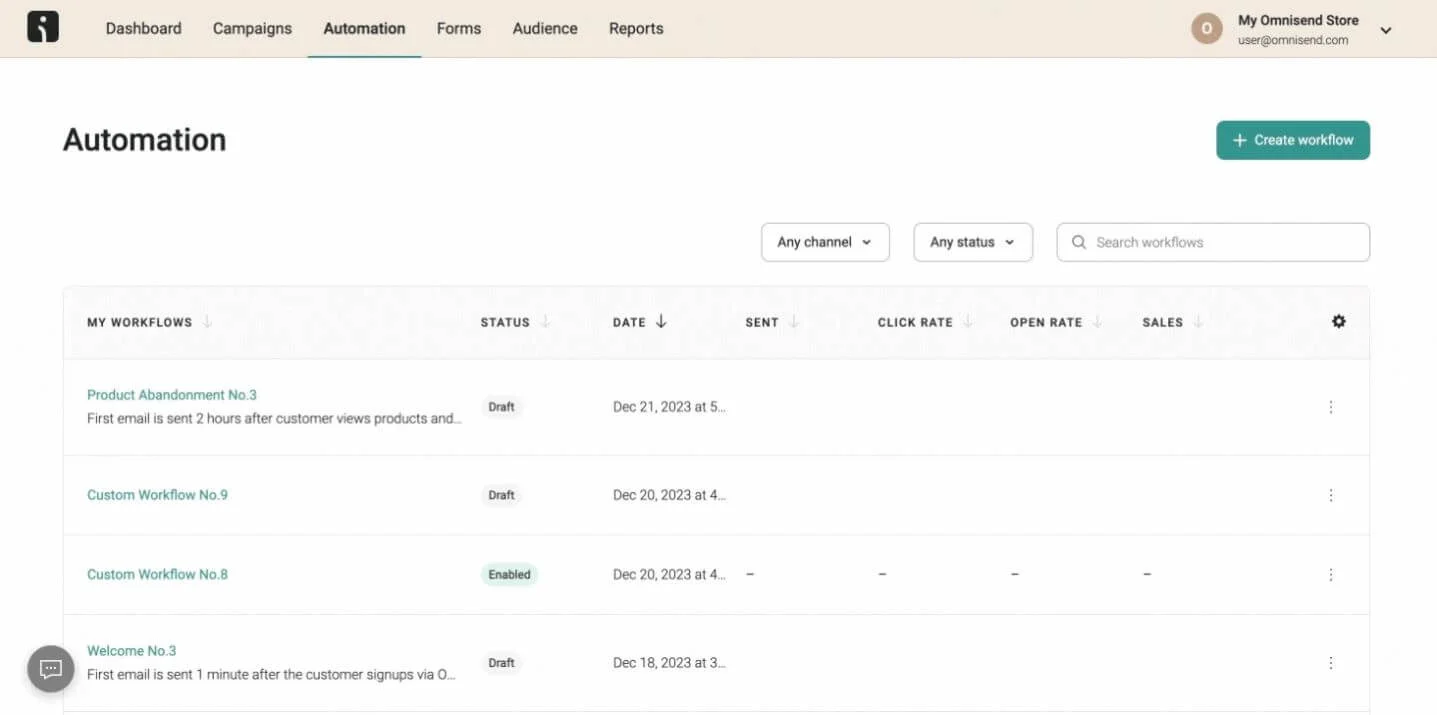
An all-in-one e-commerce marketing platform, Omnisend lets you connect with your audience via multiple channels, including SMS, emails, push notifications and more. Its functionalities are tailor-made for online sales businesses, allowing you to customize campaign content based on customer behavior and preferences.
The pre-included automations also reflect that, with welcome emails, abandoned cart, back in stock warnings and purchase confirmation as its main headliners. The biggest advantage is that all features are unlocked, even with the free plans. What differs is the number of contacts and emails per month: the free plan offers up to 500 emails per month. Paid plans start at $16/month and include 6,000 emails per month, but there are higher tiers and a custom plan too.
Kit – Best for content creators and bloggers
Designed for: Content creators, bloggers, and solopreneurs building and monetizing their audience with email automation.
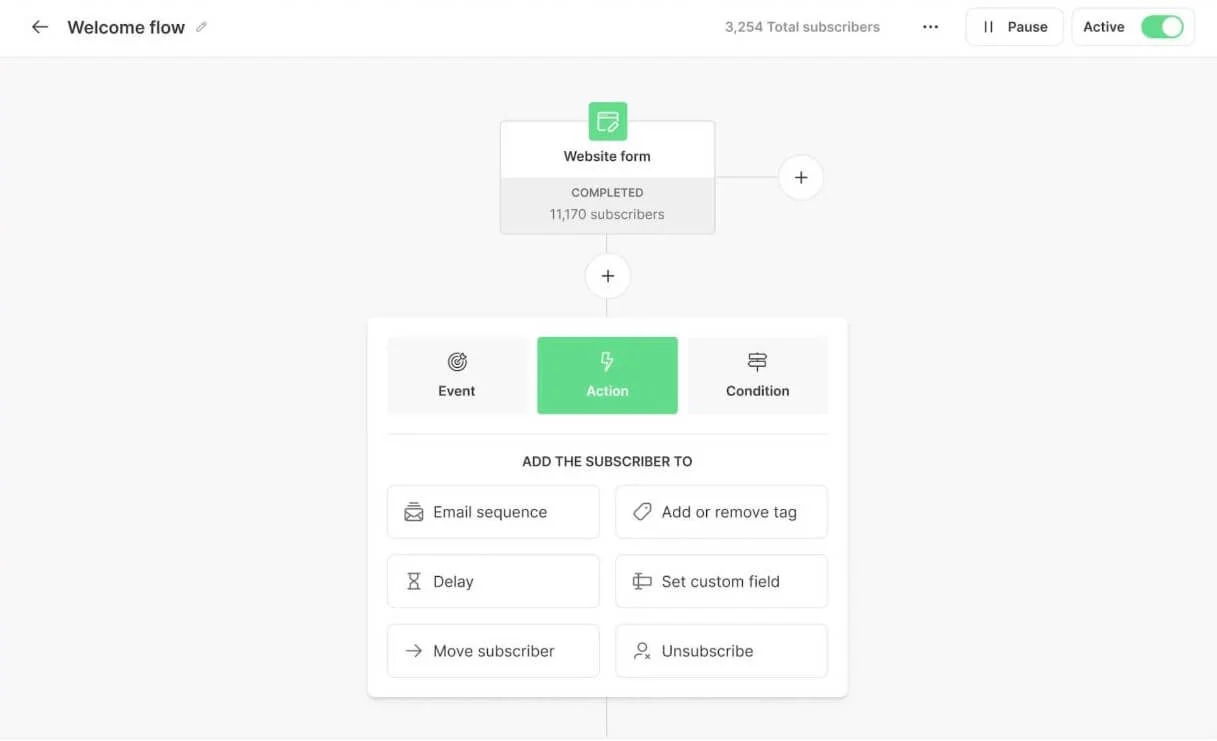
Kit is a marketing tool that focuses on bloggers and content creators. The user can create simple newsletter automations, welcoming emails and other email sequences with simplicity. The platform’s functionalities feature customizable landing pages (as seen in the example above), a tool for content monetization, audience segmentation capabilities and signup forms, among others.
The software comes with the free Newsletter plan for up to 10,000 subscribers and offers one basic visual automation, plus one email sequence. The Creator plan, billed monthly at $39, brings unlimited automations and email sequences for two users, plus other functionalities such as pools and RSS campaigns. The Pro plan costs $79 per month and adds Facebook custom sequences, unlimited users and more powerful analytics tools.
Drip – Best for advanced segmentation & personalization
Most useful for: E-commerce brands and advanced marketers focused on deep segmentation and personalized campaigns.
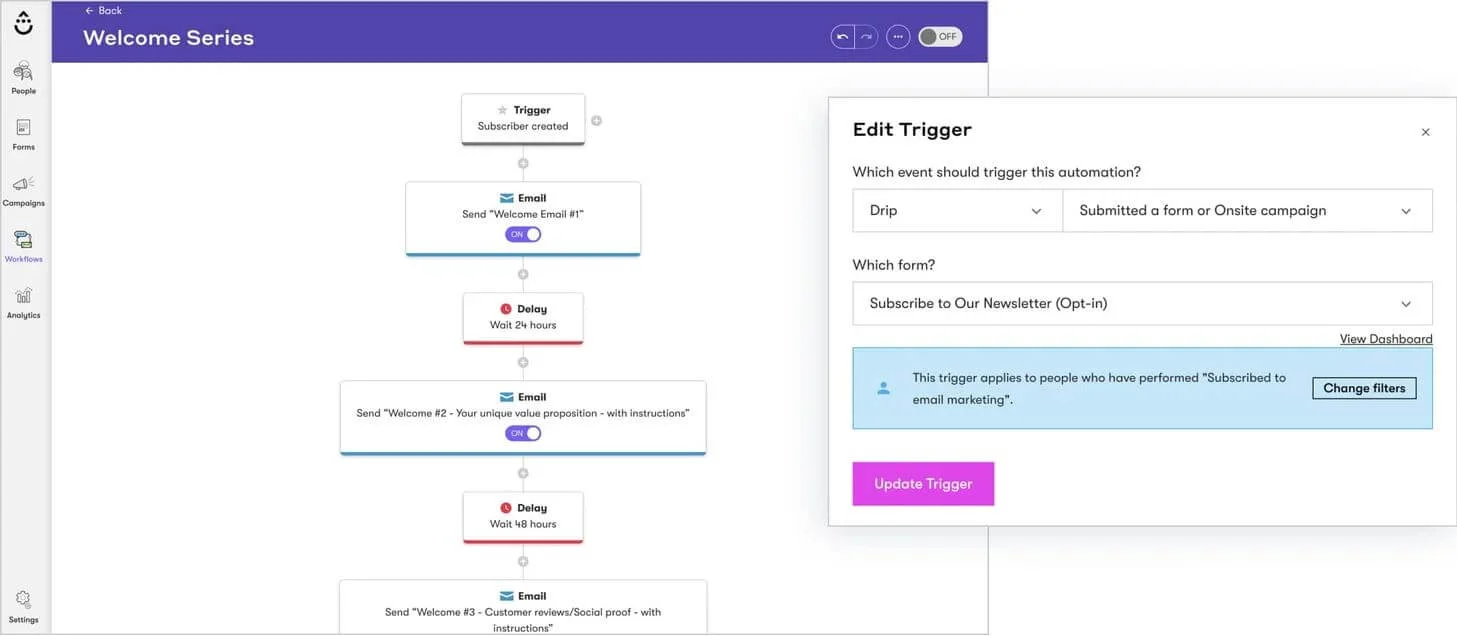
Drip is similar to Omnisend in its focus on e-commerce. The main difference is that Drip does not require you to connect an online store to it in order to use automation workflows. Drip’s strong suits are its email editor, segmentation and contact management, plus powerful real-time automation reports. It is also quite easy to use in comparison to how much you can do regarding segmentation and personalization.
Other features include over 20 automation templates, basic autoresponders and the possibility to customize and branch your automations. Its main drawback, other than the lack of functionalities like landing pages, is the price scaling. Drip has a 14-day free trial and pricing starts at a steep $39 for 2,500 contacts.
MailerLite – Best for simplicity and affordability
Great option for: Beginners and small businesses looking for an affordable, simple autoresponder with essential features.
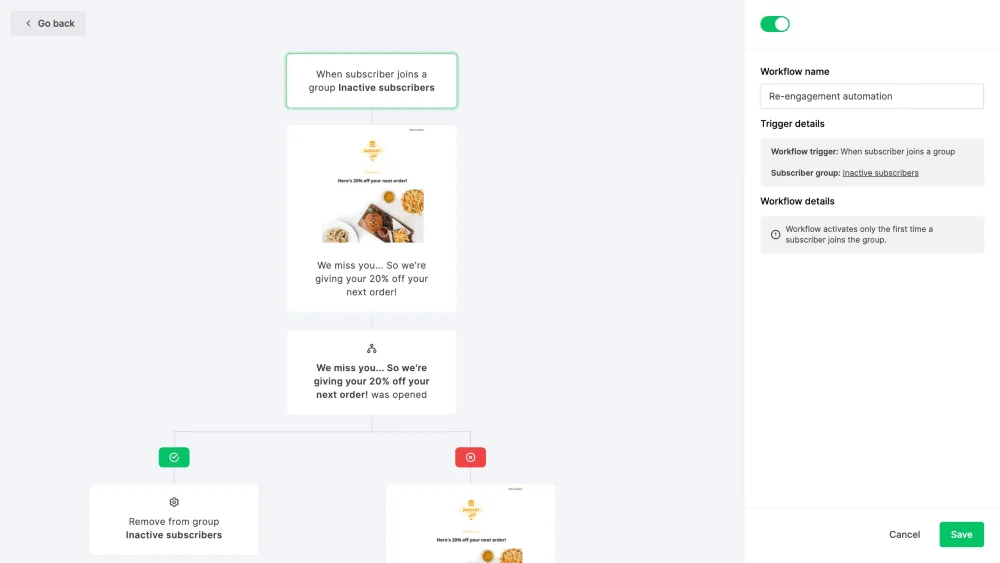
MailerLite shines for its simplicity, price range and set of features. You can create autoresponders, do A/B testing, classic email marketing campaigns, surveys and more. The interface is simple and it is also very accommodating for beginners, as you can see in the picture above. The plus is that it displays email open rates by location, allowing you to have a better sense of your demographic. MailerLite is a more basic software compared to other options here and a nice starting point.
MailerLite also includes tools for building websites, landing pages, and signup forms, along with an AI-powered editor to simplify email creation.
It has a generous free plan, allowing you to send 12,000 emails/month to up to 500 email subscribers, an email automation builder, plus a drag-and-drop editor. Paid plans start at $10 a month and unlock more interesting features: unlimited templates, a campaign auto-resend and unlimited monthly emails. The Advanced package, at $20 per month, adds AI writing and enhanced automations to the table.
How to choose the best autoresponder software?
Automation capabilities and workflow triggers
A good autoresponder should have automation capabilities along with a user-friendly interface. Check if the software has workflow templates, as it is easier to tweak rather than build them from scratch.
The picture below illustrates a very intuitive automation system we have at Selzy.
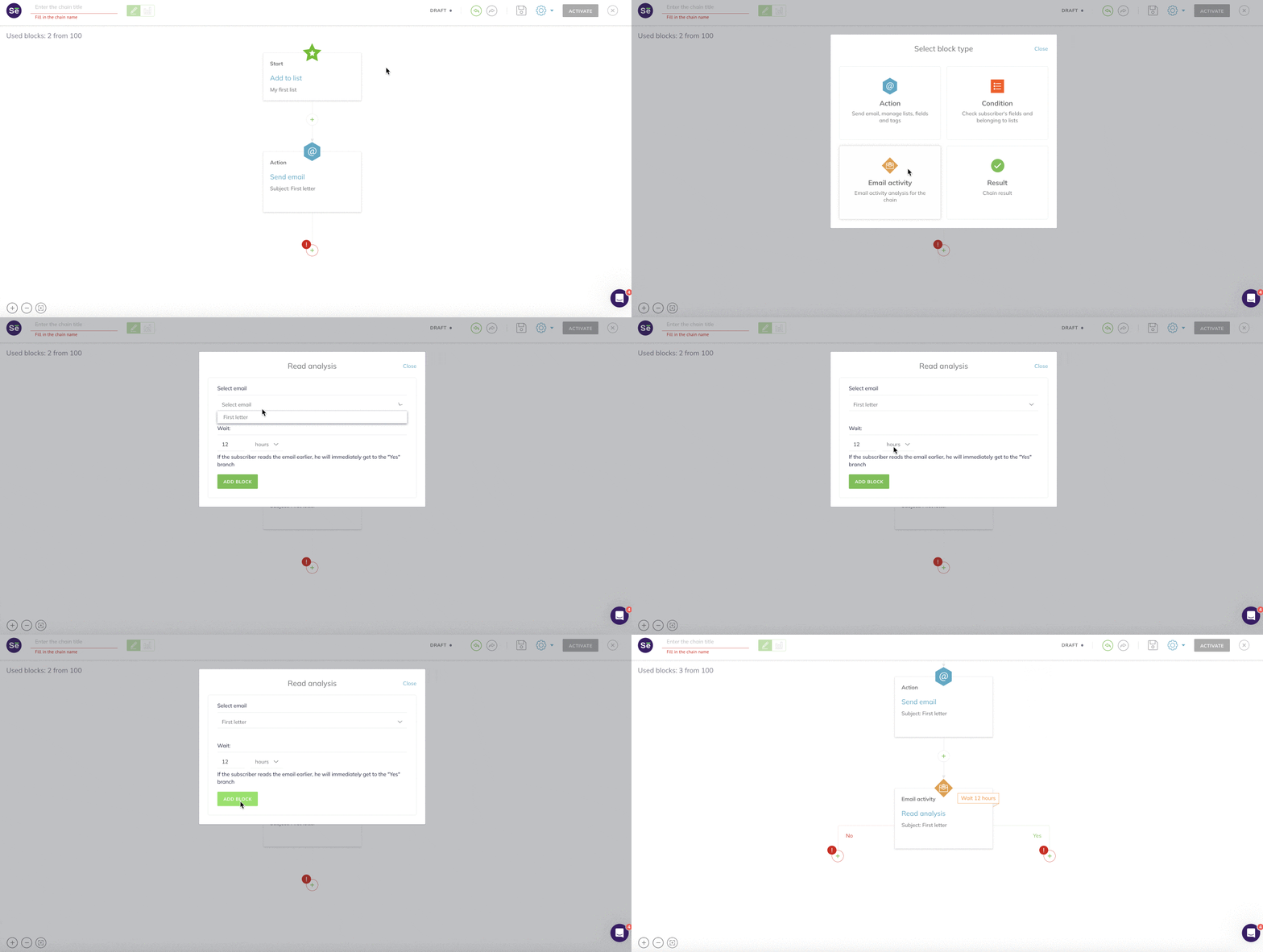
In practice, you should also check how powerful and comprehensive the list of possible triggers on that software is: most of them offer simple things such as birthday, welcome and thank-you messages, but do they offer more complex automations, capable of reacting to other triggers? A lot of platforms gate their most powerful functions behind a paywall, so keep that in mind when choosing yours and choose the best value for money.
Email deliverability and reliability
Bounced emails are one of the biggest enemies of email marketing, so make sure you choose a platform that has a good sender reputation. Your own sender reputation plays a part here, but selecting software that complies with all the data privacy regulations relevant to your business is key. You do not want to end up in a spam box because of automated responses, especially after ensuring you avoided that with your regular email marketing campaigns.
Choosing the right software can also help prevent you from being blacklisted by your recipient’s email service provider. You can check an IP or domain reputation using ReturnPath’s Sender Score checker.
Ease of use and setup process
Part of the reason to use an email autoresponder is time optimization. Setting up an automation should not be rocket science, and the software you select needs to fit your needs, but also your skill level. You might find a platform with incredibly powerful functionalities – but can you set them up easily? How intuitive and simple to use is its interface?
Choose a platform that matches your skill level and strike a balance between that and how well the automation capabilities can help you reach your goals.
Integration with other marketing tools
Autoresponder software has to work in tandem with your other marketing tools. Other than a well-rounded automation kit, you also want a platform that gives you good analytics tools and template editors.
Tracking systems are key, as you need to know if your automated responses were delivered. A/B testing will allow you to understand which version of your messages works best.
Subscription forms, landing pages and other marketing tools should also seamlessly integrate with your autoresponder software. Your workflow will thank you if you use a platform that includes all these features.
Pricing and scalability
There is freemium software, free software, and paid software. The point here is to weigh the benefits available against the price to be paid. There are advantages and disadvantages to using each type of software, so it is essential to know how the pricing system works before you fully commit. The goal is not to regret it later when your business outgrows the functions provided by your platform and unlocking them is too costly.
Depending on the business model, you may have to deal with many different versions, too, such as “Standard” or “Pro”, and license costs that differ between them. How much should it take to unlock function X or Y? Which versions of the software provide them and at what cost compared to the other options in the market?
Free vs. paid autoresponder software: Which one should you choose?
When to use a free autoresponder
To answer that question, ask yourself: what do I need from an autoresponder, and do I need to pay for that? Then, check your available options. In case the free plan suits your needs, by all means, use it. Free autoresponders are great if you are on a budget constraint, have other priorities or simply don’t need the more advanced functionalities in the current stage of your company’s life or growth. In case you are inexperienced – and that’s OK! – they are also a great way of learning the workflow without any investment.
The limitations of free autoresponder tools
The main drawbacks of free autoresponder tools are feature limitations. Most of them allow you to do simple autoresponder tasks, but chances are, your business will outgrow the number of emails and contact list size that a free plan will accommodate. Consider them a good starting point, but eventually your campaigns will require more advanced automations, better data reports and a bigger array of functionalities that free tools simply can’t provide.
Why paid autoresponders are worth the investment
Regardless of your business type, there is a platform made for you. Whether you are an online retailer or a content creator, there are autoresponders built specifically to help you, and you should take advantage of that. Their best features, however, are often locked behind paid plans, but there are many benefits to it, including time-saving features that will also allow your company to perform better.
Most of the paid plans have a price scaling, so you don’t have to pay the same price as an enterprise that is sending millions of messages a day. The investment it takes in comparison to the potential return makes it interesting to take the leap from free to paid, once you think your business is ready for it.
FAQ: Best autoresponder software
What is the best autoresponder software?
The best autoresponder software depends on your needs. Tools like Selzy and MailerLite are great for beginners, while ActiveCampaign and GetResponse offer more advanced automation features for growing businesses.
Are there free autoresponder tools?
Yes, many platforms offer free plans, including Brevo, MailerLite, and Omnisend. However, free versions usually come with limitations on contacts, emails, or advanced automation features.
What features should I look for in autoresponder software?
Key features include automation workflows, trigger-based emails, segmentation, deliverability, A/B testing, and integrations with other marketing tools like CRMs or ecommerce platforms.
What is the difference between autoresponders and email marketing automation?
Autoresponders typically send simple, trigger-based or time-based emails (like welcome emails), while marketing automation allows for more complex workflows with conditions, branching logic, and multichannel actions.
Can autoresponders help increase sales?
Yes, autoresponders can improve engagement and conversions by sending timely, relevant messages such as abandoned cart reminders, onboarding sequences, and personalized offers.
Which autoresponder is best for e-commerce?
Omnisend and Drip are among the best options for e-commerce, as they offer pre-built workflows for abandoned carts, product recommendations, and customer retention.
Final thoughts: Choosing the right email autoresponder for your needs
Now that you know the benefits of email autoresponders, the advantages and disadvantages of free vs. paid software and our top picks, you can make a well-informed decision. To summarize, take these into consideration:
- The current size of your business and your aspirations
- Your business needs
- Cost and price scaling
- Features and functionalities
- Your industry and market niche
- The goals of your current email marketing campaigns
- Your mailing list size
By following all the criteria, you will move towards your goals while making sure you are not overspending on something you don’t really need. Good luck and good sales!

 New and noteworthy on our blog
