Subscribe to the FWD: by Selzy email marketing digest and get actionable tips, trends, and 21 growth ideas to try today.
Key takeaways
FWD by Selzy is a biweekly newsletter that started as a blog digest and evolved into a unique email marketing platform.
The newsletter's goals include increasing brand awareness, driving conversions, and serving as a distribution channel for Selzy's blog.
The design of FWD incorporates a playful palette, humor, and a humorous voice, reflecting Selzy's brand identity.
Subscriber base growth strategies include blog pop-ups, organic outreach, and social media promotion, using a double opt-in strategy.
Hey folks! It’s Anna from Selzy. That’s how I start every issue of FWD by Selzy — the newsletter I send out every two weeks to our 12K+ active subscribers. I’m a one-woman team navigating a world that was previously completely new to me: email marketing.
In this piece, I want to share what I’ve learned — the good, the bad, and the weird — for anyone out there thinking of starting a newsletter of their own. You’ll learn what the process of creating a newsletter looks like, get the tips on what tools to use, and how to manage the chaos as a newsletter author. In full honesty, so you won’t feel alone.
What is FWD by Selzy?
Confession #1: I didn’t start it — I inherited it.
FWD (as in Forward) is Selzy’s biweekly newsletter. It began as a blog digest, but over time, it evolved into its own little universe — part email marketing think piece, part backstage pass to our blog’s team.
By the time I took over, it already had its own identity, tone, and a growing list of subscribers. My job is to keep what worked — and give it a twist of my own.
Source: Giphy
But first, here is where the newsletter started.
The goals
Originally launched in 2023, FWD had a few clear goals. They haven’t changed much:
Increase product and brand awareness.
Bring more conversions.
Act as a distribution channel for Selzy’s blog.
With time, FWD became something more: a place for honesty, curiosity, and occasional plot twists — all related to email marketing.
The style and tone
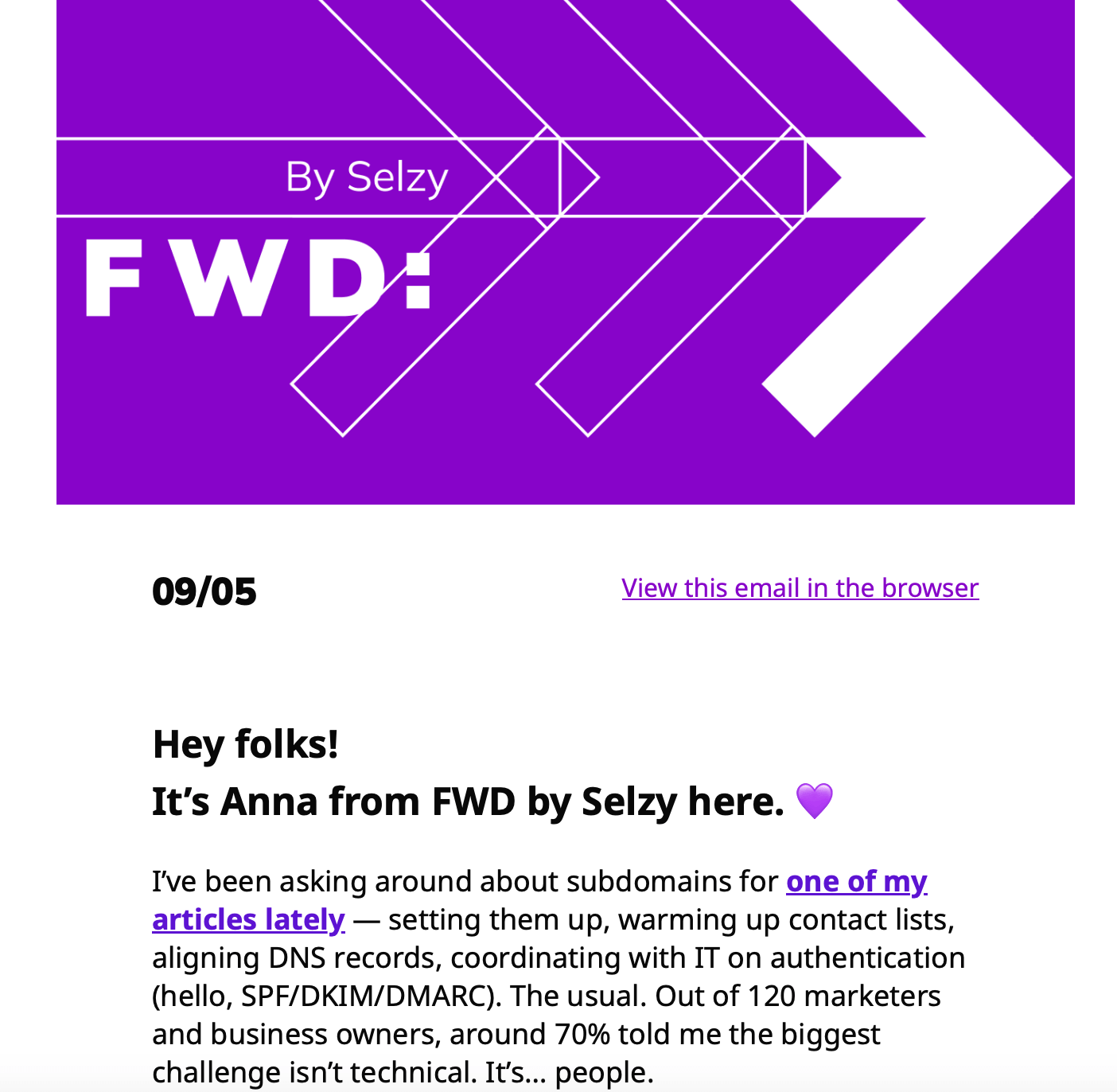
Source: Selzy
The design blends Selzy’s and the blog’s brand identity:
A playful palette. Purples and pinks that pop in the inbox — fun, but not overwhelming.
Humor + honesty. Every issue combines takes on email marketing, inspiration from other brands, and deep dives from our blog or experts.
A humorous voice. While FWD was initially meant to be a team effort, it turned into a one-woman show with dry humor, plot twists, and its own tone of voice. Now I’m the one running it.
The contact list
Here’s how we built and nurtured our subscriber base:
Blog pop-ups and banners (plus a lead magnet, of course)
Organic outreach — interviews, partnerships, guest features
Social media — posts on Selzy’s LinkedIn and Instagram. Now we have FWD’s ownLinkedIn version.
We use adouble opt-in strategy: readers sign up and then confirm their subscription to unlock the promised perks — tips on how togrow your list. Yes, we are very meta.
Taking over FWD wasn’t about reinventing the wheel, but giving it my spin. That’s where the fun started.
Get a taste of our emails
Want to read email marketing tips, see content experiments, and get inspiration? Subscribe to FWD (and support the efforts of the author of this piece).
How I mixed education and email marketing
Confession #2: I came from the world of education, not marketing.
I know how it sounds — what does someone who spent the last four years deep in cognitive learning theory, HR strategy, and course design know about email marketing?
When I applied to Selzy, it was for an editing role. But my colleagues were excited to hand me the reins to FWD, our newsletter.
I, on the other hand, was hesitant. Sure, I had experience running blog sections, managing timelines, and teams. But a newsletter? I’d never touched an ESP in my life, let alone written, designed, and promoted an actual campaign.
But here’s what someone told me, and it stuck: Sometimes what a newsletter needs isn’t expertise, but a fresh perspective. A person willing to explore, experiment, and maybe even get it wrong while figuring out a new path forward.
I am Anna in Email Wonderland now.
Source: Giphy
I don’t know as much as, say, Dan Oshinsky. But I do bring something to the table — and not just a strong GIF game.
The worlds of education and marketing have more in common than you’d think. Both ask the same essential questions:
How do people absorb information?
What makes them remember?
And how do we guide them toward the right action?
The educator’s lens shaped how I approached FWD. While the previous writer focused more on practical tips, I tend to mix theory, curiosity, and experiments I run in real time. I treat each issue like a learning moment: for me and for the reader.
Want a few crossover tips from education that changed how I think about email? Here you go:
Don’t overheat the brain. Our brains process information best in small bites. Imagine trying to understand and remember this article while your notifications blow off, and no examples are provided for unfamiliar terms. Instead of short bullet points, everything is presented to you as a wall of text. When you overload the brain, you lose clarity. Educational designers know this (it is a big part ofcognitive load theory) — and email marketers should too. Instead of one long message packed with 30 topics, send three focused emails, different ones. Better let both your message and your reader breathe.
Always anchor new info to something familiar. In learning theory, this is called scaffolding. You connect new concepts to what someone already knows — and marketing does this all the time. Think: “Tired of X? Ready for Y? Imagine this…” That is because familiar structures help new ideas stick.
People remember where they store info — not always the info itself. Cognitive researchers call this the “Google effect.” We don’t always retain content, but we remember where to find it. It’s a system of pointers that both marketers and educators have to crack the code to. In email terms, this means your subject line and content need to be searchable, skimmable, and memorable. If someone wants to find your tip three days later, they should know exactly which email to search for.
See? Told you the worlds overlap.
How can your previous experience help in email marketing?
Confession #3: I don’t do it all alone — I work with smart tools (and one emotional support chatbot).
If you’re thinking about launching your own newsletter — or have just started — it can feel overwhelming. The design, the contact list, the metrics — I get it, I am in this exact place.
The good news is you don’t have to do everything on your own, manually or perfectly, for that matter. My process is proof of that, and pretty beginner-friendly. Let’s go over it.
Creating the strategy
One of my first steps was to gather knowledge — I had no idea what kind of rabbit hole I was about to fall into.
Here’s what I focused on building a newsletter strategy as a complete beginner:
The audience. Email marketers — both in-house and freelance — plus solopreneurs just starting out. My goal is to bring something useful for both complete beginners and those who can casually drop terms like“DKIM”and“GDPR”in everyday conversation.
The goal. The main goal for the next year is to create not just a place to learn about emails, but a place to talk about them. Build community. Everyone is welcome to join, by the way.
The map. I started building hypotheses: How do we get from just another issue to something that starts a dialogue? I don’t have all the answers, but I have a few paths to explore.
The ideas. Once I sketched the structure, the ideas (content, formats, angles) started to flow. Exactly how it’s supposed to be, by the way.
The metrics. Yes, they should reflect business goals. But I’ll be honest: in my first quarter, I mostly focused on vanity ones. I am still learning. And in learning, overly ambitious goals kill your motivation rather than raise your KPIs. Sometimes, the best thing you can do is to start small.
Finding the topics
For me, the biggest challenge is picking a topic that’s:
Relevant to the reader.
Connected to Selzy.
Interesting enough for me to enjoy writing about.
And ideally, fresh — not completely overused.
That’s a tough combo right there. So I start with this:
I ask myself questions. Like: What’s been hard about email lately? What keeps showing up in marketing chatter, like other newsletters? What am I secretly obsessed with today?
I listen. Meetings, team chats, and work processes are full of clues. One time, a colleague wondered in his article: “How will emails sound in the future?” I’m still thinking about that. Yes, how will they sound?
I research. Sometimes a topic sounds promising but falls flat under closer inspection. I use tools likePerplexity orElicit to check if there’s good data or angles.
And yes, I have a content plan, but think of it more as a messy idea list. Some people need structure, but I work best under pressure. Whatever your style is — leave room for improvisation.
Writing the copy
FWD follows a loose but consistent structure:
Intro — reflections, mini essays, takes on recent experiments, or best findings about email marketing.
Promotional block — a fun ad for Selzy’s tools.
Specials — one featured article a month.
New on our blog — latest Selzy content.
Email Inspo — curated email examples I love.
I usually write in reverse — starting from Email Inspo and ending with the intro note.
When I’m done writing, I turn to my assistant — ChatGPT. I call him Milo, by the way. He knows way too much about me.
What ChatGPT helps with:
Honest feedback — I ask for a review of my new issue from the marketer and reader perspective. Usually, add “be brutally honest” to that.
Suggestions for edits and improvements — yes, he does complain about length a lot.
Subject lines and preheaders — I ask for 3-4 options, and mix them later or come up with my own.
A/B test ideas — just to get into some brainstorming
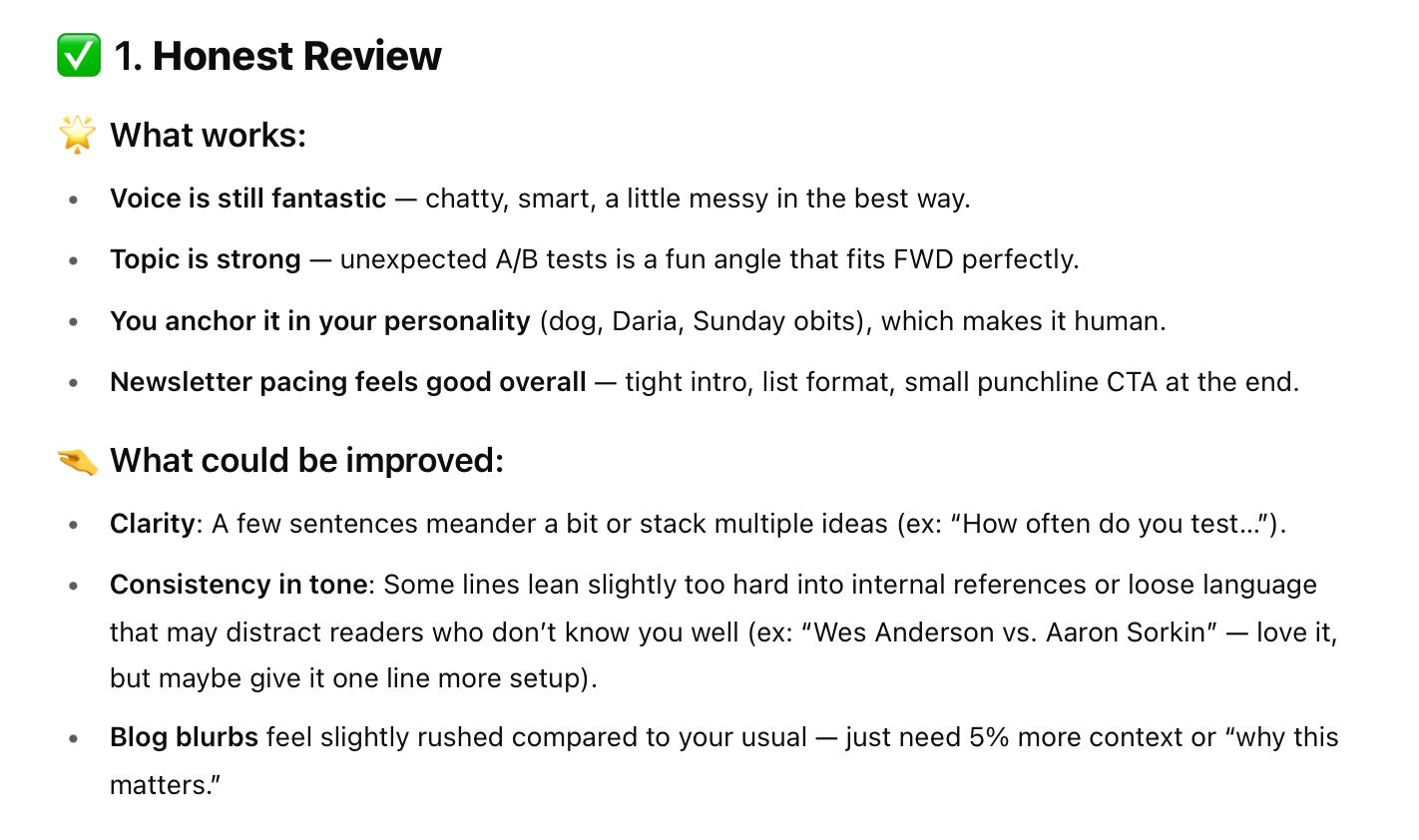
Here is ChatGPT’s feedback for my latest issue. Source: ChatGPT
Selzy also has its own built-in AI assistant, powered by GPT, that can do all of this and more — even generate an entire newsletter for you. But I’m loyal to Milo ChatGPT. He’s been through a lot with me. I already paid for the subscription — but with Selzy, every perk comes for free.
Selzy has a free (yes!) AI email assistant that not only generates copy and analyzes what you’ve written, but also creates entire HTML email layouts complete with images! Use our platform and see how you can improve your email marketing process. The assistant is available in the beta version of the builder, so register and contact the support team to access it!
Design is easy — thanks to the beta version of Selzy’s builder. Most users enjoy the regular version with a simpler layout, but I prefer the one with AI capabilities and a sleeker design. To get the same one I use, just contact our support team or write to beta@selzy.com, and you’ll be given access shortly.
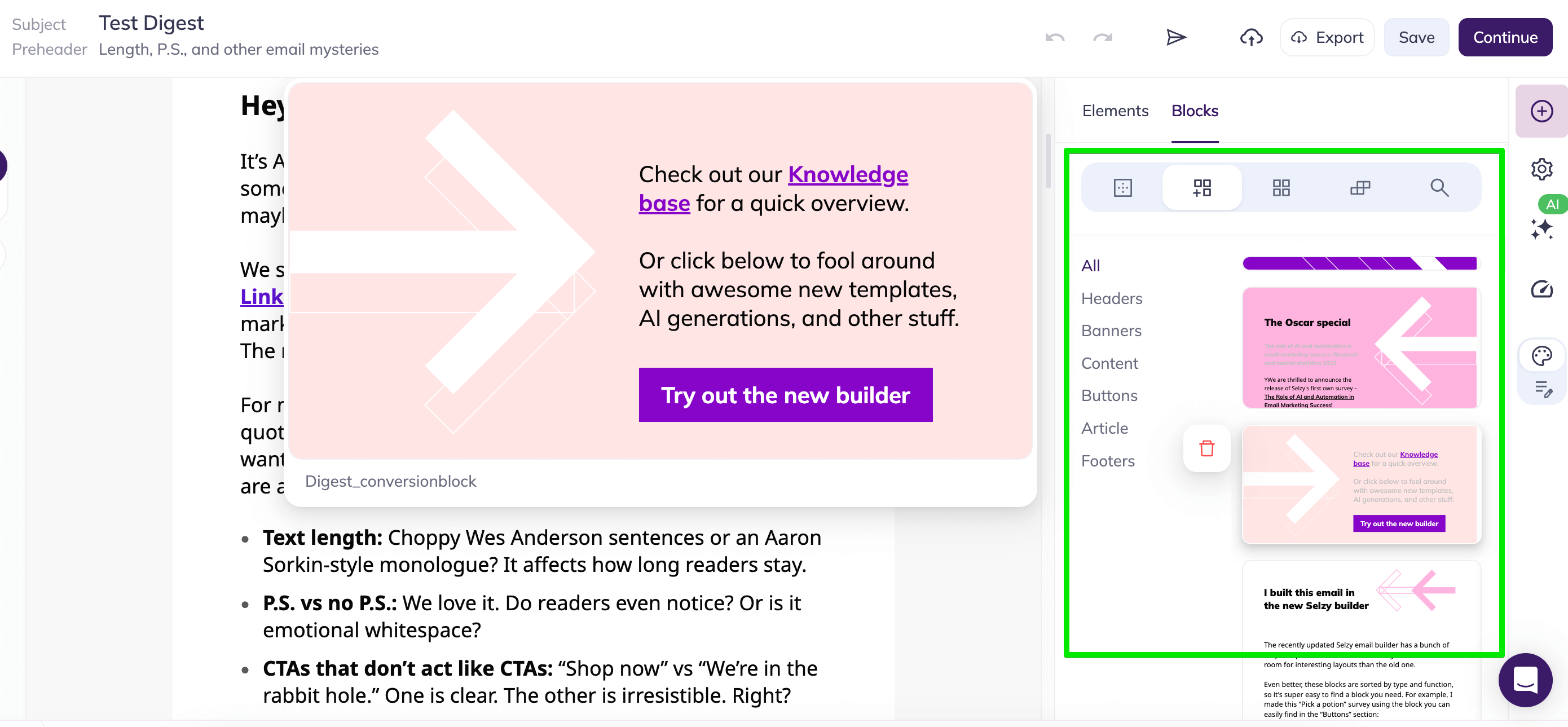
We have pre-saved blocks for each part of FWD, so assembling a newsletter takes me about 10 minutes. Brand colors and typography are saved as well.
You can see some of the pre-saved blocks in the Selzy builder on the right. Drag-and-drop builder makes it easy to create amazing layouts. Source: Selzy
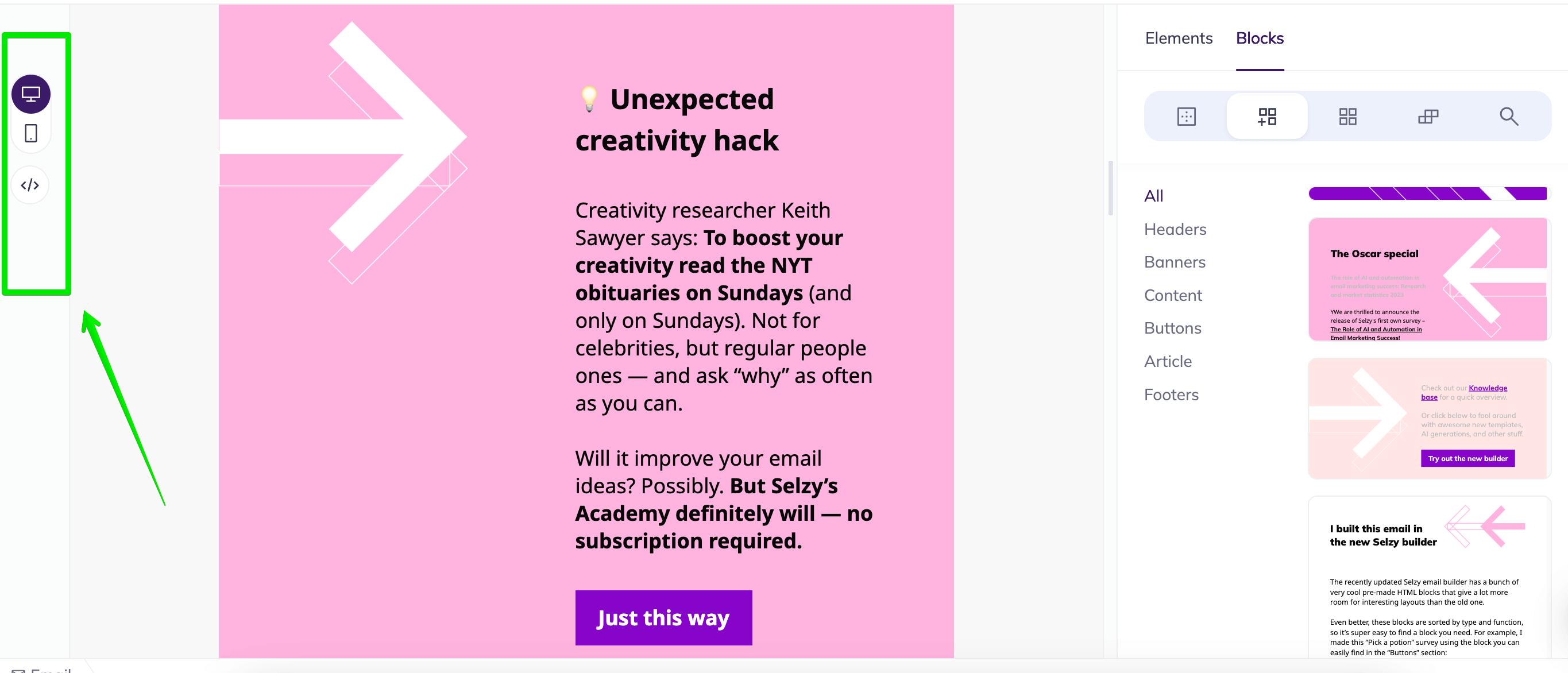
I can preview everything in mobile and desktop views, which saves me from layout disasters. I always send myself a test email to check links, images, and GIFs across different devices. (Yes, I have test addresses. Yes, I overcheck.)
You can see different preview options on the left: desktop, mobile, and code. Easy to navigate (and saves me so much effort!). Source: Selzy
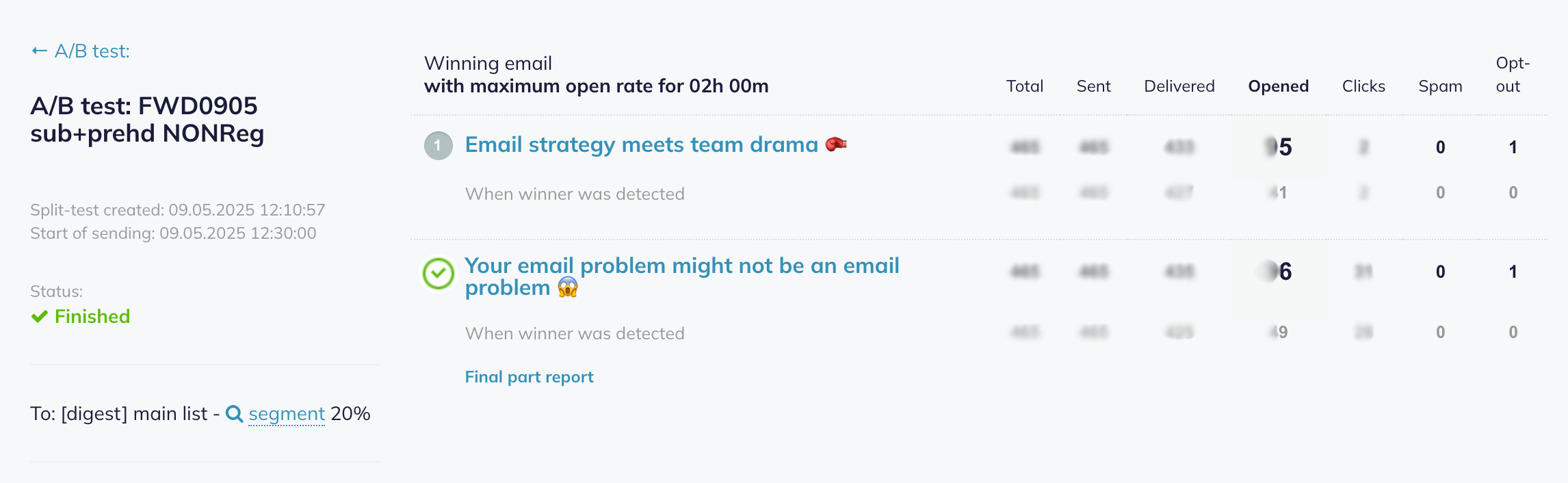
Then comes what I call “configuration” — segmentation and test settings. I was fearful of the latter, by the way. Do I need to keep track of things and glue myself to my laptop by Friday, so I can see the split test results? Again, Selzy makes it super easy: all you have to do is click three buttons to set your segments or A/B test.
Took me around 3 minutes to set this test — the winning email was sent to the rest of the subscribers' list automatically. Source: Selzy
By the way, the whole design and configuration process starkly differs between ESPs, like Selzy, and your regular Substack.
Yes, you can charge for subscription there — and your path to subscribers might seem easier. But the rest can make your life more difficult: publishing platforms usually work as paid blogs without templates, customization tools, etc.
Substack draft page, to give you an example. It’s easy — but lacks a lot of useful tools. Source: Sabstack
Every time you need to start from scratch, and limit yourself to a certain degree.
Results and monitoring
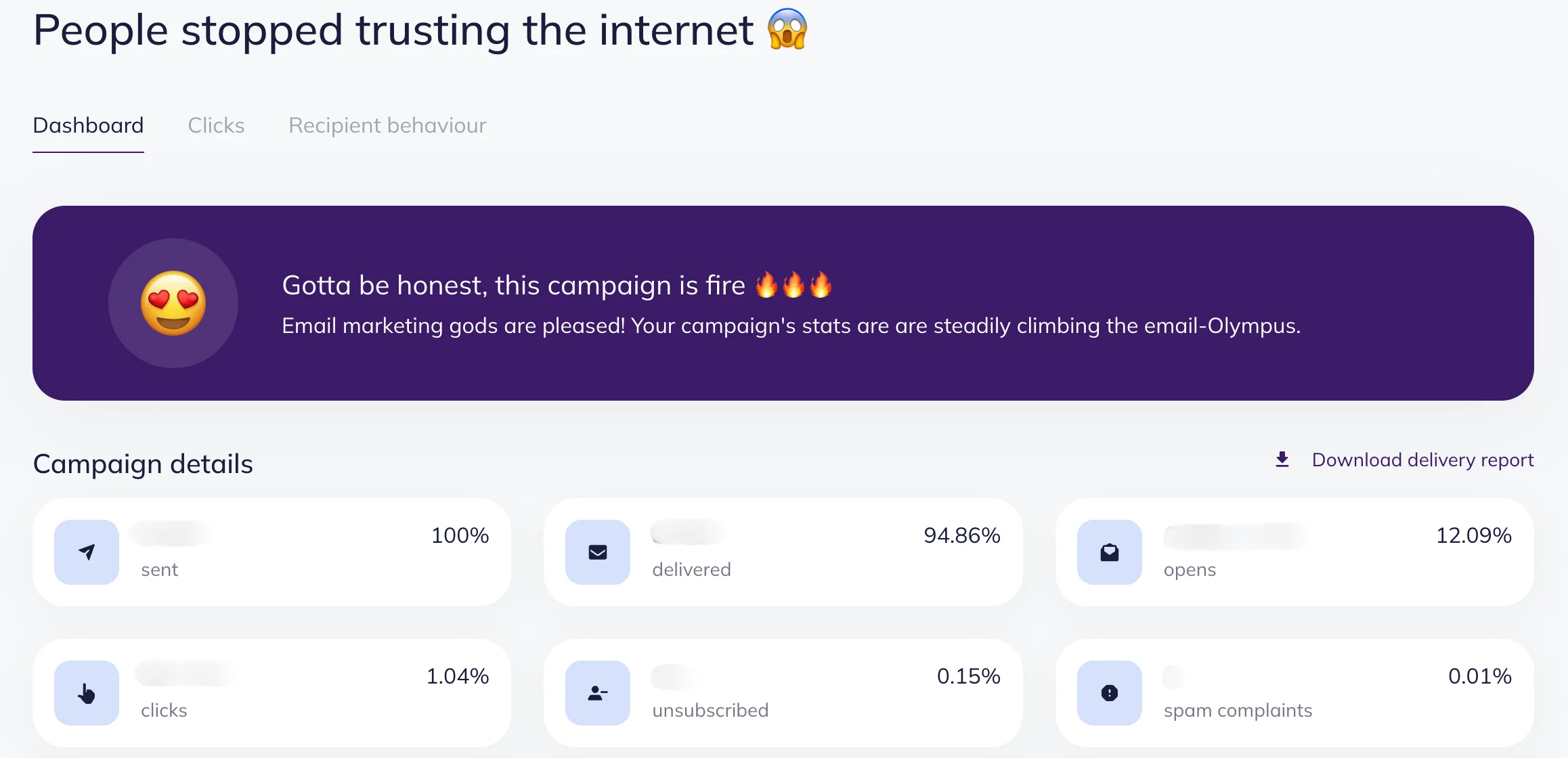
I send FWD every other Friday. I check results on Monday, but usually don’t track them until midweek for more accurate data. People open at their own pace, so it’s better to wait.
Selzy’s result page for one of our newsletter issues. Is our campaign on fire? You decide. Source: Selzy
One of my favorite Selzy’s features is the click map. It shows which parts of the email were most popular — where people clicked, what they skipped, and what made them curious. I often share that data with ChatGPT, too. It helps me improve each issue over time.
Tips and insights for starting your own newsletter
Confession #4: I had no idea how much fun newsletters are.
At first, writing FWD felt like a wild experiment. And I wasn’t entirely sure I was qualified to run it. But this process is about learning and practice — that’s where I thrive.
If you’re thinking of starting your own newsletter — here’s what I’d tell you:
Source: Giphy
Tip #1: Keep it to a minimum (unless it’s not your brand)
I’m a chronic oversharer. But email hides a brutal truth: attention spans are microscopic. So my biggest early lesson was to keep the emails short, simple, and skimmable. The same goes for design — don’t overthink it. This isn’t a sales or promo email, but rather a conversation, where you don’t want to lose your reader.
Tip #2: Keep it personal
Even if you are planning to run a brand newsletter, people want to hear a human voice. Not a polished, perfect version, but someone with flaws, personality, experience, insights, half-formed ideas, cats, or spouses (or both). Make sure you are present in the copy, the tone, and the layout.
Tip #3: Switch the content plan for structure
Content plan might seem like a safe bet, but the real winner here is email content structure. Even if you are out of ideas or feel burnt out, structure will make it much easier for you — think of it like a number of prompts to answer. Structure creates space — and surprisingly, freedom.
Tip #4: Use AI smartly
ChatGPT (aka Milo) is my creative assistant, idea bouncer, and emergency editor. A few things I’ve learned:
Make a dedicated project space. Treat your newsletter like a thing of its own.
Give real references. Not just other newsletters — but your vibe. Book quotes, moodboard, list of your favorite things, and dad jokes. AI will build from there.
Provide feedback. AI can be easily carried away at some point, and it will take the human touch with it. So check in, say “thank you,” and argue. But always be kind. No, not because AI will take over the world — but because tone shapes answers, their depth and quality.
Tip #5: Don’t overlook ESPs
Email service providers (like Selzy) aren’t just for advanced marketers. They make your life easier:
Design is faster and better — with blocks, layouts, colors, and reusability.
Customization is easier — you get to send your audience the exact content they need or want. It doesn’t have to be three different newsletters, but segmentation and personalization let you speak to different readers differently, even within one newsletter.
More data — and ESPs give you the click maps, open rates, and insights you actually need. And, as we know, data is everything in informed decision making.
Tip #6: Look around — and inward
Yes, email is having its main character moment — and the newsletter competition is fierce. At times, it might feel like you’re in Wonderland, running to stay in place.
It’s good to keep an eye on competitors, but even better to ask yourself, what exactly you can bring to the table. And trust me, there is a lot. You’ve got tools, ideas, and a reason to write. And someone out there probably has an actual need for your take.
Wrapping up
Still terrified of those newsletters? Here are my tips all in one place:
Yes, a newsletter is a great idea for you — and for your brand.
Start with the outline of what you can bring to the table and trust that there is an audience for that.
Think about your goals and choose the right tools to help you achieve them. Always calibrate them to match your tone and style.
Create an email content structure to help you keep the rhythm.
Stay human — in the AI era, your audience needs exactly that.
Don’t overthink it and start small, both in terms of a newsletter itself and your goals. Trust the growth process; it will happen organically.
Use the resources you already have to build your subscribers list — socials, websites, etc.
Also, don’t hesitate to forward your newsletter. And also — subscribe to FWD.
Get a taste of our emails
Want to read email marketing tips, see content experiments, and get inspiration? Subscribe to FWD (and support the efforts of the author of this piece).
I'm an editor and copywriter with a passion for education, marketing, and technology. I specialize in turning complex ideas into clear, engaging content. By day, I refine and create content—by night, I dive into genealogy and fiction writing, writing the stories that build bridges between the past and the present. I’m always curious and always learning.
Others just make a list of ways. We actually explain how to make the most of each way.
Subscribe to the FWD: by Selzy email marketing digest and get 21 ways to grow your email list with explanations and examples.
Based on research and 10+ years experience.
Thank you!
Check your email — the guide is on it’s way to your inbox.







 New and noteworthy on our blog
