



Key takeaways
- Consider switching email service providers if your current one has steep pricing, limited functionality, constant technical issues, or poor customer support.
- Avoid changing ESPs if your issues are related to low open/clickthrough rates or emails ending up in the Promotions tab.
- When looking for a new ESP, prioritize flexible pricing, necessary functions, scalability, deliverability rates, reliability, security, good support, and user interface.
If your business is facing the prospect of switching to a new email service provider, well… we imagine none of your sales or marketing professionals are thrilled at the prospect. Daunting as it may sound, however, it is completely doable.
In this guide we’ll explain:
- When changing email service providers should (and shouldn’t) be considered.
- What you should look for in a new email service provider.
- Which steps to take for the process to be as swift and painless as possible.
Strap in.
When you should start looking for a new ESP (email service provider)
Email is, on average, one of the better channels in a marketer’s toolbox. In 2023 it brought in an 8.7B revenue in the US alone — and half of all the marketers said their email ROI that year doubled compared to 2022. Migrating to a new ESP becomes a balancing act as a result.
However, you shouldn’t dismiss the idea of a switch if your current provider is not up to scratch. There are four common issues which are likely to push you over the edge — and force you to consider alternatives:
- Steep pricing. There are many email marketing services on the market to choose from — and pricing packages vary greatly. You might find you are throwing away hundreds of dollars monthly for functionality you don’t need — but cannot downgrade because then you’ll lose some of the functions you do need. Or you might simply find your business will exceed the email volume/subscriber limit on a lower plan.
- Limited functionality. Your current ESP might be holding your business back for any number of reasons, such as a lacking templates’ library, no support for dynamic content , a limit for the number of emails you can send/number of subscribers you can add, etc.
- Constant technical issues. Your ESP service has become unreliable, with bugs and downtime affecting your business goals.
- Poor customer support. You cannot figure out some of the functions — or have run into technical issues — and the ESP’s support team takes an eternity to get back to you.
However, there is a case to be made against switching providers as well. Here are some of the instances you should opt against finding a new ESP:
- Low open/clickthrough rates. These have more to do with your content/marketing strategy than the email provider itself. Consider adjusting your approach instead — and take a hard look at the emails’ content.
- Emails end up in the Promotions tab. Email service providers cannot guarantee your email would be sorted differently. But it doesn’t matter anyway as open rates for emails inside Promotions drop by 1-2% (compared to the Primary tab) at most.
What you should look for in a new ESP
Naturally, the first thing on the list is whatever prompted you to start considering a move away in the first place. We’ll go over some of the likely reasons:
- A more flexible pricing model. Self-explanatory. No one likes paying double of what they can when there’s a cheaper option that offers the same functionality.
- More functions to work with. Your new ESP should add whatever it is you are looking for, while shredding the bits you don’t — and won’t — use. However, consider the direction your business is going, and whether your new ESP has the features you might need in the future.
- An opportunity to continue scaling your business model. This point somewhat echoes the previous one. In short, leave room for expansion. Don’t choose a plan with an email volume/subscriber limit just above your current count.
- Higher deliverability rates. Yep, some ESPs offer better deliverability rates than others — sometimes the difference is startling. Here’s what guys at EmailToolTester found out when running deliverability tests in January 2024:
- A more reliable service. Simple enough: you’re looking for maximum uptime and as few bugs as possible.
- Higher security standards. A secure ESP will ensure your emails don’t end up in spam, and that proper end-to-end data encryption is in place. Data encryption is a key consideration for your migration process as well.
- A prompt support team. Ideally you should be looking for an ESP that will provide you with a personal account manager. Even if one isn’t offered to you, swiftness is still key: you don’t want your business operations to be affected while your ESP support team figures out your issue.
- A more intuitive user interface. Last but not least. Think about your users and how the switch will go for them. You don’t want to present them with a sophisticated interface which is not instantly obvious.
7 steps you should take when switching ESP
-
Prepare for the migration process
Decide who will coordinate the migration
Depending on how many campaigns and subscribers you have, the process can take up to a month. That’s a sizable chunk of time — so avoid changing ESPs during your busiest business period.
Inform the stakeholders about the process: they might raise concerns or points you haven’t considered. Your sales and customer support departments should be kept in the loop too — so that they could answer questions from clients.
The migration will also require coordination between multiple departments: marketing and IT at least. Your email marketing specialist should be up to date with all the content involved — but they might lack the managerial nous to coordinate the process. Your head of IT or marketing might be better equipped for the job.
Analyze what needs to be carried over
That includes your subscribers’ lists, templates, images, automated email sequences and integrations. Contact your new ESP support team to see if some of these things can be carried over automatically, via API — and which integrations they offer that you need.
Be ready to use several ESPs for a while
Don’t jump ship from your old ESP straight after the migration process is over. A buffer period during which both ESPs are operational is a good idea for two reasons:
- To ensure everything works smoothly with the new ESP.
- To let automated sequences on your old ESP run their course — otherwise some of your customers might get caught mid-automation.
Notify your subscribers about the change
The swap will most likely affect the interface of your emails — and some more technical issues might pop up along the way as well. Let your customers know in advance why the migration is taking place — and assure them it’s under control.
-
Import your subscribers
Arguably the most important part of the process. The easiest thing to do here is find out if your new ESP offers a direct integration with the old one: this way importing subscribers will be relatively straightforward. However, check that all the contact info carried over correctly.
If there’s no direct integration with the new ESP, you can simply download all the subscribers’ data from your old as an Excel file — and then import it. We’d advise you to name all the subscriber segments the way they were called in your old service: consistency will make it easier to pinpoint missing data.
There are also several other important points to keep in mind when moving your database:
- Monitor unsubscribers — so they don’t start getting emails from your new ESP. Some have opted out completely, while others have done so from only certain types of communication.
- Before the migration process, clean out your lists. Update contact info and cull the inactive subscribers.
-
Carry over all your templates and images
Much like with subscribers’ lists, a direct integration with your new ESP will make this step a breeze. However, if there is no direct integration — or if you have only a few dozen email templates — you can carry them over manually.
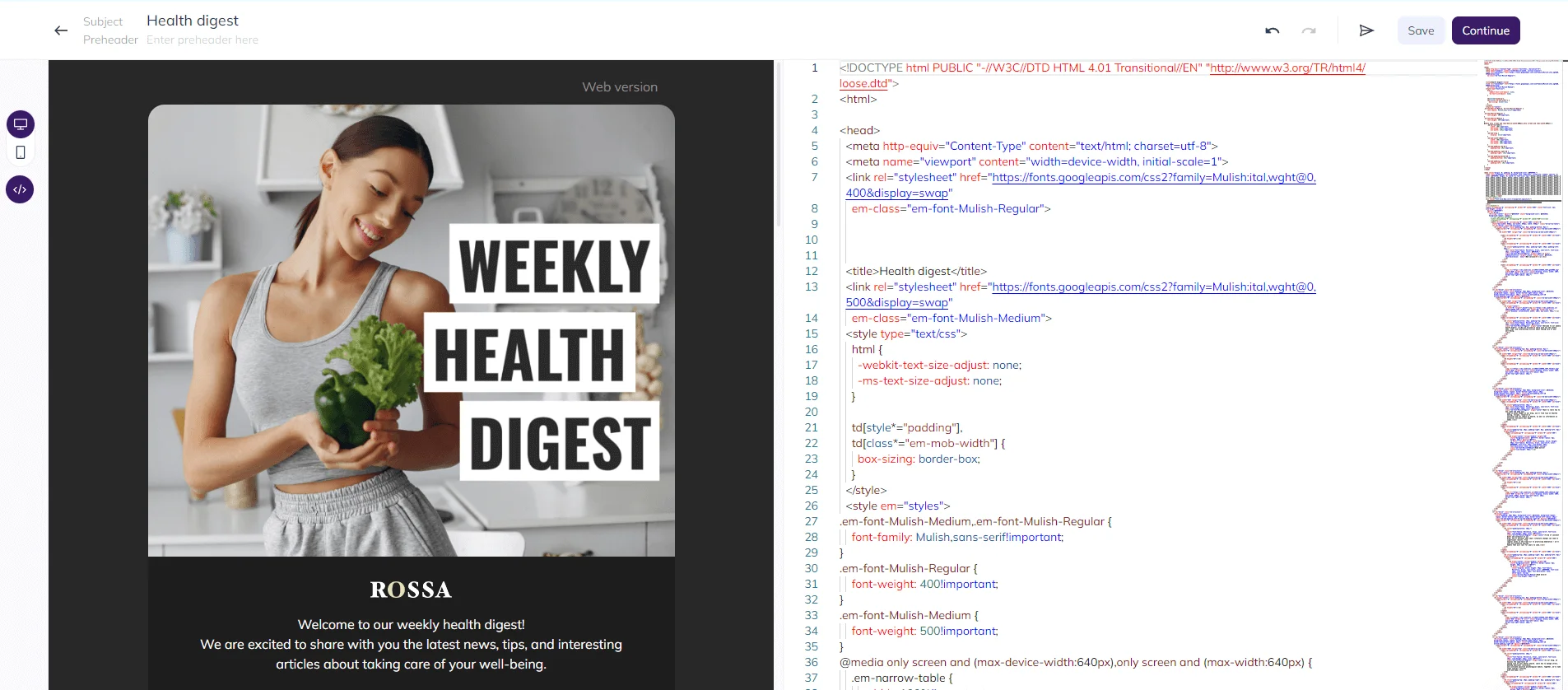
Simply copy and paste the HTML code for each template into your new ESP — and that’s it. Things might get trickier if your email templates have AMP content inside: that is, content that constantly updates, so that whenever the recipient opens your email, the AMP part of it will be brand new.
You should also check other interactive parts of your email templates, such as unsubscribe buttons. Finally, all images will need to be uploaded to your new ESP — and links to these images updated within the emails. Otherwise they won’t properly be displayed.
-
Configure all your integrations
Examine which integrations (with your CRM and CMS, with your website forms, etc.) you currently use — and set them up in your new ESP service. Like with the previous points, it can be done by means of a direct integration — unless your new ESP does not integrate with some of the things you use. In which case you’ll need to bring your new ESP customer support team and your IT department into play.
-
Set up your automated email sequences
We are talking about your transactional, welcome and triggered emails. They are easy to overlook when changing ESPs because they run on autopilot and don’t require a lot of monitoring. Here’s a short manual of how carrying over your automated emails might look like:
- Create a copy of your email sequence inside your new ESP service.
- See that it works as it should: for example, that your new subscribers get a welcome email once they sign up.
- Align subscriber lists with your automated emails, to avoid sending these emails to everyone — or simply to those customers who haven’t signed up for them.
- Launch the email sequence in your new ESP service and check that new subscribers no longer get these emails in your new ESP service.
- Deactivate the email sequence in your old ESP service.
Be prepared to use both your new and old ESP services alongside each other for a while. As far as automated email sequences go, you’ll need to let all automations run their course in your old ESP.
-
Warm up your IP address
This step becomes necessary only if you decide to request a dedicated IP address in advance. Only in this case will your new IP address become an unknown quantity to inboxes like Gmail and Apple Mail. As such, they are likely to treat large volumes of sent emails from a new IP address as spam. If you use a shared IP address from your new ESP warming it becomes redundant, as other companies working with this ESP are already using this IP pool constantly.
Warming up an IP address simply means starting small: sending a moderate amount of emails and gradually ramping up the volume as inboxes learn to trust you. We have gone over the specifics of how to properly warm up an IP address in our breakdown.
In a nutshell, it’s a good idea to target your most active and loyal subscribers first: they are most likely to open your emails, click links and perform other actions to convince email services that you can be trusted. There’s no definitive answer as to how many emails you should send for a proper warm-up — or how frequently you should send them. Below is an approximation of this process from us.
| Week | Number of recipients | % of email list |
| 1 | 2500 | 5 |
| 2 | 5000 | 10 |
| 3 | 10 000 | 20 |
| 4 | 15 000 | 30 |
| 5 | 20 000 | 40 |
| 6 | 27 500 | 55 |
| 7 | 35 000 | 70 |
| 8 | 42 500 | 85 |
| 9 | 50 000 | 100 |
-
Wrap up your migration
Use both your new and old ESP for a while. This is practical for several reasons:
- You’ll be able to monitor your stats in your new ESP service. Open rates, clickthrough rates and everything else. Tangible deviations from your averages might point to a problem that needs addressing.
- You’ll allow all automations to run their course. We’ve already touched on that point.
- You’ll be able to back up all your old data — just in case.
Once the subscriber activity in your old ESP winds down, you can stop using it — and fully embrace your new provider.
Final thoughts
Changing ESPs is a big decision and should only be resorted to when serious issues with your ESP arise. These include exorbitant pricing, limited functionality, technical problems and poor customer support. Don’t go looking for a new ESP if your emails aren’t performing well or aren’t hitting the Primary inbox tab.
Look at the following factors closely when choosing a new ESP: pricing packages, functionality, deliverability rates, scalability, reliability, security, good support, and ease of use.
Finally, treat the migration as a project. Appoint the person (or people) responsible, plan the migration for a quiet business period, and then follow these steps:
- Import your subscribers.
- Carry over all your templates and images.
- Configure all your integrations.
- Set up your automated email sequences.
- Warm up your new IP address.
- Test that everything works correctly, monitor stats and let automations run their course.
 New and noteworthy on our blog
