


Key takeaways
- Email campaign security is crucial for marketers to protect against cybercriminals.
- Phishing attacks are on the rise, emphasizing the need for constant vigilance in securing email campaigns.
- Automated email campaigns are vulnerable to phishing risks due to their predictability.
- Marketers should regularly audit automated templates and implement email authentication like SPF, DKIM, and DMARC.
- Testing links for security and functionality is essential to prevent attackers from exploiting them.
While email marketers focus on performance metrics like open rates, clicks, and conversions, a key factor often gets overlooked: email campaign security.
Considering the capabilities of modern cybercriminals, digital marketers must secure their email campaigns with technical protections, at a minimum, using SPF, DKIM, and DMARC to prove authenticity and protect against email spoofing. But that’s not all.
In this article, we highlight six blind spots marketers tend to overlook, and offer some email security best practices, so you can better protect your customers and reputation.
Why email marketing security matters more than ever
Many email marketers adopt the “we follow GDPR and CAN-SPAM; we’re covered” attitude. But simply following email marketing compliance rules protects you from fines, not hackers. Cybercriminals look for and exploit weaknesses in your email strategy. They don’t care if your privacy notice is perfect.
Phishing attacks show how serious this gets. According to the Phishing Activity Trends Report, around 3.8 million phishing attacks were recorded in 2025, a 1.1% increase from last year. That means phishing attacks aren’t slowing down anytime soon and highlights why you, as an email marketer, need to always be on the lookout and secure your campaigns, even if you’re not working in IT security.
Blind spot #1: Phishing risks in automated campaigns
Automated emails make life easier for email marketers. Password resets, order confirmations, and receipts land in subscribers’ inboxes without you thinking twice. But that predictability makes them perfect targets for criminals.
Take PayPal’s experience with fake confirmation emails.
Scammers created emails that looked exactly like real PayPal messages: same logo placement, same button design, same footer. Subscribers clicked without a second thought. They entered their login details on fake pages, handing over their credentials to criminals.
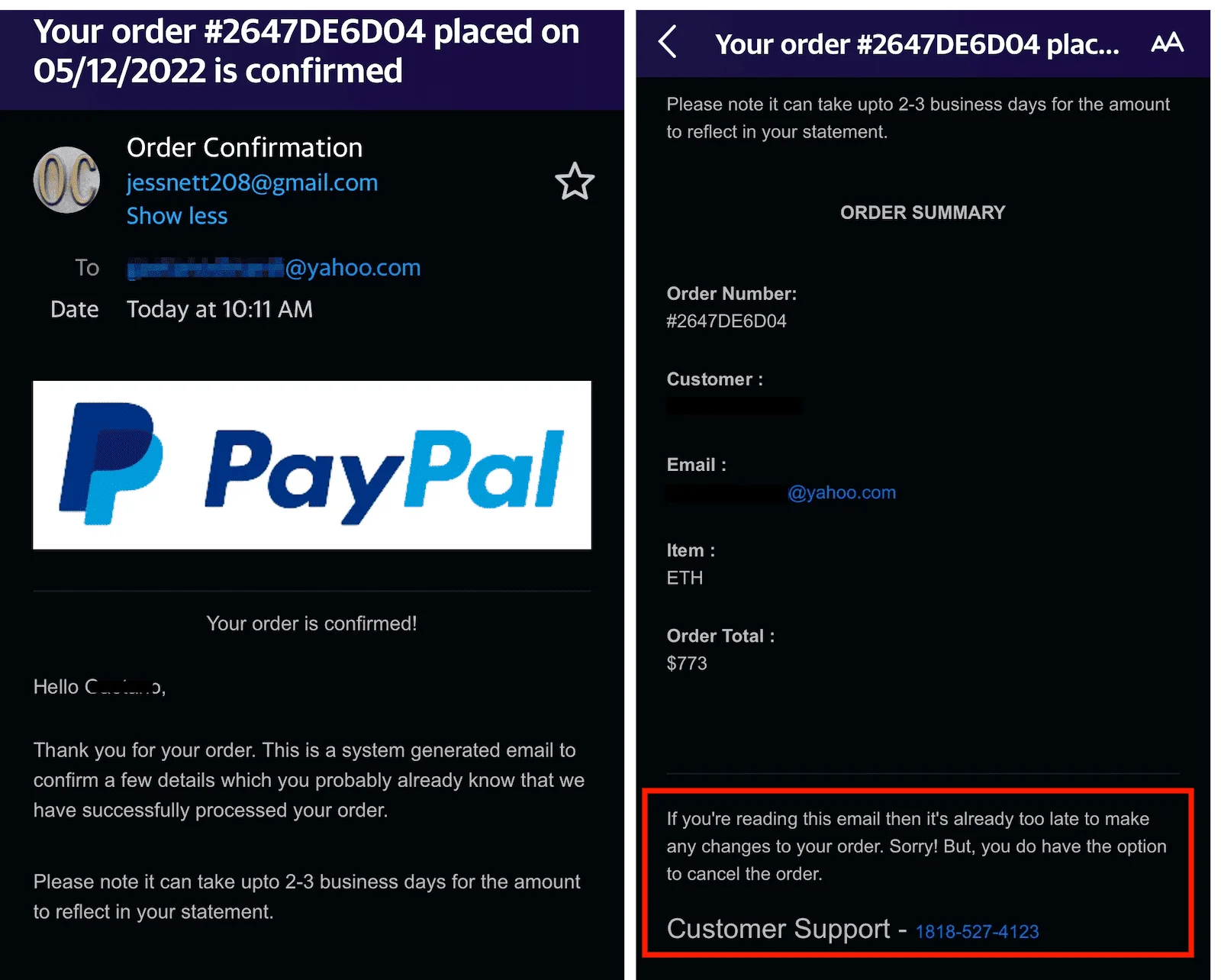
Here’s the problem: people trust automated emails, they expect to get them. And when attackers send a password reset or order confirmation with a real logo and copying a brand’s email template, subscribers assume it’s legit. That trust makes them less careful about checking the rest of the details.
Many marketing teams set up automated flows and forget about them. If you never review and renew your templates every so often, attackers can study them and create perfect copies.
How to prevent phishing in automated email campaigns
Run regular audits of your automated templates. Look at them like you’re seeing them for the first time, and ask questions like:
- Does it sound clear and professional?
- Does it look modern and clean enough?
- When was the last time I modified this template?
- Does the header/footer give information about your official policies to subscribers?
To prevent phishing in marketing emails, remember to set up email authentication. SPF, DKIM, and DMARC work together to prove your emails are real. Basically, SPF verifies sending servers, DKIM validates message integrity, and DMARC enforces authentication policy. The problem is, many teams only set up SPF and stop there. But if you skip any of these, spoofers can easily disguise themselves as you.
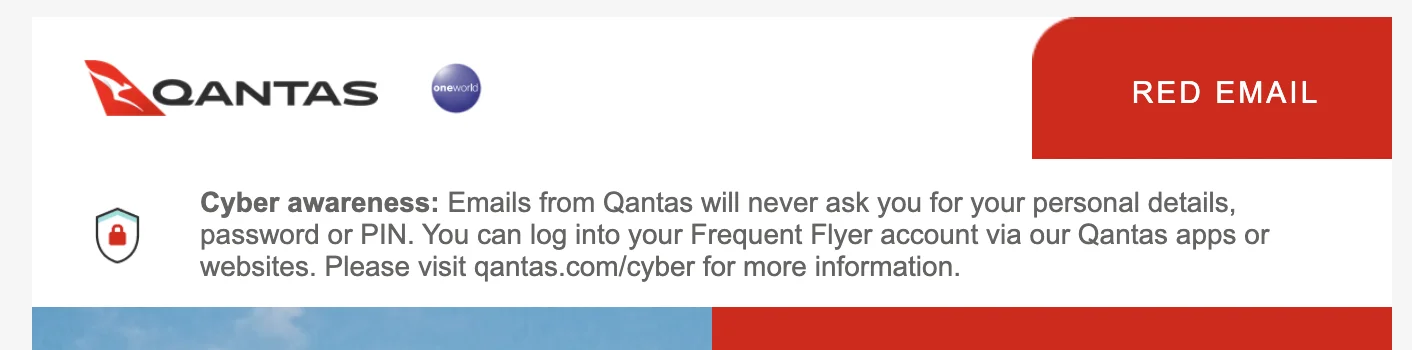
Educate your subscribers by adding simple reminders like “We’ll never ask for your password by email” in your template’s email content. These small signals make people pause and think the next time they get a suspicious email from someone claiming to be your brand. Take this great example of phishing prevention from Qantas email newsletter.
Blind spot #2: Weak link security
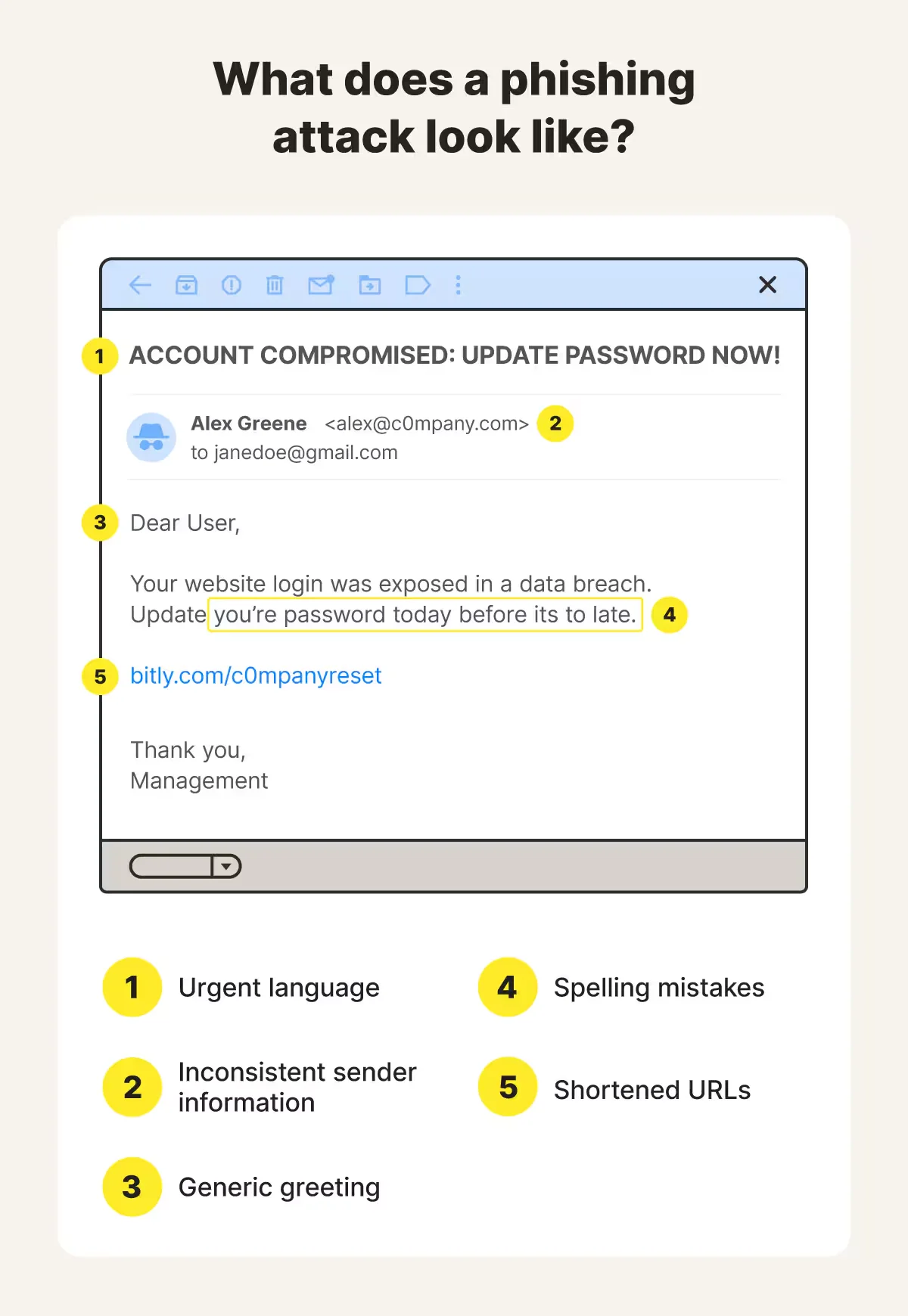
Every marketing email has links that send subscribers to landing pages, shopping carts, or resources. Although most marketers test links to make sure they work, very few of them test their links for safety. That gap gives attackers an opening to deliver ransomware and other harmful content, especially if you use short links.
Cybercriminals love short links like bit.ly/abc123 in phishing emails because they could hide the real destination of that link. In one case, attackers used bit.ly links to disguise fake Microsoft login pages. People clicked on convincing counterfeit sites and typed in their personal information.
How to secure links in email marketing
Test every link both for security and functionality. Use free tools like VirusTotal or paid deliverability platforms to check for hidden redirects. Scan affiliate and partner links too. Even legitimate sources can get hijacked if you don’t monitor them.
Set up branded short domains like go.yourbrand.com/sale. They cost a little extra, but they indicate to subscribers that the link belongs to you, and they’re worth it to build trust and security.
Check your links right before sending. URLs can change between when you create the email and when you send it.
Blind spot #3: Poor subscriber data protection
Your email list is a valuable asset, and it’s a target for attackers. So when you’re collecting email addresses for lead generation without proper protection, that puts both you and your subscribers at risk.
A recent data breach incident at NetcoreCloud illustrates what can go wrong, as over 40 billion records were leaked due to weak security on forms and data storage.
To understand why and how it happens, look at the difference between HTTP and HTTPS below. When a web form isn’t encrypted (without SSL), it’s easy for attackers to intercept and gain access to personal data like email address, phone numbers, or even bank details.
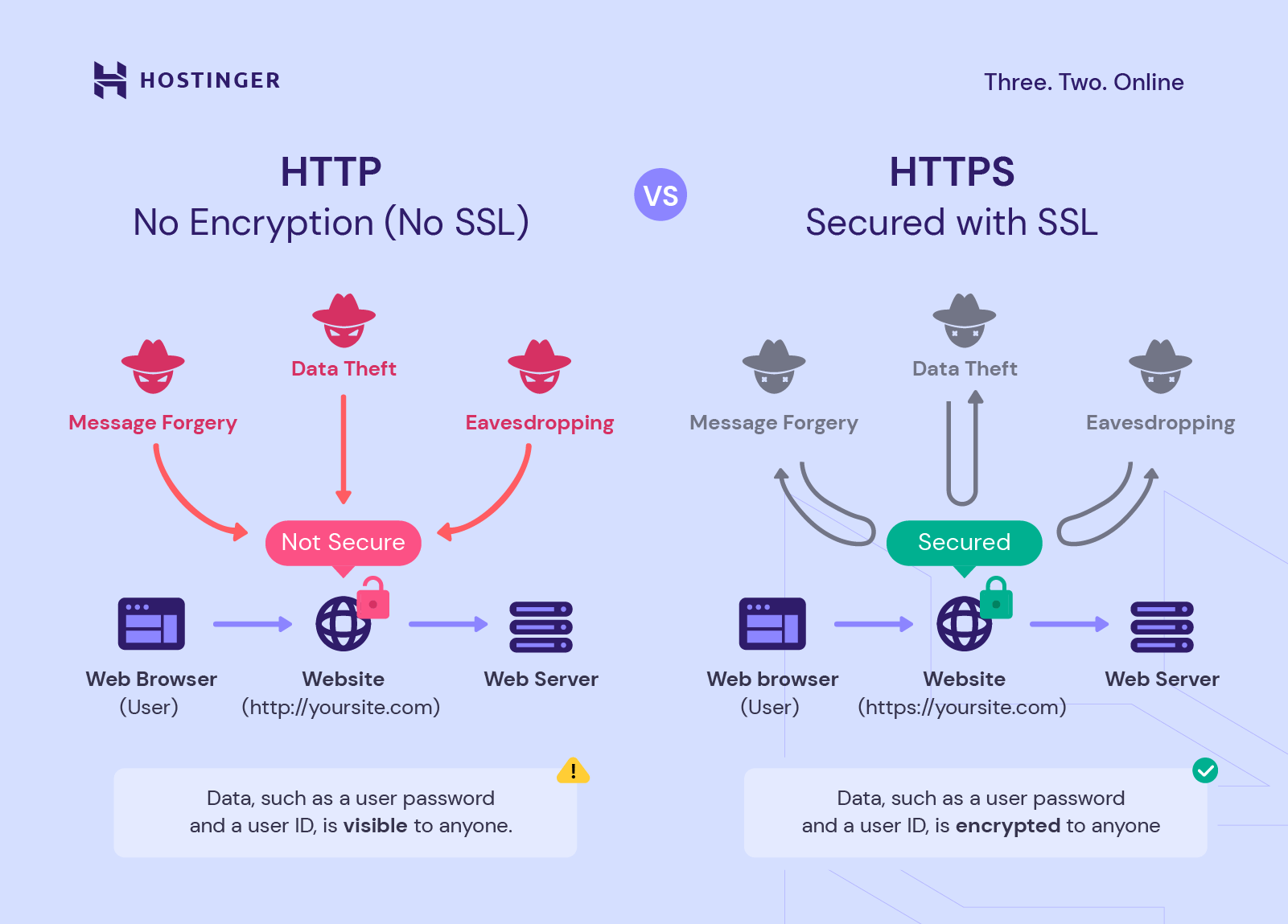
So the problems often start with sign-up forms without SSL encryption. Because without it, sensitive data such as phone numbers and email addresses can get intercepted. Unsecured storage makes things worse. Teams sometimes share subscriber lists in spreadsheets or messaging apps without realizing the danger.
Email list data protection best practices
Start with encrypted forms. SSL certificates secure data while it travels from the form to your system. Ensure that your ESP encrypts stored data as well.
Limit who can access subscriber data. Not every team member needs to download your full email list. Create role-based permissions that grant users only the necessary access. You can also encourage your customers to use a digital footprint checker to see what information about them is available online.
Train your team on data handling. Simple mistakes like sharing lists through unsecured channels create huge risks.
When subscribers give you their email accounts, they’re trusting you. Protecting that data isn’t just about compliance. It’s about keeping that trust.
Blind spot #4: Business email compromise
Business Email Compromise (BEC) scams no longer just target finance teams. Marketing teams are becoming prime targets of business email compromise attacks because they have access to valuable subscriber data.
Here’s how it works: attackers impersonate your executives and send urgent emails to you. The message might look like it came from your CEO asking for “the latest customer list for an important investor meeting”. The tone feels urgent but normal.
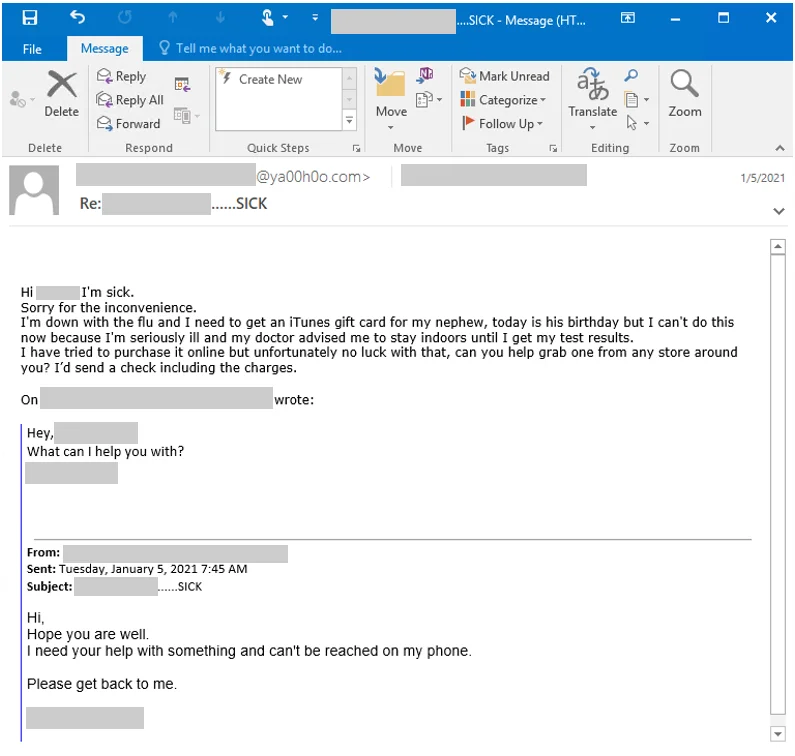
You as a busy marketer might hand over the data without thinking twice.
The FBI says BEC scams caused over $2.8 billion in losses in 2025, and the problem keeps growing every year.
How to prevent business email compromise in marketing teams
Always verify unusual requests through another channel. If an email request feels off, a quick phone call or message to verify its authenticity with the sender is an easy way to avoid a security breach.
Train your team to spot red flags like unusual urgency, requests for secrecy, or instructions that skip normal procedures. When everyone knows what to watch for, your whole team becomes a defense line.
Set up approval processes for data requests. Even legitimate requests should go through proper channels.
Marketing teams are targets just like finance and operations. Don’t assume you’re safe because you’re not handling money directly.
Blind spot #5: Mobile and multi-channel risks
According to Litmus, around 43% of emails get opened on mobile devices. That’s why many campaigns now include SMS messages too. This shift creates new security risks that most marketers don’t think about.
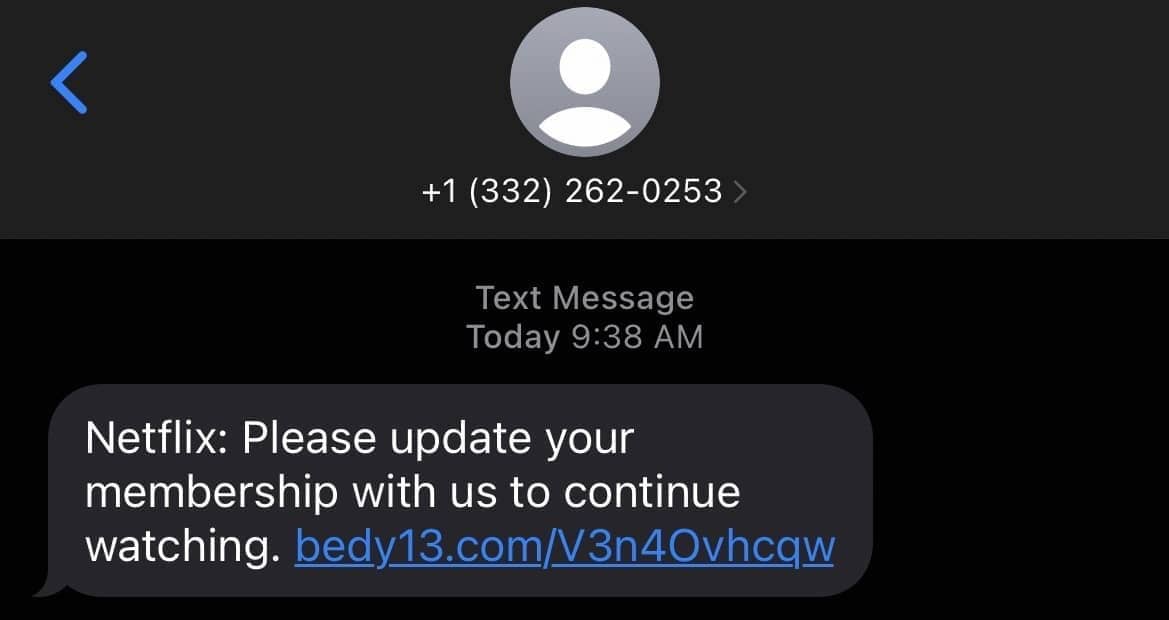
SMS phishing (or “smishing”) is spreading fast. For example, attackers may pretend to be from well-known companies like Netflix. They sent text messages with fake tracking links. Many people believed it and clicked without thinking twice, and that automatically either installed malware to their device or led them to a phishing website that gave away their sensitive information.
How to secure mobile and SMS marketing campaigns
Choose SMS vendors that prioritize SMS marketing security. Good providers block spoofing attempts and monitor for suspicious activity.
Add clear disclaimers to your messages. Lines like “We never request payment details by SMS” help subscribers identify genuine messages from fake ones.
Test your campaigns on mobile devices in real conditions. Don’t just check if they look good; also, verify that they are accurate. Make sure links work safely across different devices and networks.
Mobile-first marketing needs mobile-first security measures to protect customer data from mobile phishing risks, and ensure safe and improved email deliverability.
Blind spot #6: Mistaking compliance for security
Many marketers think following compliance rules means they’re secure. But that’s not true.
Take British Airways as an example. In 2018, attackers stole payment and personal data from more than 500,000 customers. The company already followed GDPR (General Data Protection Regulation) rules, but it turned out they had weak internal data security systems that left them exposed. Regulators fined them nearly £200M, and the damage to trust was even greater.
Compliance only sets the baseline. Real protection comes from continuous monitoring, testing, and strong teamwork with IT. As a marketer, remember, compliance keeps you legal, but security builds trust and helps with the customer experience. You need both to succeed long-term.
How to go beyond compliance and strengthen email marketing security
Set up security alerts. You should know immediately if someone downloads your full subscriber list or logs in from an unusual location.
Collaborate with IT teams and run regular penetration tests. These reveal weak points for you to fix before attackers find them.
Monitor your campaigns for unusual activity. Sudden spikes in unsubscribes or spam complaints might signal a security issue that you need to dig further before disaster happens.
5 emerging cyber threats marketers should watch for
Security threats keep evolving. Here are five new ones to watch:
1. AI-driven phishing
With the rapid development of artificial intelligence, cybercriminals can now create extremely convincing phishing campaigns that emulate tone, style, and personal details of a person or brand. These are very convincing, so being hyper-vigilant is essential.
2. List poisoning
Bots sign up fake or harmful email addresses through your forms, which overwhelms internal systems and damages deliverability metrics through email providers such as Gmail.
3. Cookie phase-out changes
With third-party cookies disappearing, you lose part of your visibility into subscriber behavior. That makes it harder to identify unusual activity. Fraud, bots, or suspicious sign-ups may blend into your real audience.
4. QR code phishing
QR codes are popular in email marketing because they are simple to scan; but attackers exploit that trust. They create and include malicious QR codes in an email that lead to fake login pages or malware downloads. So remember to always check if a QR code is safe before scanning it.
5. AI spam floods
Generative AI makes it easy to create endless amounts of spam emails, which attackers then use to overwhelm filters and inboxes. In turn, legitimate campaigns have a harder time reaching subscribers.
How marketers can fix these blind spots and strengthen email marketing security
The best approach to improving email security is to take it step by step.
- First, review your automated email templates. Scan every link before sending. Set up SPF, DKIM, and DMARC authentication. Make sure your sign-up forms use SSL encryption.
- Then build from there. Run security audits every quarter. As part of your customer journey management, watch for unusual activity like large data downloads. Also, train your team to recognize phishing and BEC attempts and work with your IT team to run vulnerability tests.
Over time, security becomes part of your normal workflow and your subscribers will notice the difference. When they trust your messages, they engage more freely.
- Finally, always have a clear plan in case of a breach. Marketers play a big role in handling this situation. You’ll need to let customers know what happened, what the next steps are, and help rebuild that trust. Even offering something practical like a short period of identity theft protection can make a big difference. It shows your customers that you care, which in turn strengthens your relationship with them.
Stronger email security means stronger marketing
Email remains one of the most powerful marketing channels available. It’s also one of the most targeted by criminals. One security breach can undo years of hard work building your brand.
Security isn’t separate from marketing. It’s part of good marketing. When you protect your subscribers, you protect your brand. Strong email marketing security creates strong campaigns that build loyalty, trust, and long-term success.
FAQ: Email marketing security
What is email marketing security?
Email marketing security is a practice that protects organizations and their subscribers from potential cyberattacks, such as phishing.
How do SPF, DKIM, and DMARC protect email campaigns?
SPF, DKIM, and DMARC work together to prove that your emails are real. It verifies your identity, encrypts sensitive data, and monitors for malicious activity.
How can marketers prevent phishing attacks?
To prevent phishing attacks, marketers need to run regular audits and modify their email marketing templates from time to time, set up SPF, DKIM, and DMARC, educate their audience and teams, and monitor campaigns for unusual activities.
Is GDPR compliance enough for email security?
No, following GDPR compliance is not the same as email security. Compliance keeps you legal, but security keeps your brand trusted and running in the long run – you need both to succeed.
What is a business email compromise in marketing?
Business email compromise (BEC) is one of the most common phishing tactics where the attacker impersonates a trusted party (an employee, vendor, manager, CEO, etc.) and tricks them through an email communication to transfer money, sensitive data, or other types of assets.
 New and noteworthy on our blog