


A customer has clicked “Buy,” received an order confirmation, and completed the conversion. The next stage of the relationship now begins.
Every purchase is the beginning of a longer customer relationship. What happens next can determine whether the customer returns or treats the order as a one-time transaction. Yet many brands still treat post-purchase communication as an afterthought, missing opportunities to build trust and generate repeat revenue.
A thoughtful post-purchase email sequence can build stronger customer relationships, reduce returns, collect useful feedback, and turn first-time buyers into repeat customers. In this guide, you’ll learn what post-purchase emails are, why they matter, how successful brands use them, and how to build an effective automated flow.
What are post-purchase emails?
A post-purchase email is an automated message or sequence that you send to customers after they complete a purchase or achieve another target action like successful delivery.
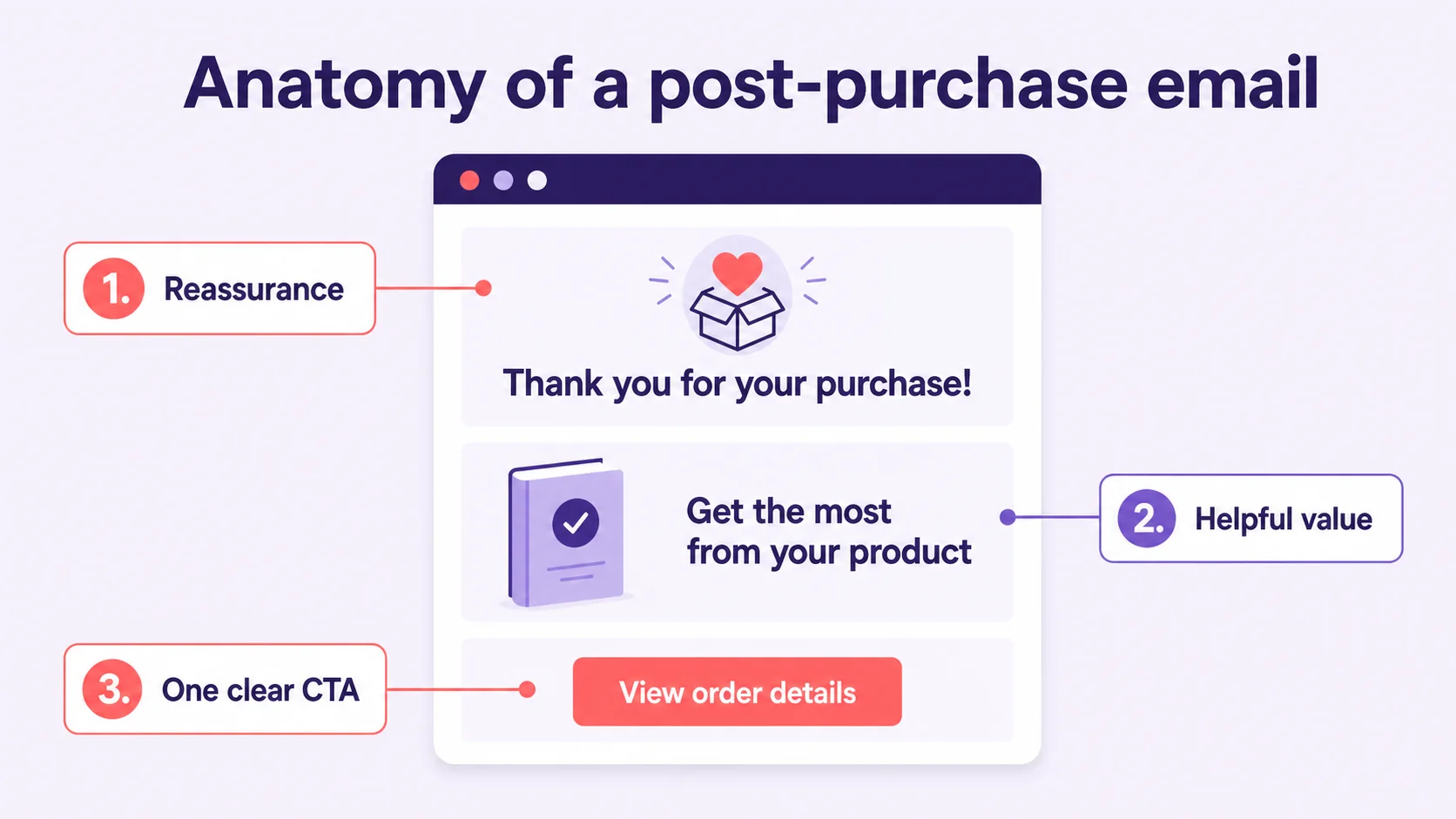
A typical post-purchase email includes:
- Introduction, thanking the customer for their purchase and acknowledging their order.
- Main section, providing helpful tips on how to use the product, along with instructions, guides, and educational content.
- Additional offers, recommending related products or services, sharing information about promotions, and offering bonuses for repeat purchases.
- Call to action, encouraging customers to rate the product, leave a review, complete a survey, follow your social media, or contact support if needed.
Post-purchase emails often earn strong open rates because recipients have already demonstrated interest by completing a purchase. When the messages provide timely, relevant value, they can encourage repeat purchases and increase customer lifetime value.
Important: post-purchase emails are not transactional emails.
Unlike transactional emails, which primarily confirm order details, post-purchase emails support a broader set of relationship and retention goals. Marketers use them to:
- Thank customers.
- Strengthen brand reputation and trust.
- Maintain communication.
- Increase customer loyalty and lifetime value.
- Provide helpful product information.
- Encourage repeat purchases with upselling and cross-selling.
- Reduce returns and support requests.
- Gather feedback and reviews.
Here’s a summary to help you better understand the difference:
| Aspect | Transactional emails | Post-purchase emails |
| Trigger | System-driven event (think of order being placed/shipped/delivered) | Certain amount of time after purchase, delivery, or customer behavior |
| Primary goal | Provide essential order information | Build trust, engagement, and encourage repeat purchases |
| Customer expectation | Expected and essential | Optional, but value-driven |
| Timing | Immediate or real-time | Delayed and strategically spaced |
| Tone | Concise, informational and straightforward | Conversational, supportive, sometimes promotional |
| Personalization | Basic (order details, address, shipment info) | Advanced (purchase history, behavior, lifecycle stage) |
| Revenue focus | None or indirect | Direct and intentional |
| Can it include promotions? | Generally no, except for limited service-related offers | Yes, when relevant |
| Is it part of a flow? | Usually standalone | Usually part of a broader sequence |
The bottom line:
Transactional emails tell customers what happened.
Post-purchase emails build relationships and drive future action.
Why are post-purchase emails so important?
Still on the fence about investing time in post-purchase flows? Let the numbers do the talking.
Customers expect post-purchase emails
Modern customers expect something more than essential transactional email, they want brands to guide them through the entire journey, from order tracking to product tips and loyalty rewards.
When you meet (or better exceed) these expectations, you build trust. When you don’t, you might create doubt or even anxiety.
Post-purchase emails have higher open and click rates
Customers are highly attentive after making a purchase and may actively expect follow-up communication. As a result, relevant post-purchase emails can generate stronger engagement than standard promotional campaigns.
Few benchmark reports isolate post-purchase emails as a separate category. Most group them with broader segments such as order follow-ups, triggered emails, or lifecycle campaigns, so the following figures should be interpreted in that wider context:
- According to Omnisend’s 2025 e-commerce marketing report, order follow-up and post-purchase-related emails are among the highest-performing automated messages in e-commerce with ~37% of email revenue from ~2% of sends.
- As per Email Marketing Benchmarks by GetResponse, triggered and lifecycle emails significantly outperform newsletters and promotional campaigns. Across industries, behavior-based emails achieve average open rates of around 35-45%, compared to 20-30% for newsletters, and click-through rates of 3-6% versus 1-3% for bulk campaigns.
- Mailgun’s 2025 deliverability research shows that missing anticipated emails is the #1 negative outcome of poor inbox placement (37.5%), making post-purchase emails especially critical to deliver reliably.
- Research published by Harvard Business Review shows that repeat customers become more valuable over time and contribute disproportionately to long-term profitability, underscoring the importance of post-purchase engagement.
Post-purchase emails reduce buyer’s remorse
Buyer’s remorse is the regret, anxiety, or doubt some customers feel after making a purchase, particularly an expensive one. If brands leave that uncertainty unaddressed, it can reduce satisfaction and discourage future purchases.
Post-purchase emails can help combat this by reassuring customers they made the right choice, providing social proof, offering helpful resources so customers get maximum value, creating a sense of community and belonging.
Post-purchase emails increase LTV and drive automated revenue growth as a result
Use post-purchase emails to:
- Encourage customers to return with recommendations based on their purchase history and interests.
- Lay the groundwork for re-orders through replenishment reminders.
- Ensure satisfaction by providing helpful resources.
- Collect customer feedback to improve your products and service.
- Create an exceptional customer experience that competitors can’t match.
Once you set up your post-purchase flow, it works on autopilot, nurturing every customer who makes a purchase without additional work from your team.
9 ideas for post-purchase emails and 9 real-world examples
Now let’s look at real brands doing post-purchase emails right. Each example highlights specific strategies you can adapt for your own campaigns.
Here are the most common types:
1. Thank-you emails
These emails are usually short and to the point, but warm and emotional. They’re universal and work for any product and business.
Show customers that you value their relationship with the brand and welcome them into its community. Keep upselling and cross-selling secondary: the message should lead with genuine appreciation rather than another sales pitch.
Just say “thank you” and offer help if needed. You can personalize your message using a name, featuring specific items and tips on how to use the product.
Thank-you email template:
Thanks for your order! We’ve received your purchase and are getting everything ready for shipment.
Order summary:
– Product: {{Product name}}
– Order number: {{Order ID}}
– Delivery address: {{Address}}
You’ll receive another email as soon as your order ships. If you have any questions in the meantime, our support team is happy to help.
Thanks again for choosing {{Brand name}} — we’ll take it from here.
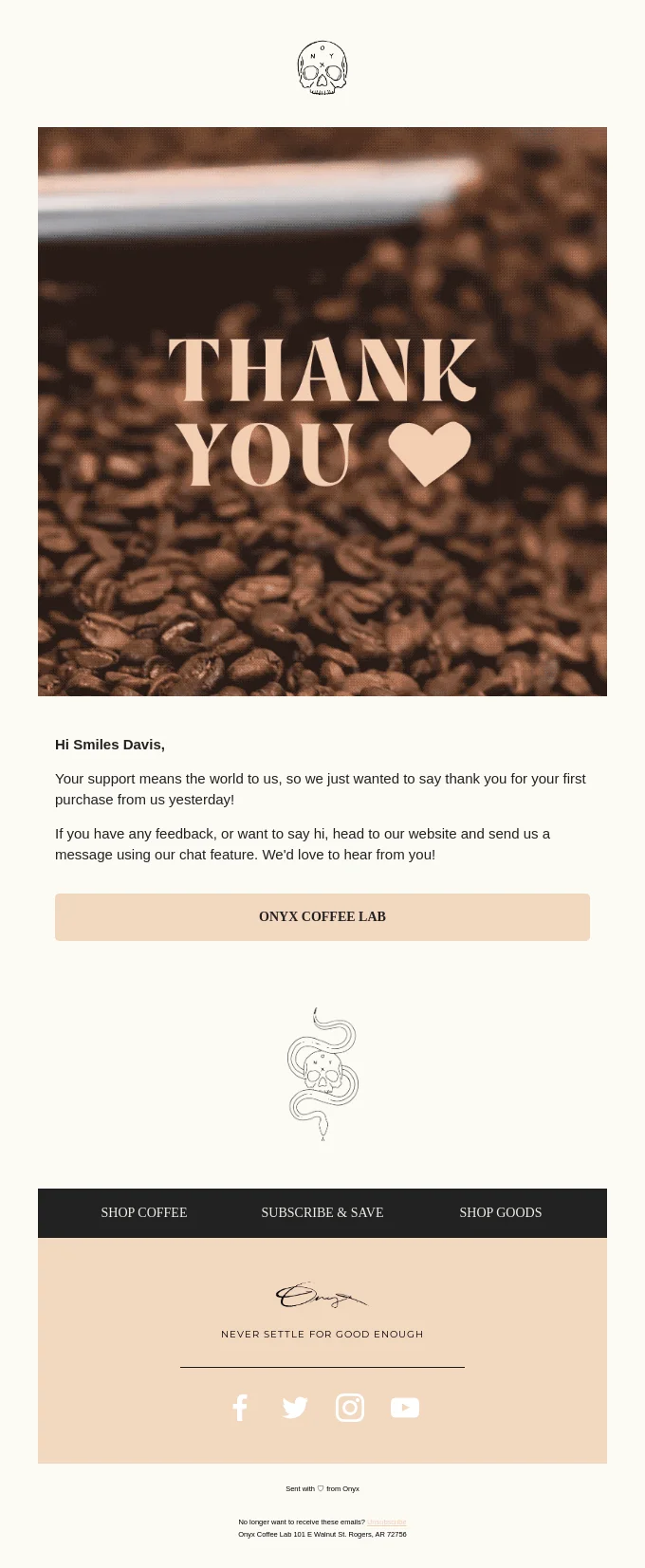
What we like about this email:
- It has a huge header image with coffee beans and a big “THANK YOU” text — the intent is very clear.
- It immediately addresses the customer and mentions their first purchase.
- It’s warm and emotional without being overly sentimental and going too much into details — it strikes the perfect balance.
- The design is clean and uncluttered, making it easy to read and digest.
- It offers help if needed, with clear contact information (offering to connect via chat).
2. Request for feedback
These emails collect feedback that can guide product improvements and build trust among prospective customers through reviews and testimonials.
Reviews influence purchase decisions, especially for higher-consideration products. Collecting customer feedback can strengthen social proof, reduce uncertainty for future buyers, and reveal opportunities to improve the product.
Keep it light and don’t be too pushy. Make the process simple with direct links and rating scales. Consider offering incentives like small discounts or loyalty points to increase response rates.
Request for feedback email template:
We hope you’ve had some time to try your {{Product name}}. Your feedback helps other customers shop with confidence — and helps us improve.
It only takes a minute to leave a review, and we read every response.
Thanks for helping us make {{Brand name}} better.
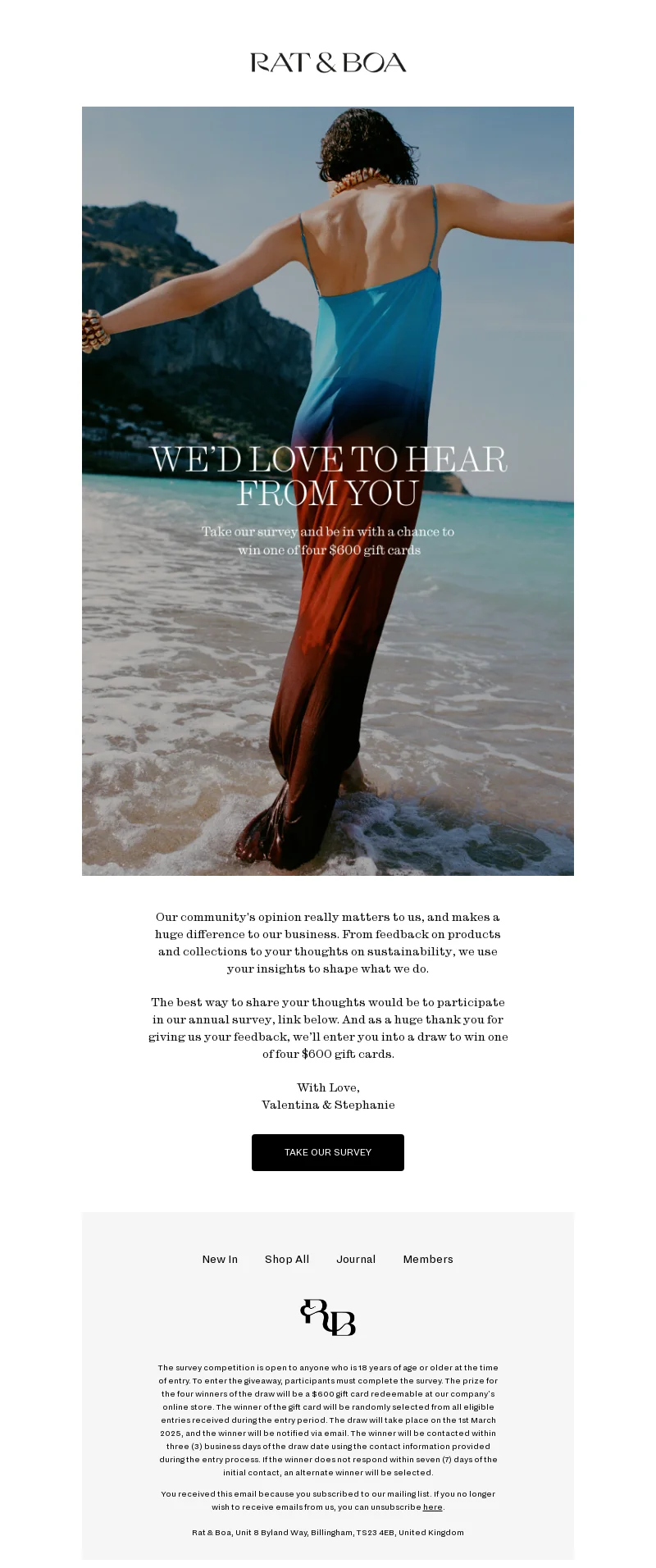
What we like about this email:
- The big and vibrant visual makes it hard to look away.
- The email makes it clear that customer feedback matters and will be used to improve products and make them more sustainable.
- It includes an incentive (an opportunity to win one of four $600 gift cards).
- The copy is subtle and respectful.
3. Reminders to replenish stock
For consumable products, timing is everything. These emails remind customers to restock before they run out, creating a seamless buying experience.
Estimate the typical usage cycle and send the reminder shortly before customers are likely to run out. Reduce friction with a direct reorder link or a subscription option that offers added convenience or savings.
Convenience is the priority: a well-timed reminder helps customers reorder before running out.
Reminder to replenish stock email template:
Based on your last order, you might be running low on {{Product name}}. Reordering now means no interruptions and no last-minute rush.
You can reorder in just a couple of clicks — or set up automatic refills for extra convenience.
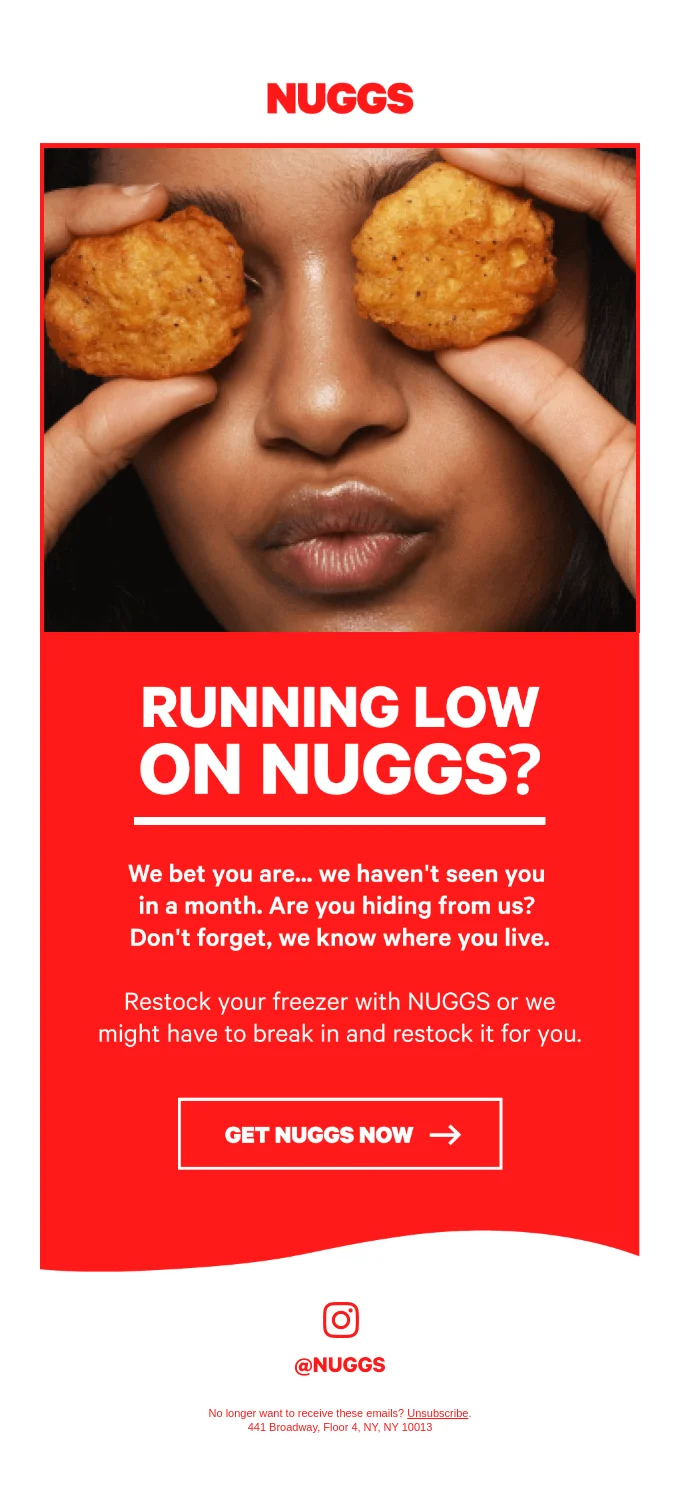
This example takes a humorous approach to a replenishment reminder:
What we like about this email:
- It is simple and direct. Rather than relying on a complex replenishment calculation, the brand sends the campaign one month after customers purchase NUGGS, a plant-based chicken nugget alternative. A prominent one-click option makes reordering easy.
- It’s bold and very vivid — from huge headline typography to creative visuals.
- The playful concept makes the reminder memorable. Although humor involving burglary requires careful judgment, the message remains consistent with the brand’s distinctive tone of voice.
4. Suggestion of related products
These emails suggest related or complementary products based on what customers already purchased. They work best when recommendations are genuinely relevant, not random.
Use purchase history and browsing behavior to personalize suggestions. Include social proof like “Customers who bought X also loved Y” to build confidence.
Avoid overwhelming customers: recommend three or four carefully selected products that genuinely complement their purchase.
Suggestion of related products email template:
Many customers who bought {{Purchased product}} also found these items useful:
– {{Product recommendation 1}}
– {{Product recommendation 2}}
– {{Product recommendation 3}}
They’re designed to work perfectly with what you already have.
Take a look, you might find exactly what you need next.
What we like about this email:
- The product appears as a natural solution rather than a forced promotion.
- It’s short, scannable and very on-point.
- The copy is almost poetic in its rhythmicity, but actionable.
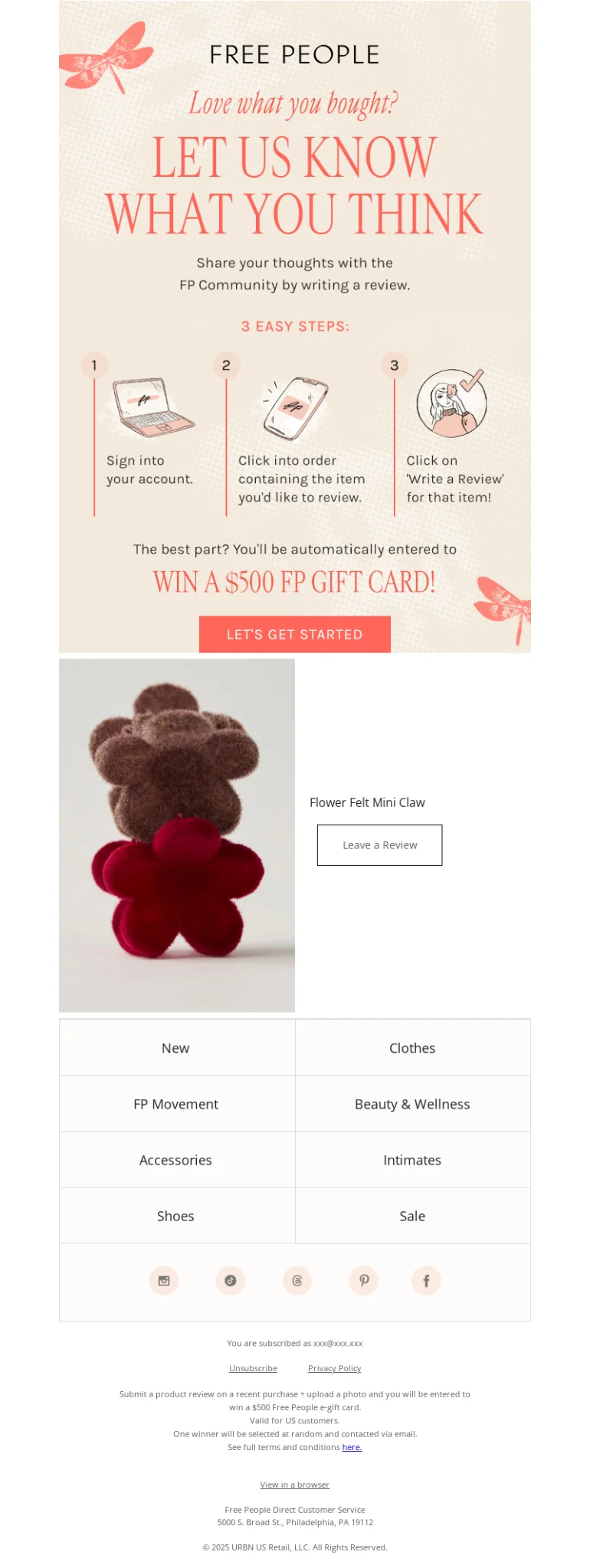
5. Asking for a review
These emails are similar to feedback requests reviewed earlier in this article, but they specifically focus on collecting product reviews that will appear on brand’s website or in marketing materials.
Send these 1-2 weeks after delivery when customers have had some time to use the product. Make leaving a review as frictionless as possible with direct links and pre-filled forms.
It’s a good idea to incentivize: a small discount or loyalty points can significantly boost response rates while generating valuable social proof.
Asking for a review template:
You’ve been using your {{Product name}} for about {{timeframe}}. Your experience will help future customers make informed decisions and provide our team with improvement insights.
Share your honest thoughts: [DIRECT REVIEW LINK]
It takes just 60 seconds, and we read every submission personally.
Appreciating your perspective,
{{Name}}
{{Company name}}
What we like about this email:
- The email makes the review process feel valuable, not like a chore.
- It plays on the sense of belonging and contribution: most people like helping others and being a part of a community.
- It makes you feel valued: your opinion matters.
6. Information email with instructions
Customers may not discover every product feature on their own. Use instructions, guides, and practical tips to help them get value from the product sooner.
Don’t give too much information at once, though — keep it conversational and digestible. Use videos, step-by-step guides, or quick-start checklists.
The goal is to help customers get more value from their purchase, reducing returns and support requests while easing post-purchase uncertainty.
Information email template:
- Now that your {{Product name}} has arrived, here are a few tips to help you get the best results right away:
- Tip #1 related to product usage.
- Tip #2 to avoid common mistakes.
- Tip #3 to extend product life.
We’ve also put together a short guide to help you get started in minutes.
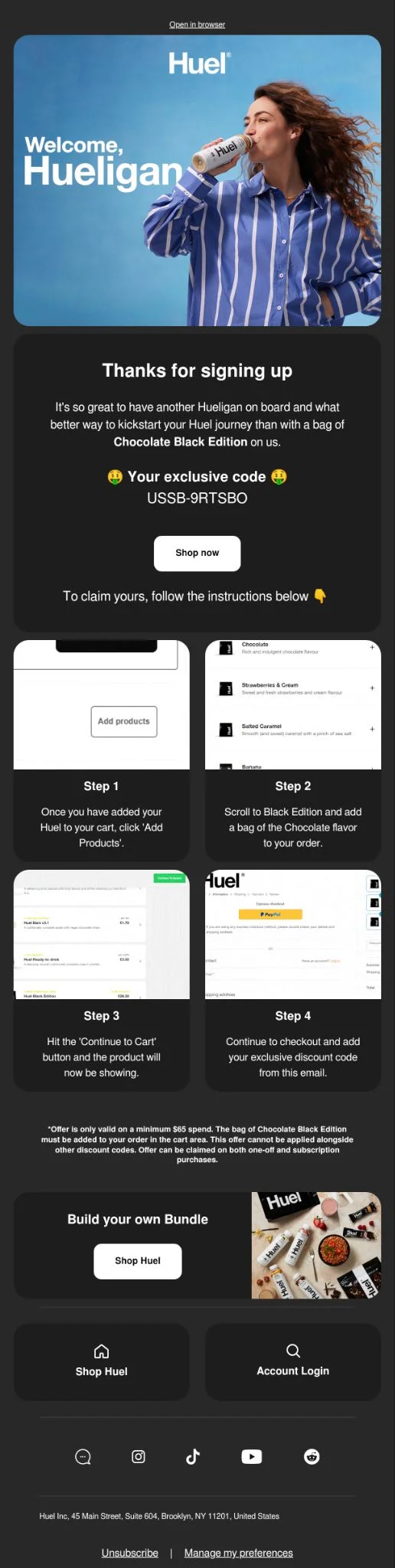
The following onboarding email also works as a post-purchase message because it helps customers begin using the product successfully:
What we like about this email:
- The step-by-step format makes information easily digestible.
- Visual markers at each section improve scannability.
- The design is mobile-friendly with large headers and contrasting CTAs.
7. Recommendation for future purchases
These emails encourage clients to buy more by recommending products that enhance or complement their purchase.
Show what other customers chose, offer personalized recommendations, and provide bundles. Be unobtrusive and offer only those products that are truly relevant.
Avoid recommending the same durable product the customer has just purchased, as this can create confusion. Repeat-purchase recommendations are more appropriate for consumables and other products customers regularly need to replace.
Recommendation for future purchases template:
Many customers who bought {{Purchased product}} also found these items useful:
– {{Product recommendation 1}}
– {{Product recommendation 2}}
They’re designed to work perfectly with what you already have.
Take a look — you might find exactly what you need next.
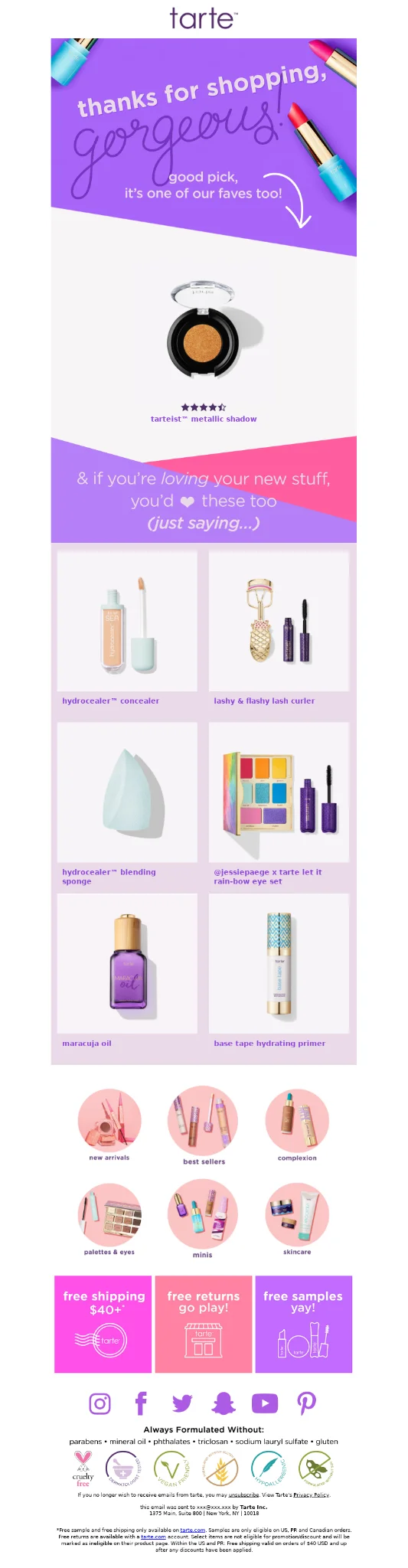
What we like about this email:
- The recommendations seem to be based on purchase history, not random products.
- Product images are high-quality and the layout is clean.
- The copy is playful and unobtrusive.
8. Help suggestion
These emails proactively offer assistance before customers get frustrated or confused. They show you’re thinking about their experience and care about their success with the product.
So, provide easy access to multiple support channels (chat, email, help center) and include links to the most common questions for their specific product. Keep the tone friendly and approachable.
Set realistic expectations for response times and offer only the support channels your team can maintain. Reliable, accessible assistance reduces friction and builds trust when customers need help.
Help suggestion template:
We hope you’re enjoying your {{Product name}}! If you need any help getting started or have questions, we’re here for you.
Our support team is available:
– Live chat: [CHAT LINK]
– Email: {{support email}}
– Help center: [FAQ LINK]
We’re here to help,
{{Brand name}} team
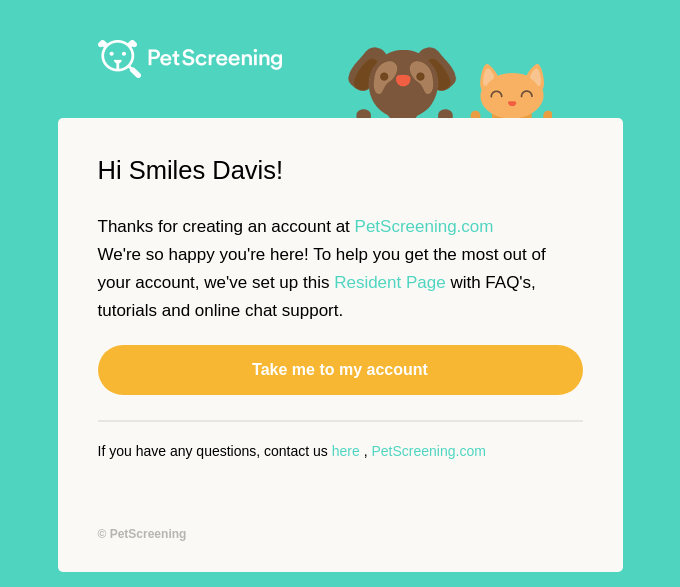
What we like about this email:
- It’s straightforward by providing a very on-point instruction leading to a big and prominent CTA.
- It features cute visuals lightening the mood.
- It offers timely assistance at a stage when customers may still have questions about the product.
9. Loyalty/referral invitation
These emails invite satisfied customers to join rewards programs or refer friends in exchange for benefits.
Target your happiest customers, in other words, those with repeat purchases or positive reviews. The best time to send these is after a customer has demonstrated satisfaction through their behavior.
Make the value clear: explain what customers can earn, how the program works, and why it is worth joining. Offer meaningful rewards to both the referrer and the referred customer.
Loyalty/referral invitation template:
Thanks for being part of {{Brand name}}. As a customer, you can earn rewards when you shop again — or when friends purchase using your referral link.
It’s our way of saying thanks for supporting us.
What we like about this email:
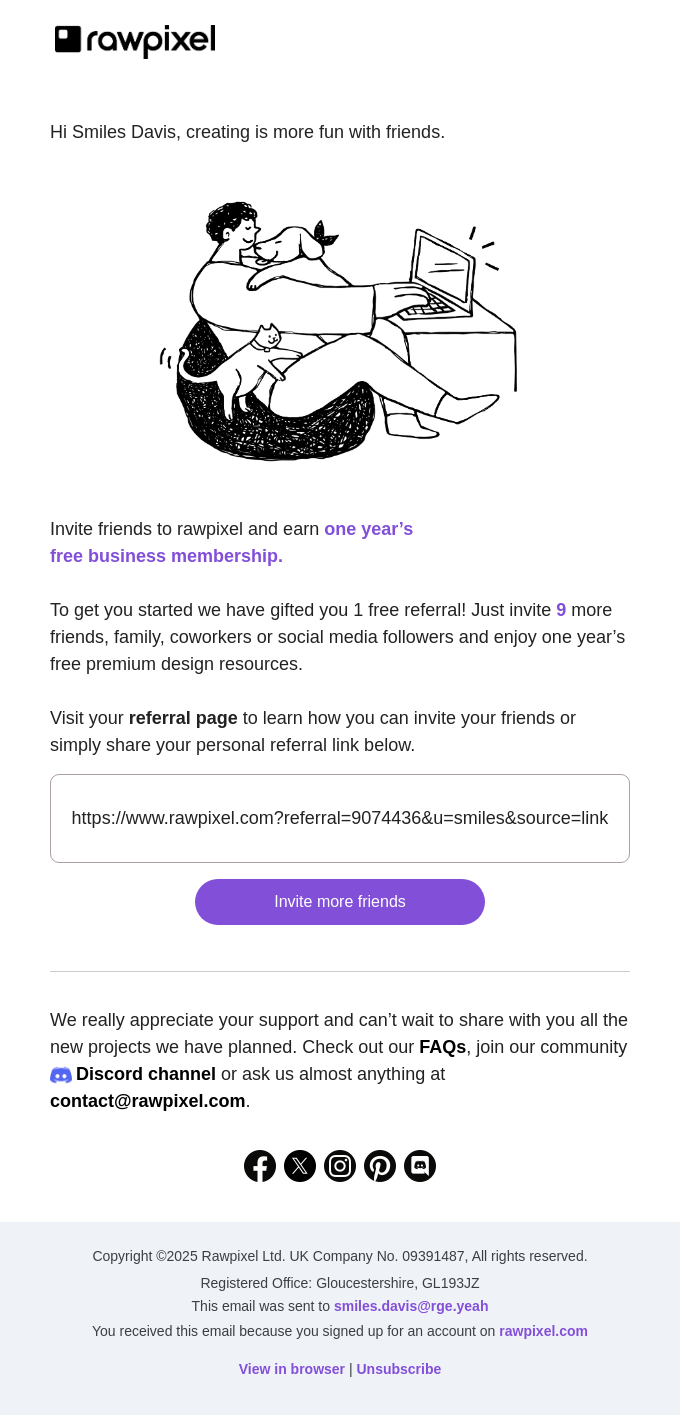
- It’s very clear on all the details you need to know to find out how you can get the prize (free premium design resources for a year): how many people to invite, where, which link to use.
- It’s neat and simple in its structure (in a good way).
- The heartwarming illustrations invoke the sense of belonging to a group, friendship and genuine desire to do good to others.

Post-purchase email subject lines
Here are some of the post-purchase email subject lines from real brands for your inspiration:
For thank-you emails:
- Andrew, we got you something 💌
- With gratitude…
- Thank you for choosing VERAFIED Andrew
For review/feedback requests:
- Tell Us About Yourself
- What did you think of Boiler Room: LA | Sunday?
- Take this survey + you could win $100 (!)
- Share your thoughts for a chance to win $250!
- Can We Ask You One Question? 🙏
- A review = $10!
For replenishment reminders:
- Running low on groceries?
- Restock Alert
- Running Low On Light Beams? Here’s Your Chance to Snag One For Free
For product recommendations:
- Burgers, Fries, and… Cosmos??? 🤔
- Brand new motion graphics are here!
- Smiles Davis, book one these top picks
For educational content:
- Morning or Night: When Should You Plunge?
- Get more from your lab visits
- Tips and Tricks of Our App
For loyalty/referral programs:
- Travel rewards that fit right into your pocket 💳
- 🎁 FYI, you could be earning rewards
- Snag 2X the Points with Strawberry 🍓
Tips for creating post-purchase emails that work
Now that you’ve seen what works, let’s consolidate everything into actionable best practices you can implement immediately.
Determine the goal
First, get clear on what you’re trying to achieve. Are you decreasing churn? Increasing LTV? Generating reviews? Reducing the number of support tickets?
Identify two or three primary KPIs that align with your business objectives, such as customer satisfaction, support ticket volume, customer lifetime value, open rate, click rate, or conversion rate.
Segment your customers
New customers need reassurance, education, and loyalty program invitations, while returning customers appreciate recognition, VIP perks, and personalized recommendations.
High-value customers deserve exclusive early access, special discounts, and VIP treatment that makes them feel valued.
Product type matters just as much. Consumables require replenishment reminders based on usage cycles. Electronics need setup guides, warranty information, and troubleshooting resources. Clothing benefits from care instructions, styling tips, and accessory suggestions. Furniture customers appreciate assembly help, styling guides, and matching item recommendations. The more targeted your segmentation, the more relevant—and effective—your emails become.
Take into account the timing of your emails
Post-purchase email flow timeline:
| Post-purchase email type | Typical timing | Primary purpose | How it supports retention | Key success metrics |
| Thank-you email | Immediately after purchase or delivery | Reinforce appreciation and brand affinity | Sets emotional tone, reduces buyer’s remorse, humanizes the brand | Open rate, reply rate, sentiment |
| Information email with instructions | 1-3 days after delivery | Help customers use the product successfully | Improves product adoption, lowers returns, increases satisfaction | Click rate, time on content, support tickets |
| Help suggestion email | 2–5 days after delivery | Offer proactive assistance and support resources | Prevents frustration, builds trust, reduces churn risk | CTR to help docs, support deflection |
| Request for feedback (survey/NPS) | 5–10 days after delivery | Capture early sentiment and identify issues | Flags dissatisfaction early and enables recovery | Response rate, NPS/CSAT |
| Asking for a review | 7–21 days after delivery (after usage) | Generate social proof and UGC | Strengthens loyalty and influences future buyers | Review submission rate |
| Suggestion of related products | 10–21 days after delivery | Introduce complementary or accessory products | Encourages second purchase based on relevance | Conversion rate, AOV |
| Recommendation for future purchases | 2–6 weeks after purchase | Guide customers to next logical product | Extends customer lifecycle and repeat buying | Repeat purchase rate |
| Reminders to replenish stock | Based on product usage cycle | Prompt timely reorders | Drives predictable repeat revenue | Reorder rate, subscription sign-ups |
| Loyalty / referral invitation | After positive engagement or repeat purchase | Incentivize long-term loyalty and advocacy | Increases LTV and customer-driven growth | Program sign-ups, referral rate |
Use quality copywriting
Write for one clear action at a time. Lead with the value to the customer, keep paragraphs short, use specific CTA copy, and match the tone to the stage of the journey. Reassurance and practical help should come before a sales pitch; promotional messages work best when the recommendation is genuinely relevant.
Personalize
Personalization makes the message feel more relevant to the individual customer. Use the customer’s name, reference the items they purchased, and tailor recommendations to their order history and preferences.
Analyze results
Return to the KPIs you selected and compare performance across segments, messages, and send times. Use the results to refine timing, content, and targeting, then test one change at a time so you can identify what improves the sequence.
Post-purchase email automation with Selzy
- In your Selzy account, navigate to the automation section and create a new scenario.
- Drag the API trigger block into the workspace — this trigger will launch your post-purchase sequence when a customer completes a purchase.
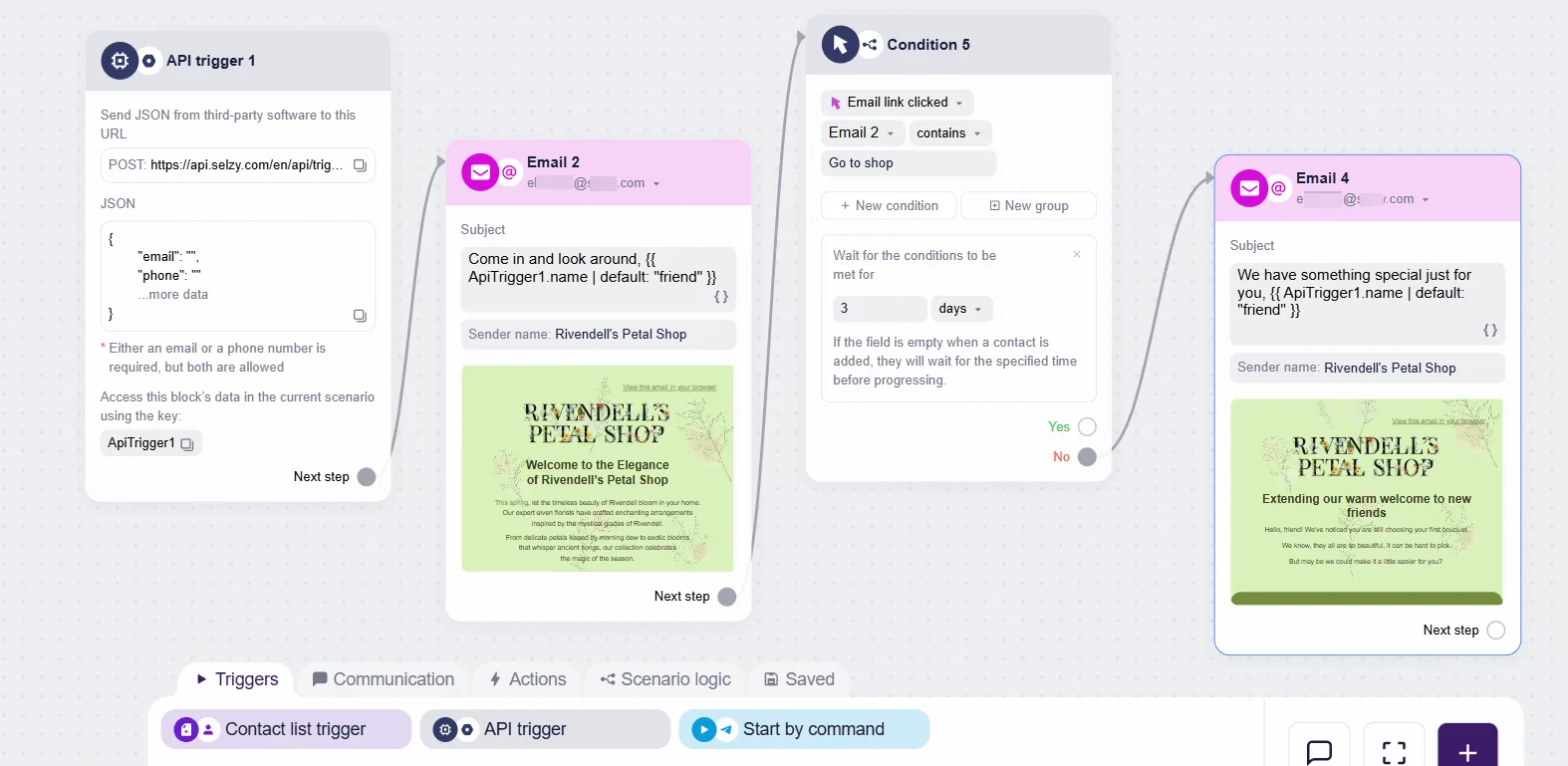
- Connect your website or store to Selzy by sending a POST request in JSON format to the unique URL generated by the trigger block. This request must include at least the customer’s email address. You can also pass:
- Customer name
- Order number
- Product details (name, price, image URL)
- Order total
- Shipping information
- Purchase date
Here are detailed instructions on how you can connect popular CMS platforms to Selzy.
- Once the data is flowing, you can use it to personalize your post-purchase emails with dynamic content. Selzy supports Liquid templating, so you can pull variables directly from the incoming JSON data. This allows you to create one template that automatically adapts to each customer’s specific purchase.
- Create multiple emails within your automation flow. For each email, set the appropriate delay and trigger conditions.
- Before going live:
- Send test emails to yourself and your team
- Check all dynamic variables are pulling correctly
- Test on multiple devices (desktop, mobile, tablet)
- Review all links and CTAs
- Ensure unsubscribe links work properly
- Once everything looks good, activate your automation!
Note: This setup requires API triggers, so you may need your IT team to help connect the systems. Check out the API triggers article from our Help Center for more details, or reach out to Selzy Support if you need guidance.
FAQ
What are post-purchase emails?
Post-purchase emails are automated messages or sequences sent after a customer completes a purchase or another target action, such as successful delivery. They are used to support relationship and retention goals, not just confirm order details.
How are post-purchase emails different from transactional emails?
Transactional emails provide essential order information and are usually immediate and system-driven. Post-purchase emails are delayed and strategically spaced to build trust, encourage engagement, and increase repeat purchases. They can also be more conversational, personalized, and promotional when relevant.
What should a post-purchase email include?
A typical post-purchase email includes a thank-you message, helpful product tips or instructions, related offers or bonuses, and a clear call to action. Common CTAs include asking for a review, requesting feedback, inviting a survey, or directing customers to support.
Why do post-purchase emails matter for brands?
They help strengthen customer relationships, maintain communication, reduce returns, and gather feedback and reviews. They can also increase loyalty, customer lifetime value, and repeat revenue by turning first-time buyers into returning customers.
What kind of actions can a post-purchase email encourage?
Post-purchase emails can encourage customers to rate the product, leave a review, complete a survey, follow social media, contact support, or explore related products and services. They can also highlight promotions or bonuses for repeat purchases when appropriate.
 New and noteworthy on our blog