


Key takeaways
- AMP for email allows marketers to include dynamic and interactive elements like forms, carousels, and live content in emails, reducing clicks between the message and action.
- AMP emails use AMPHTML and require a standard HTML fallback for compatibility with email clients.
- AMP emails offer benefits like interactive experiences, real-time content updates, higher engagement, and conversion rates.
- Considerations before using AMP include limited support in email clients, the need for a developer to add AMP elements, and the importance of an HTML fallback.
AMP for email is a technology that lets marketers add dynamic and interactive elements to emails, such as forms, carousels, accordions, live content, and in-email actions. Unlike a standard HTML email, an AMP email can update after it is sent and let subscribers interact without opening a landing page.
For marketers, that means fewer clicks between the message and the action. Subscribers can answer a survey, browse product options, book a slot, or view updated information from the inbox itself, as long as their email client supports AMP and the campaign includes a proper HTML fallback.
What is an AMP email?
An AMP email is an email with interactive content inside. It can either be dynamic content – that updates based on who sees it and when – or something like a quiz/feedback form, which you can fill out without leaving the email.
An AMP email is usually sent with a regular HTML version and an AMPHTML version. If the subscriber’s email client supports AMP and the sender meets the client’s requirements, the subscriber sees the interactive AMP version. If not, they see the fallback HTML email instead.
How AMP emails work
AMP emails use AMPHTML, a restricted version of AMP designed for email inboxes. The sender includes an AMP version of the email together with a standard HTML fallback. When a compatible inbox receives the message, it can render interactive components like forms, carousels, accordions, lists, and dynamic content. When the inbox does not support AMP, the subscriber still receives the regular HTML version.
Before sending AMP campaigns, marketers also need to check the requirements of the email clients they target. For example, Gmail requires senders to meet authentication and registration requirements before AMP content can be rendered for recipients.
AMP vs HTML emails
Your first question is probably: how do AMP emails differ from others? How can I tell if that email sitting in my inbox is AMP or not? The short answer is: an AMP email is either interactive or simply adds spice to proceedings — a standout visual element, for example.
AMP emails are built using dynamic content, i.e., content that refreshes based on who and when opens it. Meanwhile, HTML emails are straightforward: they contain text, images and links. Below’s a table showing how the two types are different.
| Feature | Plain HTML email | AMP email |
| Interactivity | Limited: relies on static links that take users to a website or app. | Interactive elements like carousels, forms, quizzes, and polls can be completed inside the email. |
| Content updates | Static: once sent, the content can’t change. | Dynamic: content can update in real time (e.g., live pricing, countdown timers). |
| User actions | Most actions (purchase, booking, survey) require leaving the inbox. | Many actions can be done directly within the email (e.g., replies to invitations, form submissions, product selection). |
| Technology | HTML + CSS + basic images and GIFs. | HTML + CSS + AMP components (special tags like amp-carousel, amp-form, amp-list). |
| Supported clients | Works in virtually all email clients. | Limited support. Gmail and Yahoo Mail are among the best-known clients that support AMP, while Apple Mail and Outlook do not render AMP content. Always include an HTML fallback and check the latest client support before launch. |
| Maintenance | Simple to create and maintain. | Requires a separate AMP version of the email + fallback HTML version. |
| Goal fit | Best for static promotions, newsletters, transactional emails. | Best for interactive experiences, product showcases, gamification, and live data. |
Which benefits do AMP emails offer?
Aside from offering that wow effect (if executed properly, of course), AMP emails offer several advantages to marketers and users.
Interactive experience
AMP emails can make campaigns more useful because subscribers can act inside the inbox. They can answer a poll, submit feedback, browse product options, expand product details, or view updated information without opening another page.
That matters because every extra click can create friction. When the action is simple and the email client supports AMP, an interactive email can help subscribers respond faster and with less effort.
Real-time, dynamic content
We’ve already touched on that, but dynamic content is at the heart of AMP emails. The information within the email will adapt based on who and when opens them. That can be useful if you offer travel and accommodation services, weather updates, or have just declared a nationwide sale of your old collection. Or that can simply be handy even if the matter at hand is not pressing and doesn’t require careful tracking.
Higher engagement and conversion rates
AMP email is still not the common format — we’ll explain why that is in a tad — but several companies nonetheless did carry out studies or draw data from public sources. These cases, while isolated, yielded astonishing results, where engagement, sales, or other metrics improved drastically. Here are a couple of cases:
- Ecwid witnessed an 82% increase in recovering abandoned carts when they started sending emails featuring a carousel of images of products their customers left behind.
- Findomestic reported stronger engagement after embedding a loan calculator directly into email, according to AMP.dev’s success story.
One client in retail had an AMP email with an interactive product poll inside. The design was simple: a clean grid of product images with a click-to-vote interaction. The underlying psychology? Tap into emotion before the user reaches the destination. When we A/B tested this against the static version, we saw a 44% lift in CTR and a 31% gain in conversions. The instant feedback loop — click and instantly see a result — kept users engaged and created a micro-conversion.
Reduced friction in user journeys
We’ve touched on that above — by using AMP, you lessen your customers’ need to complete extra steps. They can view, select, and complete actions right inside the email you’ve sent. Fewer steps lead to a better user experience: less friction = more chance of them doing what you want them to do, even if it’s simply rating their experience with your brand.
There is, however, an important limitation we should mention here: Google doesn’t support, for security reasons, AMP functionality that enables making payments from inside the email. So, while your customers can browse, choose, and even add your products to their cart, they’ll have to visit a website page to actually complete the payment.
Things you should consider before making AMP part of your email marketing strategy
AMP emails are still not the norm — and there is a good reason why brands are not adopting it en masse, despite the huge potential upside when it comes to revenue. Inability to process payments inside emails is just the tip of the iceberg. Here are some other important considerations.
Not all email clients support AMP
AMP support depends on your subscribers’ email clients. If a large share of your audience opens campaigns in Apple Mail or Outlook, most of them will see the HTML fallback instead of the AMP version.
Before investing in an AMP campaign, check your own email client report and decide whether the interactive version will reach enough people to justify the extra production work. Either way, the fallback HTML version has to work on its own.
| Email service | AMP support |
| Apple Mail | No |
| Gmail | Yes |
| Outlook | No |
| Yahoo | Yes |
| AOL Mail | Yes |
| Samsung Mail | No |
AMP is worth testing when the interaction itself reduces friction: surveys, RSVPs, appointment booking, product browsing, preference centers, quizzes, and live information updates are good candidates. If most of your list uses unsupported clients, or if a static HTML email can get the same result with less effort, start with a regular campaign and test AMP only for high-impact journeys.
Not all email service providers support AMP
Not every email service provider supports building, validating, or sending AMPHTML emails. Before planning an AMP campaign, check whether your ESP supports AMP components, fallback HTML, validation, previewing, and delivery requirements. If it does not, you may need a separate AMP builder or an export workflow.
Selzy supports AMP elements in the email builder, so you can create interactive blocks without coding every component from scratch. You can use Selzy’s email builder to create an AMP email with either a carousel or an accordion – or import an AMP email from elsewhere and edit it in Selzy.


You are going to need a developer to add AMP elements to emails
AMP elements need adding code to your emails that contain said AMP element. If you are sending out a lot of emails with AMP additions, it’s a full-time job for your developer — you might even need several dedicated professionals, depending on your volume.
Coding something into each separate email creates another problem: your automated workflows, i.e., triggered email campaigns, might be affected — if you need some of the emails to contain AMP. Your copywriters, email marketers and dedicated developers will need to work in sync — and be attentive — to pull it off.
But there’s an upside: You’ll stand out from the crowd
For reasons outlined above, brands have not gone all-in on AMP. That leaves a gap you can fill. We are not urging you to divert all your resources to creating AMP emails — but the benefits are as clear as the potential difficulties.
AMP emails are memorable, functional, and enjoyable for your customers. Such emails remove several steps from your clients’ journeys, provide them with a better user experience, and increase the probability of you getting what you want: feedback, a recovered cart, or a brand new sale.
Brands use AMP emails as a nice bonus — but those that do stand out from the rest.
Which AMP components can you use?
We’ve mentioned several throughout the article; now we’ll just round them up — and add others, which might turn out to be equally as useful for your brand. We’ll add examples from famous brands using said amp elements, too.
-
Lists
Probably the most powerful AMP element you can use: lists pull live data into emails. Just a few examples of how you can use it — and why it’s helpful for your customers:
- Show real-time product inventory: What’s in stock, what’s not.
- Display deals/offers: Updated prices and discounts.
- Stream the latest news: Blog updates, product updates, relevant news from your industry.
- Load available time slots: If you run a brand where clients need to book appointments/rooms/cars.
- Show order status updates: Real-time info on delivery.
-
Forms
These look like a field where clients can leave their comments without leaving their email. It can be feedback on their last interaction with your brand, suggestions of any sort, or questionnaires, which will help you know your clients better — and personalize their experience in the future.
Here’s how Huel — a company that makes plant-based meals — used both a list and a form inside their email. First, the user gets to vote for their favourite drink (form) and then sees poll results (list).

We replaced the standard survey link with a one-question NPS form embedded directly in the email. Because users could respond with a single click without leaving the inbox, our survey response rate increased significantly. A small interactive element made a huge difference by respecting the user’s time.
-
Carousels
Fairly straightforward: carousels of images that give your customers a better idea of what to expect. What your new collection looks like, or pictures of a hotel/apartment they are booking through your service, or photos of a rental car they want to take out.
Google used a carousel AMP element when promoting their new Pixel Buds: users could choose the color and add to cart without leaving the email. Image changes based on the color you picked.

We tested AMP emails when promoting a webinar series. Instead of sending people to a landing page, we embedded a registration form directly inside the email. Engagement went up noticeably — our click-to-registration conversion jumped from 18 % to 30 %. AMP saves people time, and they actually use it.
-
Accordions
Accordions are collapsible/expandable lists — think of a table of contents that you can view in full/hide on click. Accordions look best when you want to present a lot of info, but not all of it might be relevant to your clients. It can be your coffee shop’s summer menu, or your store’s new arrivals. Either way, your consumers will appreciate not having to scroll through a list they don’t need.
BBC advertised their David Attenborough-presented A Perfect Planet program, making use of an accordion element in the process. All the menus (volcanoes, weather, etc.) are expandable/collapsible.

-
Sidebars
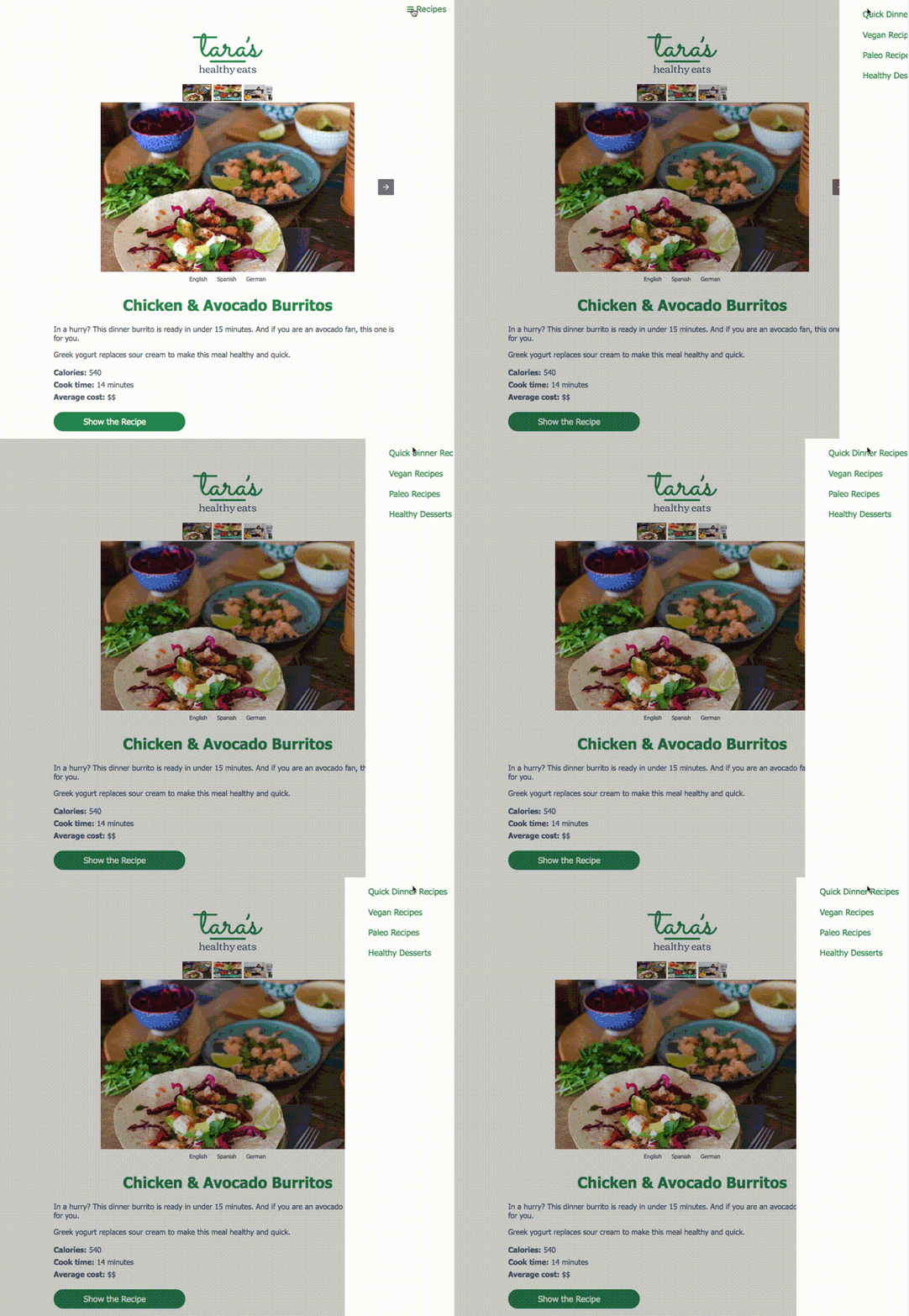
Sidebars also function like a table of contents — but it works outside the email. So, a sidebar slides out on click and viewers can instantly see which sections your email contains — without having to scroll the email itself. It’s useful if your email is packed with info, which you broke down into sections for easier navigation.
Here’s how that looks — an example from Lara’s Healthy Eats. A sidebar lets you access other content without making the email huge.
-
Games
Gamification as an AMP element works well. Wordle uses it for their famous “guess a 5-letter word from 6 tries”, but there are other examples. Stripo created a fully-rendered Hangman game; Karcher inserted a spin-the-wheel for users to win promo-codes for their products; while Stylus increased their open rates using holiday-themed puzzles (for Valentine’s Day, for example).
Disney is another example of a gamified email: they let users solve a crossword without leaving the email. Much like Wordle.

AMP email best practices
If you are looking to implement email campaigns with AMP elements, there are several things to keep in mind. Here’s, in short, what you should pay attention to:
- Make sure there’s an HTML fallback option: Not all email clients support AMP — make sure your email campaigns can be seen by those who use Apple Mail, Outlook and other services without said support.
- Optimize for mobile: Over 50% of emails are opened on mobile devices — your campaigns should be tested for mobile before they are tested for desktop, even. Use single-column touch-friendly layouts and check that the AMP sections — like carousels — are displayed properly.
- Personalize beyond names: Your powerful AMP components can offer up-to-date info. Use that as a platform to offer personalized deals to your customers — based on their purchase history and behavioral patterns.
- Track how your AMP emails perform: AMP is not the be-all and end-all. Approach AMP email campaigns sensibly: segment your audience, see how it works, and then adapt based on the results. Your HTML emails might perform better among some — or even all of your customers. There’s no shame in admitting that’s the case — after you’ve tried the alternative.
AMP email FAQs
What is an AMP email?
An AMP email is an email that includes AMPHTML, allowing supported inboxes to render interactive and dynamic content. For example, subscribers can submit a form, browse a carousel, expand sections, or see updated information without leaving the email.
Is AMP for email dead?
No, AMP for email is not dead, but it is a specialized technology rather than a universal email standard. It works best when the audience uses supported email clients and when the interactive element clearly reduces friction compared with a regular HTML email.
What does AMP stand for?
AMP stands for Accelerated Mobile Pages. In email, AMP refers to AMPHTML content that can be rendered inside supported inboxes.
How do you send AMP emails?
To send AMP emails, create an AMPHTML version of the campaign, include a regular HTML fallback, validate the AMP code, and use an ESP that supports AMP sending. You also need to follow the requirements of the email clients you target, such as sender authentication and registration rules for Gmail.
Wrapping up
AMP for email lets you craft campaigns that improve user experience by enabling them to complete actions or see important real-time info without leaving the email. AMP emails are different from static emails in that they feature dynamic and/or interactive content.
That’s one of the benefits of using AMP emails. Others include providing an interactive experience for your customers, reducing the friction in their journeys, and driving higher engagement because of a more thoughtful approach.
However, AMP emails are not supported by some major email clients – such as Apple Mail and Outlook – and not every email service provider supports AMPHTML sending, validation, and previews. AMP emails can also require extra development work in many cases.
If you decide to implement AMP emails in your marketing campaigns, make sure to provide an HTML-based fallback option, optimize the emails for mobile devices, and track the performance diligently. We hope we’ve given you enough to go on in this article.
 New and noteworthy on our blog
