


Email campaigns help you bring guests back, promote your services, and stay in touch with people who’ve already visited. Unlike ads, they don’t require you to find a new audience every time: you work with your own guest list and send offers at the right moment.
Sending an offer to past customers or scheduling a message before a guest’s arrival requires different features. For a one-time campaign, an up-to-date contact list may be sufficient. To send an airport transfer offer two days before each stay, the tool needs to know the reservation dates and receive any changes or cancellations.
Before making a choice, consider what emails you want to send and who will be responsible for preparing them. A small hotel with just one person in charge of marketing may prioritize a simple editor and cost. A hotel group will likely need to share information among its properties and integrate email with its property management system (PMS) or customer relationship management (CRM) system. These integrations will add costs and require configuration work.
We compared seven platforms to help you compile a list of tools that are a good fit for your hotel. We reviewed what each one allows you to do, the limitations of their plans, and what’s important to check before signing up. The choice will depend on your campaigns, the data available, and the time your team can dedicate to them.
Why hotels need email marketing
Hotels need email campaigns to bring guests back, offer services, and stay in touch with their audience after check-out.
Drive additional sales. In emails, you can offer guests extra services and special deals. You can also tailor offers to the room category. For example, offer guests who booked a Standard room an upgrade, late check-out or a transfer, and offer spa treatments and dining to those who chose a Suite.
Increase direct bookings. Guests respond well to personal offers and promo codes. For example, if a guest booked through an OTA for the first time, send them an email after check-out inviting them to join your loyalty program and get a special offer for their next trip. That way, next time they can book directly, with no OTA commission.
Strengthen relationships with guests. It’s important to stay in touch with guests after their stay: send holiday greetings, tell them about new services and offers, and remind them about you between trips. You can also send a personal birthday discount or bonus points toward a stay by email.
Build your reputation. After check-out, you can send an email asking guests to share their impressions and leave a review. If something went wrong, the review will help you address the problem in time.
A good reputation can also be monetized through a referral program. Guests recommend the hotel to friends and earn points, and the hotel gets new guests at no promotion cost. You can set up a referral program in the TravelLine loyalty program.
What hotels should write about in emails
Hotel email marketing works best when every email has a specific goal: bring the guest back to the website, remind them about their trip, offer services for their stay, or invite them to join the loyalty program.
Remind guests about unfinished bookings
If a guest left the website without completing a booking, you can still win them back. Set up an email for these guests: they’ll receive the booking details and a link to complete it.
To give guests more reason to complete the booking, add a bonus to the email, such as a restaurant voucher or a discount on an excursion or another service. Or suggest other hotels in your chain, so that if this property doesn’t suit the guest, they can find an alternative and still stay your customer.
Remind guests about check-in and help them prepare for the trip
Before arrival, send guests useful information: how to get to the hotel, what to bring, what services you offer, and what’s included in the rate or treatment program. Tell guests about events, excursions and activities on site.
Reach out to guests who haven’t visited in a while
If a guest booked a room several months or years ago, remind them about yourself. Tell them about updates, new services and upcoming events. Add a special offer or a promo code for their next trip.
For example, use the subject line “Come stay with us again” and briefly describe what’s new at the hotel since their last visit:
“We’ve opened new heated pools and refreshed our breakfast menu. Come and experience your stay with us in a whole new way. Book with 15% off using the promo code LONG_TIME_NO_SEE!”
Increase average spend with welcome emails
Welcome emails usually have a high open rate. In welcome emails, you can offer guests a room upgrade, a transfer or meals added to their booking, or paid late check-out.
Increase repeat bookings with feedback emails
After check-out, send guests an email asking them to rate their stay. In the feedback email, the guest gives a rating and leaves a comment. For high ratings, you can invite guests to publish a review on the hotel website or a popular review platform.
Hotel email software at a glance
Start with the work you need the platform to handle; the price tag makes much more sense once the job is clear.
| Platform | Property Fit | Automation | Integration requirement | Pricing basis and limits |
| Selzy | Independent hotels and small teams | Welcome emails and promotions | Guest data import or integration | Contact-based plans; limited free plan |
| GetResponse | Hotels using forms and landing pages | Welcome sequences and advanced workflows | PMS or booking engine connection | Contact-based pricing; automation varies by plan |
| Mailchimp | Hotels managing campaigns and guest lists | Basic to advanced automation | Check reservation data compatibility | Contact-based pricing with email limits |
| HubSpot | Hotels managing marketing and sales inquiries | Basic to advanced workflows | Import guest and reservation data into CRM | Marketing contacts, user seats and subscription |
| Moosend | Small teams focused on automation | Workflow editor and templates | Booking events require integration | Subscriber-based pricing; paid extras |
| StayFi | Vacation rentals and compatible properties | Guest journeys using connected data | Supported PMS or guest Wi-Fi setup | Subscriber-based pricing; additional service costs |
| Revinate | Hotels and groups needing guest profiles | Pre-arrival, win-back and other guest campaigns | Compatible PMS and booking engine | Custom quotes based on room count |
Features and prices were checked on the providers’ official websites in October 2026. Prices may vary depending on contact limits and billing terms. This comparison is based on published information, not hands-on testing.
Best email marketing software for hotels
1. Selzy: For boutique hotels getting started with email marketing
If you run a small hotel and don’t need a full hotel CRM, Selzy covers the basics: newsletters, signup forms and subscriber collection.
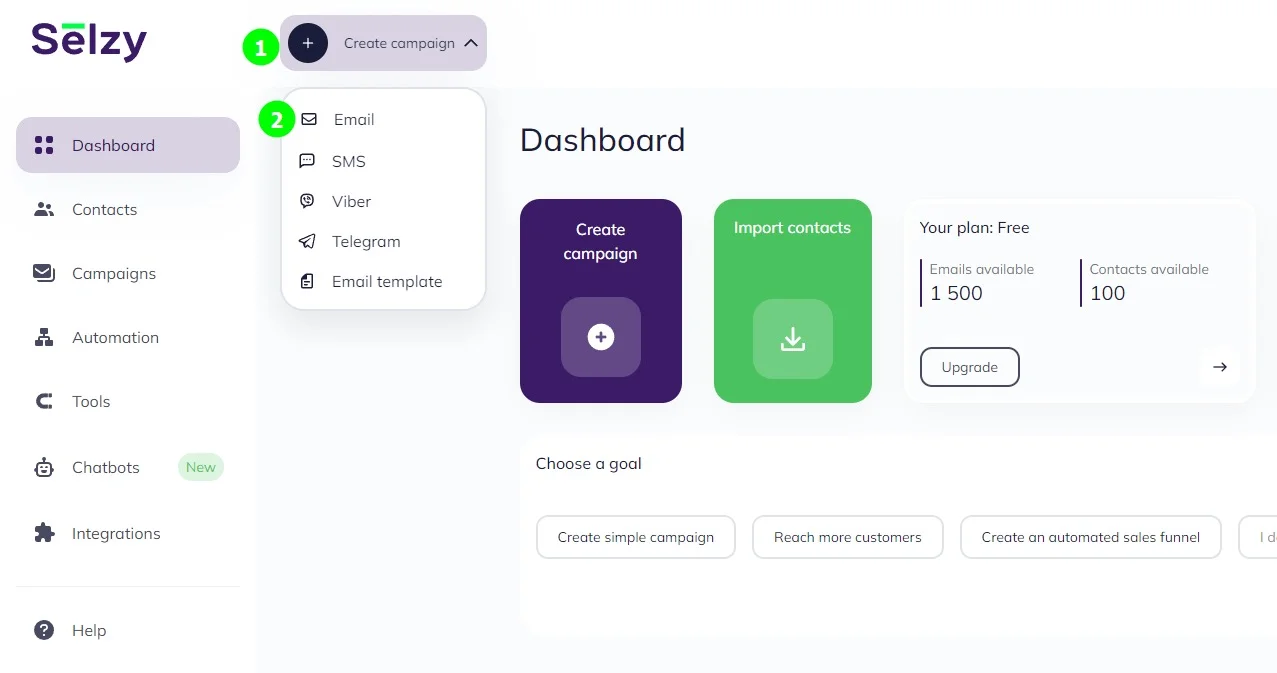
It is good for weekend packages, or event promotion at your restaurant. On a paid plan you can also segment imported contacts by stay history or preferences.
Pros
- From the Lite plan up, you can segment contacts and run A/B tests on different versions of an email.
- According to Selzy, every plan includes 24/7 support by phone, email and chat.
Cons
- Free plan emails include Selzy branding.
- Integrations cost extra, rising with transaction volume, so check they work with your hotel’s systems.
- Free and Lite plans don’t include the email quality check tools or the subject line assistant.
Pricing
- Free plan: 100 contacts and up to 1,000 emails per month. There’s also a 14-day trial with 2,000 contacts and 10,000 emails.
- Lite plan: $7.50/month for 500 contacts, with unlimited emails. Includes segmentation and A/B testing, and removes the Selzy branding.
- Standard plan: $15/month for 500 contacts, with unlimited emails, email quality checks, Telegram chatbots and a certified email marketing course.
- Enterprise plan: Custom quote for more than 500,000 contacts.
Prices with monthly billing, checked on October 16, 2026, on the official Selzy website. The integration service costs extra.

2. GetResponse: For hotels that combine lead generation and automation
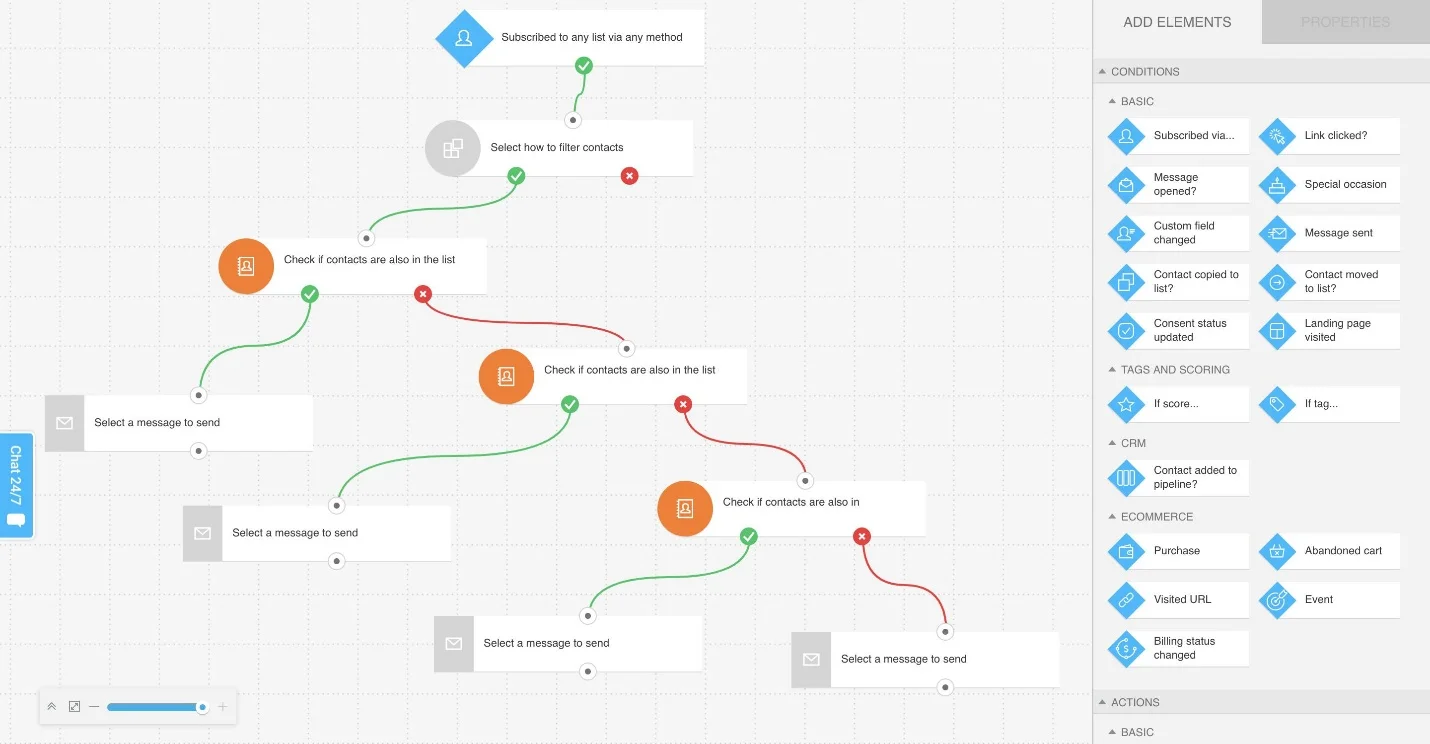
GetResponse creates newsletters using data signup forms, landing pages and automation. It is a perfect fit for hotels collecting enquiries through campaign pages — for a wedding package or seasonal retreat, for example — and following up by email.
GetResponse has different plans. Starter includes one custom workflow, while Marketer includes unlimited workflows and advanced segmentation. Make sure you select a proper plan for your needs.
Pros:
- The free plan (500 contacts, 2,500 emails/month) is more generous than several competitors’ free tiers.
- Funnels, landing pages, and webinars reduce the need for separate tools.
Cons:
- The entry Starter plan ($19/month, billed monthly) includes only one custom automation workflow.
- Overage billing applies once you exceed your contracted contact count
Pricing:
- Free: $0/month for up to 500 contacts and 2,500 newsletters. Limited features.
- Starter: From $19/month for 1,000 contacts billed monthly. Includes unlimited emails, landing pages, welcome sequences and one custom automation workflow.
- Marketer: From $59/month for 1,000 contacts. Adds unlimited automation workflows, advanced segmentation, promotional codes and revenue reports.
- Creator: From $69/month for 1,000 contacts. Adds webinars, a website builder and course creation tools.
- Enterprise: Custom pricing. Comes with transactional emails, dedicated IP addresses and priority support.
Prices with monthly billing, checked on October 16, 2026, on the official GetResponse website. The integration service costs extra.
3. Mailchimp: For hotels that want well-designed campaigns and organized guest lists
Mailchimp is an option for hotels that want to build branded newsletters, organize subscribers and develop automated campaigns as their marketing grows.
Pros:
- 300+ integrations with third-party tools
- Email templates and a drag-and-drop editor to customize your campaigns
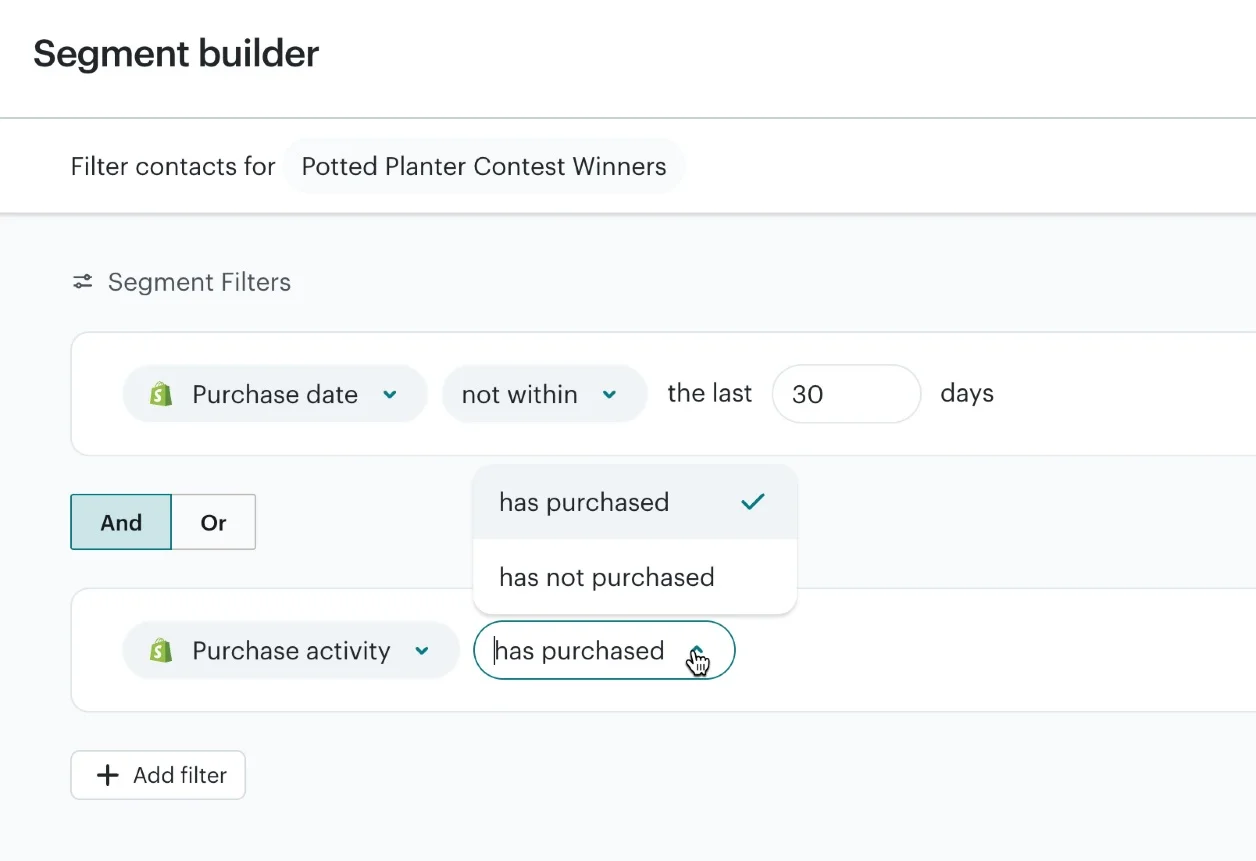
- Standard supports automation workflows with up to 200 steps and multiple branching paths.
Cons:
- Unsubscribed and non-subscribed contacts still count toward your limit, unless you archive them.
- Phone support is exclusive to Premium.
Pricing
- Free: $0/month. You get 250 contacts, 500 emails a month, and a daily sending limit of 250.
- Essentials: from $13/month for 500 contacts billed monthly, with a 14-day free trial. Comes with 5,000 emails a month, A/B testing, and automation workflows of up to four steps.
- Standard: from $20/month for 500 contacts, with a 14-day free trial. Adds 6,000 emails a month, advanced segmentation, and more complex automation workflows.
- Premium: from $350/month for 10,000 contacts. Covers 150,000 emails a month, unlimited users, and phone support. New customers who qualify can get a one-month free trial through Mailchimp’s sales team.
Pricing verified on Mailchimp’s website on October 16, 2026
4. HubSpot: For hotels connecting email with sales and inquiries
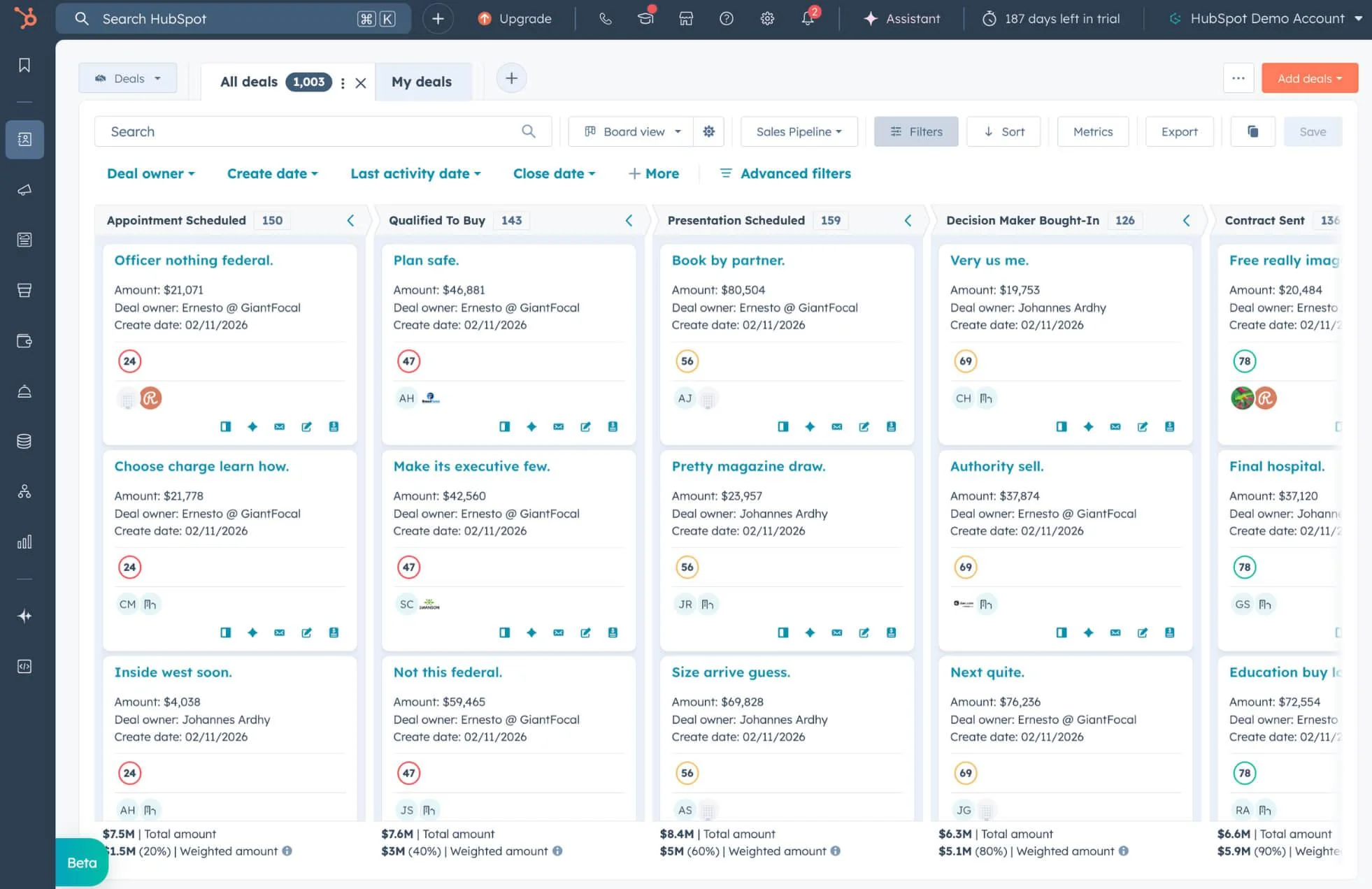
HubSpot puts email marketing and CRM in the same place: contacts, inquiries and sales opportunities all in one system.
Picture a company asking about a conference for 80 people. Your sales team logs it in HubSpot, follows up by email and tracks the proposal through to the end.
Pros:
- Sales and marketing work from the same contact records and communication history
- Non-marketing contacts can be stored without contributing to the billable marketing contact tier. See HubSpot’s contact billing rules.
Cons:
- Advanced automation starts with the Professional plan.
- Costs rise as you add marketing contacts or paid user seats.
- Sending emails based on reservation dates requires a compatible PMS or booking engine integration
Pricing:
- Free: $0/month. Includes 2,000 emails per month with HubSpot branding and basic reporting.
- Starter: from $20/user/month, billed monthly.
- Professional: from $890/month billed monthly. Includes 2,000 marketing contacts, 3 Core Seats, and advanced automation. A $3,000 onboarding fee applies.
- Enterprise: from $3,600/month, billed annually. Includes 10,000 marketing contacts, 5 Core Seats, and advanced reporting. A $7,000 onboarding fee applies.
Prices checked on October 16, 2026, on the official HubSpot website.
5. Moosend: For small teams prioritizing email automation
Moosend runs email campaigns and follow-ups without a separate CRM.
It also tracks visits to your hotel’s website, and can trigger emails from them.
Say an identified subscriber browses your weekend getaway page and leaves without booking. With tracking configured, you can follow up with the offer and a booking link.
Pros
- Powerful automation tools, available starting with the Pro plan
- The free trial includes automation and A/B testing
Cons
· Transactional emails require a higher-tier plan or add-on.
- Booking-related emails require integration with a compatible PMS or booking engine
Pricing
- 30-day free trial: up to 1,000 subscribers, unlimited emails, automation, and A/B testing.
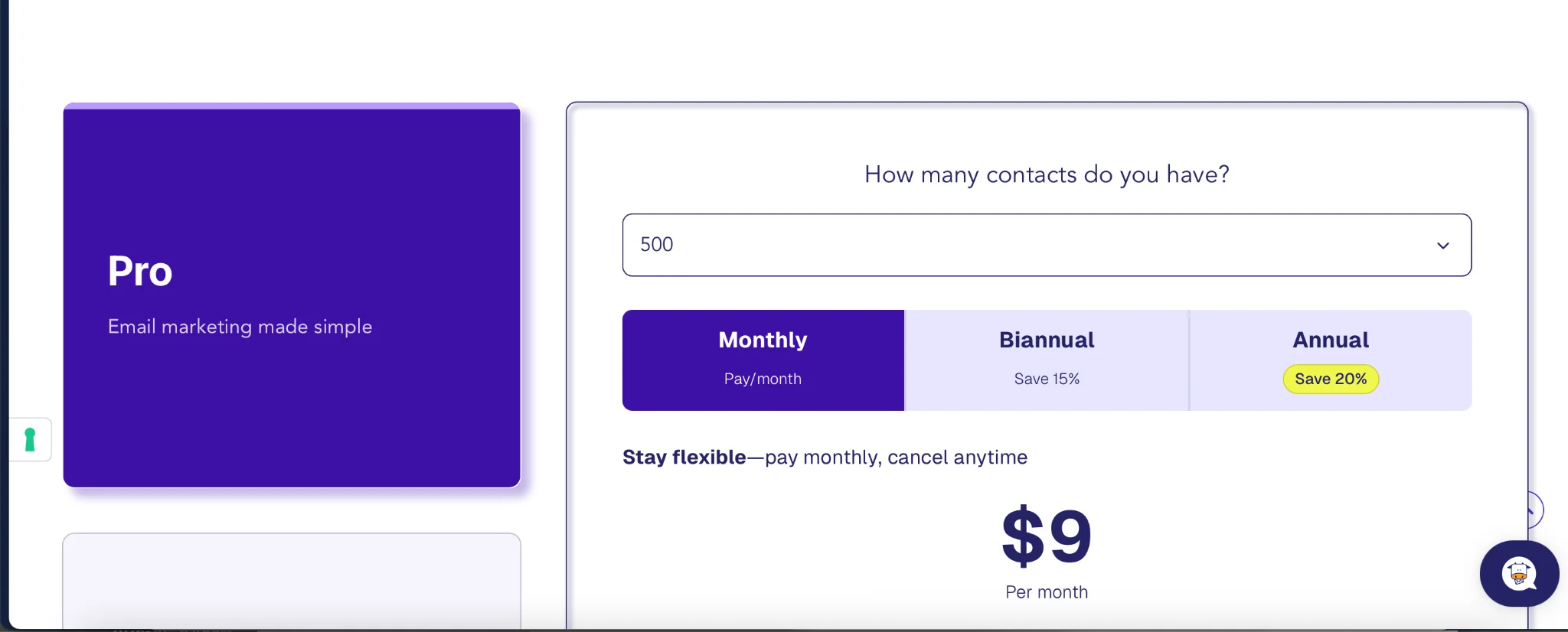
- Pro: from $9/month for 500 subscribers billed monthly. Includes unlimited emails, landing pages, forms, and automation.
- Moosend+: custom pricing. Includes Pro plan features with optional add-ons, such as transactional emails, hosted files, and custom reports.
- Enterprise: custom pricing. Includes advanced features, transactional emails, an account manager, and priority support.
Prices increase as your subscriber list grows. Moosend offers a 15% discount for six-month billing and a 20% discount for annual billing.
Moosend prices checked on its official website on October 16, 2026.
6. StayFi: For properties combining guest-data collection with marketing
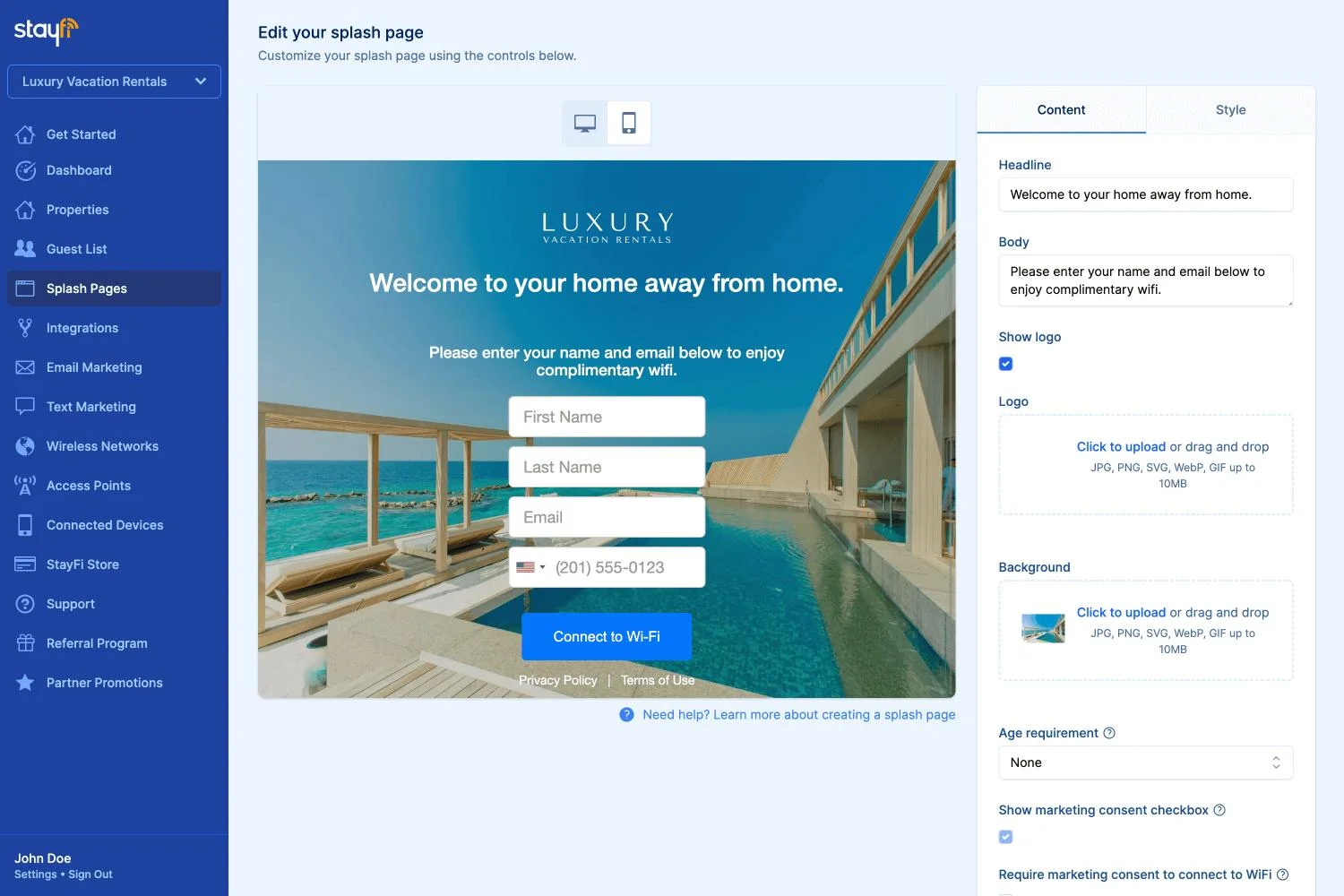
StayFi can collect guest contact details through a supported PMS, pre-arrival forms or guest Wi-Fi, helping you reach guests beyond the lead booker. Before sending promotions, check how marketing permissions are recorded and how unsubscribes are synced.
Pros:
- Includes automated welcome, post-departure, and stay-anniversary journeys
- Property AutoFill lets Email Plus users add property details, rates and availability from a supported PMS to promotional emails. See StayFi’s email features.
Cons:
- Templates and workflows focus on vacation rentals, so hotels should confirm compatibility with their property type and systems
- Discounted email pricing requires at least one active qualifying Wi-Fi device or PMS integration
- Wi-Fi hardware, device subscriptions, and SMS credits can add to the email subscription cost
Pricing:
- 0–200 subscribers: free with a qualifying active device or PMS integration.
- 201–350 subscribers: $10/month under the same conditions.
- 351–500 subscribers: $15/month under the same conditions.
- Over 500 subscribers: pricing increases with subscriber count; use the pricing calculator for your database size.
- All email plans: unlimited sends, automation and targeting. Subscriber counts are calculated across the account, rather than billed separately per property.
Prices checked on October 16, 2026, on the official StayFi website.
7. Revinate: For hotels needing hospitality-specific guest profiles
Revinate Marketing is built on guest profiles and PMS data: targeted emails like pre-arrival offers, abandoned booking reminders and win-back campaigns for previous guests.
Pros:
- Built for hospitality, using consolidated guest profiles and connected PMS data for segmentation.
- Includes booking-revenue attribution and reporting at property and group levels. See Revinate’s product overview.
Cons:
- First-property implementation typically takes 45–90 days, according to Revinate.
- Upsell requests require staff approval and manual PMS updates.
- Data connections, transactional emails and abandonment features can cost extra.
Pricing:
- Core Data Platform: the base for both plans, with guest profiles, advanced segmentation and a PMS data connection. Pricing on request.
- Starter: custom quote based on room count.
- Pro: custom quote based on room count. Adds A/B testing, drip campaigns, upsell campaigns and cancellation recovery campaigns.
- Optional add-ons: data connections by system, transactional emails, cart abandonment, website abandonment and one-to-one emails.
- Contact and sending allowances: confirm these, implementation fees and included integrations in the proposal.
Pricing information checked on October 16, 2026, on the official Revinate website. All costs are quote-based.
How to choose email marketing software for your hotel
Our advice: pick two or three platforms and test the same campaign on each one.
Start by figuring out what your hotel actually needs. If you run a small hotel and most of what you send is seasonal promotions and newsletters, a simple editor, affordable pricing, and good customer support may be all you need. It’s not worth paying for advanced features you’ll never use.
If, on the other hand, you want to send offers before check-in or follow up with guests after their stay, your priorities change. Check whether the software can pull booking dates and guest information without any manual work. A cheaper plan isn’t really a saving if your team has to spend time keeping contact lists up to date.
And if you manage a hotel chain, pay close attention to how the platform handles multiple properties. Can each property run its own campaigns? Can the marketing team share templates and coordinate messaging across different locations?
Our most honest recommendation: before you sign up, ask for a demo based on your hotel’s specific use case. Don’t settle for a generic product demo.
PMS, CRM and booking-engine connections
The important detail is which data an integration actually transfers: some move contact details and nothing else, while others handle reservation dates, changes and cancellations too. There are four main ways to connect your systems:
- Direct connector: check that your PMS or CRM is supported, which data it shares, and whether reservation changes actually sync.
- Middleware connection: same questions, plus update frequency, costs and who’s on the hook when the connection breaks.
- Custom API integration: if no connector exists, confirm API access first and budget for development and maintenance.
- CSV import: fine for the occasional newsletter, but manual updates make it less practical for reservation-based emails.
Whatever you choose, make the provider show you what happens to scheduled emails when a booking changes or gets canceled.
Segmentation and team requirements
You can segment contacts by previous stays, booking frequency, package preferences or interactions with past campaigns.
Email engagement data is usually available within the platform, while booking history and guest preferences may need to be imported. Make sure these records are up to date before using them to create more specific segments.
A small hotel can live on templates and good support; a hotel group will want separate user permissions and shared resources.
Pricing and plan limits
Estimate costs from your actual email activity, seasonal peaks included.
Do the math before comparing plans: 5,000 subscribers and four newsletters a month is 20,000 emails before a single automated message. And remember that entry prices use different contact tiers and billing units, so compare platforms at the same list size and sending volume.
Compare:
- Contact allowance and how billable contacts are counted.
- Monthly send limits and overage fees.
- Access to segmentation, testing and automation.
- Integration, onboarding and transactional-email costs.
- Licenses, property access, and technical support.
- Standard renewal pricing after introductory discounts.
Guest journeys to automate
Some of these you schedule in advance; others only fire when a guest does something.
Abandoned reservation
Remind identified visitors who abandon a reservation. Your booking engine has to pass that signal to your email platform, and reminders should stop once the booking is completed.
Before arrival
This is your chance to offer airport transfers, restaurant bookings or room upgrades that match the reservation. Just be clear about when staff approval is needed.
After checkout
A thank-you or a review request works well here, but check first: your PMS may already send these, and nobody wants two.
Previous guests
Booking history tells you who to target. Exclude anyone who’s already booked, and don’t discount your regulars for no reason.
Measuring email marketing results
Opens and clicks are useful engagement signals, but they’re only part of the picture. Track bookings and revenue too.
Metrics worth watching:
| Metric | What it tells you |
| Booking-link clicks | How many people show interest in your offer |
| Completed reservations | Bookings linked to your campaigns |
| Booking revenue and room nights | Business generated by your campaigns |
| Repeat bookings | How many previous guests book again |
| Upgrade or package purchases | Revenue from additional services |
| Unsubscribes and complaints | Whether your emails are too frequent or irrelevant |
Add tracking parameters to your email links, then verify they work across your website and booking engine.
Set an attribution window, decide whether revenue counts at booking or checkout, and exclude cancellations. A booking after an email isn’t proof the email caused it.
You can also use A/B testing to compare offers or booking buttons.
FAQ
What's the best email marketing software for a small hotel?
For newsletters and basic automation, Selzy is a good option. Moosend, Mailchimp and GetResponse are also solid alternatives, though the best choice depends on your budget, the size of your contact list, and compatibility with your PMS.
Can a hotel use a free plan on a permanent basis?
Only if the contact list is small. You should check the monthly sending limits and whether automation features are included.
Does every hotel need a dedicated CRM?
No. Standard email marketing platforms can easily handle newsletters and promotions. However, a hotel-specific CRM adds value by maintaining booking history, consolidating data across multiple properties (for hotel chains), and automating reservation-related emails.
Which emails should a hotel automate first?
For new guests, it is best to start with a post-checkout email, such as a thank-you email or a request for a review. For hotels with an established guest base, the first emails to automate should be pre-arrival offers.
Can hotels use email marketing software for loyalty programs?
Yes, provided the tool can access your guest data. Managing points and rewards, however, may require separate specialized software.
 New and noteworthy on our blog

