


Key takeaways
- Educational email templates save time, maintain branding consistency, reduce errors, and enhance subscriber experience.
- When choosing a template, consider design, purpose, features, responsiveness, and pricing.
- Selzy offers free responsive templates for educational emails.
- Educational email ideas include admissions, new courses, events, fundraising, discounts, and success stories.
If you’re planning education email campaigns for a school, university, online course, or EdTech product, the right template can save time and make your message easier to act on.
This guide covers the benefits of educational email templates, how to choose one, campaign ideas, and real educational email examples you can learn from.
The benefits of using educational email templates
Educational email templates are pre-designed email layouts used by educational institutions, course creators, and EdTech teams. They can save time, keep branding consistent, and make campaigns easier to launch.
Here are some of the most important ones:
- Increased productivity. Using email templates saves a lot of time, since you don’t have to start from scratch every time. Choose one that you like or need, fill it out, and hit the send button. Later, you can just reuse it.
- Consistent branding. Educators and administrators don’t have to struggle with the design — the template includes a color scheme, font, and logo. Consistency helps make your school brand recognizable to the audience and your emails more polished and easier to recognize.
- Reduced margin of error. When you create an email layout from scratch, it is easy to make mistakes — typos, broken links, etc. With an email template, the margin of error is significantly reduced.
- Improved subscriber experience. Email templates are organized and usually well-designed. This means that they are easy to read and digest. Whether your subscribers are students or paid customers, their experience plays an important role.
How do you find the perfect template?
To make sure you find the perfect template for your needs, take the following factors into consideration.
Design
Emails are more effective and engaging with strong design, and in higher education, even more so. Look for templates with:
- Clean, professional layouts that match your school’s or company’s brand style.
- Flexibility in color schemes and font choices.
- Pre-made sections (like headers, CTAs, and image blocks) that help you communicate clearly.
Good design helps guide the reader through the content smoothly.
Purpose
Before you start browsing through email templates, you need to have a clear idea of what you want to use them for. Do you want to send out a newsletter to let students know about a guest lecture or launch a promotional campaign for a new course? Is your goal to offer your educational services and resources to others or send a reminder email before your workshop? Once you know the purpose of an email, it will be much easier to find a template that meets your needs.
Also think about who will receive the email and what action they should take. A prospective student needs a clear enrollment or event CTA, while current students may need deadlines, resources, or next steps. Parents, alumni, and course buyers may need different wording, proof points, and links, so one template should not be reused for every audience without edits.
Features
Some email templates come with useful features like:
- Dynamic content blocks (for personalization)
- Embedded videos, quizzes, or other interactive elements
- Social media buttons or feedback forms
- Downloadable resources (like PDFs or cheat sheets)
All of this might be useful for promotional marketing campaigns and educational emails.
Responsiveness
Emails should look good on any device, so it is important to choose a responsive email template that adjusts to different screens. Make sure it looks great on mobiles, tablets, and desktops.
For example, in the Selzy builder, you can easily switch between laptop and mobile mode to see if the layout is perfect for both. Fonts, pictures, and design adjust automatically — and this is exactly what you need for an easy template.
Pricing
Some email templates are available for free, while others come with a price tag. For example, Selzy offers top-notch free education email templates. Some platforms offer paid templates, and prices vary from a couple of dollars to $50+ price tag for a subscription.
Where can you find email templates?
Selzy offers 1000+ free templates for any occasion or theme, including higher education and EdTech. Whether you promote EdTech software products and services or create your course, you’ll find a perfect template. Those templates are responsive; you can check how they will look on both desktop and mobile screens.
Here are some examples from the Selzy email template library — you can download them or use them in Selzy’s drag-and-drop builder to adjust to your needs.
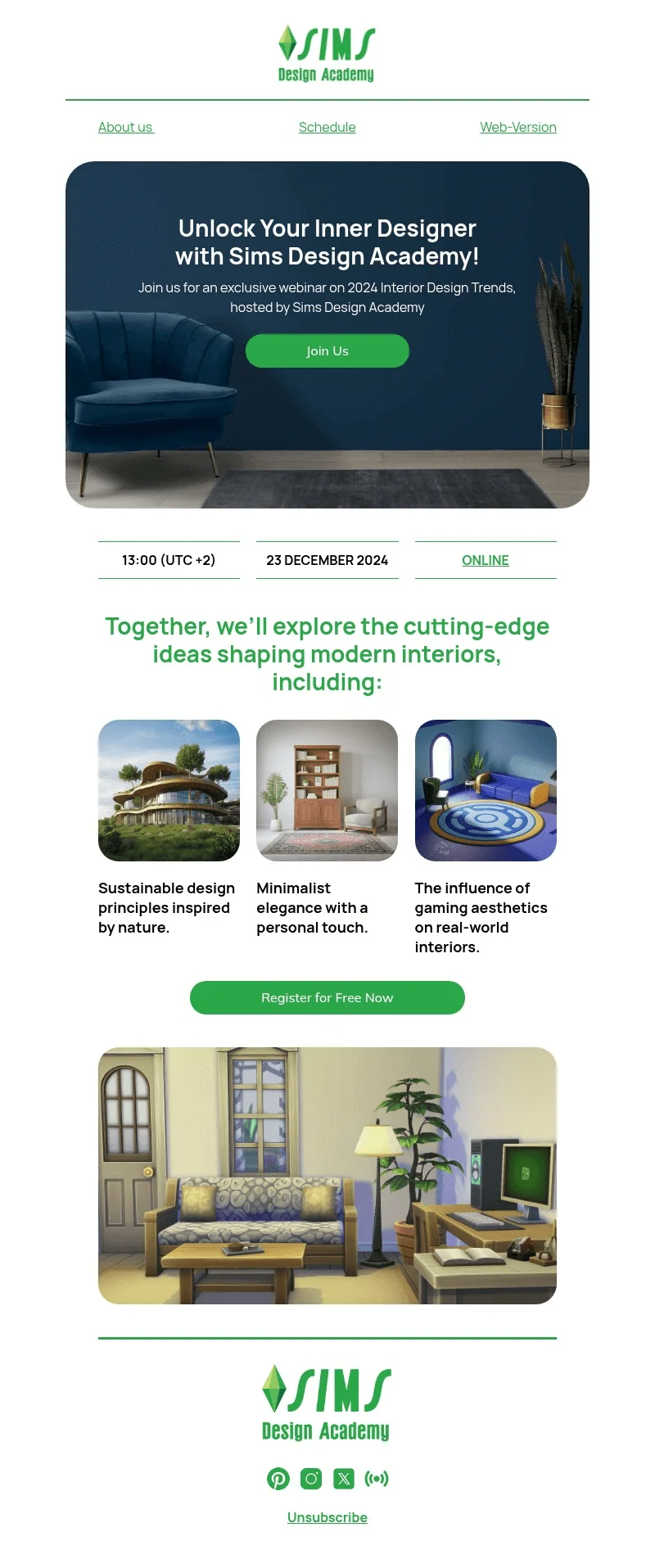
Email template for a webinar or EdTech event
This email template is designed for webinar promotions but can be easily adjusted for any other event, such as a course presentation, workshop, or Q&A. It has the ideal layout, featuring a call-to-action, space for necessary event details, value highlights, and an easily digestible design. You can download the template from Selzy’s library.
Email template for educational newsletter
This template is made for announcements, updates, or can be used for your next educational newsletter. The design is a mix of modern and retro vibes — a good fit for academic announcements and campus updates. You can download this template from our library.

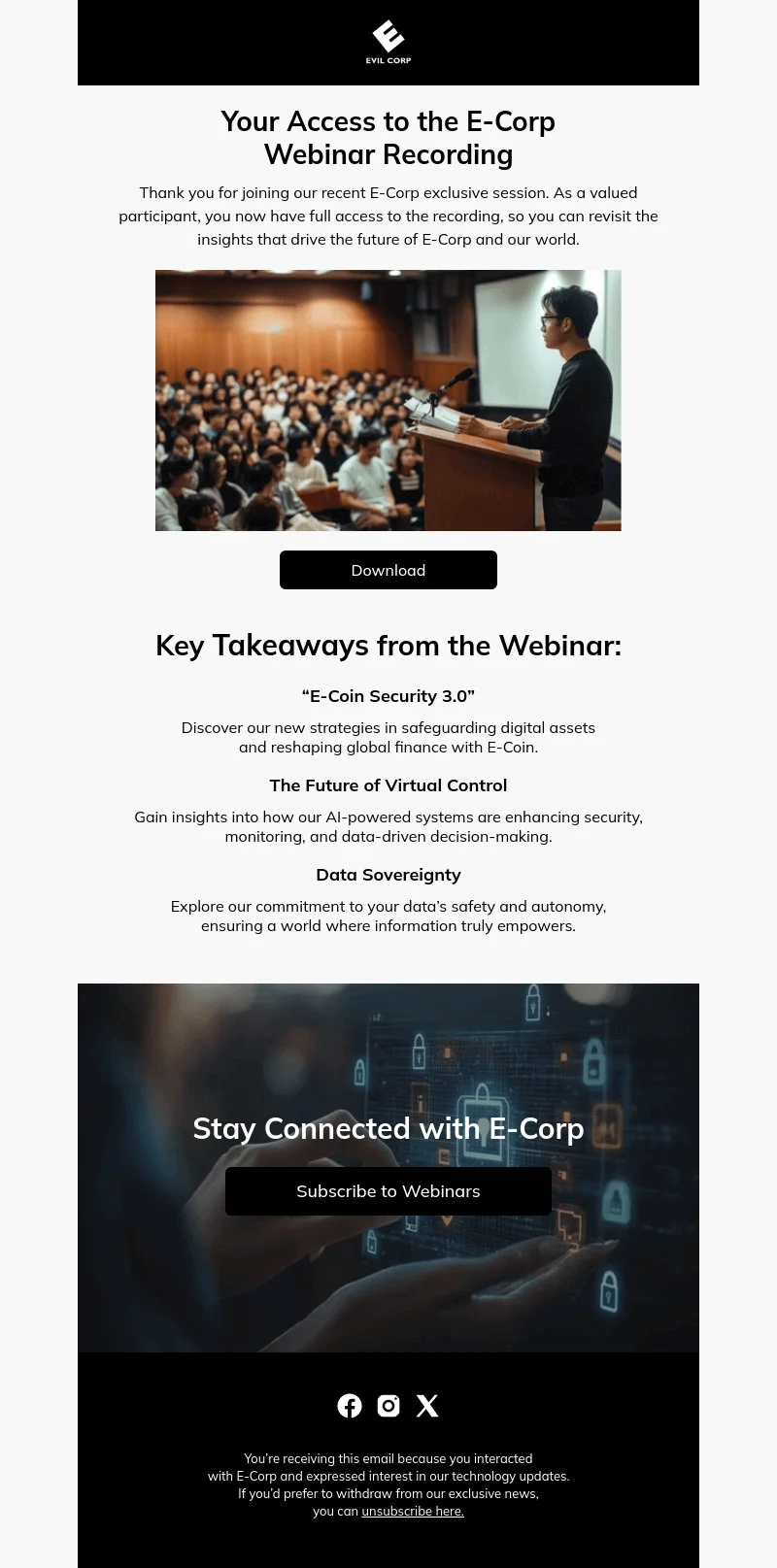
Email template for follow-ups and educational content
As educators know, learning is nothing without practice — and the most important part is the one that comes after the lesson. This is why webinars, workshops, and even regular classes now end with follow-up emails, including additional materials, checklists, and invitations to continue the learning process (or keep customers engaged). This email template was created for such an occasion; you can download it from Selzy’s email template library.
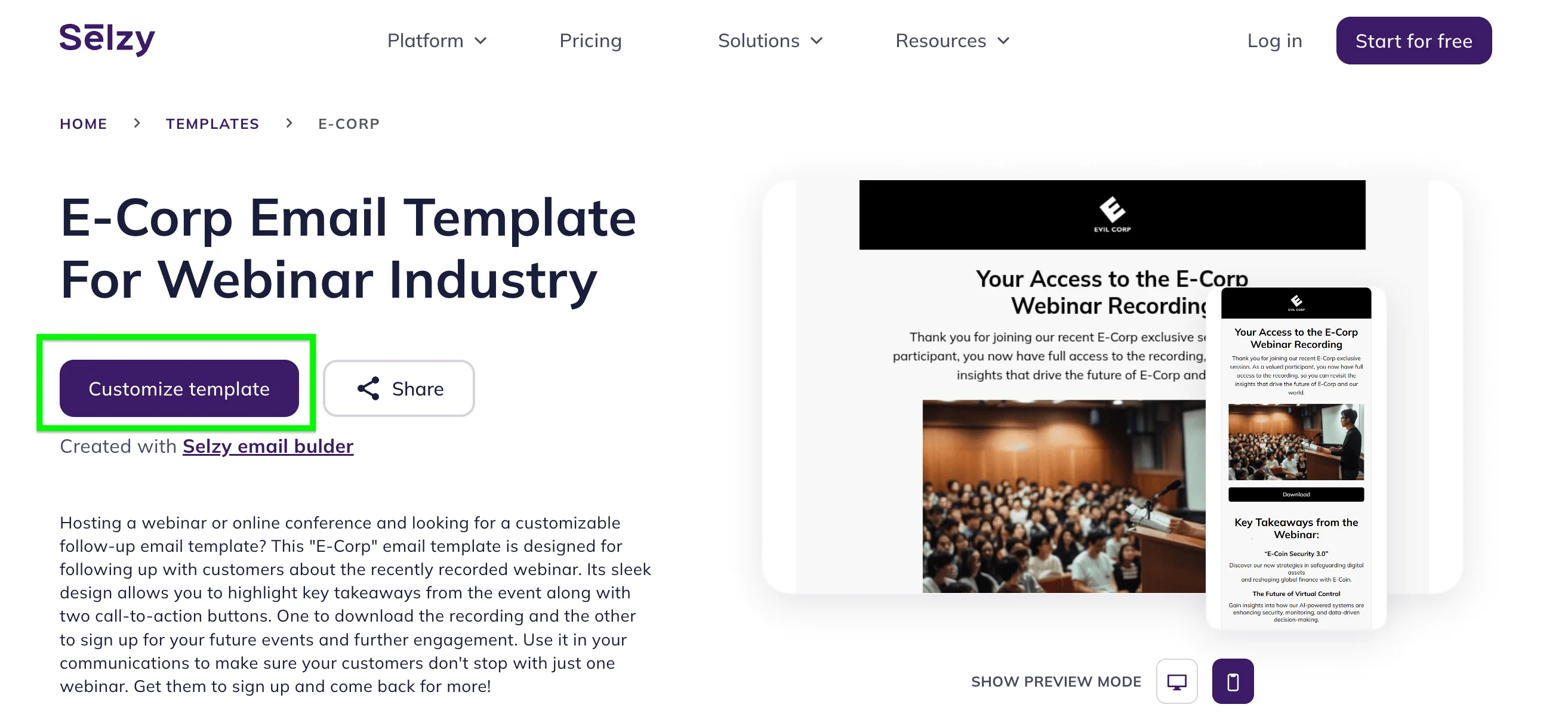
To use any of the templates, go to the template’s page, click the “Customize template” button, and you’ll be redirected to the Selzy builder. All you need to do next is put your words and details (such as logo, social media links, and address) into the template.
Educational email ideas
Now, if you’re just getting into email marketing for educational institutions, you might be feeling kind of lost. What should you write about? In case you need some help with that, here are a few interesting educational email ideas.
Admissions
If you want to attract new students, consider sending out an email about admissions. It is a great way to promote your institution and get people interested in what you have to offer. Just make sure to include all the necessary information, such as deadlines and requirements.
New courses
If your institution offers new courses, don’t hesitate to let people know about it! The email could include a general overview of a specific course. In addition, you could post a link to the course website in the email so that people can sign up for it immediately after receiving the email.
Events
In case you are organizing an event, such as a webinar or a conference, make sure to promote it via email. Include the date, time, and topic of the event, as well as a link to the registration page. You could also include a promotional video in the email to make it more engaging.
Fundraising
If you’re looking for ways to raise funds for something, be it a new building or a charity, email is a great way to do it. Ideally, an email should outline what the money is going towards and how people can donate. You could also include a link to a website where people can learn more about the fundraiser.
Discounts
Who doesn’t love a discount? If you want to promote your institution, consider offering a discount on tuition fees. Alternatively, if you’re selling online courses or course materials, you could write about an upcoming sale or send out a discount code.
Success stories
If you want to show off your institution in the best light possible, consider sharing student success stories. Include a photo of the student together with a short description of their stories. Yes, this is a very common marketing tactic similar to reviews and testimonials from customers, and it works! For more inspiration, check out the best email marketing campaigns — the rules are the same, the inspiration is endless.

Great educational email examples that you can learn from
Syracuse University

Sometimes, educational institutions need to ask for donations — and the best way to do it is through an email marketing campaign. All it takes is an email that is easy to navigate and attention-grabbing. For instance, it might contain a large call to action or a colorful banner.
Include a link to the official page of the fundraiser and an encouraging description of what the donations are going towards. Plus, you can include helpful resources and information on the topic.
Takeaway: Donation emails should make the cause, donation path, and supporting resources easy to find without overloading the reader.
Skillshare

Skillshare is an online learning platform with numerous interesting courses taught by experts. Its newsletter includes weekly emails featuring the most popular classes and guides.
The color scheme is quite attention-grabbing. The blue and orange background makes the content of the email stand out. Aside from that, it contains numerous calls to action, such as Learn more and Watch now, each one having a bright green background. Thanks to this email’s design, anyone who receives it will be more likely to check out the Skillshare blog or sign up for one of their courses.
Takeaway: If an email promotes several learning resources, use clear visual hierarchy and repeated CTAs so readers can choose their next step quickly.
University of the Pacific

The University of the Pacific newsletter is easy to navigate, thanks to the visible sections. The links lead to social media websites associated with the university, which helps grow the university’s social media presence.
While the color scheme is not that attention-grabbing, there are two orange-colored calls to action. They direct the recipient’s gaze towards interesting links, making the recipient more likely to check them out.
Takeaway: For institutional newsletters, visible sections and social links help readers scan updates and stay connected across channels.
Montclair State University

This is a great example of a newsletter. It begins with a warm introduction, followed by a cute graduation proposal ceremony — which immediately makes the content more interesting and human.
Notably, the entire newsletter is divided into sections using both headers and colors; each section is placed inside a dark-gray square. It makes the newsletter look more organized and visually pleasing, as well as easier to skim.
Takeaway: Human stories and strong sectioning can make a school newsletter feel warmer and easier to skim.
Stockholm University
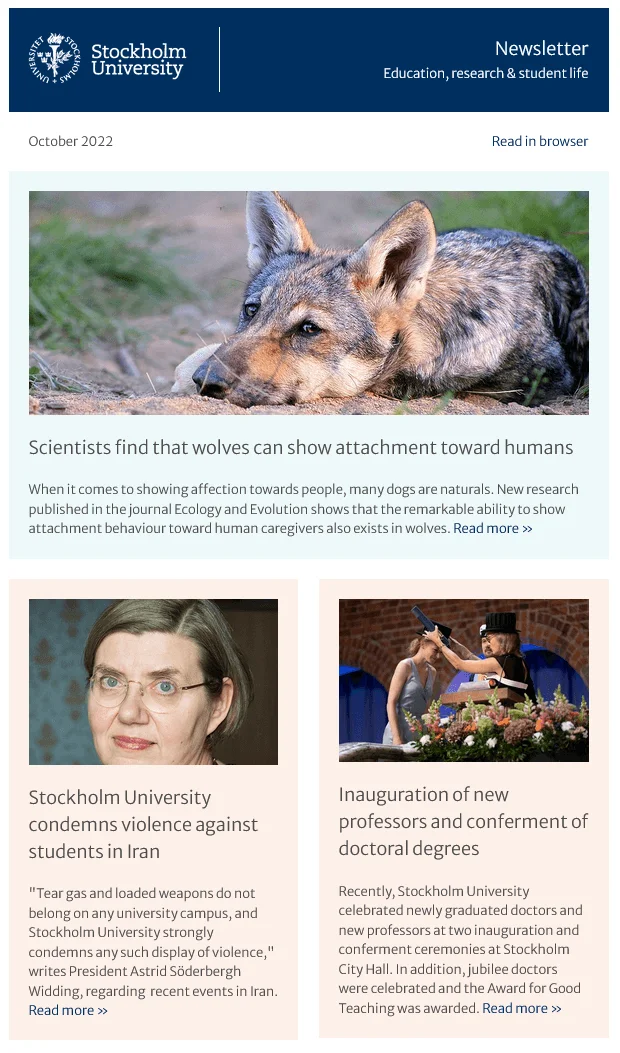
The Stockholm University newsletter is organized, easy on the eyes, and informative. Just like the Montclair State University newsletter, it separates different sections from one another by using orange and blue squares. It also encourages its readers to share the newsletter with friends and contains a direct link to the newsletter subscription page.
Takeaway: A simple newsletter can still drive engagement when it has organized sections and a clear subscription or sharing prompt.
University of Oxford
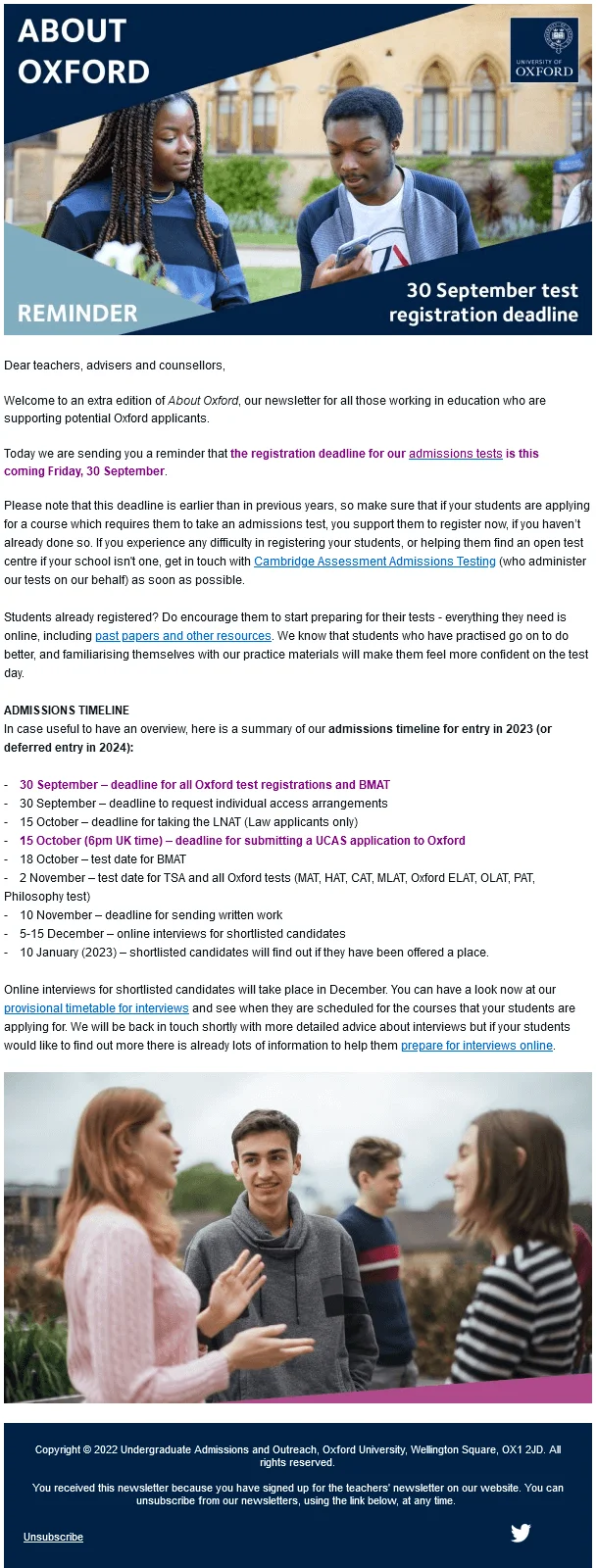
The newsletter above is not directed at students, but at teachers. It’s meant to be a reminder about upcoming admissions and registration deadlines. It achieves its goal with the help of a short admissions timeline. It might not be that aesthetically pleasing or advanced, but it gets the job done.
Takeaway: Reminder emails do not need complex design if the timeline, deadline, and audience are clear.
Stanford University
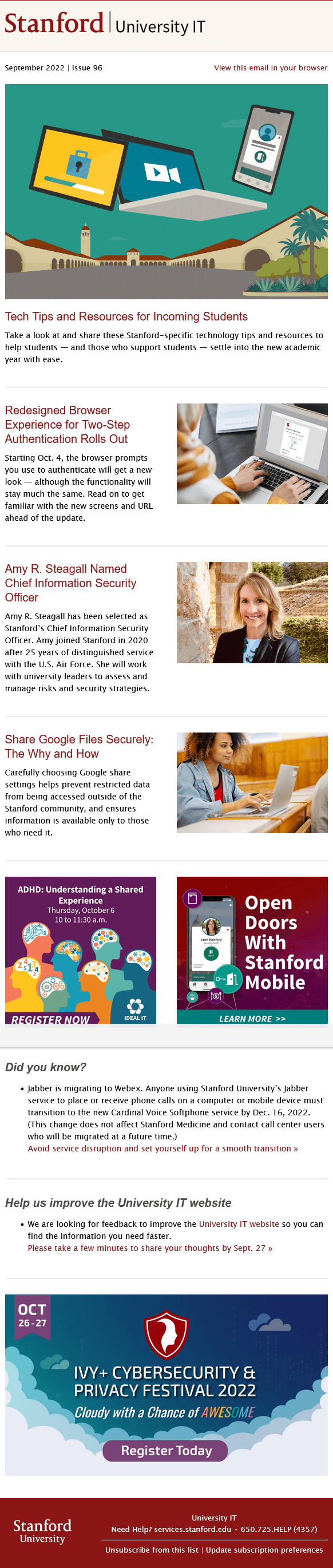
The newsletter above is prepared by the information technology department of Stanford University. It’s supposed to help incoming and current students get the hang of the digital software that the university uses, with links to guides and articles about cybersecurity. Moreover, it prompts the reader to register for a cybersecurity festival using a purple call-to-action button.
The main advantage of this newsletter is its simplicity. It’s not too long and not too short. As a result, the reader isn’t going to end up feeling overwhelmed by the sheer number of articles and stories that it contains.
Takeaway: Resource-heavy emails work best when they stay focused and avoid overwhelming readers with too many links.
Codecademy

Last but not least is an email from Codecademy, which is an online learning platform. While you can complete the Codecademy courses for free, you could also pay for a pro membership. The main purpose of their email here is to encourage you to do so with the help of a Black Friday discount.
The way the discount is presented is pretty notable. Its rate is the largest thing in the entire email. Then, there’s a stark contrast between the white letters and the dark blue background. It’s pretty hard to miss and guaranteed to get the reader’s attention.
Then again, the discount makes it cheaper, but it’s not free. To convince the recipient to buy the pro membership, the email advertising it contains a succinct outline of its benefits.
Takeaway: Promotional education emails need a clear offer plus a short reason to act, especially when the email moves from learning content to paid membership.
FAQ
What is an educational email?
An educational email is a campaign that teaches, guides, or informs a specific audience instead of only pushing a sale. In education, it can be used by schools, universities, online course creators, and EdTech companies to share admissions updates, events, course materials, student stories, and learning resources.
What should an educational email include?
The best educational emails combine a clear purpose, a scannable structure, useful content, and one obvious next step. They should be easy to read and make it clear what the recipient should do next, whether that is enrolling, registering, or accessing resources.
What are some examples of educational emails for schools or universities?
Examples include admissions updates, event announcements, course materials, student stories, and learning resources. They can also be used for newsletters about guest lectures, workshop reminders, or other updates relevant to students and prospective students.
How do you choose the right education email template?
Start by defining the email’s purpose and audience, since a prospective student, current student, parent, alumni, or course buyer may need different wording and calls to action. Then look for a clean, professional design, flexible colors and fonts, pre-made sections, and useful features like dynamic content blocks, videos, social buttons, feedback forms, or downloadable resources.
How do educational email templates help create campaigns?
Educational email templates save time, keep branding consistent, reduce the chance of errors, and improve the subscriber experience. They make campaigns easier to launch because you can reuse a well-designed layout instead of starting from scratch each time.
Conclusion
To sum things up, if you want your upcoming educational email marketing campaign to be easier to launch and easier to read, start with a strong template. Templates can improve productivity and brand consistency, reduce the margin of error, and create a better subscriber experience.
If you don’t know what to write about, check whether there are any upcoming events or courses that are worth advertising. Alternatively, you could write about admissions, fundraisers, or student success stories.
Your first campaign might not be perfect, and that is fine. Treat it as a learning experience and use the results to improve the next send.
 New and noteworthy on our blog
