
MCP Server for Email Marketing
Turn your AI assistant into an email marketing operator
MCP, or Model Context Protocol, gives AI tools a structured way to connect with external platforms such as Selzy.

A secure bridge to Selzy
Once connected, your AI assistant can use the Selzy data and actions you give it access to.

Ask in natural language
Instead of copying campaign numbers into a chat or manually searching through contact lists, simply ask for what you need.

Work with real account data
The AI can retrieve relevant Selzy data and give you an answer based on your actual account information.
Analyze, create, and manage from one conversation
Use the Selzy MCP server to move from a question to an action without repeating the same manual steps across different tools.
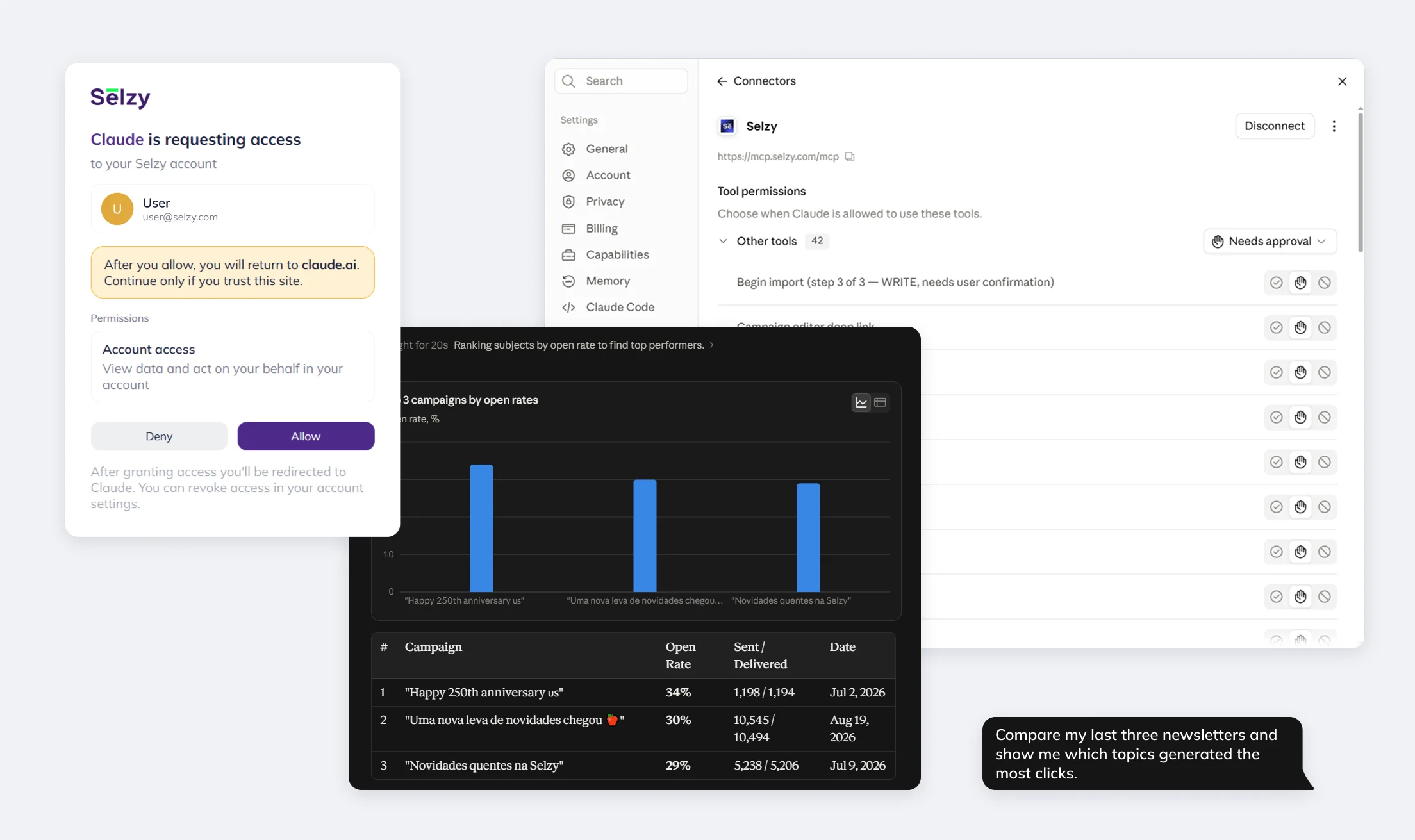
Understand campaign performance
Ask your AI assistant to explore campaign results and quickly find what’s working.
- Review key performance metrics
- Compare campaign results
- Spot changes in engagement
Try: “Compare my last three newsletters and show me which topics generated the most clicks.”
Manage contacts and segments
Work with subscriber data and organize audiences using simple prompts.
- Find and review contacts
- Create lists and import contacts
- Work with segments and audience groups
Try: “Find subscribers who haven’t engaged with my recent emails and create a segment for a re-engagement campaign.”
Create and send campaigns
Prepare campaigns with your AI assistant, check them before launch, and send when ready.
- Create and edit campaigns
- Validate before sending
- Send or schedule with confirmation
Try: “Draft an email promoting our upcoming webinar using this campaign brief.”
Connect Selzy to your AI tool
Getting started takes three main steps:
1. Choose a compatible AI tool
Open an AI assistant or application that supports MCP connections.
2. Connect your Selzy account
Add the Selzy MCP server to your MCP-compatible AI assistant using: https://mcp.selzy.com/mcp. Then authorize the connection to your Selzy account and review the available tools and permissions.
3. Start with a prompt
Ask the AI to retrieve information or perform one of the supported Selzy actions. Once the connection is active, continue working in natural language rather than learning a new set of commands.
Stay in control of your data and actions
Selzy MCP limits access to permitted data and adds checks before campaigns are sent. You can revoke the connection whenever needed.
Permissions
- 🔐 Only permitted account data is accessible
Confirmation
- 📤 Sensitive actions require confirmation
Validation
- 🛡️ Campaigns are validated before sending
Working with multiple Selzy projects
If you run more than one Selzy project, MCP works with each of them, just not at the same time through a single connection. Switching between projects takes two steps. Many users keep a separate chat for each project, so every chat can stay connected to its own Selzy account without switching mid-conversation.
1. Disconnect the current project
Disconnect the MCP connector from the Selzy project you are currently working with.
2. Connect the next project
Connect the MCP connector to the Selzy project you want to work with next.
50,000+ customers can't be wrong...
Selzy is the easiest way to start selling with email — but don’t just take our word for it.
Read our customers’ success stories and see what they have to say 👉


“A true gem we discovered in a huge pile of email marketing software. Way more affordable than those big known brands, and it outperforms them! All we need for full blown email marketing campaigns.”

“The overview dashboard is something I really love, because of how easy it is to understand and the summary statistics of my overall opens, clicks and unsubscribe. The support desk is really great and quick to respond.”


“I sent the first (test) campaign in less than 5 minutes. How did Selzy get me? Pleasant dashboard, clear statistics, including the deliverability of emails from the campaign, send an email to contacts who haven't opened the message (with one click), simple import of contacts”

“Great buy! The builder covers everything, I was looking at the large array of design templates. The UX/UI is just smooth. Selzy makes Mailchimp look pale in comparison.”


“The best thing about Selzy is its ability to manage marketing emails with fantastic templates, simplifying the process.”

“Not kidding. Selzy is really good. their support is beyond excellent. Response time is less than 5 minutes. They staff is skilled. The ux/ui is amazing. I highly recommend everyone to use it. This company really knows what they are doing! In fact, this is one of the best LTD's I've bought in a while.”

“Selzy is cost effective to the max and it makes it clear how my list health is going. Also top of the line support. We are talking minutes no matter what time I pinged the chat.”


“I have been extremely satisfied with Selzy and would highly recommend it to anyone looking for a reliable and user-friendly email campaign management tool. The analytics and reporting tools are top-notch, providing detailed insights into the performance of my campaigns.”

“Great UI, super easy to use and navigate around. I really love the ease of use and the amazing and attractive templates it has that makes it so simple.”

“Create email campaigns super fast, and having my email list on different categories is awesome. Been using Selzy a lot, no complaints at all.”

“Instead of opting for larger platforms like Mailchimp or Constant Contact, which offer an abundance of unnecessary features and complex interfaces, I desired a more straightforward solution focused on email sending. After comparing various email marketing platforms like Sender, Sendpulse, and Mailerlite, I ultimately chose Selzy.”

“I can run a campaign easily. It’s an alternative solution to the CRM+Email marketing tool I use on a daily basis.”







Get round-the-clock support via chat, email, and phone
Frequently asked questions
What is an MCP server for email marketing?
Model Context Protocol (MCP) is an open standard, introduced by Anthropic in late 2024, for connecting AI assistants to external tools and data sources. An MCP server for Selzy applies that standard to email marketing: it connects an MCP-compatible AI tool to your Selzy account, so the AI can access supported campaign data, contacts, and actions instead of you copying numbers into a chat by hand.
Which AI assistants work with Selzy MCP?
Selzy MCP can be connected to AI assistants with MCP support, including Claude and Claude Code.
For step-by-step setup instructions, example prompts, and practical email marketing use cases, see our guide to using Selzy MCP for email marketing.
What can I do with Selzy MCP?
Selzy MCP gives AI assistants access to tools for working with campaigns, contacts, lists, segments, and account data.
You can use it to:
- Analyze campaign performance, including opens, clicks, and unsubscribes
- View campaigns, lists, segments, templates, senders, and account information
- Create contact lists and import contacts
- Preview contact imports before adding data
- Create and work with email campaigns
- Validate campaigns before sending
- Send campaigns after explicit confirmation
- Cancel scheduled campaigns
The exact tools available may change as Selzy MCP is updated.
Can an AI assistant send emails through Selzy MCP?
Yes. Selzy MCP supports campaign sending, but the AI cannot simply send a campaign without checks.
Before sending, the campaign goes through a dry run, and the send action requires explicit confirmation. Campaigns are also subject to Selzy’s standard moderation process. If a campaign has been scheduled, it can be cancelled through the MCP.
Do I need coding skills to connect Selzy MCP?
For supported MCP clients, you don’t need to build a custom integration from scratch. Follow Selzy’s connection instructions to authenticate your account and configure the MCP connection.
How does Selzy control permissions and protect account data?
The MCP connection is limited to the data and actions made available through its permissions. You remain in control of the connection and can revoke access when needed.
Spend less time navigating. Get more email work done.
Your campaign data already lives in Selzy. MCP gives your AI assistant a way to work with it, so you can analyze results, manage audiences, and move toward your next campaign through the same conversation.
Connect Selzy to AI